
As the digital ecosystem evolves, platforms are building increasingly sophisticated walls to guard their data and monitor user behavior. For affiliate marketers, crypto enthusiasts, ad verification specialists, and data analysts, hitting a wall means lost revenue and wasted time.
To bypass these obstacles, professionals rely on two foundational pieces of tech: an elite anti-detect browser to manage browser identities, and an unbannable proxy network to hide their true network origin. Today, we’re looking at how combining 🔗 NiuProxy’s ultra-fast, high-purity residential network with 🚀 Dolphin Anty’s state-of-the-art fingerprint management creates the ultimate environment for seamless multi-accounting and automated web tasks.
If you want to keep your digital assets safe, scale your operations, and stop worrying about sudden bans, this integration guide is for you.
The Synergy Between Fingerprints and Clean IPs
Why do top-tier teams insist on using NiuProxy alongside Dolphin Anty? The answer lies in how modern anti-bot systems like Cloudflare, Akamai, and PerimeterX evaluate traffic. They use a holistic scoring model that cross-references your browser environment with your network reputation.
Dolphin Anty is a market 🔝 leader in browser virtualization. It allows you to modify your canvas data, user-agent, operating system details, language preferences, and hardware profiles. It ensures that every browser profile operates in its own perfectly isolated sandbox, completely free of leaks.
But if that pristine sandbox connects to the internet using a recycled, heavily flagged public IP, your profile’s reputation drops to zero.
NiuProxy counters this threat by giving you access to real-peer residential and mobile IP pools globally. These IPs look identical to standard home internet consumers browsing from their couches. By combining NiuProxy’s clean IP reputation with Dolphin Anty’s meticulous fingerprint masking, you pass even the most stringent security checks effortlessly.
How to Configure NiuProxy in Your Dolphin Anty Browser
Integrating NiuProxy into your Dolphin Anty ecosystem is quick and intuitive. You can add them to individual profiles or upload them in bulk. Here is the standard configuration process:
1. Generate Your IPs in NiuProxy
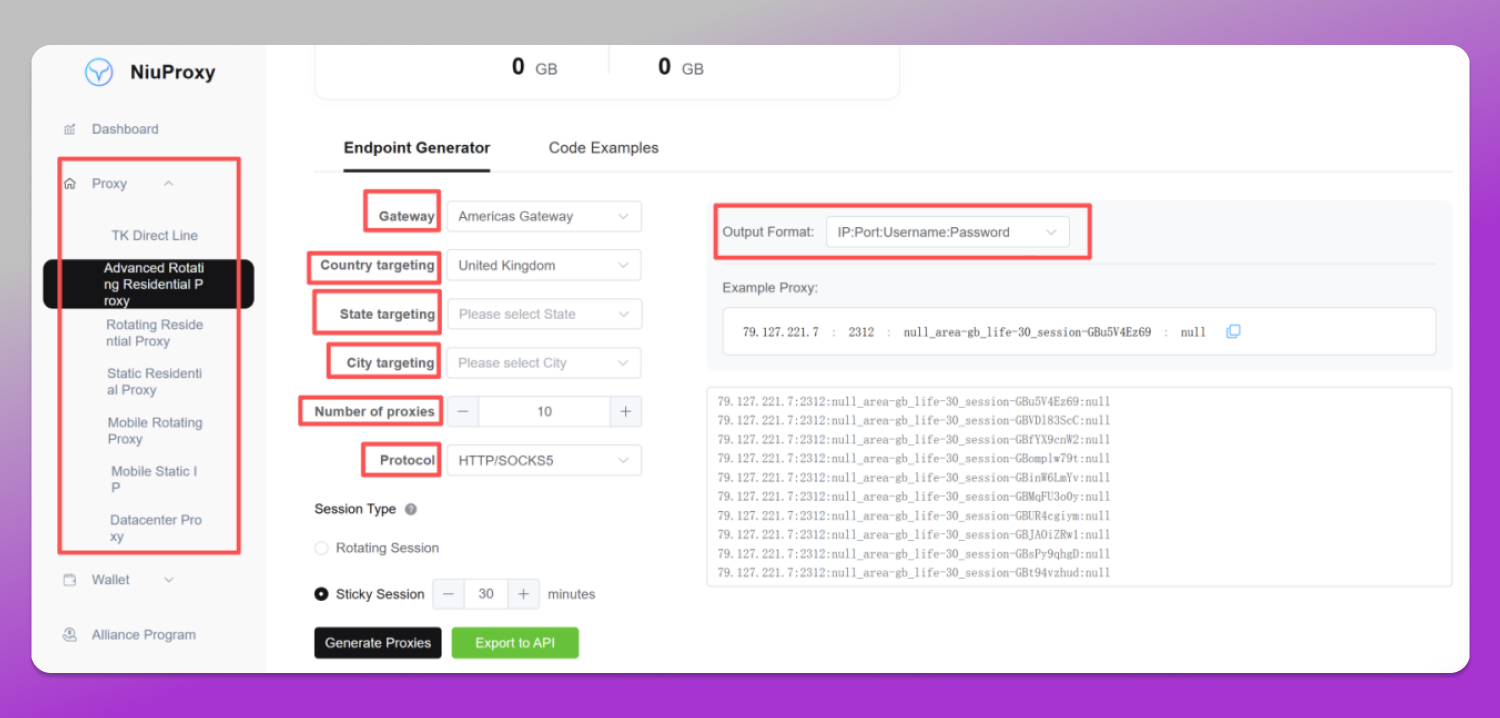
Log into your NiuProxy dashboard. Choose your deployment model (Dynamic Residential, Static Residential, Mobile Proxies, Rotating Datacenter). Select your desired target location down to the specific country or city level. Generate your proxy credentials, ensuring you note the format: IP:port:username:password.
2. Open the Dolphin Anty Proxy Manager
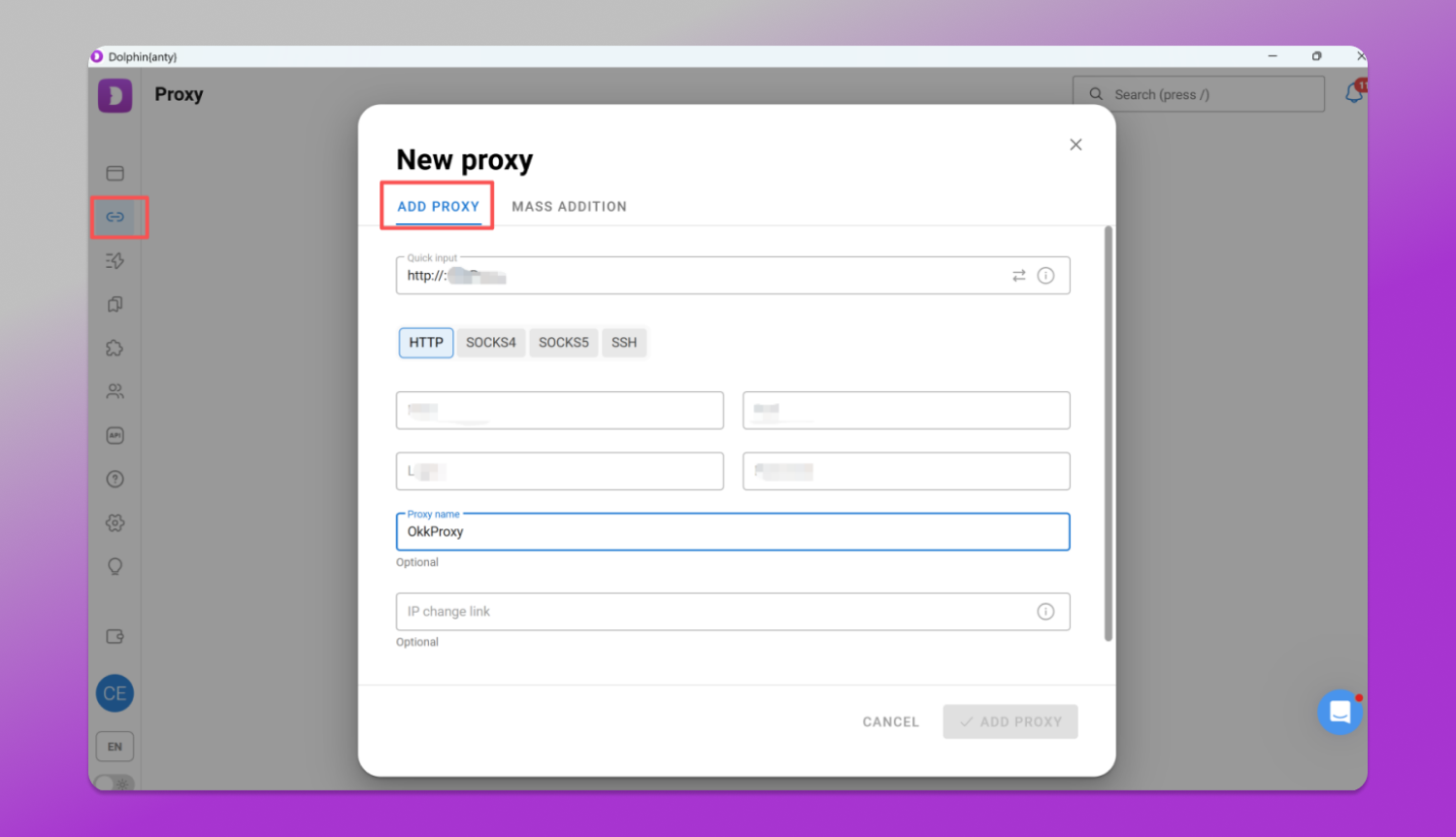
While you can add proxies during individual profile creation, Dolphin Anty features an excellent built-in Proxy Manager for handling lists. Click on the “Proxies” icon in the left-hand navigation sidebar.
3. Bulk Add or Single Entry
Click the “+” (Add Proxy) button in the upper right. Here, you can paste your NiuProxy credentials. Dolphin Anty conveniently supports bulk pasting. If you have multiple proxies, enter them line by line like this:
host:port:username:password[HTTP]` or host:port:username:password[SOCKS5]
4. Validate Your Network Status
Once pasted, click the “Check Connection” button. Dolphin Anty will systematically verify each NiuProxy line, confirming the active status, response speed (ping), and target country.
5. Assign to Profiles
Now, whenever you create or edit a profile in Dolphin Anty, you don’t have to re-enter credentials. Simply go to the proxy dropdown menu and select your pre-verified NiuProxy connection. Save your profile, click “Start”, and your secure session begins immediately.
Optimizing Your Setup for Heavy Workloads
Whether you are managing dozens of social accounts or running automated scripts, optimizing your setup ensures maximum longevity for your accounts:
📌 Leverage SOCKS5 for High-Speed Tasks: NiuProxy fully supports both HTTP and SOCKS5 protocols. If your workflow involves transferring heavy media, running live streams, or fast-paced scraping, choose SOCKS5 in Dolphin Anty for faster data transfer speeds and lower latency.
📌 Keep Geolocation Synchronized: Make sure the proxy location generated in NiuProxy matches the location settings in your Dolphin Anty profile. If your IP is from London, ensure your profile’s coordinate system (Geolocation) is set to auto-detect or manually configured to match London coordinates. This prevents location leaks.
📌 Utilize Mobile Proxies for High-Risk Actions: For actions that trigger intense security verification—like creating new Google accounts or running high-budget Facebook ad campaigns—use NiuProxy’s mobile 4G/5G pools. Mobile IPs share cellular towers with thousands of real people, making platforms extremely hesitant to ban them.
A Special Welcome Pack for Dolphin Anty Users
To help you scale your infrastructure efficiently, NiuProxy is rolling out an exclusive partnership deal specifically for the Dolphin Anty userbase. Take advantage of our premium, high-speed residential nodes with a massive discount on your next purchase.
Exclusive Coupon: Dolphin80
Your Benefit: Get 20% OFF any proxy plan at checkout.
Take control of your multi-accounting workflows. Pair the elite browser isolation of 🔥 Dolphin Anty with the unmatched purity of 🔗 NiuProxy nodes, and run your business without borders or boundaries.