
The Ultimate OkkProxy and Dolphin Anty Integration Guide
In the fast-paced world of digital marketing, e-commerce, and social media management, managing multiple accounts is no longer just an asset—it’s a core necessity. Whether you are running a fleet of Facebook Ads accounts, scraping critical market intelligence, or scaling a dropshipping empire, you’ve likely realized that standard browsers and basic IP setups just won’t cut it anymore.
Security algorithms on major platforms are smarter than ever. They don’t just look at your password; they analyze your digital fingerprint, your browser configuration, and, most importantly, your network reputation. This is exactly where the powerhouse combination of an advanced anti-detect browser like 🚀 Dolphin Anty and a premium proxy infrastructure like 🔗 OkkProxy comes into play.
When you pair the world-class fingerprint spoofing of Dolphin Anty with the hyper-localized, clean residential network of OkkProxy, you build an ironclad shield around your digital profiles. Let’s dive deep into why this combination works so well and exactly how you can set it up to safeguard your workflows.
Why Anti-Detect Fingerprinting Needs Clean Proxies
To understand why this partnership is so vital, let’s look at how website security works. Dolphin Anty does an incredible job of managing your browser configuration. It creates distinct, isolated virtual browser profiles, customizing parameters like WebGL, Canvas, fonts, audio fingerprints, and operating system data. To any target website, each profile looks like a completely different physical device.
However, a flawless hardware fingerprint is useless if all your profiles originate from the exact same Internet Protocol (IP) address, or worse, from blacklisted datacenter IPs. If Facebook sees fifty “distinct devices” all logging in from a single data server in Ohio, the red flags go up instantly.
OkkProxy solves this by providing massive pools of authentic, ethically sourced residential and mobile proxies across more than 🌏 190 countries. Because these IPs belong to real home internet connections and cellular networks, they carry the highest possible trust scores. When matched with Dolphin Anty’s isolated environments, your profiles become entirely indistinguishable from real, organic users.
Step-by-Step Guide: Integrating OkkProxy into Dolphin Anty
Setting up your OkkProxy credentials inside Dolphin Anty is straightforward and takes less than a minute per profile. Follow these steps to ensure a flawless connection:
Step 1: Extract Your Proxy Credentials
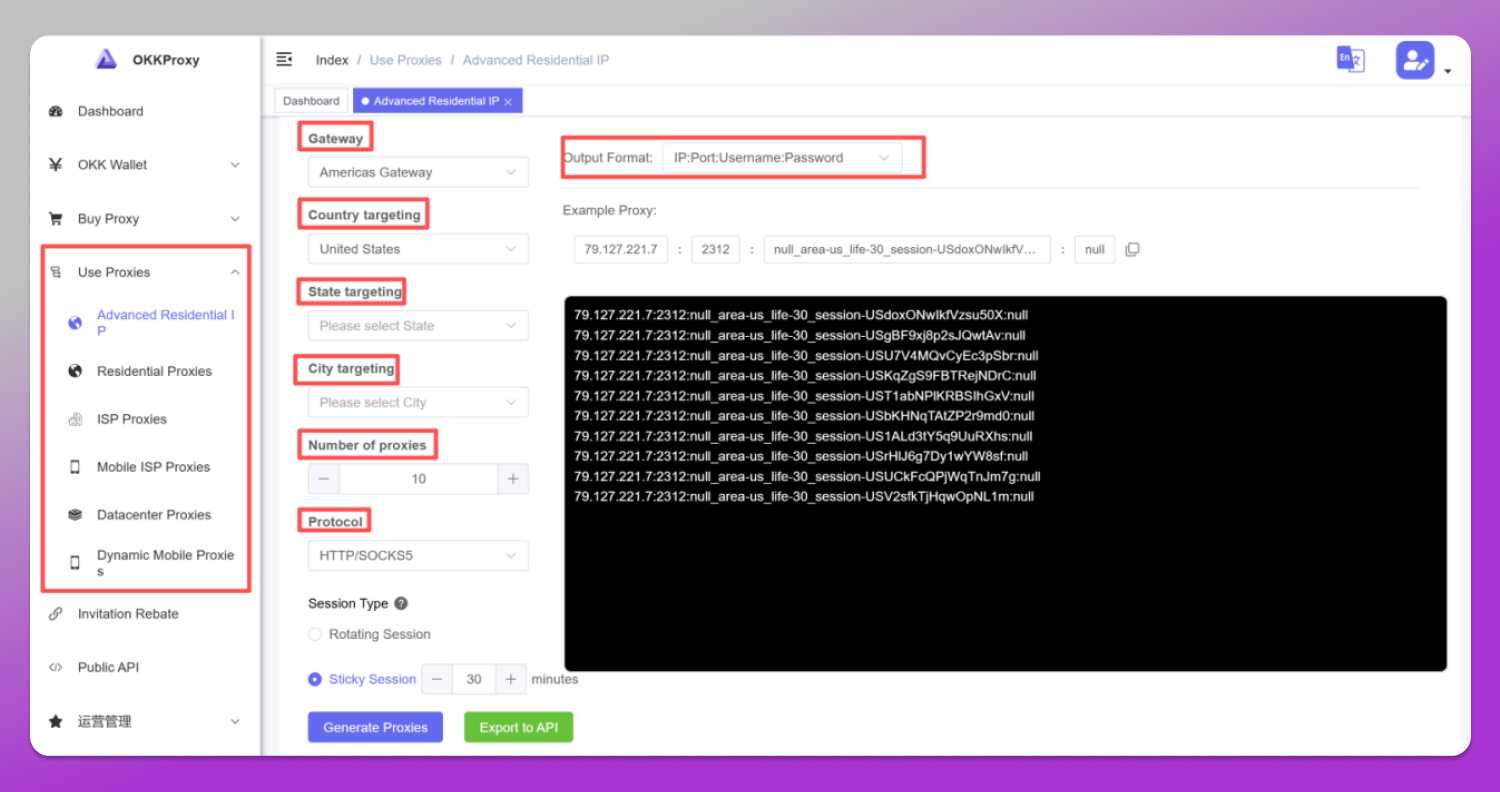
Log into your OkkProxy dashboard. Choose your preferred proxy type (Rotating Residential, Static Residential, Mobile Proxies, Rotating Datacenter Proxies) and select your target targeting criteria (Gateway, Country, State, City, Number of proxies, Protocol, Session Types, ect). Generate your proxy list in the standard format: IP:Port:Username:Password.
Step 2: Open Dolphin Anty and Create a New Profile
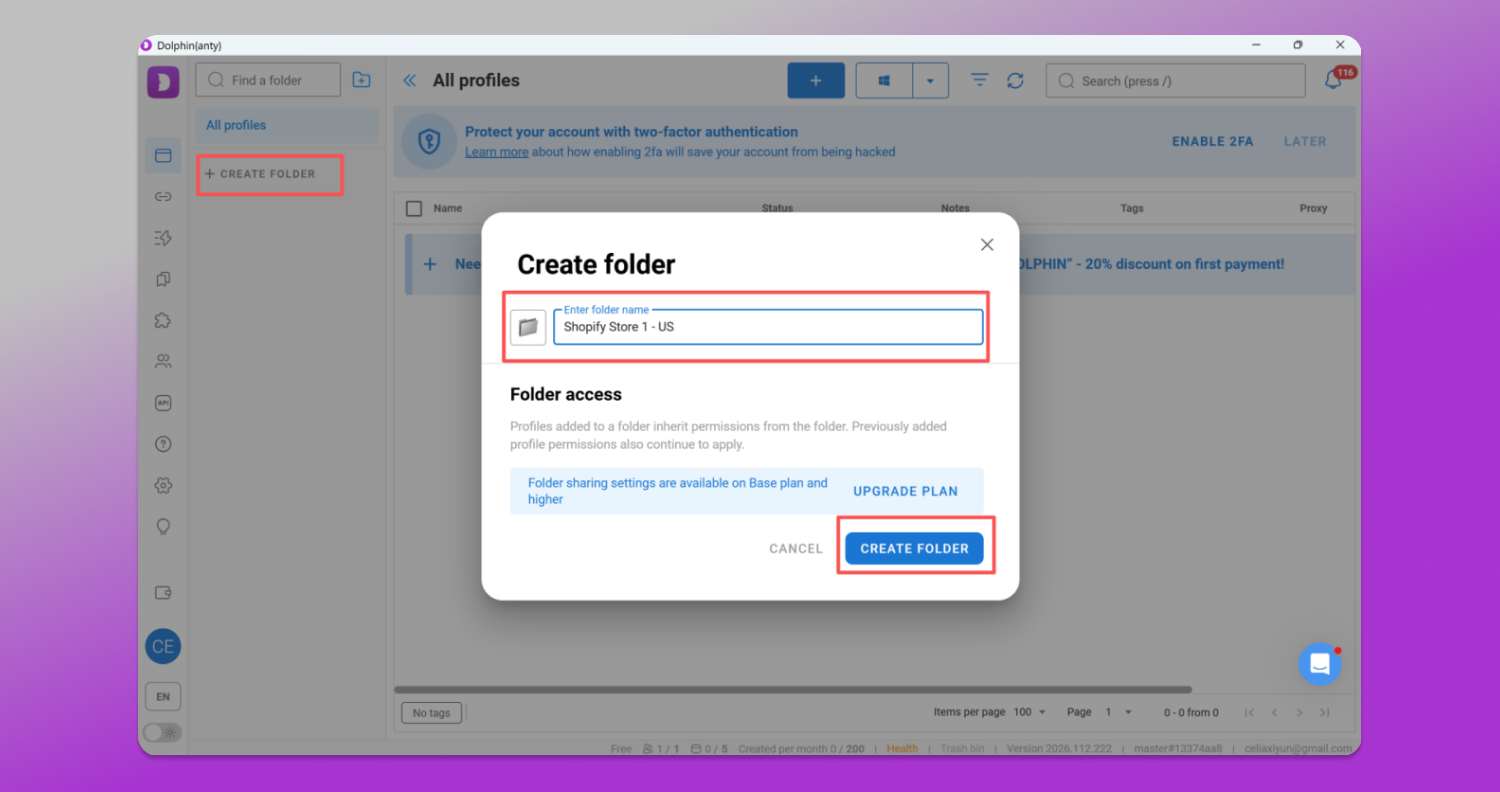
Launch your Dolphin Anty desktop application. In the top-left corner, click on the “Create Folder” button. Give your folder a recognizable name (e.g., Shopify Store 1 – US).
Step 3: Navigate to the Proxy Section
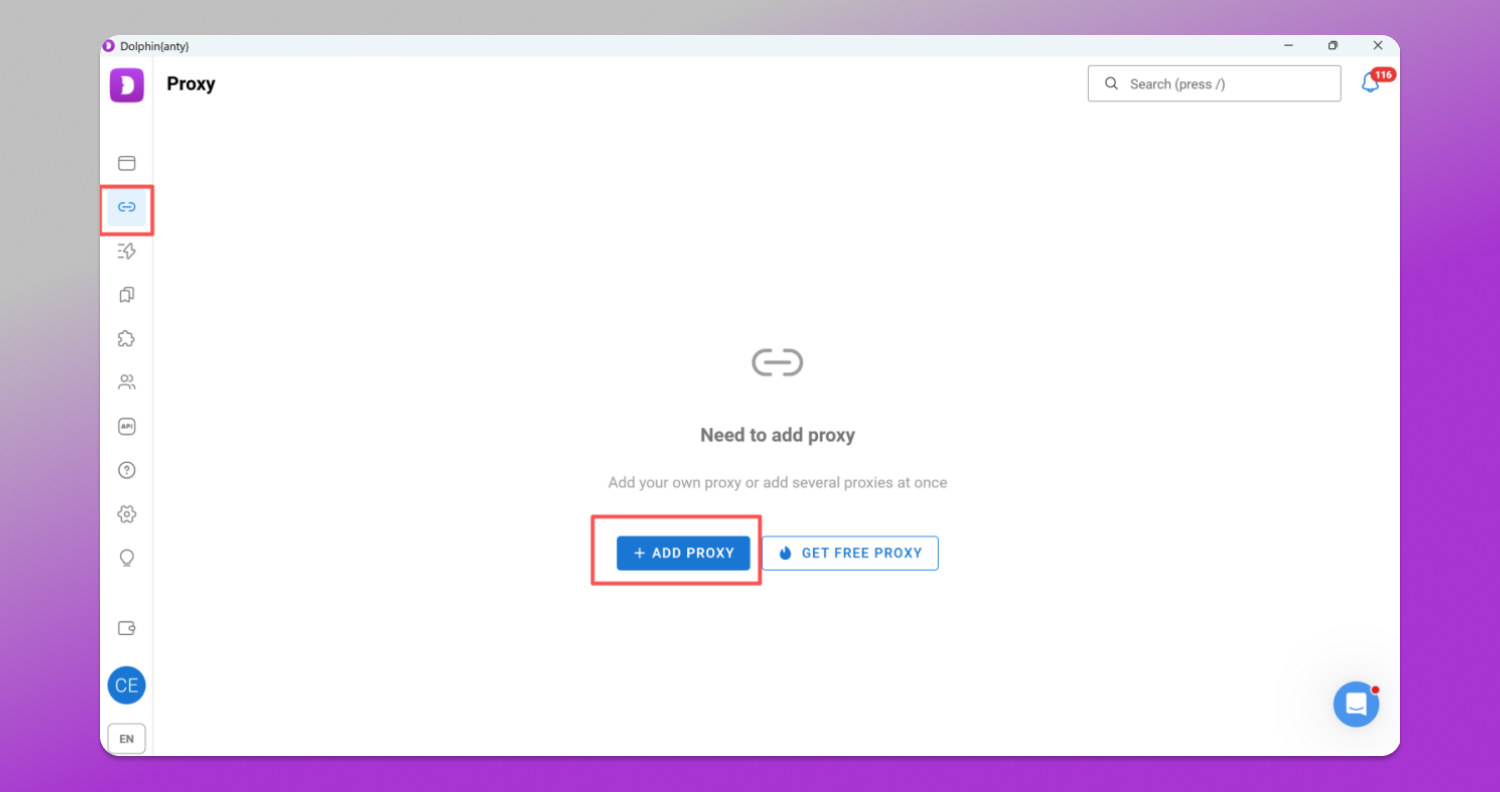
In the profile configuration window, locate the “Proxy” tab on the left-hand panel. Click the “Add Proxy” to add OkkProxy proxy infomation.
Step 4: Input Your OkkProxy Details
Dolphin Anty supports multiple proxy protocols. We highly recommend selecting HTTP or SOCKS5 for optimal performance and security.
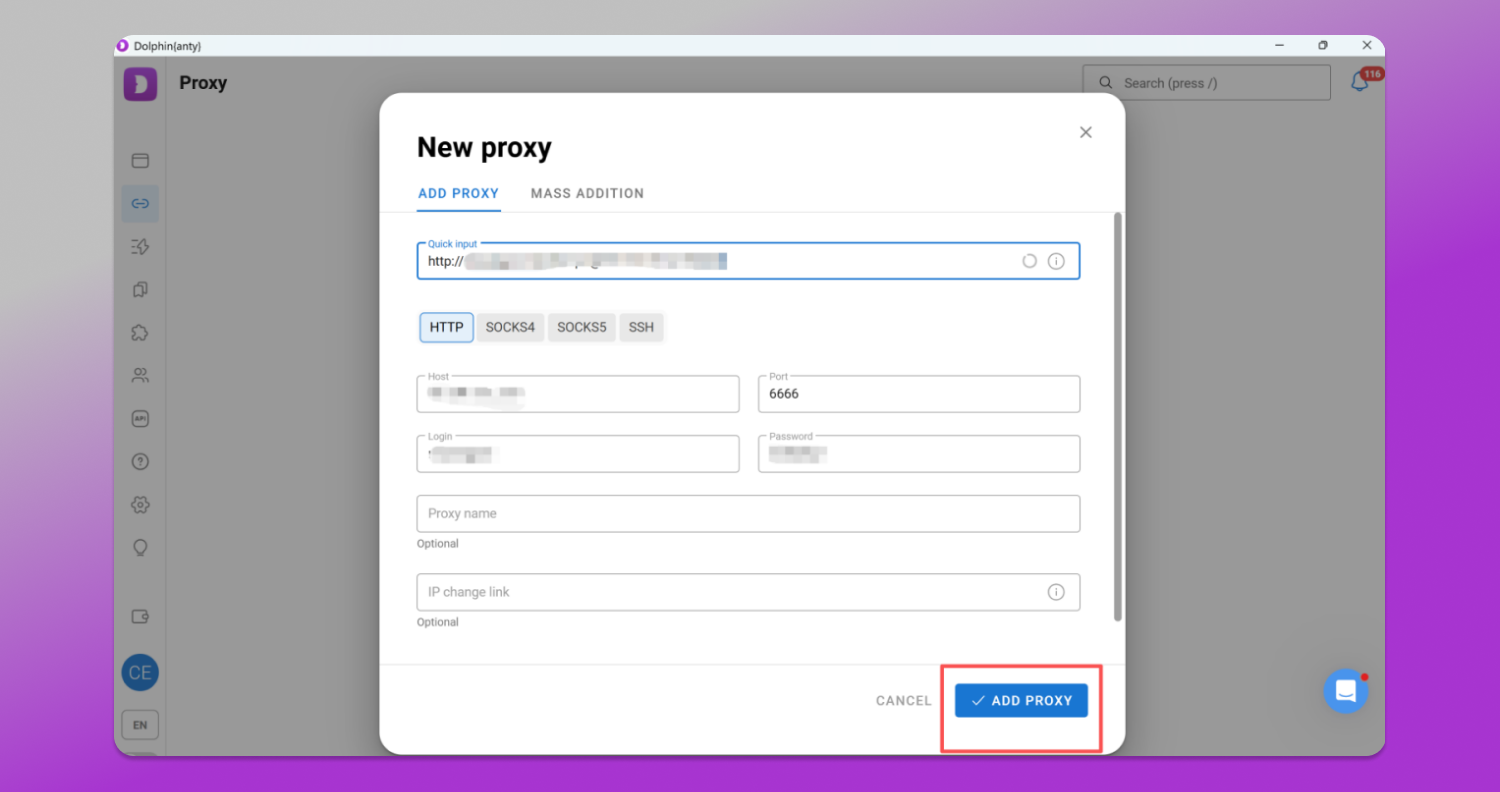
In the input field, simply paste your credentials in the standard format:
username:password@host:port
Alternatively, you can fill in the Host, Port, Login, and Password fields individually.
Step 5: Test the Connection
Before saving, click the “Check Connection” button. Dolphin Anty will instantly ping the OkkProxy server. Within seconds, you should see a green success message displaying the proxy IP and its exact geographical location.
Step 6: Launch and Work Safely
Click “Create” in the top right. Your profile is now securely bound to your dedicated OkkProxy IP. Click “Start” to launch the browser and begin working with complete peace of mind.
Pro-Tips for Maximizing Success with OkkProxy and Dolphin Anty
To get the absolute most out of your setup, keep these best practices in mind:
📌 Match Your Browser Timezone and WebRTC: In Dolphin Anty, always ensure your Timezone and WebRTC settings are set to “Based on IP”. This ensures that if your OkkProxy IP is located in Paris, your browser profile’s internal clock automatically reflects Central European Time, preventing data mismatches that trigger anti-fraud filters.
📌 Leverage Sticky Sessions for Account Maintenance: When logging into financial accounts or social media dashboards, use OkkProxy’s “Sticky Sessions”. This keeps you on the same residential IP address for up to 30 or 60 minutes, preventing abrupt IP jumps mid-session.
📌 Use Rotating IPs for Web Scraping: If you are using Dolphin Anty to automate data extraction or price monitoring, switch your OkkProxy settings to “Rotating”. Every single request will route through a new IP, allowing you to scrape at scale without encountering CAPTCHAs or rate limits.
Exclusive Offer for the Dolphin Anty Community
We believe that high-tier security shouldn’t break the bank. To welcome Dolphin Anty users to the OkkProxy ecosystem, we are thrilled to offer an exclusive discount.
Whether you need rotating residential proxies for massive data parsing or highly stable mobile IPs for social media automation, we have you covered.
Promo Code: Dolphin80
The Deal: Enjoy a 20% OFF discount across our premium proxy packages.
Don’t let IP bans slow down your growth. Equip your 🔥 Dolphin Anty profiles with the elite network infrastructure of 🔗 OkkProxy today, and experience seamless, unrestricted browsing.