
Updated: 18.05.2026.
Which One is Better?
Disclaimer: You’re reading a comparison review of antidetect browsers on the Dolphin Anty blog. This material is based on feedback and reviews from real users who have worked with us before or are still working with us. We’ve done our best to present the information as objectively as possible, relying solely on facts, so you can make an informed decision.
Looking for the right antidetect browser? Two names that consistently come up at the top of the market are 🚀 Dolphin Anty and Octo Browser. Both platforms offer convenient profile management, reliable fingerprint spoofing and a full set of tools for multiaccounting, which is why they’re regularly featured in industry rankings. In this article we’ll discover their core features and key differences to help you decide which solution fits your workflow best.
📣 If you are already considering switching from Octo Browser to Dolphin Anty, now is the perfect time: use the promo code OCTO21 to get a 21% discount. You can activate it via the link.
Octo Browser: Summary
It’s a professional tool designed for affiliate marketers and other specialists. It allows users to manage multiple browser profiles, customize fingerprints and connect proxies. Basically, it can do everything you’d expect from a modern antidetect browser. It also performs well in fingerprint checker tests.
💻 Available on: Windows, macOS (Intel & Apple Silicon), Linux.
🇬🇧 Languages: Russian, Ukrainian, English, Brazilian Portuguese, Spanish, Vietnamese, Chinese.
🔗 Official website: octobrowser.net
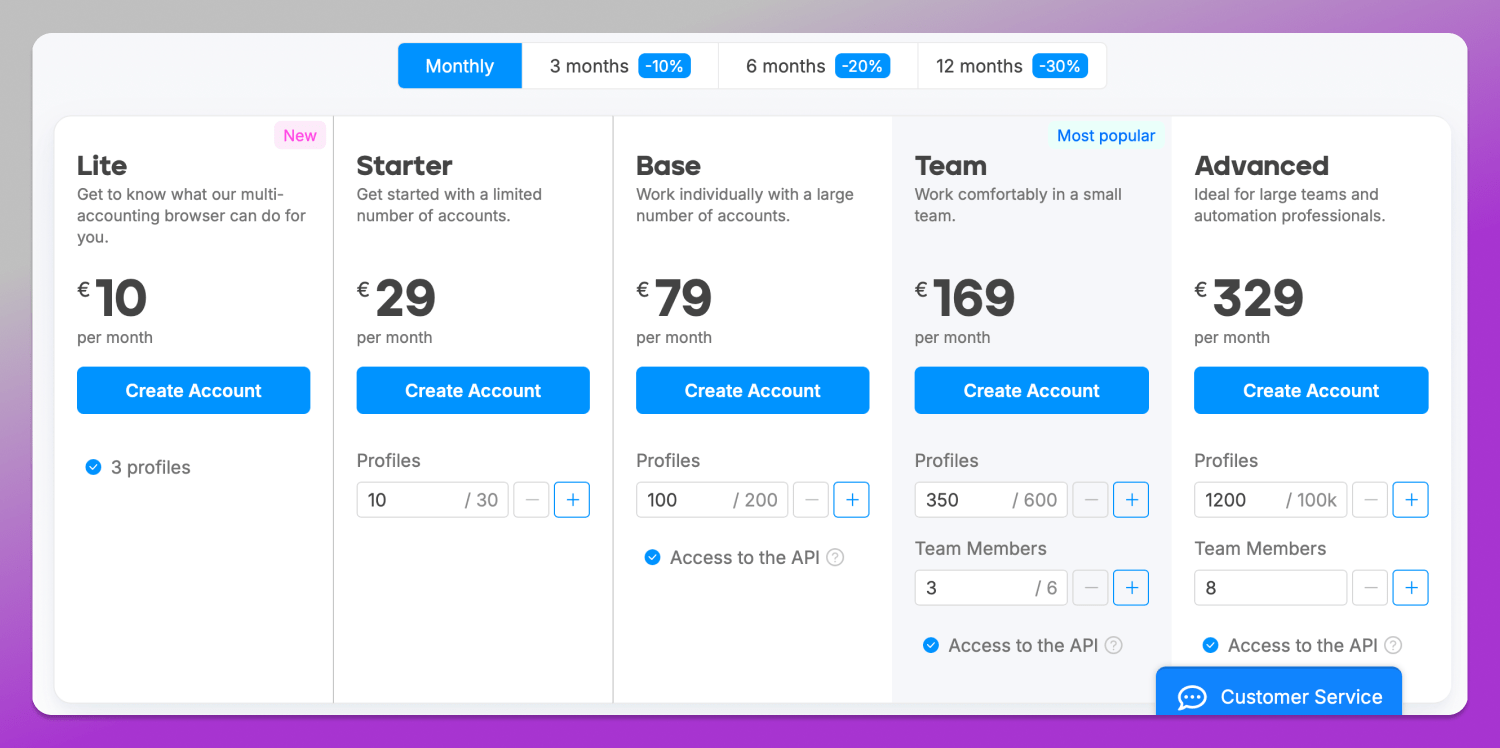
💰 Price: starting from €10/month.
🏁 Free trial: not available.
Octo Browser is considered 💰 one of the most expensive antidetect browsers on the market. Its cheapest plan costs €10/month and includes only 3 profiles. There’s no free trial and no free version with limited functionality.
Dolphin Anty: Summary
It’s a product developed by the Dolphin team that not only helps users stay 🥷 fully anonymous online, but also offers a wide range of tools for organizing workflows more efficiently. Many of its features are genuinely unique and rarely found together in a single antidetect browser.
💻 Available on: Windows, macOS (Intel & Apple Silicon), Linux.
🇬🇧 Languages: Russian, Ukrainian, English, Spanish, Portuguese, and Vietnamese.
🔗 Official website: dolphin-anty.net;
💰 Price: starting from 0$;
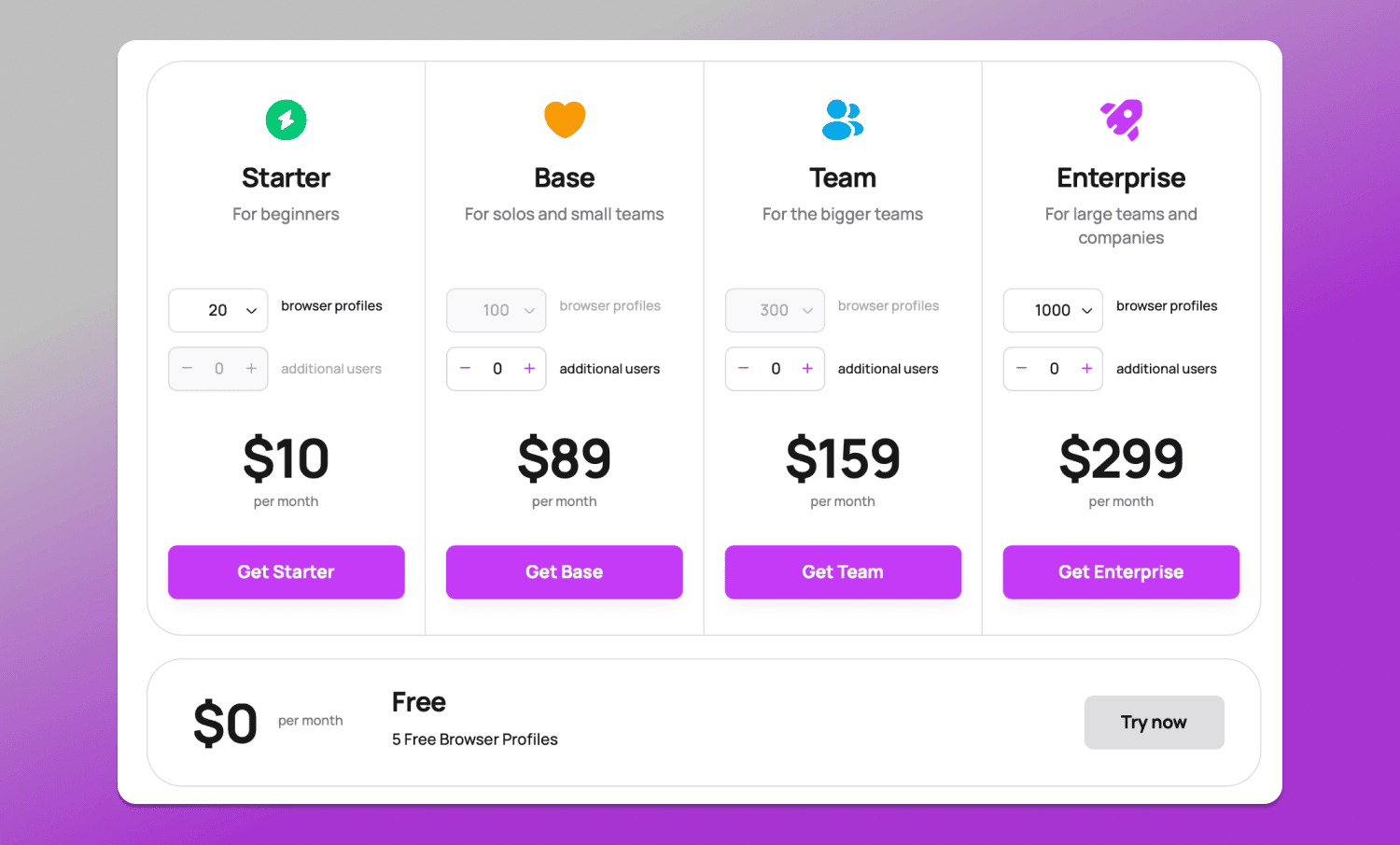
🏁 Free trial: up to 5 profiles available for free without linking a credit card.
🏆 Ranked as the best antidetect browser by many affiliate marketing platforms. But instead of relying on ratings alone, let’s compare Dolphin Anty and Octo Browser in practice.
Workspace
Let’s start with the workspace, since this is where users spend most of their time.
Interface
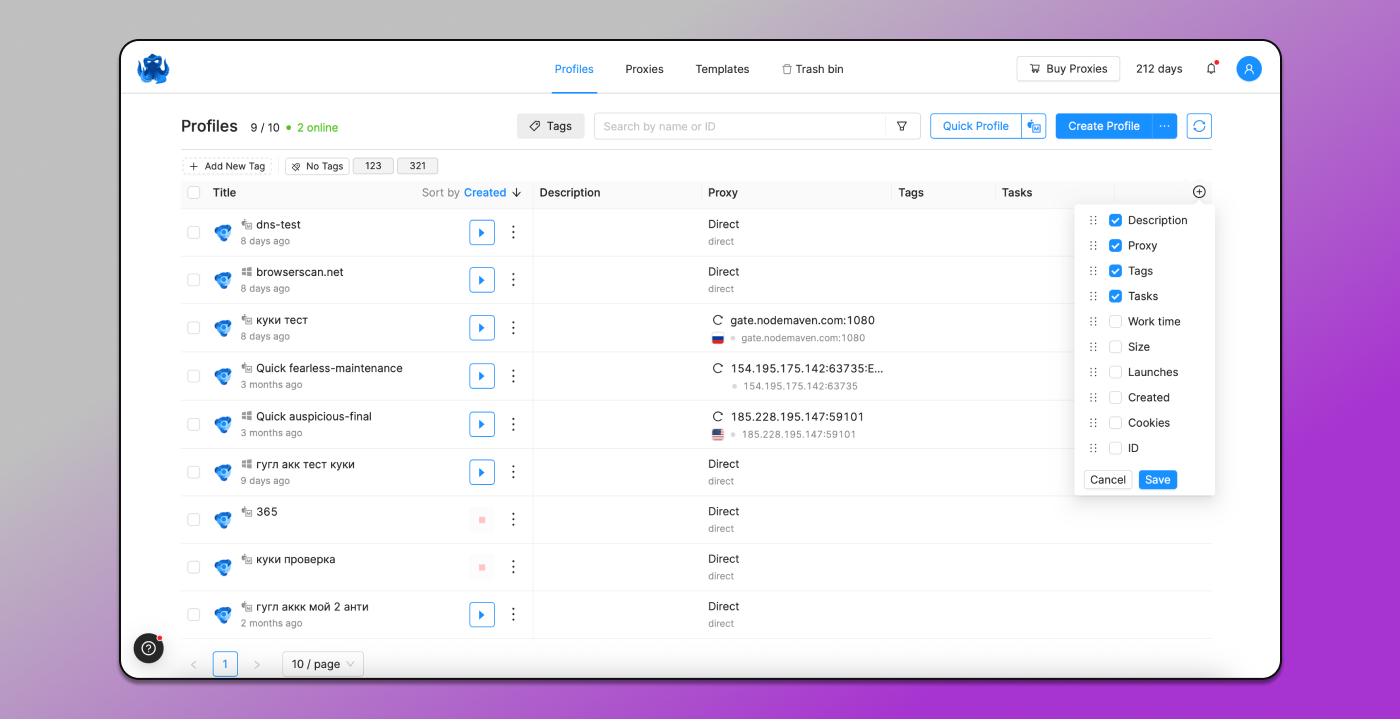
The interfaces of Dolphin Anty and Octo Browser follow a similar layout: browser profiles are displayed in rows, while profile settings and parameters are organized into columns. In Octo Browser, the available columns include:
- Name;
- Description;
- Proxy;
- Tags;
- Tasks…
…and other parameters.
Dolphin Anty also includes all of these features:
- Name;
- Folders;
- Status;
- Notes;
- Tags;
- Proxy…
…plus additional columns such as usage time, timer, creation date, last modified date, launch date and profile ID.
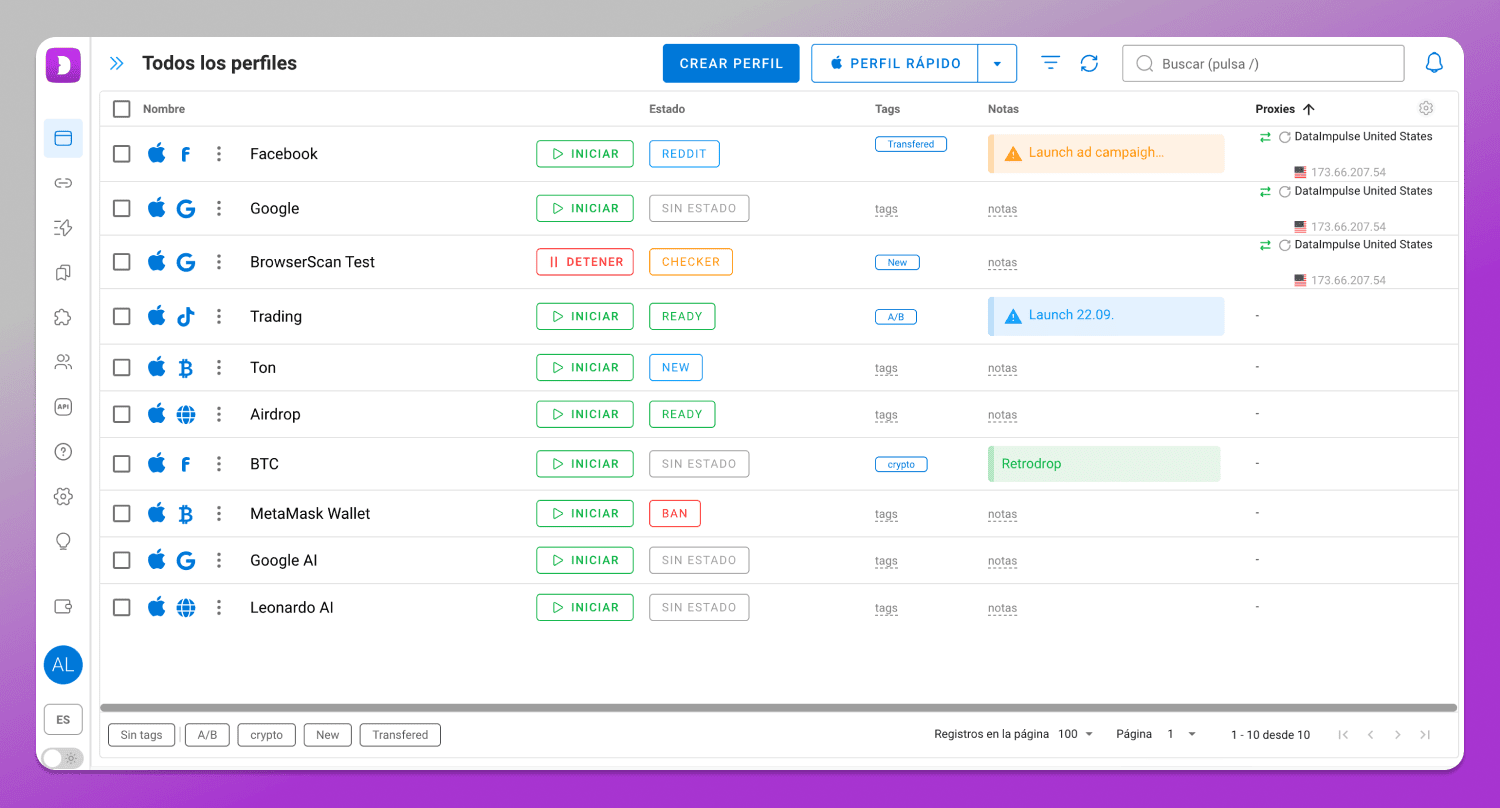
A separate mention goes to 📁 Folders. In Dolphin Anty, profiles can be grouped using any structure that fits your workflow. This is especially useful for managing teams, organizing projects or separating personal and client accounts.
Octo Browser 🙅♂️ lacks this feature.
Profile Navigation
When working with dozens or even hundreds of browser profiles, navigation and workspace organization become critical. In practice, users only interact with a portion of their profiles at any given time, so being able to quickly find the right accounts and hide irrelevant ones makes a big difference.
Both browsers include 🔎 search and filtering tools. In Octo Browser profiles can be filtered by name/ID, proxy, status (running or stopped), password protection, tasks and tags.
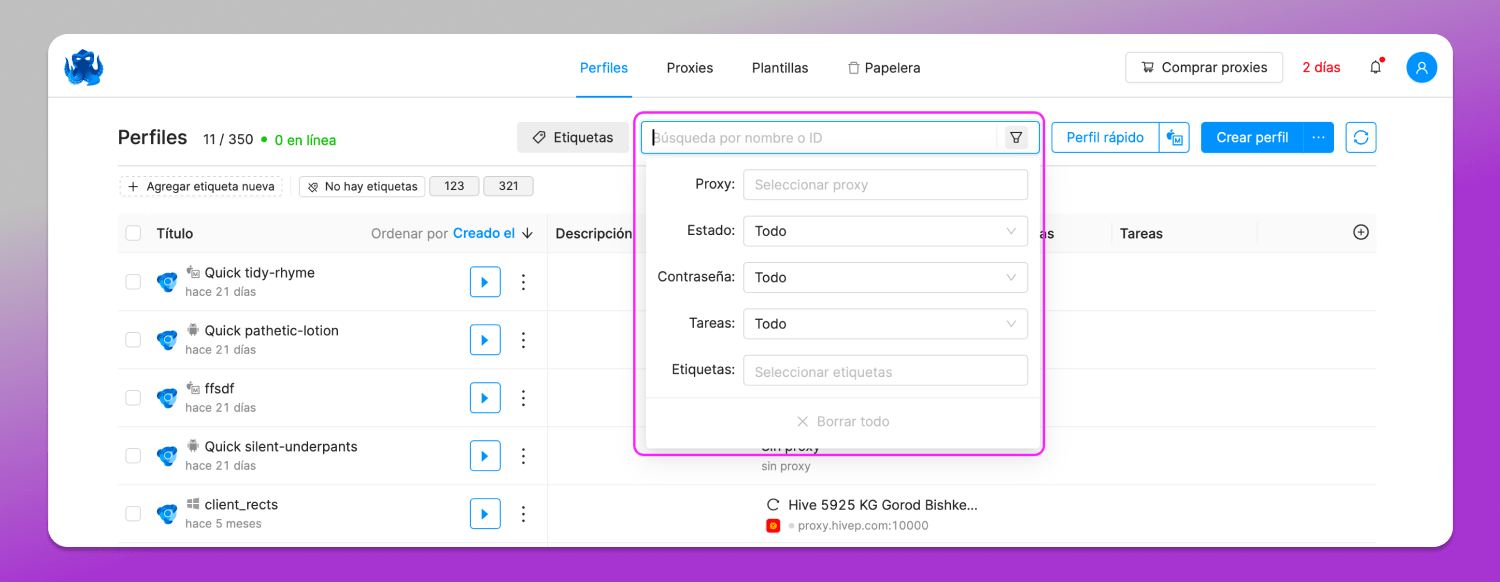
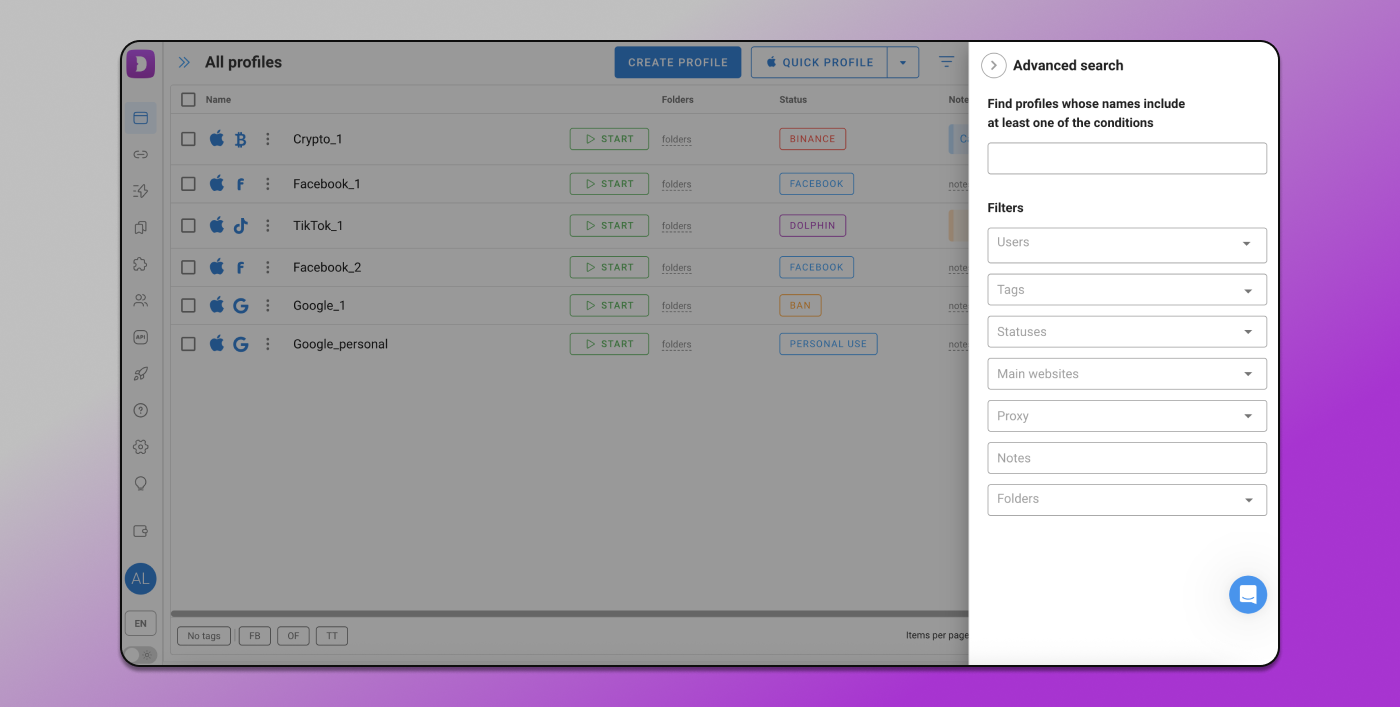
In Dolphin Anty profiles can be filtered by name, users, tags, statuses, main websites, proxies, notes and folders.
Notes 📋
Notes are used to store important information about a profile, for example, login credentials for an account.
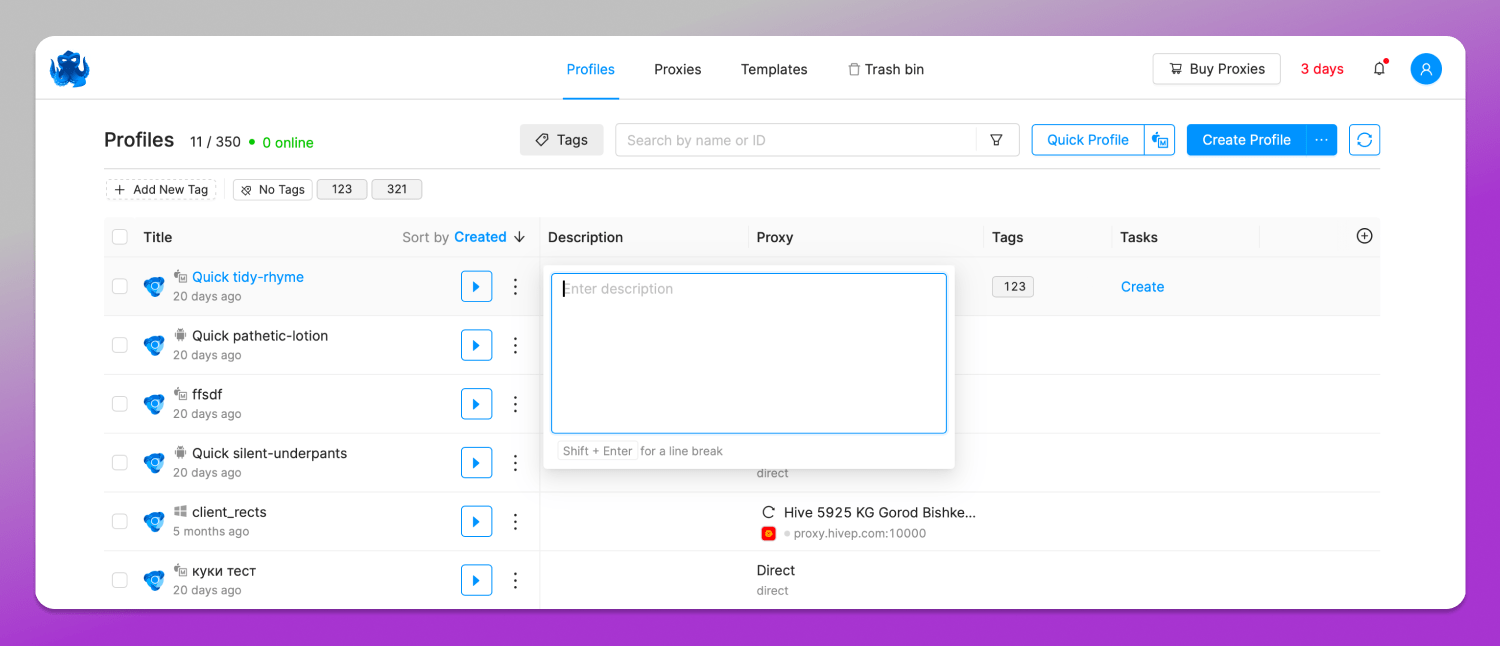
In Octo Browser this feature is called “Description.” It can be added to any account, but it ❌ cannot be edited as it’s just static text.
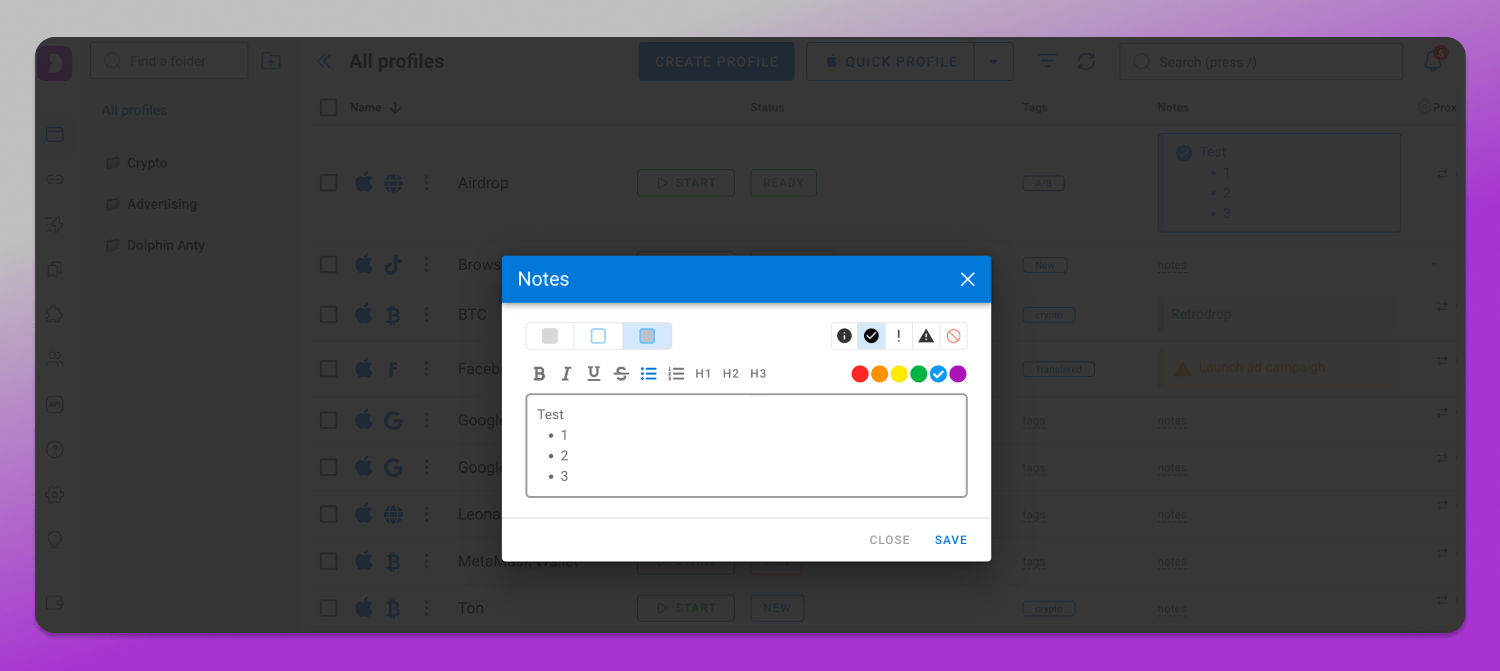
In Dolphin Anty notes are more flexible: you can not only add text, but also edit it later, assign colors and use custom icons.
Profile Types
Icons help navigate the profile list and quickly understand which platform each profile is meant for.
In Octo Browser all profiles use the same default icon, which makes them visually blend into one uniform list. You can assign a different icon, but only by uploading it manually from your computer.
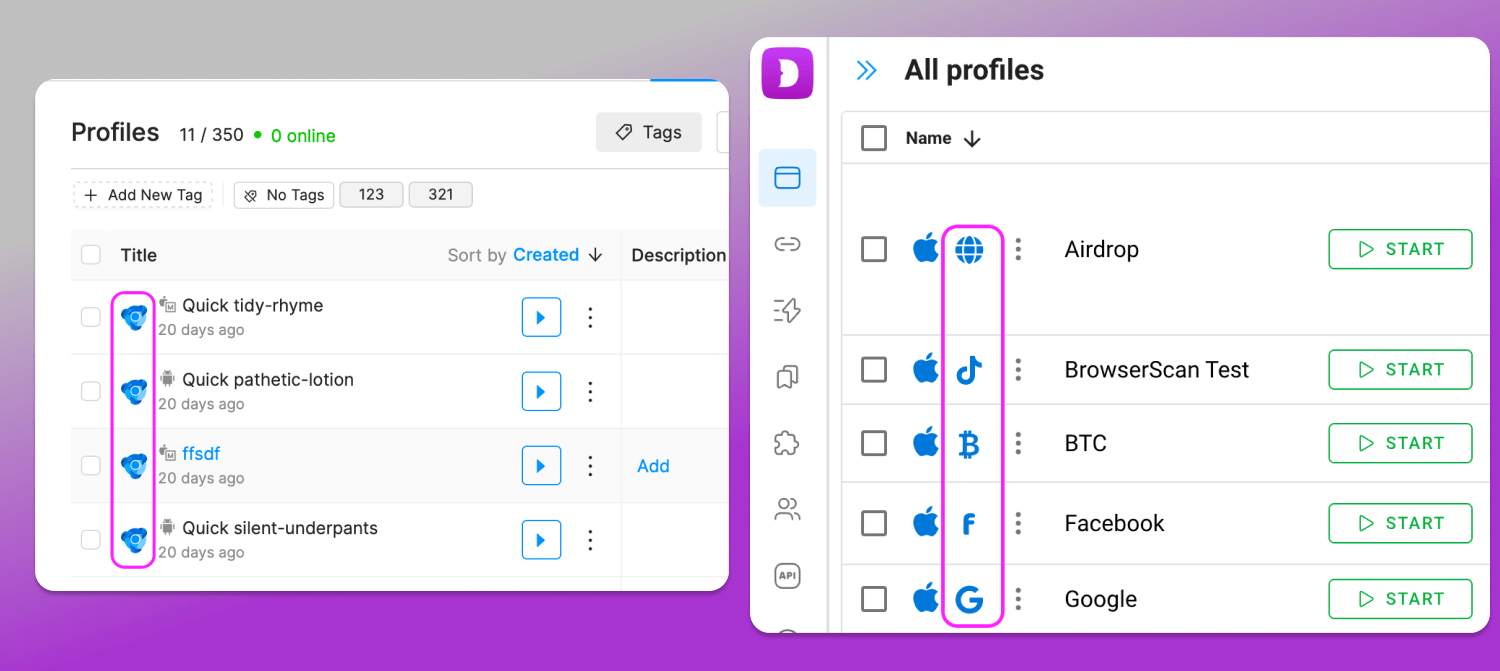
Profile icons for in Octo Browser (left) and Dolphin Anty (right).
In Dolphin Anty,] each profile is ✅ clearly marked with icons indicating the operating system and the target platform it was created for, such as FB, Google, TikTok or Crypto. These icons are assigned automatically when the browser profile is created and the only thing the user needs to do is select the profile type.
Profile Creation
In a modern antidetect browser adding new profiles should be as simple and flexible as possible.
In Octo Browser profile creation and configuration are split into multiple tabs. This approach can feel a bit inconvenient, since while you’re adjusting one set of fingerprint settings, others are hidden behind separate sections, requiring constant switching. In practice this increases the risk of misconfiguration, which can ultimately lead to account bans within that profile.
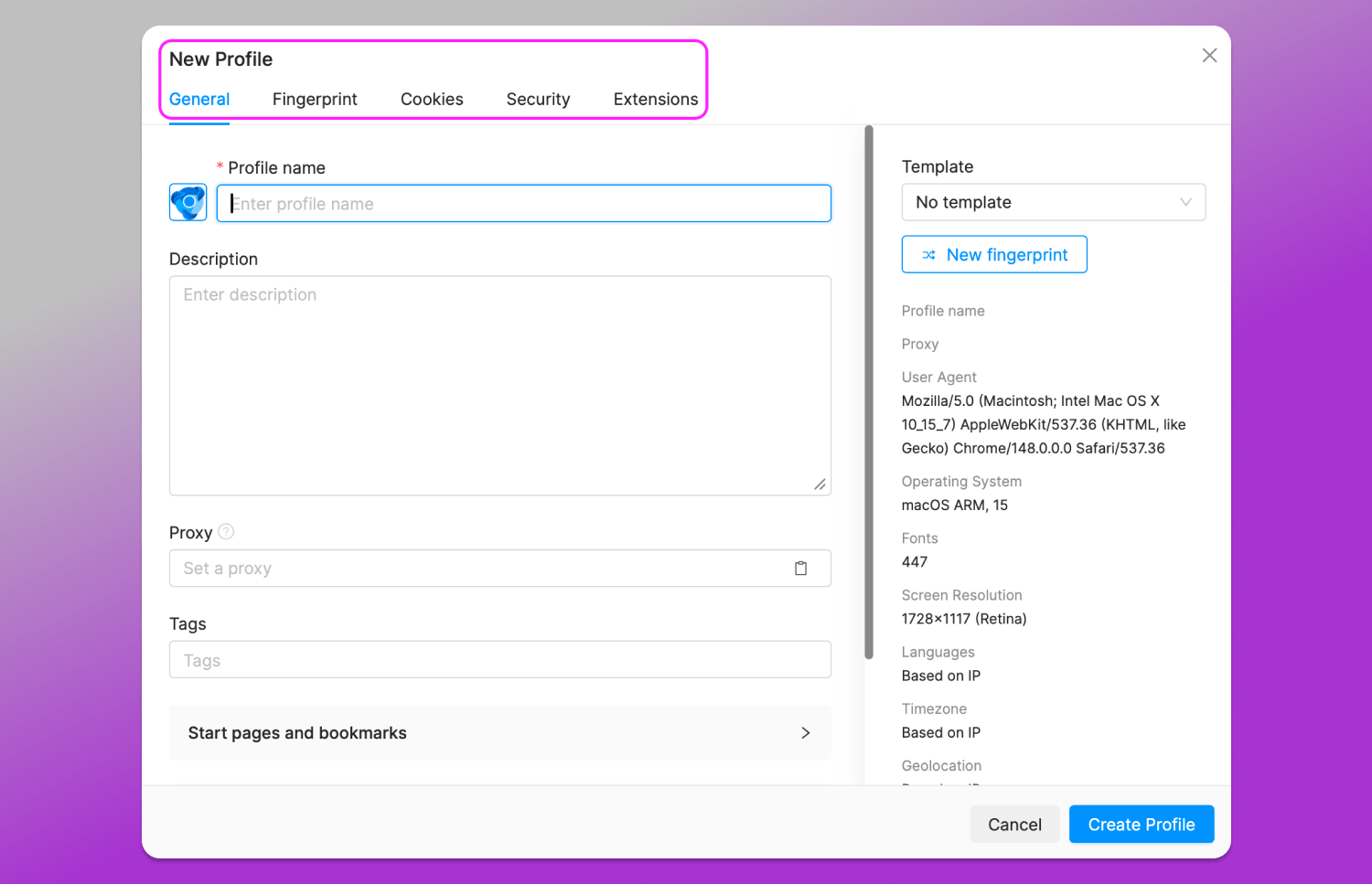
In Dolphin Anty a profile can be created and configured within a single window. The “General” section lets users set everything up without diving into technical fingerprint details, while the “Advanced” section provides full control over the digital fingerprint for users who know exactly what they’re doing.
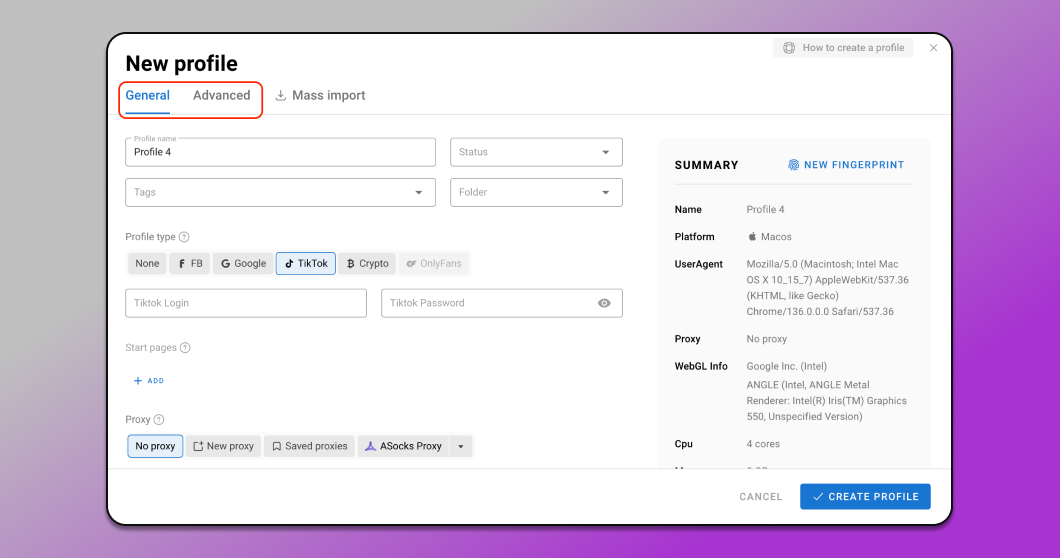
If you choose the simplified setup, the fingerprint parameters are already ✅ pre-configured and aligned with each other. This means they don’t contain contradictions and are designed to closely resemble real devices. All the user needs to do is select a profile type, add a proxy and optionally upload cookies. You can also immediately add tags, statuses and notes or manage them later in separate sections of the browser. This setup process is 💡 easy to pick up even for users with no prior experience.
Fingerprint Setup
Overall, both antidetect browsers offer a similar set of fingerprint configuration options. However, there are a few key differences.
In Dolphin Anty, users can block specific ports that could potentially leak information about the real device. This adds an extra and valuable layer of protection.
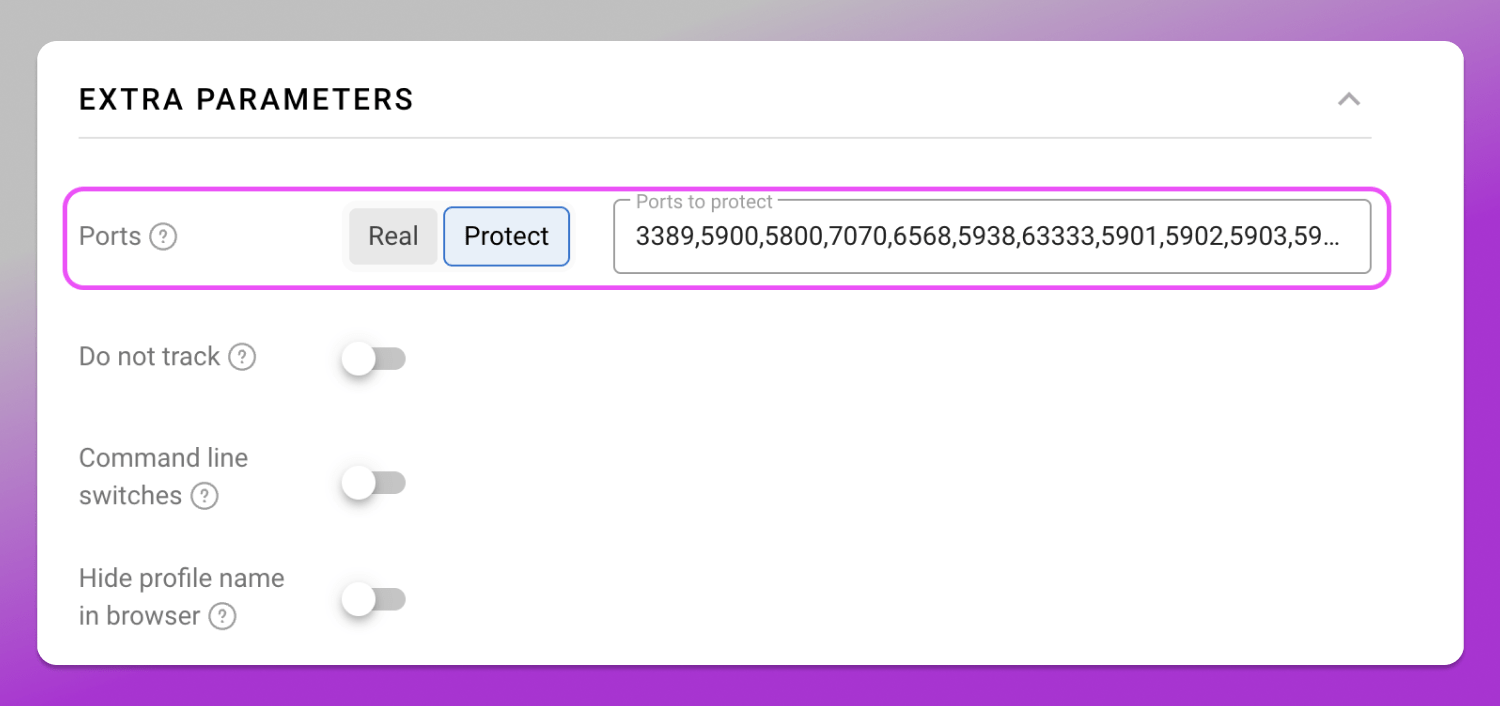
Octo Browser doesn’t offer this feature nor does it support creating profiles with Linux as the operating system.
Extensions, Bookmarks and Start Pages
In Octo Browser bookmarks and start pages must be added manually for each profile. An available alternative is a template so that new profiles inherit preconfigured settings. Either way, this takes extra time and effort.
In Dolphin Anty extensions, bookmarks and start pages can be added once and automatically applied to new profiles if the corresponding profile type is selected. If a specific setup of pages, bookmarks or plugins isn’t needed, you simply choose a different profile type.
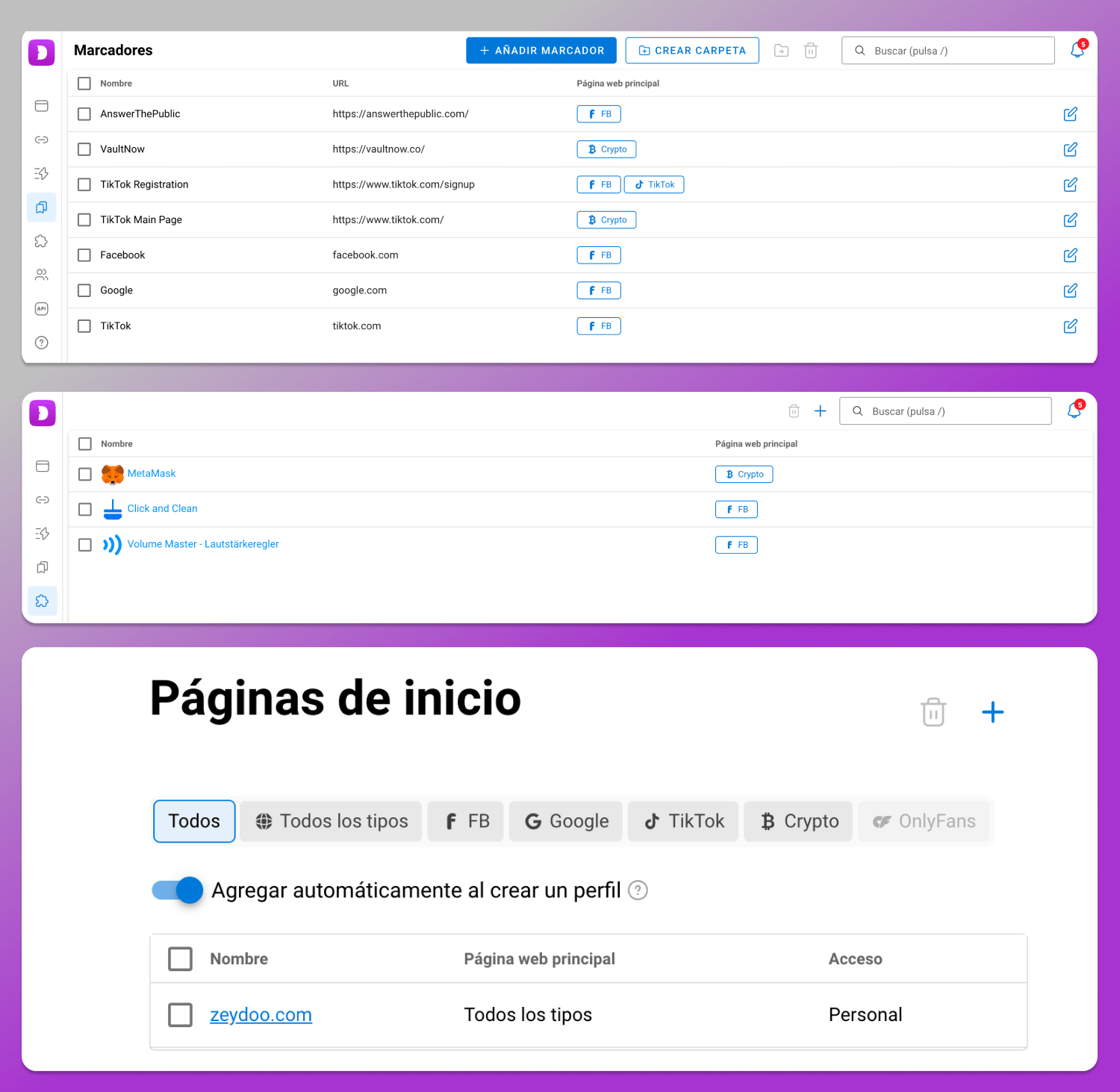
❗ Dolphin Anty profiles come with pre-configured start pages optimized for Facebook, Google, TikTok, and crypto platforms out of the box.
Octo Browser profiles, on the other hand, don’t include preset start pages by default. You’ll need to add them manually to each profile or configure them in a template.
Bulk Profile Import
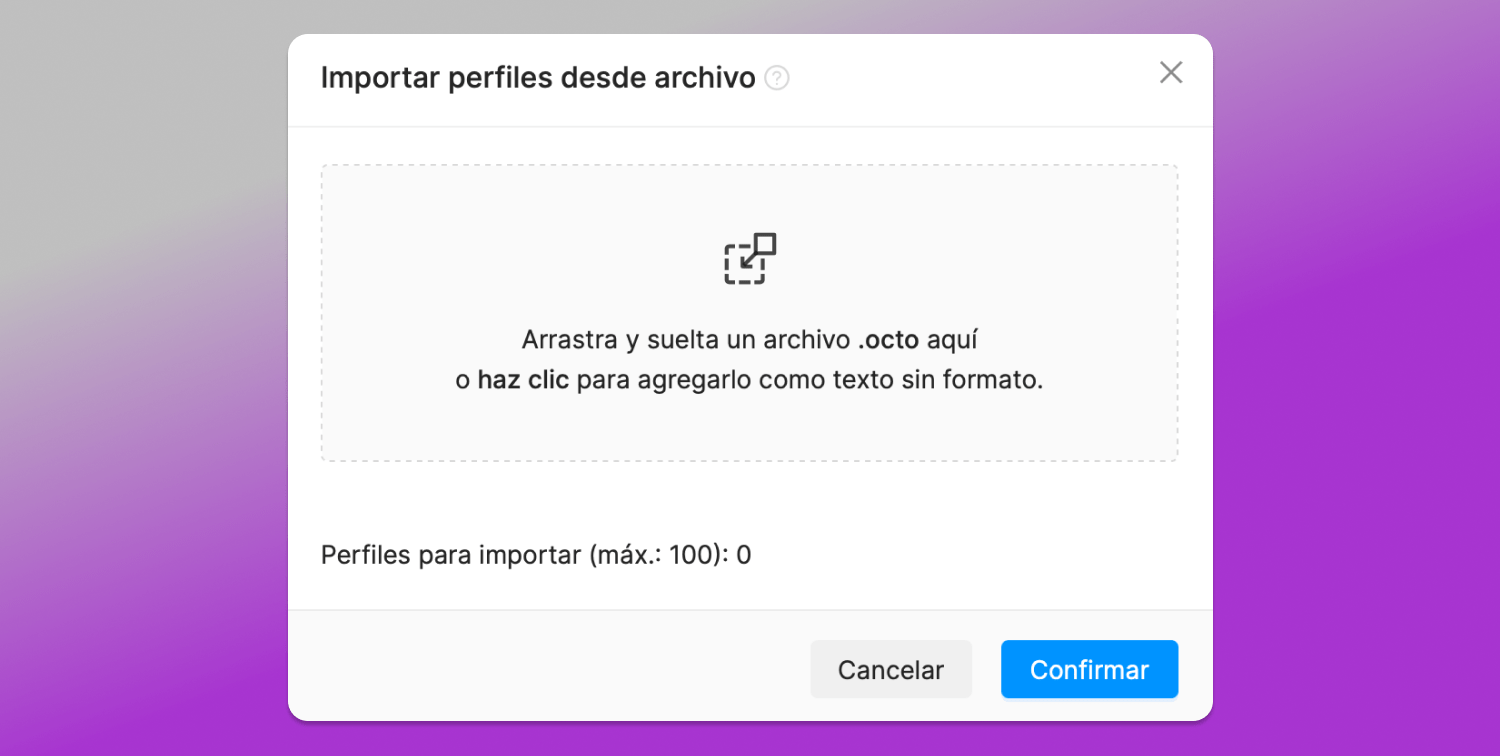
Octo Browser limits bulk imports to 100 profiles per upload and only supports .octo files. You also can’t configure fingerprints during the import process, so all adjustments have to be made afterward.
Dolphin Anty, by contrast, lets you import an unlimited number of profiles in a single file. On top of that, you can edit fingerprints directly during bulk import. Profiles can be added not only via file upload, but also by pasting raw text into a dedicated input field.
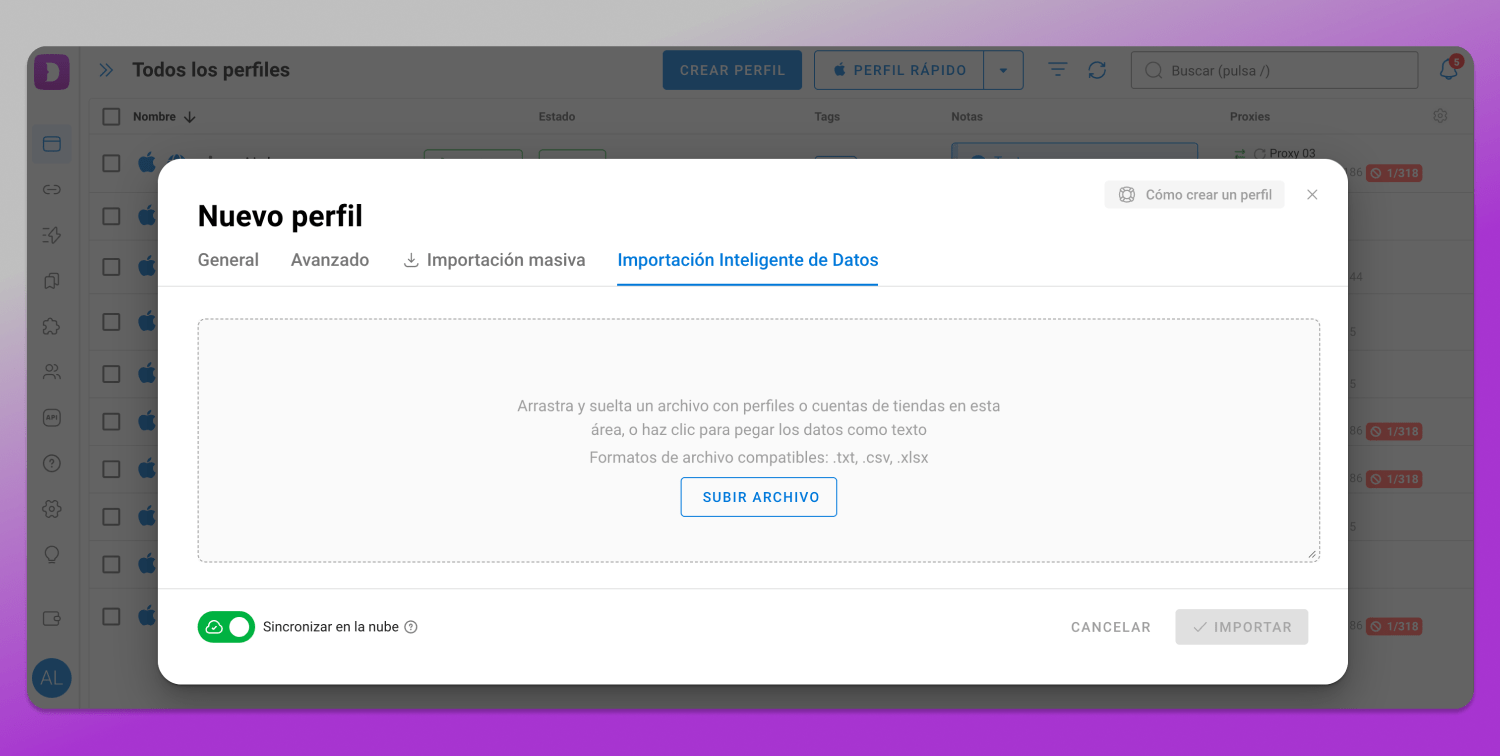
On top of that, Dolphin Anty offers 🤓 smart data import, which automatically recognizes all data arrays without any manual input.
Profile Management
Both Dolphin Anty and Octo Browser let you do more than just edit profiles as you can perform a variety of actions with them.
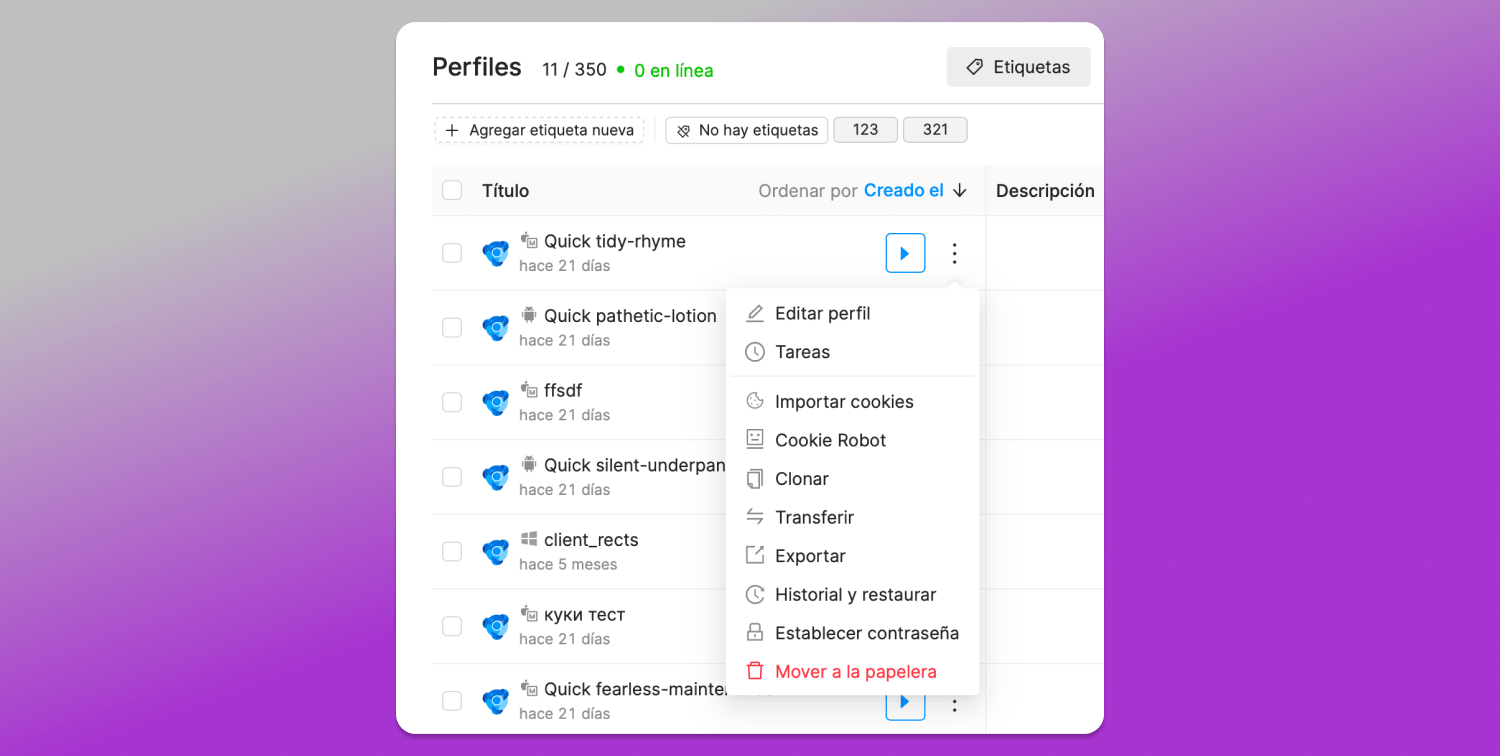
Here’s what you can do with profiles in Octo Browser:
- Run tasks;
- Import cookies;
- Run a cookie bot;
- Duplicate a profile;
- Move or export a profile;
- View activity history and restore profiles;
- Set a profile password;
- Delete a profile.
Exporting profiles is a 💲 paid feature in Octo Browser.
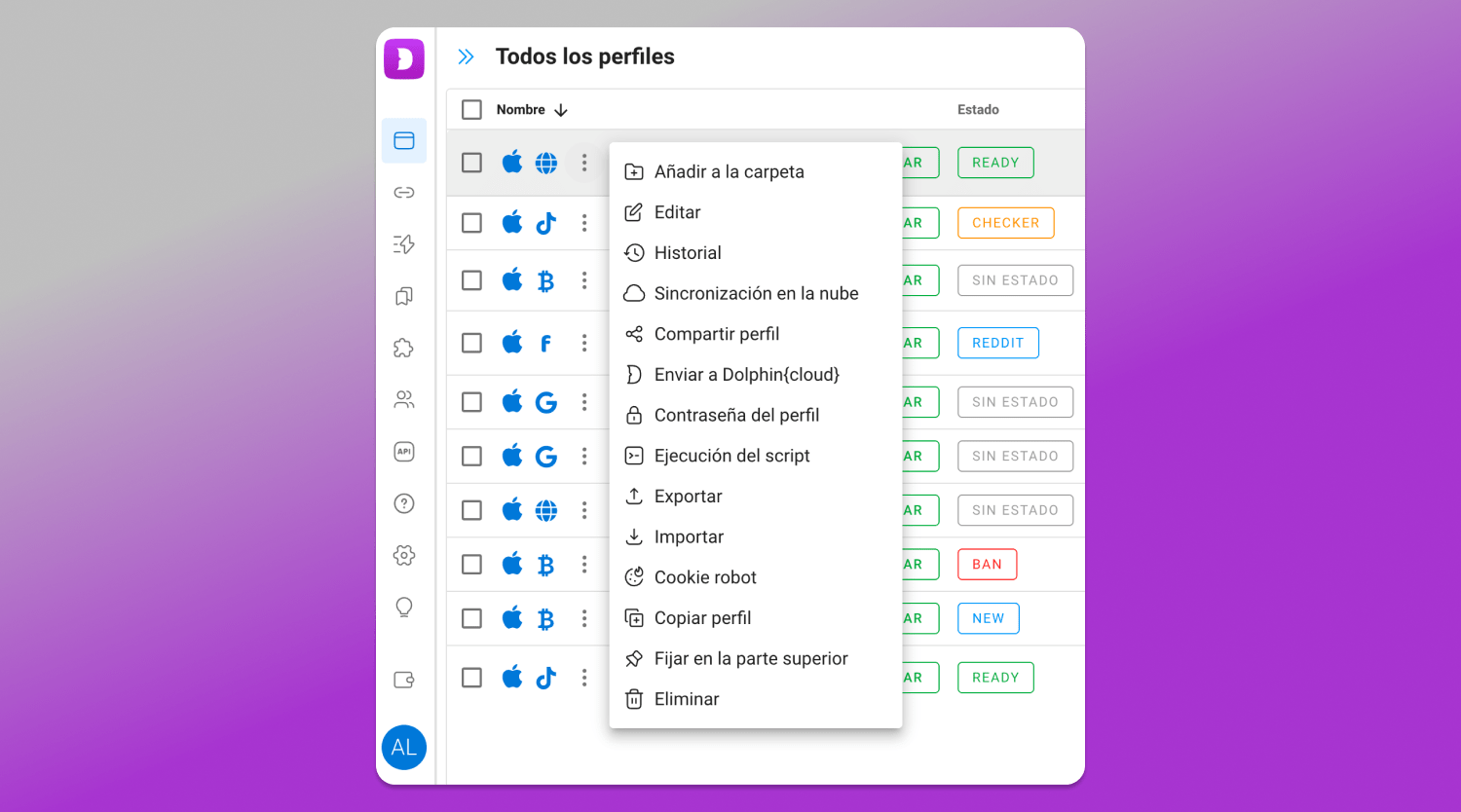
In Dolphin Anty in addition to everything listed above, you can:
- Add a profile to a folder;
- Run cloud sync;
- Send a profile to Dolphin Cloud;
- Execute a script;
- Import data;
- Pin a profile to the top of the list.
Bulk Actions
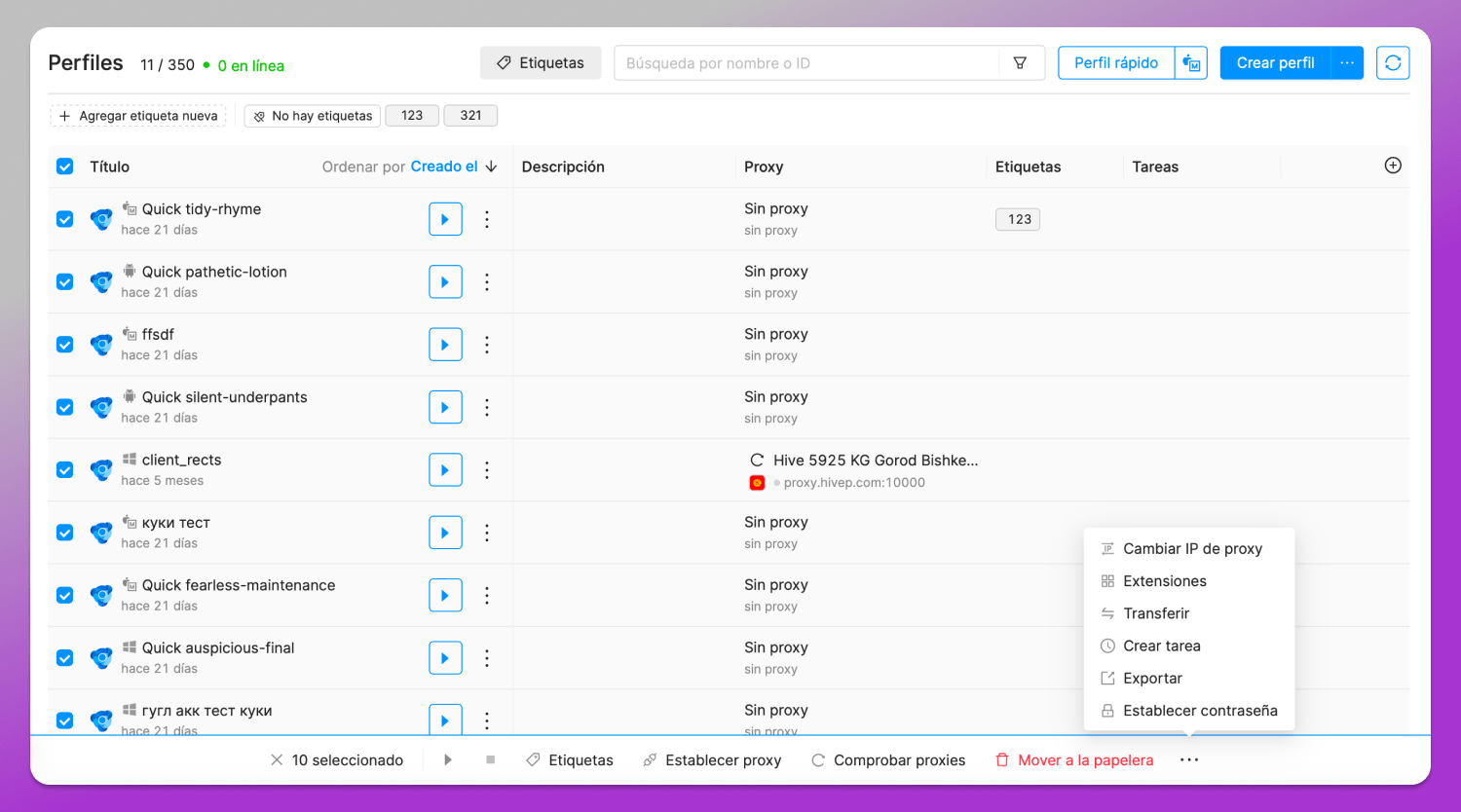
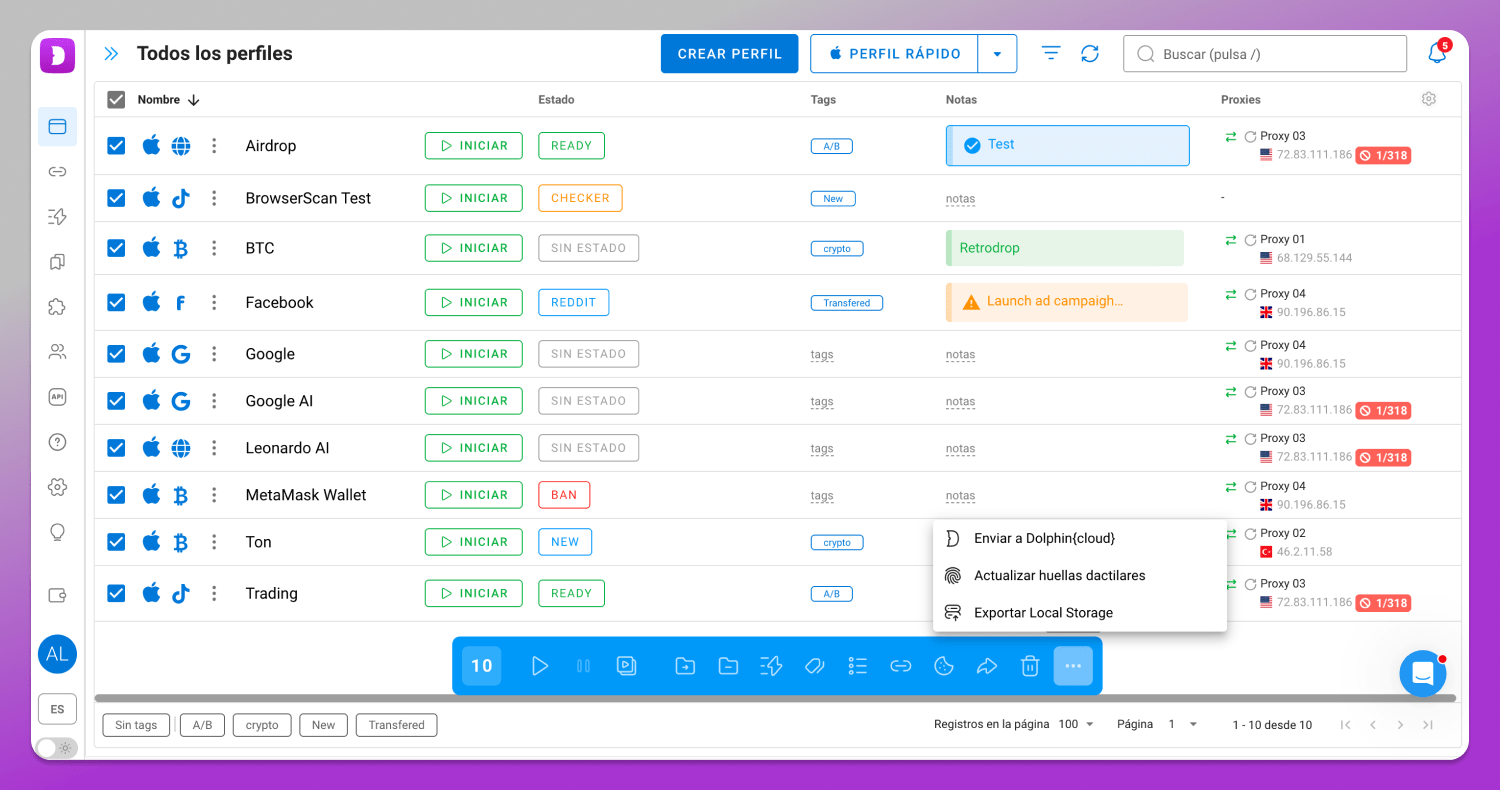
At the same time, Dolphin Anty offers all the same features, plus:
- Run the synchronizer;
- Add or remove profiles from a folder;
- Execute automated scenarios;
- Add or remove statuses;
- Export cookies;
- Send profiles to Dolphin Cloud;
- Update fingerprints;
- Export profiles to local storage.
Cookie Robot
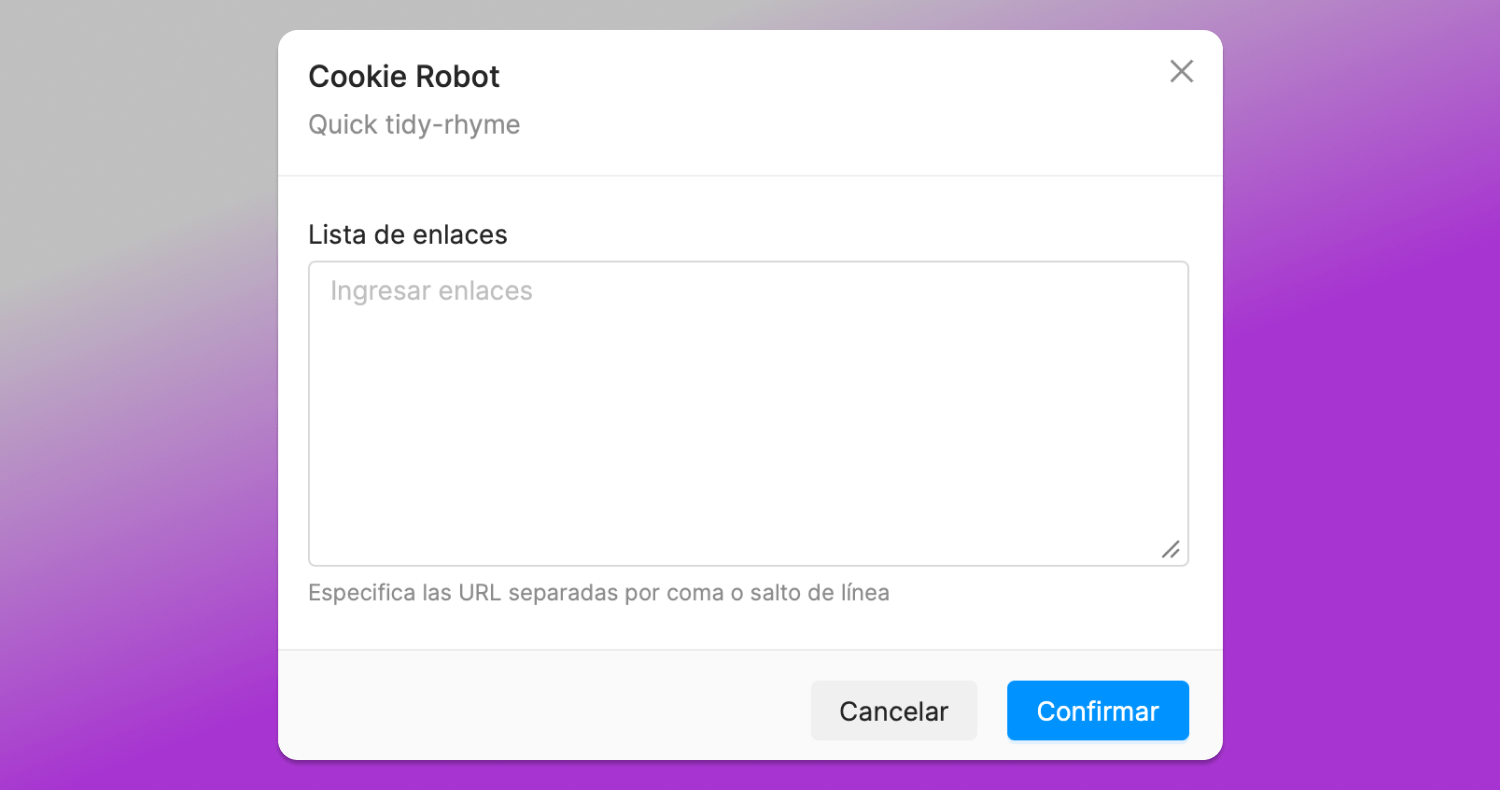
Cookie robot in Octo Browser.
The Cookie robot in Dolphin Anty is more advanced. Besides basic cookie collection, it can run in the background (headless) and skip loading images to save device memory and proxy bandwidth. Octo Browser doesn’t offer these options.
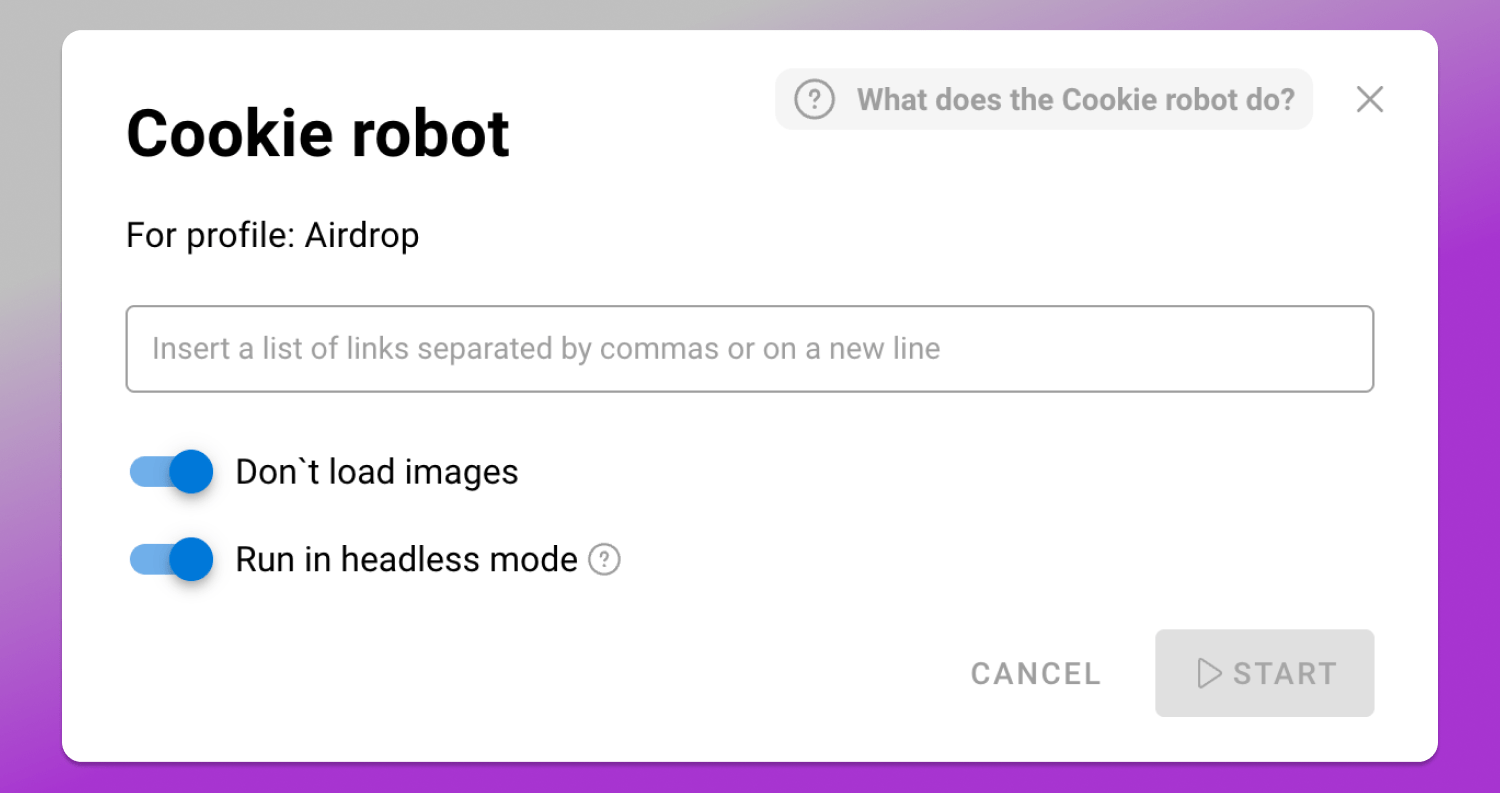
Cookie robot in Dolphin Anty.
Profile Cloning
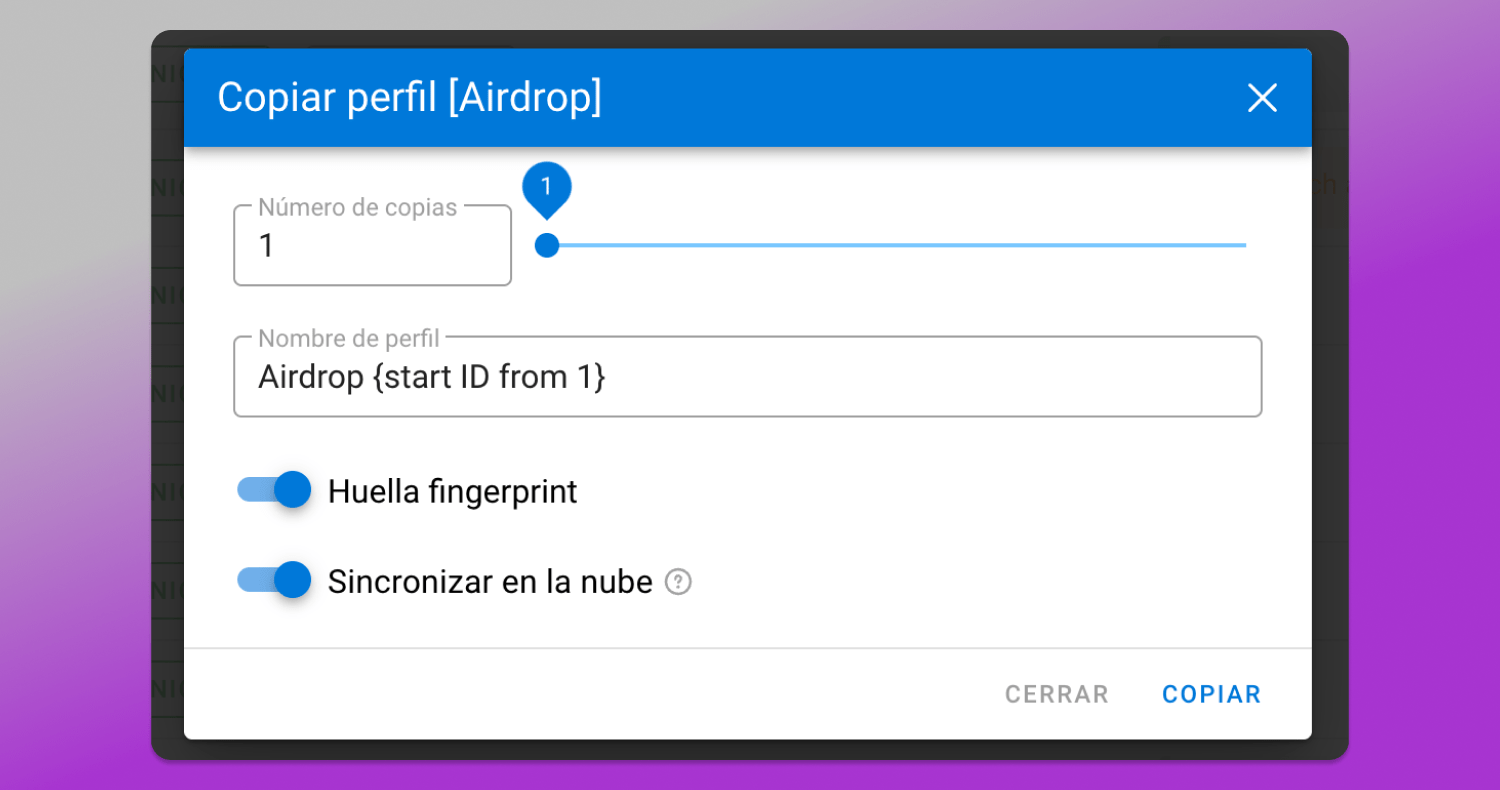
This feature is available in both antidetect browsers and lets you duplicate a profile as many times as you want. However, in Octo Browser the copies are created with identical fingerprints.
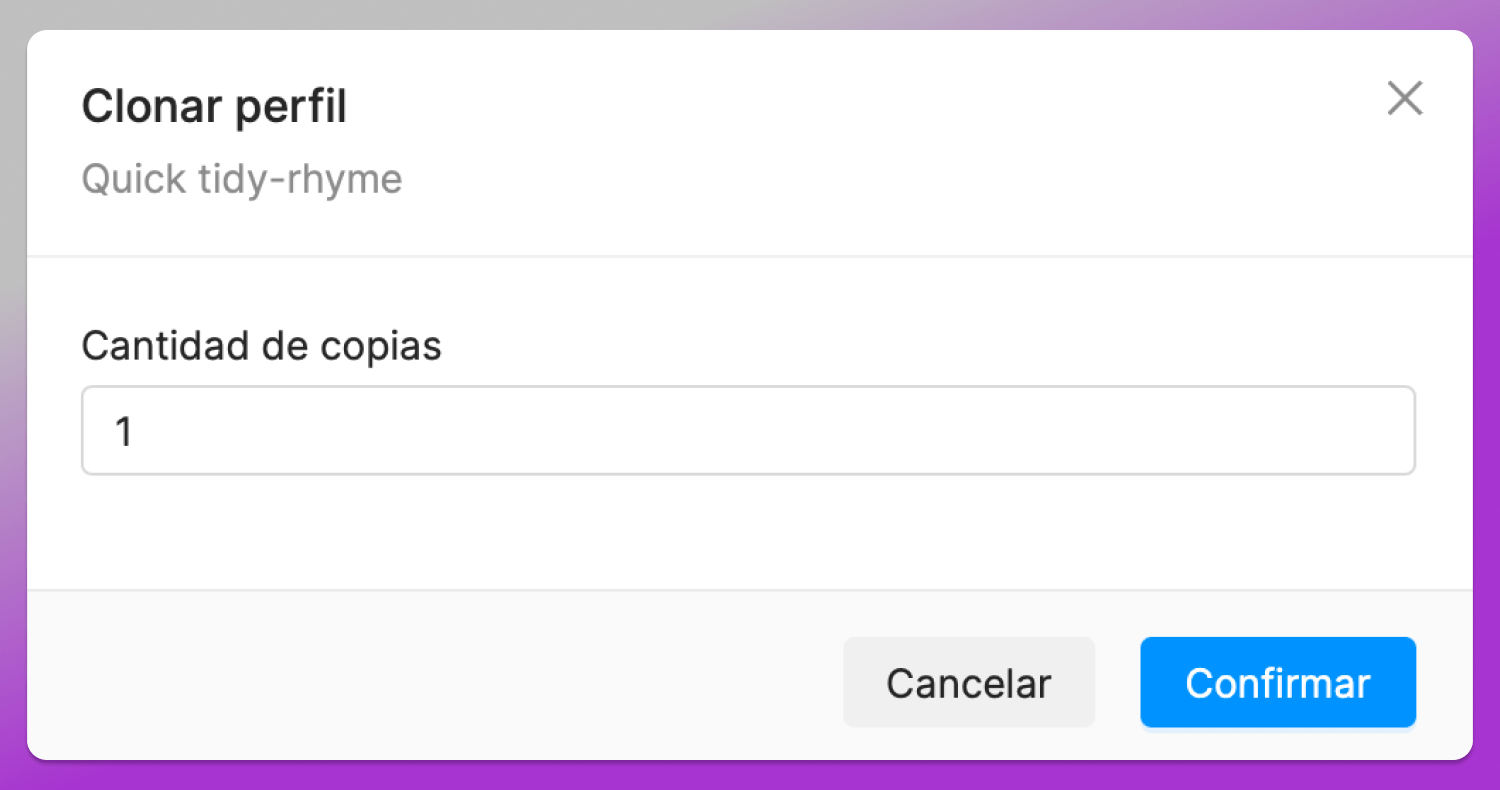
Dolphin Anty lets you not only clone profiles but also:
- Randomize the digital fingerprint in each copy, making every profile unique;
- Sync profiles to the cloud.
Features missing in Octo Browser
Dolphin Anty offers several unique features. Let’s go through them.
Scenarios
A scenario is a sequence of automated actions that the browser performs on its own.
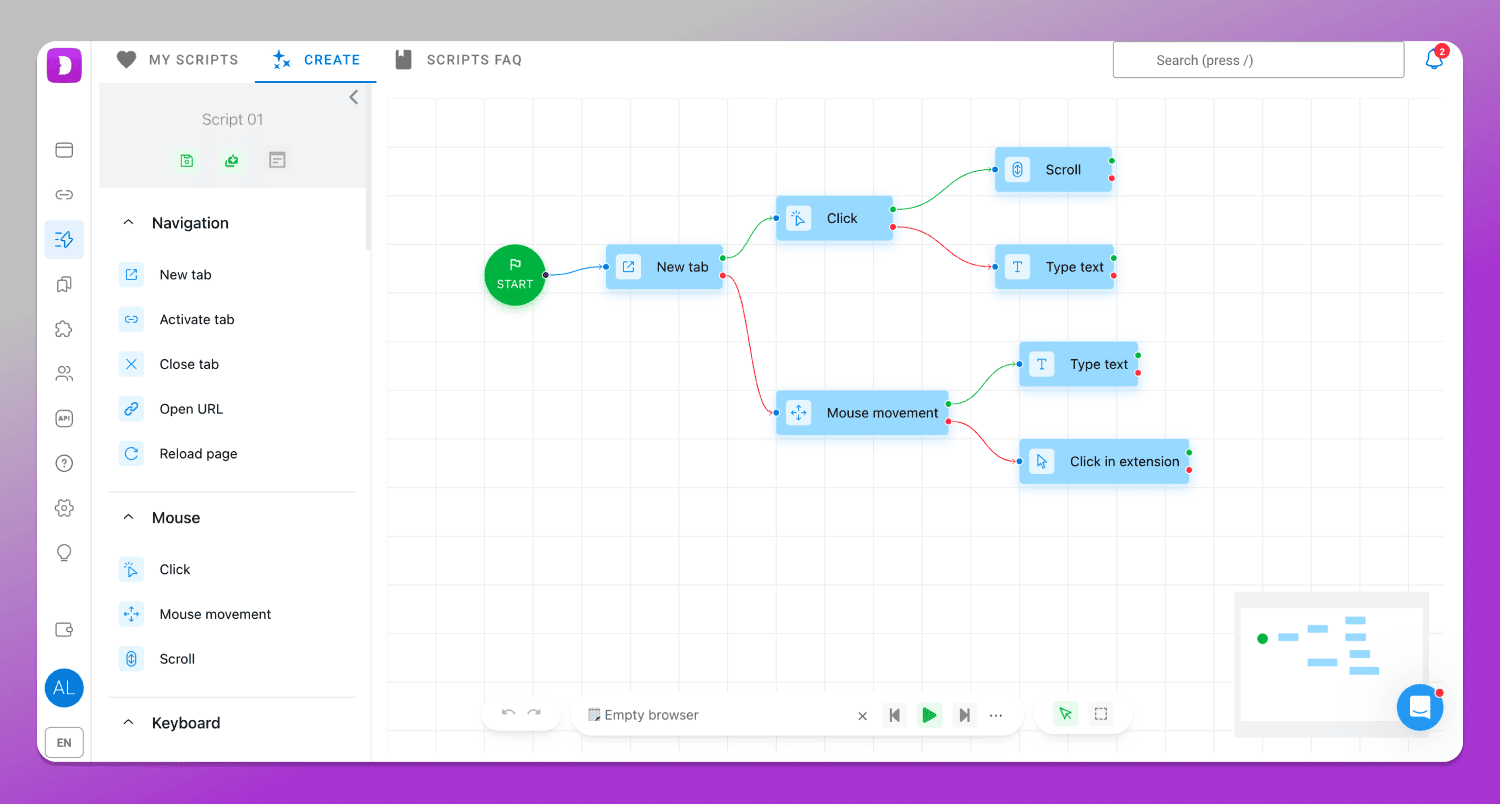
Anyone can figure everything out as the developers made it intuitive and easy to use via an interactive map. Setting up tasks, whether it’s warming up accounts, scraping websites, participating in auctions and more, can save a lot of time.
Synchronizer

Integration with Dolphin Cloud
Pricing
Comparative Table
Let’s summarize the comparison and advantages in an easy-to-read table.
| Parameter | Dolphin Anty | Octo Browser |
|---|---|---|
| Starter plan | Free, up to 5 profiles | From €10 for 3 profiles |
| Trial access | Yes, no card required | No |
| Profile folders | Yes | No |
| Profile filtering | By folders, notes, sites, statuses, proxies, tags | Basic filters only |
| Notes | Colors, icons, editable | Text description only |
| Profile icons | Automatic platform & OS icons | Identical, must be uploaded manually |
| Linux fingerprints | Supported | No |
| Start pages and extensions | Applied automatically by profile type | Must be set manually or via templates |
| Bulk import | Unlimited + text import | Up to 100 profiles via .octo files |
| Smart import | Yes | No |
| Cookie robot | Headless mode, saves memory & bandwidth | Basic mode |
| Profile cloning | Fingerprints randomized | Copies have identical fingerprints |
| Automation scripts and synchronizer | Yes | No |
| Multitool (Dolphin Cloud) | Yes | No |
| Profile export | Free | Paid feature |
| Bulk actions | Extended set of operations | Basic set |
Conclusion
Both antidetect browsers offer a high level of anonymity and are suitable for multiaccount management. Octo Browser remains a powerful professional tool with solid profile configuration and stable performance.
However, on closer comparison 🔥 Dolphin Anty stands out as a more flexible and user-friendly solution for everyday work. Its free plan, advanced workspace organization, automation features, action synchronization, extended bulk operations and integration with its own multitool make it a better fit for teams and professionals managing a large number of accounts.
Which One is Better?
Disclaimer: You’re reading a comparison review of antidetect browsers on the Dolphin Anty blog. This material is based on feedback and reviews from real users who have worked with us before or are still working with us. We’ve done our best to present the information as objectively as possible, relying solely on facts, so you can make an informed decision.
Looking for the right antidetect browser? Two names that consistently come up at the top of the market are 🚀 Dolphin Anty and Octo Browser. Both platforms offer convenient profile management, reliable fingerprint spoofing and a full set of tools for multiaccounting, which is why they’re regularly featured in industry rankings. In this article we’ll discover their core features and key differences to help you decide which solution fits your workflow best.
📣 If you are already considering switching from Octo Browser to Dolphin Anty, now is the perfect time: use the promo code OCTO21 to get a 21% discount. You can activate it via the link.
Octo Browser: Summary
It’s a professional tool designed for affiliate marketers and other specialists. It allows users to manage multiple browser profiles, customize fingerprints and connect proxies. Basically, it can do everything you’d expect from a modern antidetect browser. It also performs well in fingerprint checker tests.
💻 Available on: Windows, macOS (Intel & Apple Silicon), Linux.
🇬🇧 Languages: Russian, Ukrainian, English, Brazilian Portuguese, Spanish, Vietnamese, Chinese.
🔗 Official website: octobrowser.net
💰 Price: starting from €10/month.
🏁 Free trial: not available.
Octo Browser is considered 💰 one of the most expensive antidetect browsers on the market. Its cheapest plan costs €10/month and includes only 3 profiles. There’s no free trial and no free version with limited functionality.
Dolphin Anty: Summary
It’s a product developed by the Dolphin team that not only helps users stay 🥷 fully anonymous online, but also offers a wide range of tools for organizing workflows more efficiently. Many of its features are genuinely unique and rarely found together in a single antidetect browser.
💻 Available on: Windows, macOS (Intel & Apple Silicon), Linux.
🇬🇧 Languages: Russian, Ukrainian, English, Spanish, Portuguese, and Vietnamese.
🔗 Official website: dolphin-anty.net;
💰 Price: starting from 0$;
🏁 Free trial: up to 5 profiles available for free without linking a credit card.
🏆 Ranked as the best antidetect browser by many affiliate marketing platforms. But instead of relying on ratings alone, let’s compare Dolphin Anty and Octo Browser in practice.
Workspace
Let’s start with the workspace, since this is where users spend most of their time.
Interface
The interfaces of Dolphin Anty and Octo Browser follow a similar layout: browser profiles are displayed in rows, while profile settings and parameters are organized into columns. In Octo Browser, the available columns include:
- Name;
- Description;
- Proxy;
- Tags;
- Tasks…
…and other parameters.
Dolphin Anty also includes all of these features:
- Name;
- Folders;
- Status;
- Notes;
- Tags;
- Proxy…
…plus additional columns such as usage time, timer, creation date, last modified date, launch date and profile ID.
A separate mention goes to 📁 Folders. In Dolphin Anty, profiles can be grouped using any structure that fits your workflow. This is especially useful for managing teams, organizing projects or separating personal and client accounts.
Octo Browser 🙅♂️ lacks this feature.
Profile Navigation
When working with dozens or even hundreds of browser profiles, navigation and workspace organization become critical. In practice, users only interact with a portion of their profiles at any given time, so being able to quickly find the right accounts and hide irrelevant ones makes a big difference.
Both browsers include 🔎 search and filtering tools. In Octo Browser profiles can be filtered by name/ID, proxy, status (running or stopped), password protection, tasks and tags.
In Dolphin Anty profiles can be filtered by name, users, tags, statuses, main websites, proxies, notes and folders.
Notes 📋
Notes are used to store important information about a profile, for example, login credentials for an account.
In Octo Browser this feature is called “Description.” It can be added to any account, but it ❌ cannot be edited as it’s just static text.
In Dolphin Anty notes are more flexible: you can not only add text, but also edit it later, assign colors and use custom icons.
Profile Types
Icons help navigate the profile list and quickly understand which platform each profile is meant for.
In Octo Browser all profiles use the same default icon, which makes them visually blend into one uniform list. You can assign a different icon, but only by uploading it manually from your computer.
In Dolphin Anty,] each profile is ✅ clearly marked with icons indicating the operating system and the target platform it was created for, such as FB, Google, TikTok or Crypto. These icons are assigned automatically when the browser profile is created and the only thing the user needs to do is select the profile type.
Profile Creation
In a modern antidetect browser adding new profiles should be as simple and flexible as possible.
In Octo Browser profile creation and configuration are split into multiple tabs. This approach can feel a bit inconvenient, since while you’re adjusting one set of fingerprint settings, others are hidden behind separate sections, requiring constant switching. In practice this increases the risk of misconfiguration, which can ultimately lead to account bans within that profile.
In Dolphin Anty a profile can be created and configured within a single window. The “General” section lets users set everything up without diving into technical fingerprint details, while the “Advanced” section provides full control over the digital fingerprint for users who know exactly what they’re doing.
If you choose the simplified setup, the fingerprint parameters are already ✅ pre-configured and aligned with each other. This means they don’t contain contradictions and are designed to closely resemble real devices. All the user needs to do is select a profile type, add a proxy and optionally upload cookies. You can also immediately add tags, statuses and notes or manage them later in separate sections of the browser. This setup process is 💡 easy to pick up even for users with no prior experience.
Fingerprint Setup
Overall, both antidetect browsers offer a similar set of fingerprint configuration options. However, there are a few key differences.
In Dolphin Anty, users can block specific ports that could potentially leak information about the real device. This adds an extra and valuable layer of protection.
Octo Browser doesn’t offer this feature nor does it support creating profiles with Linux as the operating system.
Extensions, Bookmarks and Start Pages
In Octo Browser bookmarks and start pages must be added manually for each profile. An available alternative is a template so that new profiles inherit preconfigured settings. Either way, this takes extra time and effort.
In Dolphin Anty extensions, bookmarks and start pages can be added once and automatically applied to new profiles if the corresponding profile type is selected. If a specific setup of pages, bookmarks or plugins isn’t needed, you simply choose a different profile type.
❗ Dolphin Anty profiles come with pre-configured start pages optimized for Facebook, Google, TikTok, and crypto platforms out of the box.
Octo Browser profiles, on the other hand, don’t include preset start pages by default. You’ll need to add them manually to each profile or configure them in a template.
Bulk Profile Import
Both Octo Browser and Dolphin Anty support bulk profile imports, but there are a few key differences between them.
Octo Browser limits bulk imports to 100 profiles per upload and only supports .octo files. You also can’t configure fingerprints during the import process, so all adjustments have to be made afterward.
Dolphin Anty, by contrast, lets you import an unlimited number of profiles in a single file. On top of that, you can edit fingerprints directly during bulk import. Profiles can be added not only via file upload, but also by pasting raw text into a dedicated input field.
On top of that, Dolphin Anty offers 🤓 smart data import, which automatically recognizes all data arrays without any manual input.
Profile Management
Both Dolphin Anty and Octo Browser let you do more than just edit profiles as you can perform a variety of actions with them.
Here’s what you can do with profiles in Octo Browser:
- Run tasks;
- Import cookies;
- Run a cookie bot;
- Duplicate a profile;
- Move or export a profile;
- View activity history and restore profiles;
- Set a profile password;
- Delete a profile.
Exporting profiles is a 💲 paid feature in Octo Browser.
In Dolphin Anty in addition to everything listed above, you can:
- Add a profile to a folder;
- Run cloud sync;
- Send a profile to Dolphin Cloud;
- Execute a script;
- Import data;
- Pin a profile to the top of the list.
Bulk Actions
When it comes to bulk operations, both browsers offer a wide range of features.
Here’s what’s available in Octo Browser:
- Start and stop profiles;
- Add and remove tags;
- Set and check proxies, change IP;
- Add extensions;
- Move profiles;
- Create tasks;
- Export;
- Set passwords;
- Delete.
At the same time, Dolphin Anty offers all the same features, plus:
- Run the synchronizer;
- Add or remove profiles from a folder;
- Execute automated scenarios;
- Add or remove statuses;
- Export cookies;
- Send profiles to Dolphin Cloud;
- Update fingerprints;
- Export profiles to local storage.
Cookie Robot
Both antidetect browsers include a cookie robot. In October Browser you just select a profile, choose the option from the context menu, fill in the sites and start the bot.
The Cookie robot in Dolphin Anty is more advanced. Besides basic cookie collection, it can run in the background (headless) and skip loading images to save device memory and proxy bandwidth. Octo Browser doesn’t offer these options.
Profile Cloning
This feature is available in both antidetect browsers and lets you duplicate a profile as many times as you want. However, in Octo Browser the copies are created with identical fingerprints.
Dolphin Anty lets you not only clone profiles but also:
- Randomize the digital fingerprint in each copy, making every profile unique;
- Sync profiles to the cloud.
Features missing in Octo Browser
Dolphin Anty offers several unique features. Let’s go through them.
Scenarios
A scenario is a sequence of automated actions that the browser performs on its own.
Anyone can figure everything out as the developers made it intuitive and easy to use via an interactive map. Setting up tasks, whether it’s warming up accounts, scraping websites, participating in auctions and more, can save a lot of time.
Synchronizer
When you open multiple browser profiles through the synchronizer, all actions performed in the main profile are mirrored across the others. This comes in handy for farming or warming up accounts, where the same actions often need to be repeated multiple times.
Integration with Dolphin Cloud
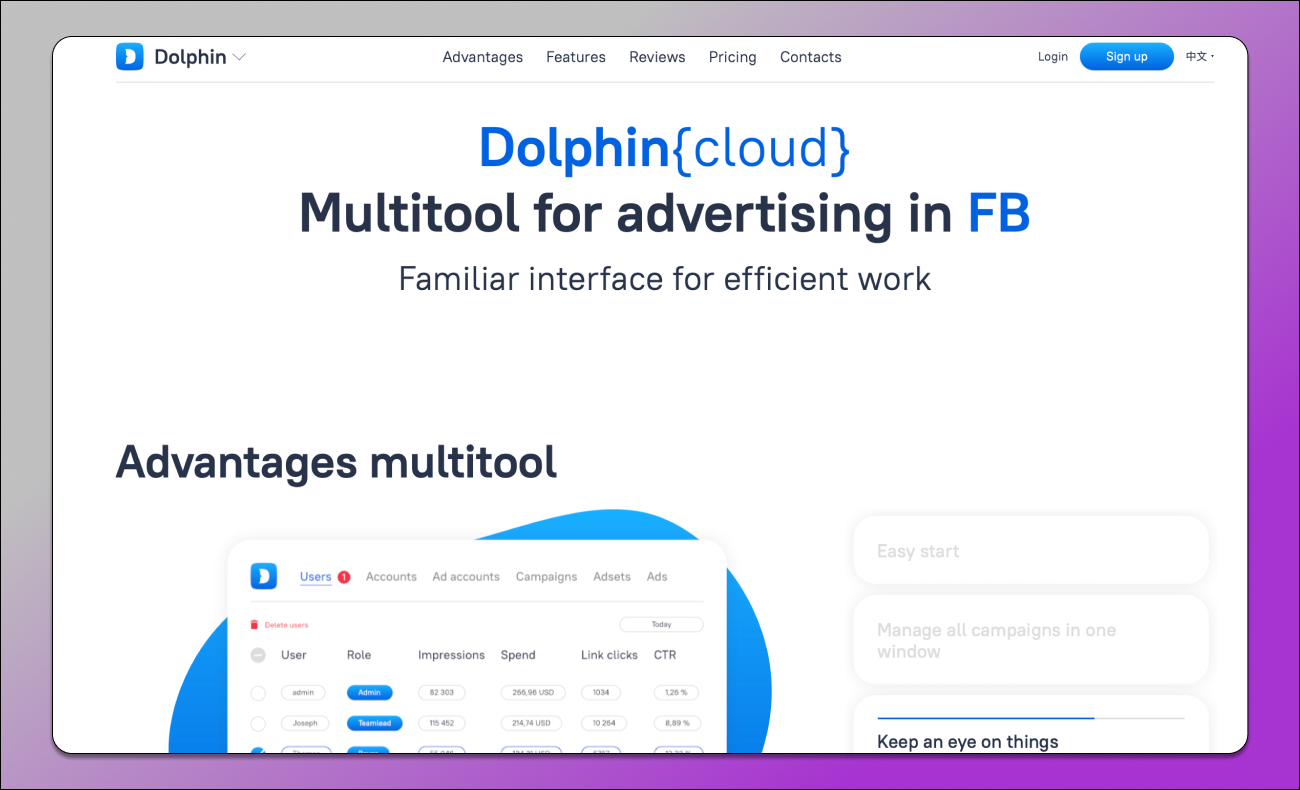
Dolphin Anty supports integration with ☁️ Dolphin Cloud — a cloud-based solution that lets you manage hundreds of Facebook ad accounts. You can build ad funnels and pages, moderate comments, make creatives unique and much more in just minutes, saving a huge amount of time. This is an essential tool for advertising professionals. Integration with the browser takes less than a minute, as it’s built by the same development team.
Pricing
In Octo Browser, all plans are paid. There’s no trial version, either limited or time-restricted. To test the browser, you have to pay upfront.
Dolphin Anty offers a free plan that lets you create up to 5 browser profiles. Paid plans are also more affordable. At the entry level $10 gets you 20 profiles instead of just three.
Comparative Table
Let’s summarize the comparison and advantages in an easy-to-read table.
| Parameter | Dolphin Anty | Octo Browser |
|---|---|---|
| Starter plan | Free, up to 5 profiles | From €10 for 3 profiles |
| Trial access | Yes, no card required | No |
| Profile folders | Yes | No |
| Profile filtering | By folders, notes, sites, statuses, proxies, tags | Basic filters only |
| Notes | Colors, icons, editable | Text description only |
| Profile icons | Automatic platform & OS icons | Identical, must be uploaded manually |
| Linux fingerprints | Supported | No |
| Start pages and extensions | Applied automatically by profile type | Must be set manually or via templates |
| Bulk import | Unlimited + text import | Up to 100 profiles via .octo files |
| Smart import | Yes | No |
| Cookie robot | Headless mode, saves memory & bandwidth | Basic mode |
| Profile cloning | Fingerprints randomized | Copies have identical fingerprints |
| Automation scripts and synchronizer | Yes | No |
| Multitool (Dolphin Cloud) | Yes | No |
| Profile export | Free | Paid feature |
| Bulk actions | Extended set of operations | Basic set |
Conclusion
Both antidetect browsers offer a high level of anonymity and are suitable for multiaccount management. Octo Browser remains a powerful professional tool with solid profile configuration and stable performance.
However, on closer comparison 🔥 Dolphin Anty stands out as a more flexible and user-friendly solution for everyday work. Its free plan, advanced workspace organization, automation features, action synchronization, extended bulk operations and integration with its own multitool make it a better fit for teams and professionals managing a large number of accounts.