
If Instagram suspended your account, that decision has nothing to do with the Restrict feature — even though “Instagram suspended my account” and “how do I restrict someone” often get lumped together. A ❌ suspension is Instagram’s action against a profile, taken for rule violations or for signals read as irregular use.
Restrict is something else: a privacy tool you apply to another profile to reduce the reach of that person’s comments and messages, without cutting contact and without notifying them. This guide covers both, in that order.
What the Restrict feature actually does
Restrict came out of Instagram’s anti-bullying toolkit, for cases where blocking someone would cause more awkwardness than relief: a coworker, a relative, a difficult client.
What changes for the restricted person
- their comments on your posts are visible only to them, unless you approve each one;
- their direct messages go to your message requests folder, not your main inbox;
- they stop seeing your activity status and your read receipts;
- they get no notification: the action is silent;
- if they already followed you, they keep seeing your posts and stories as usual.
Where the option sits and how to undo it
Restrict is applied from the person’s profile or from the comment itself, and it can be reversed through the restricted accounts list.
Restrict, mute, and block: the differences
Mute changes only what you 👀 see. Restrict changes what the other person can do on your profile. Block ends the contact.
| Action | What the other person sees | Are they notified? |
| Restrict | Sees your profile; their comments hidden from everyone else | No |
| Mute | Notices nothing; only your feed changes | No |
| Block | Loses access to your profile, posts, and stories | No notice, but it becomes noticeable |
Why Instagram suspended or banned your account
A different topic from the Restrict feature. Suspensions and bans are Instagram’s decisions about your account, and they have ☝️ four common sources:
- violating the Community Guidelines or the Terms of Use;
- activity flagged as automated: likes, follows, and comments at an unusual volume;
- mass reporting, even when unfounded, which triggers an automated review;
- combined technical signals pointing to irregular use.
Automated behavior and unusual volume
The system doesn’t only look at what you do, but at the pace. A hundred follows in a minute, with identical intervals, is a pattern no human produces. New accounts get less room: the more recent the profile, the sooner the action limit appears.
Does Instagram block by IP?
Not by IP alone. The address is one signal among several: the anti-fraud system also cross-references the device fingerprint (model, operating system, browser or app settings), cookies, behavior, and account history.
Why changing your IP isn’t enough
❗ Using a VPN by itself rarely prevents a block, because the other signals stay the same. The system sees the same device and the same cookies signing in from a new address, which draws attention instead of hiding anything.
Why several accounts go down at once
This is the most common scenario for anyone running business profiles. When several accounts are accessed from the same device, browser, and IP, Instagram can link them together even with different logins.
Shared fingerprints across profiles
If one account in the group gets flagged, the others tied to the same technical pattern can go down with it, even if they broke no rule. Isolating each account with its own fingerprint, cookies, and proxy breaks that link: that is what an antidetect browser does.
Dolphin Anty: one isolated profile per account
⭐ Dolphin Anty is an antidetect browser that creates a separate profile for every account, with its own fingerprint across more than 20 parameters, plus isolated proxy and cookies. Each profile presents itself to Instagram as a different device, so a penalty on one account doesn’t drag the others down.
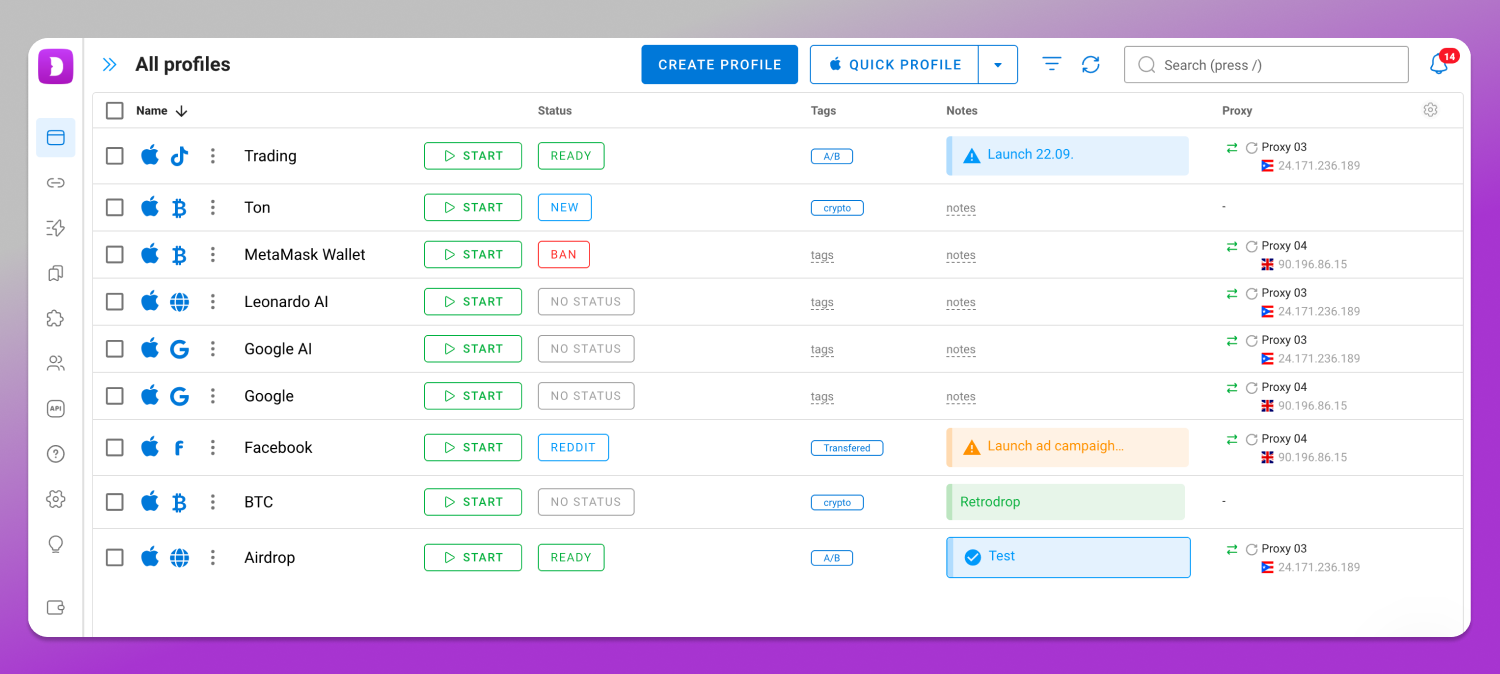
This does not evade moderation for someone who broke the rules. It is the correct way to run legitimate agency, e-commerce, or paid media accounts, with per-user permissions and API automation, so nobody passes a client’s password around in chat.
Plans and supported systems
Free $0 (5 profiles), Starter $10/month (20 profiles), Base $89/month (100 profiles), Team $159/month (300 profiles), Enterprise $299/month (1,000 profiles), and Custom, with unlimited profiles and pricing on request. Signing up unlocks 5 free profiles, no card required. It runs on 64-bit Windows, macOS (Intel and M-series chips), and Linux (AppImage, .deb, .rpm).
How to appeal an Instagram suspension
The official route, per Instagram’s Help Center, starts on the warning screen:
- On the disabled account, look for the review request button.
- If it doesn’t appear in the app, open help.instagram.com and find the form for your case.
- Identity verification may be required, with a code handwritten on paper and photographed next to your face.
- There is no guaranteed response time: some cases are resolved in days, others take weeks.
Avoid repeated forms: duplicate requests delay the review.
A routine to reduce the risk of a block
- one account per browser profile, with a fixed proxy;
- no robotic pace of follows and likes, especially on new accounts;
- two-factor authentication on, email and phone number current;
- no buying or reselling access: profiles that change owners collect bad signals;
- a backup of your content, kept outside the account.
Frequently asked questions
Is Restrict the same as blocking on Instagram?
No. Restricting only reduces the visibility of that person’s comments and moves their messages to the requests folder, while keeping their access to your profile. Blocking cuts that access off entirely, including your posts, your stories, and your direct messages.
Does the restricted person find out?
Instagram sends no notification at all. The restricted person may suspect something if they notice that their comments aren’t visible to anyone else or that your activity status is gone, but the platform never reveals who applied the restriction, or when.
Does Instagram block accounts by IP alone?
No. The IP address is only one of the signals analyzed, alongside the device fingerprint, the cookies, and the usage patterns. That is why switching networks or turning on a VPN, on its own, is rarely enough to reverse a block.
Why did Instagram suspend my accounts all at once?
Most likely because they shared a device, a browser, and an IP, which lets Instagram associate them even with different logins. Once one is flagged, the system extends the decision to accounts tied to the same technical pattern, with no individual review.
How do I appeal a suspension on Instagram?
Use the review button shown on the app’s warning screen, or else fill out the matching form at help.instagram.com. Describe the case plainly, submit the identity verification if it is requested, and then simply wait: one request at a time.
Conclusion
Restrict solves a coexistence problem inside your profile; suspensions and bans are platform decisions about your account. For anyone running several accounts, the decisive precaution is technical: separate sessions, fingerprints, and proxies before the first warning arrives.