
Private browsing deletes four things when you close the window: the local history of that session, the cookies it created, the cache it filled, and anything you typed into a form. All of that happens on this device. That’s the whole feature. Open a private window with Ctrl+Shift+N in Chrome, Ctrl+Shift+P in Firefox, or Cmd+Shift+N in Safari on a Mac, and you get a clean storage container that throws itself away on exit. If your goal is to keep a gift search off the family laptop, that is enough and you can stop reading after the next section. If your goal is that two accounts never get connected to each other, a private window does nothing for you, because the site sees the same IP address and the same browser fingerprint either way. The second half of this article covers what does work.
How to Turn Private Browsing On (And Off) in Every Browser
The shortcuts below are the fast path. Menu wording shifts between versions, so treat the menu route as the fallback and the keyboard shortcut as the reliable one.
Google Chrome on Desktop (Incognito Mode)
- Press Ctrl+Shift+N (Windows, Linux) or Cmd+Shift+N (macOS).
- Or open the browser’s main menu and pick the entry that opens a new incognito window.
- The new-tab page then lists what Chrome does and does not save. Read it once; it is the most honest thing any browser vendor writes about this feature.
Safari on Mac (Private Browsing)
- Press Cmd+Shift+N.
- Or use the File menu and pick the New Private Window entry.
- The address bar turns dark, which is the only visual cue.
Mozilla Firefox (Private Window)
- Press Ctrl+Shift+P (Windows, Linux) or Cmd+Shift+P (macOS).
- Or open the hamburger menu and choose the New private window entry.
- Firefox marks the window with a purple mask icon. It also runs its tracking protection at a stricter level in private windows than in normal ones by default.
Microsoft Edge (InPrivate)
- Press Ctrl+Shift+N.
- Or open the three-dot menu and choose the New InPrivate window entry.
- Microsoft calls the mode InPrivate browsing. The behavior matches Chrome’s, since both are built on Chromium.
Opera (Private Window)
- Press Ctrl+Shift+N (Windows, Linux) or Cmd+Shift+N (macOS).
- Or open Opera’s main menu and pick the entry that opens a new private window.
- Opera ships a built-in VPN-style feature separate from private windows. Turning on the private window does not turn that on, and turning that on does not clear your history.
On Your Phone: iPhone/Safari and Android/Chrome
Mobile private modes are features of those mobile browsers. They have nothing to do with Dolphin Anty, which is desktop software.
- iPhone, Safari: open the tab overview, switch to the private tab group, and open a new tab inside it.
- Android, Chrome: open the browser menu and choose the entry that opens a new Incognito tab.
How to Turn Private Browsing Off / Get Back to a Normal Window
There is no switch. Private browsing is a window, not a setting, so you leave it by closing it.
- Any desktop browser: close the private window. Your normal windows are untouched and your history there is intact.
- Safari on iPhone: this is where people get stuck. The browser remembers which tab group you were last in and reopens it. Open the tab overview, switch from the Private group back to the regular tab group, and Safari stays there next time.
- Chrome on Android: close the Incognito tabs, or use the close-all notification that Chrome posts while any Incognito tab is open.
- Nothing to undo afterward. Once the private window is closed, its cookies and history are gone from the device. Files you downloaded and bookmarks you saved during the session stay.
What Private Browsing Actually Does
A private window is a separate storage container. Cookies, local storage, session storage and the cache created inside it get discarded when the last window of that session closes. The browser also skips writing entries into your main history file and does not offer autofill from your saved form data.
That container is why you appear logged out. Your normal session cookie for Amazon or Gmail sits in the regular container, the private window cannot read it, so the site treats you as a new visitor. This single behavior is the origin of nearly every myth in this article. People see “logged out” and read it as “different person.”
Things that survive the session, by design:
- Files you downloaded. They are on your disk, and in most browsers the download entry stays in the download list.
- Bookmarks you created. Saved to your profile like any other bookmark.
- DNS queries. Your resolver saw every domain you visited.
- Your network’s logs. Router, ISP, corporate proxy, whatever sits between you and the site.
- Anything the site itself recorded. Server logs do not care which window you used.
So the accurate summary is not “private browsing saves nothing.” It is: private browsing does not write local traces of this session, and it isolates its storage from your normal profile. Everything past the edge of your device is unaffected.
What Private Browsing Does Not Do
Your IP address is unchanged. Every site you open sees the same address as your normal window, and so does every third-party tracker embedded in those pages. Your ISP resolves the same DNS queries. A network administrator at work or on a school network sees the same connections in the same logs. Your browser fingerprint is byte-for-byte identical. And the moment you log in to an account, you have told the platform exactly who you are, which retroactively labels the whole session.
Advertising networks and large platforms do not rely on a single cookie anyway. They combine IP, fingerprint signals, timing and behavior into a probability that two sessions belong to one person. A fresh cookie jar removes one weak signal out of many.
Protects You From / Does Not Protect You From
| Who is watching | Private browsing helps? | What actually happens |
| Someone else using this computer | Yes | No history entry, no leftover cookie, no autofill suggestion |
| The website you visit | No | Same IP, same fingerprint, same server-side log entry |
| An advertising network / third-party tracker | Partly | Its cookie is dropped at close; IP and fingerprint signals persist |
| Your ISP | No | It resolves your DNS queries and routes your traffic regardless |
| Your employer or school network | No | Network-level monitoring sits outside the browser entirely |
| A platform where you log in | No | Login identifies you directly; the window type is irrelevant |
| Malware and phishing | No | Private browsing is a storage feature, not a security product |
Does Incognito Mode Hide Your Browser Fingerprint?
No, and this is the part most guides skip. Fingerprinting reads properties of your device and browser that a private window does not touch, because they are not stored data. They are what your machine is.
Parameters that come out identical in a private window: user agent string, screen resolution and color depth, available window size, time zone, system language and language list, installed font list, canvas rendering hash, WebGL vendor and renderer, number of CPU cores, device memory, audio context signature, and touch support flags. A site that hashes those into an identifier gets the same identifier before and after you open the private window. That set is exactly what makes two sessions look like one machine.
WebRTC deserves its own line. It can reveal your local network address to a page through a mechanism that has nothing to do with cookies, so a private window offers no protection there either.
Can Your ISP or Your Employer See What You Browse?
Yes, at the level they already could. Private browsing is a client-side storage feature and changes nothing about the connection. HTTPS hides page contents from an observer in the middle, but the destination domain stays visible through DNS and connection metadata in most setups.
What your provider is required to retain, and for how long, depends entirely on where you and it are. The GDPR in the EU, the UK GDPR, and CCPA/CPRA in California each give people rights over data companies hold about them, and each sets different expectations for retention and disclosure. None of them are affected by which window you opened. If you need to know what your own provider keeps, the retention terms in its privacy policy are the source, not a browser feature.
Five Myths About Incognito Mode
“Incognito Is the Same as a VPN.” Different layers entirely. A private window controls local storage. A VPN encrypts your traffic to an exit server and swaps the IP that sites see. Neither one changes your fingerprint, and neither one logs you out of an account you deliberately signed into.
“Incognito Separates My Accounts.” This is the expensive one. Here is how the scenario plays out: an SMM specialist keeps a client’s page in a normal window and opens a second work account in a private window, on the assumption that two containers equal two identities. Both sessions leave from the same IP. Both report the same user agent, screen resolution, time zone and canvas hash. From the platform’s side, that is one device signing into two accounts within a few minutes. The usual result is a verification request on the newer account, sometimes a checkpoint on both.
“Ads Can’t Track Me in Incognito.” Some trackers lose their cookie at window close, and Firefox blocks a portion of them more aggressively in private windows. Behavioral and network-level signals stay available. You are harder to follow across weeks, not invisible within a session.
“There Is a True Incognito Browser Out There.” There is no product class by that name. It is a phrase from app-store listings and ad copy. What exists is a set of concrete capabilities: storage isolation, IP substitution, fingerprint control, tracker blocking. Any tool is a combination of those, and you should evaluate it that way.
“A Hidden Browser Makes Me Invisible to the Website.” Nothing on this list makes anyone untraceable, and any product claiming otherwise is selling a feeling. The realistic goal is reduced linkability: making it harder to tie two sessions together, not erasing yourself from a server log.
What to Actually Use Instead: a Ladder of Real Alternatives
Each step solves a different problem. Pick by the problem you actually have.
Step 1: Clearing Browsing Data and Using Separate Browser Profiles
Chrome, Edge and Firefox all support multiple named profiles, each with its own cookies, extensions and saved logins. Two profiles keep two logins alive at once without either one dropping the other. Covers: convenient separation of personal and work logins on one machine. Does not cover: IP and fingerprint, which are shared across every profile on that computer.
Step 2: A VPN
Encrypts your traffic and presents a different exit IP to the sites you visit. Covers: an ISP or network administrator reading your destinations, and a site geolocating your home address. Does not cover: your fingerprint, your logins, or the fact that everyone in your household using the same VPN endpoint shares one apparent IP. Which tool to actually surf with day to day is a separate question from what incognito does.
Step 3: A Proxy
Changes the visible IP at the connection level, and, more usefully here, can be assigned per browser profile rather than to the whole machine. Residential proxies present addresses that belong to consumer ISP ranges rather than data centers, which is why they behave differently on platforms that score IP reputation. Covers: giving each identity its own network origin. Does not cover: anything about your browser fingerprint. Two proxied sessions with one identical fingerprint still look like one device wearing two coats.
Step 4: A Browser With Isolated Profiles and Fingerprint Control
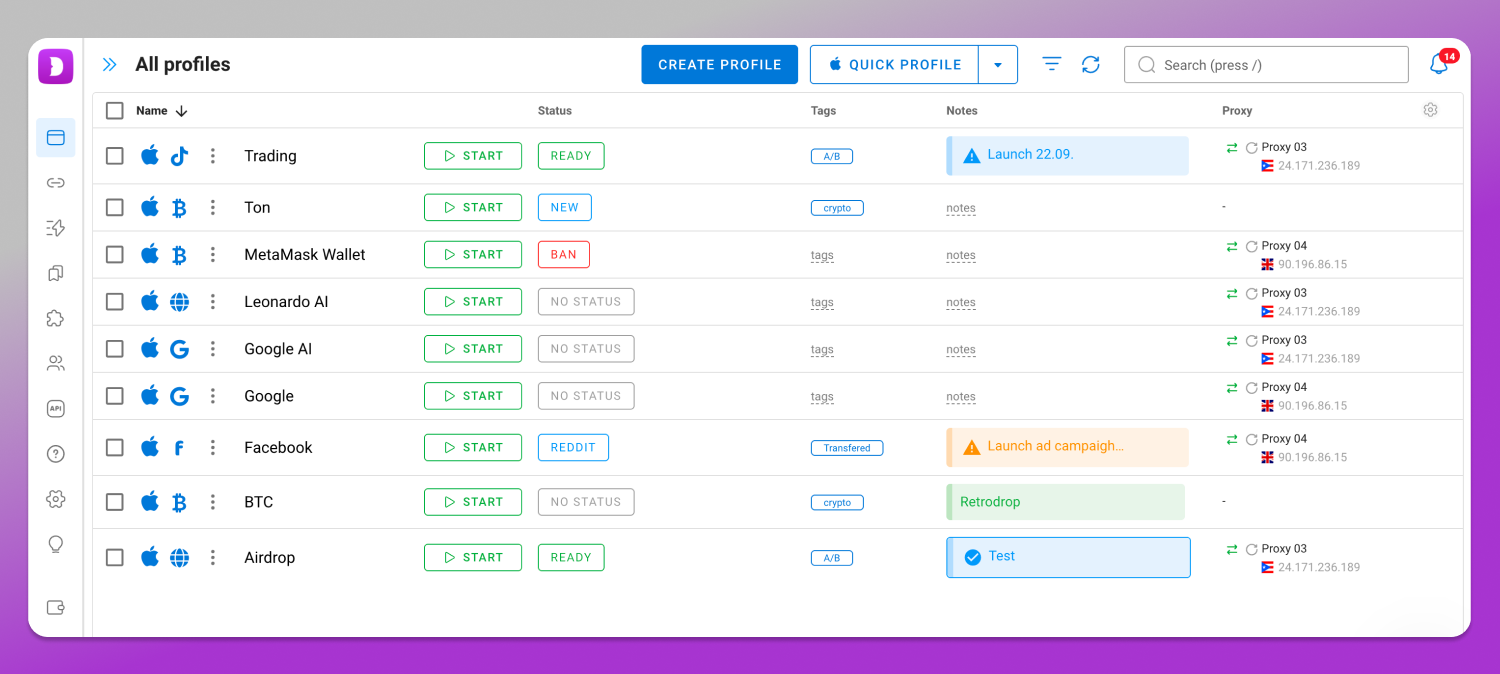
This is where 🚀 Dolphin Anty sits. It is a desktop application for Windows, macOS and Linux in which every account lives in its own profile with its own fingerprint, cookie store and proxy, and profiles run in parallel without touching each other. The fingerprint parameters per profile are configurable rather than inherited from your machine, which is the difference between “another window” and “another device signature.” It is not an improved incognito mode, and framing it that way gets the job wrong: incognito exists to forget, and this exists to remember. A work profile keeps its identity stable for months, so a platform sees a returning user rather than a new stranger every login. Covers: running many separate working identities in parallel. Does not cover: anonymity, which no tool on this ladder provides.
Private Browsing vs Antidetect Browser: The Side-by-Side
| Axis | Private browsing | Antidetect browser |
| Storage isolation | Yes, one temporary container per session | Yes, one permanent container per profile |
| Browser fingerprint | Inherited from your machine, identical everywhere | Configured per profile |
| IP address | Unchanged | Proxy assigned per profile |
| Parallel identities | One private session per browser, effectively | Many profiles at once, each isolated |
| Persistence between sessions | None; everything is erased at close | Full; cookies and history are kept per profile |
| Team access and profile sharing | Not applicable | Profiles can be shared with teammates with access rights |
| What it is actually for | Leaving no trace on this computer | Keeping working identities separate and stable |
The counterintuitive line is in the persistence row. Private browsing erases state on purpose, and that is exactly wrong for multi-accounting. An account that logs in from a clean slate every time, with no cookie history and no familiar device signature, looks more suspicious to a platform, not less. Working identities need to be stable, reproducible and isolated. Private windows are stable at none of those.
Which Level Is Enough for You?
Everyday User
You share a laptop, or you don’t want a search sitting in the address bar suggestions. A private window is the correct tool, it costs nothing, and there is no reason to go further. Pair it with clearing your browsing data occasionally and you have covered what you set out to cover.
Someone Juggling Two or Three Personal Accounts
Two email accounts, a personal marketplace login and a side-project one on eBay or Etsy. Separate named browser profiles solve the login collision, and a VPN handles the network side if you need it. You do not need a full multi-accounting stack for three accounts.
A Team Running Dozens of Work Accounts
An agency with client accounts on Meta Ads and Google Ads, a seller managing Amazon, Shopify and TikTok Shop storefronts across regions, an affiliate testing creatives. This is where isolated profiles with a dedicated proxy per profile become the working setup rather than a precaution, along with role-based access so a contractor gets one profile and not the whole account list. Check current plans and limits on the Dolphin Anty pricing page.
One condition sits over all of it. Every platform sets its own rules on how many accounts a person or business may hold and how they must be operated: Meta Advertising Policies, the Amazon Seller Code of Conduct, the X Rules. Profile isolation is infrastructure for legitimate parallel work, such as an agency separating client accounts, a seller separating regional storefronts, or a team separating staging from production. It is not a way around a platform’s terms or around local law, and using it that way ends the same way it always does.
Frequently Asked Questions
Is There Such a Thing as a True Incognito Browser?
No. It is a marketing label, not a product category. Browsers differ in tracker blocking, storage handling and fingerprint control, and those are the features to compare. A listing that promises “true incognito” is describing a feeling rather than a capability.
Can I Use an Online Incognito Browser Through a Web Service?
Browser-in-browser services do exist, and they render pages on a remote machine and stream the result to you. That shifts who sees your traffic to the service operator, and it means trusting a third party with every session. Dolphin Anty is not one of these: it runs locally on your computer, and its cloud sync moves profile settings between your own devices rather than running the browser remotely.
What Is the Best Incognito Browser Alternative?
There is no single answer, because incognito does one job and the alternatives do different ones. Local traces on a shared computer: a private window is already the answer. Hiding traffic from your network: a VPN. Separating working identities: isolated profiles with per-profile proxies and fingerprints.
What Is a Hidden Web Browser?
Another label without a technical definition. It usually describes either an app that hides its own icon on a phone, or an ordinary browser marketed on privacy. Neither hides you from the sites you visit.
Do I Need an Anonymous Browser With Proxy?
If the phrase means “a browser where each profile has its own IP and its own fingerprint,” then that is what an antidetect browser does, and it is useful when you run several accounts. Drop the word anonymous, though. The realistic outcome is session isolation and reduced linkability.
Does Incognito Hide My History From My Internet Provider?
No. Connection logs and DNS queries are created outside the browser, and a private window has no influence over them. HTTPS keeps page contents private in transit; the destination domain generally is not.
Is DuckDuckGo Better Than Incognito Mode?
They solve different halves. DuckDuckGo as a search engine avoids building a search profile on you, which incognito does not do since Google still logs the query against your IP. DuckDuckGo’s browser adds tracker blocking. Neither changes your IP or your fingerprint.
Does Private Browsing Stop Websites From Fingerprinting Me?
No. Fingerprinting reads device and browser properties, not stored data, so a fresh storage container leaves the readings unchanged. Firefox applies some anti-fingerprinting measures in private windows, and they reduce a few signals rather than removing the technique.
Incognito does precisely what its own new-tab page says it does, and not one step more: it clears traces on your computer. For sites, platforms and ad networks, you are the same person in a private window as in a normal one. If two of your sessions must not be connected, what has to differ is the fingerprint and the IP, not the window. 🔥 Dolphin Anty runs on Windows, macOS and Linux if that is the problem you are solving, and the current plans are listed on its pricing page.