
A SOCKS5 proxy is a proxy protocol that forwards raw TCP and UDP traffic through an intermediary server without reading or rewriting what is inside. That single sentence already settles the most common confusion in this topic: SOCKS5 describes how your traffic reaches the proxy server, not whose IP address the destination site will see. Those are two separate decisions, made separately, and the second one belongs to a different discussion about residential, ISP, datacenter and mobile IPs.
This guide is for people who have just been handed a line like 203.0.113.10:1080:user123:•••••• and told to “put it in the browser.” You get the protocol in plain language, a comparison table against HTTP(S) proxies, four things SOCKS5 flatly does not do, and then the practical half: what each element of that connection string means, and how one proxy gets pinned to one browser profile. The working scenario behind the whole text is ordinary: 30 advertising profiles, each with its own SOCKS5 address attached, and the pairing never changes between sessions.
Proxy in One Paragraph: Who Sees What
The chain is short. Your browser opens a connection to the proxy server, the proxy opens a connection to the target site, and the site answers the proxy. The site logs the proxy’s IP address, the source port, the TLS handshake parameters your browser offered, and every HTTP header your browser sent. It does not see your home IP. The proxy operator sees the opposite half: your real IP, the destination host you asked for, and the timing and volume of the exchange. With HTTPS the proxy sees the destination but not the page content. With plain HTTP it sees everything.
Your internet provider sees a connection to the proxy’s IP and nothing about the sites behind it.
SOCKS5 sits at the transport layer of that chain. It is the courier, not the identity. One thing it changes: the IP address in the site’s log. One thing it does not touch: your browser fingerprint. Canvas and WebGL rendering, installed fonts, screen metrics, user agent, audio stack. All of that keeps arriving exactly as your machine produces it, through any proxy you like.
What Is a SOCKS5 Proxy?
A SOCKS5 proxy is the fifth version of the SOCKS proxy protocol. It works at the transport layer, routes network packets through an intermediary server, and carries arbitrary TCP and UDP traffic without inspecting the payload or rewriting packet headers. It hides your real IP address from the destination and supports built-in authentication.
Key properties, short list:
- TCP and UDP support. HTTP proxies handle web requests. SOCKS5 tunnels anything that speaks TCP, plus UDP for protocols that need it.
- Built-in authentication. Username and password authentication is part of the protocol itself, not a bolt-on.
- IPv6 addressing. Destination addresses can be IPv4, IPv6 or a domain name.
- Remote DNS resolution. The proxy can resolve the hostname for you, which is what stops your local resolver from leaking the domains you visit.
- No native encryption. SOCKS5 moves bytes. It does not encrypt them.
That last point is the one beginners get wrong most often, so it gets its own section below.
SOCKS4 vs SOCKS5: Why Nobody Uses SOCKS4 Anymore
Four differences, and every one of them matters in practice.
Authentication. SOCKS4 has no real credential mechanism. SOCKS5 defines authentication methods including a username and password exchange, which is how commercial providers meter and protect access.
UDP. SOCKS4 is TCP only. SOCKS5 relays UDP as well, which opens it to anything from voice traffic to certain P2P and game protocols.
IPv6. SOCKS4 predates it. SOCKS5 handles IPv6 destinations natively.
DNS resolution. SOCKS4 expects your machine to resolve the hostname first and hand over an IP. SOCKS5 accepts a domain name and resolves it on the proxy side.
In practice you will only ever be sold the fifth version. If a provider offers SOCKS4, treat it as a sign the infrastructure has not been touched in a long time.
SOCKS5 vs HTTP(S) Proxy: Which One Do You Actually Need
Both are proxy servers. They differ in how much they understand about what passes through them.
| Aspect | SOCKS5 proxy | HTTP(S) proxy |
| What the proxy sees in traffic | Destination address and a byte stream; payload not parsed | Full HTTP request structure on plain HTTP; destination only on HTTPS |
| Work with HTTP headers | None; headers are passed through untouched | Can read, add, filter and rewrite headers |
| Caching | Not possible; no notion of a web object | Supported, since responses are understood |
| Non-HTTP protocols | Yes, any TCP protocol | No, HTTP semantics only |
| TCP / UDP | TCP and UDP | TCP only |
| Tunneling | Native to the protocol | Through the CONNECT method |
| DNS leak risk | Depends on the scheme: with socks5 your own machine resolves the hostname and leaks it; socks5h sends the name to the proxy and removes the leak | Resolution happens on the proxy side by design |
| Authentication | Username and password, or IP whitelisting | Username and password, or IP whitelisting |
| Setup complexity | Host, port, credentials; fewer moving parts | Similar, plus HTTP-specific behavior to account for |
| Typical tasks | Multi-account browser profiles, scraping, non-web traffic | Content filtering, corporate gateways, caching, ad verification pipelines |
The honest conclusion under this table: “better” depends on the task, not on the protocol. An HTTP(S) proxy earns its place where web requests need to be parsed, filtered or cached. A SOCKS5 proxy earns its place where you want a general-purpose transport and the least possible interference with the traffic. For browser profiles the second is the cleaner fit, because no intermediary layer is deciding what to do with your headers.
This table compares protocols. The residential, ISP, datacenter and mobile distinction is a different axis, and a datacenter proxy can speak SOCKS5 just as a residential one can.
What a SOCKS5 Proxy Does NOT Do
Four flat denials.
It does not encrypt your traffic. The protocol has no encryption layer. Whatever protection you have comes from HTTPS/TLS running on top. Send something over plain HTTP through a SOCKS5 proxy and the operator of that proxy reads it in the clear.
It does not replace HTTPS. The padlock in the address bar is doing a different job. Keep it.
It is not a VPN. A VPN encrypts traffic and wraps the whole system: every application, by default. A SOCKS5 proxy affects only the applications you configured to use it. Your browser goes through the proxy while your mail client and your background services keep using the normal route.
It does not change your browser fingerprint. New IP, same canvas hash, same WebGL renderer string, same font list, same user agent. A platform that correlates accounts by fingerprint keeps correlating them no matter how many proxies you rotate through.
One aside about Tor. Tor exposes a local SOCKS5 interface, which makes people assume Tor and a SOCKS5 proxy are the same category of thing. They are not. The SOCKS5 part is only how applications hand traffic to Tor; the layered encryption and multi-hop circuit behind it have no equivalent in a plain SOCKS5 proxy.
Anatomy of a SOCKS5 Connection
Providers usually deliver credentials as one colon-separated line. Take a documentation-range example:
203.0.113.10:1080:user123:••••••
- 203.0.113.10 is the host: the server address of the proxy. It may also arrive as a hostname such as gate.example-provider.net.
- 1080 is the port number. 1080 is the historical SOCKS port, but providers assign whatever they like, and the port often encodes which exit IP or session you get.
- user123 is the username.
- The fourth field is the password.
Some providers reverse the order and send username:password@host:port. Read the label, not the position.
Two Ways to Authenticate
Username and password authentication travels with the request, so the proxy works from any network you happen to be on. This suits laptops, changing offices and teams. Protect the credential pair: anyone holding it can use your traffic allowance and your exit IP.
IP whitelisting binds access to your own public IP instead. No credentials in the connection string, nothing to leak in a config file. The cost is rigidity: your own IP has to be static, and every new location means editing the whitelist in the provider’s dashboard. Home connections with dynamic addresses break this quietly.
Static Ports vs Rotating Ports
A static or sticky port keeps giving you the same exit IP for the life of the session. A rotating port hands you a different IP on every new connection, sometimes on every request. Rotation is built for scraping, where being one of thousands of anonymous requesters is the point. For multi-accounting it is the opposite of what you need. An account that logged in from one city for two months and suddenly arrives from four countries within an hour is describing itself as automated. Pick static or sticky, with a session duration long enough to cover a real working day.
socks5:// vs socks5h://
A small detail with a large failure mode. With socks5://, your own machine resolves the domain name and only then asks the proxy to connect to the resulting IP. Your DNS resolver, usually your internet provider’s, sees every hostname you visit. That is a DNS leak, and a checker shows it as a mismatch between your proxy country and your resolver country.
With socks5h://, the hostname goes to the proxy and is resolved there. Same connection, no leak. In curl this is the difference between –proxy socks5:// and –proxy socks5h://; in browser profile settings it is usually a checkbox for proxying DNS. Turn it on.
Connecting a SOCKS5 Proxy to a Browser Profile (Step by Step)
This is where an antidetect browser enters, because the proxy solves the IP layer and the browser profile solves the fingerprint layer. 🚀 Dolphin Anty is a desktop application for Windows, macOS and Linux, and each profile it creates is a separate browser environment with its own set of fingerprint parameters and its own proxy binding.
1. One proxy, one profile. Assign a single SOCKS5 address to a single profile and keep that pairing fixed between sessions. Record it outside the tool as well; losing track of which IP belonged to which account is how sessions get flagged.
2. Enter the connection details in the profile. Open the profile’s proxy settings and fill in what your provider’s line contains: the protocol (SOCKS5), the host, the port, the username and the password. Save the proxy under a recognizable name so it gets reused deliberately rather than by accident.
3. Match timezone, language and locale to the IP’s geolocation. A profile carrying a German exit IP should report a German timezone offset, a plausible Accept-Language value and a matching locale. Mismatches between IP geolocation and browser locale are among the cheapest signals a platform can check.
4. Test the connection before you work. Start the profile and confirm the proxy actually answers. Dead or overloaded proxies fail at login, which is the worst possible moment.
5. Verify with checkers. Open an IP checker and confirm the address and country. Open a DNS leak test and confirm the resolver sits behind the proxy, not with your local ISP. Open a WebRTC leak test and confirm no local address is exposed. Any reputable checker will do; what matters is that all three answers agree with the country your proxy claims. Only then log in.
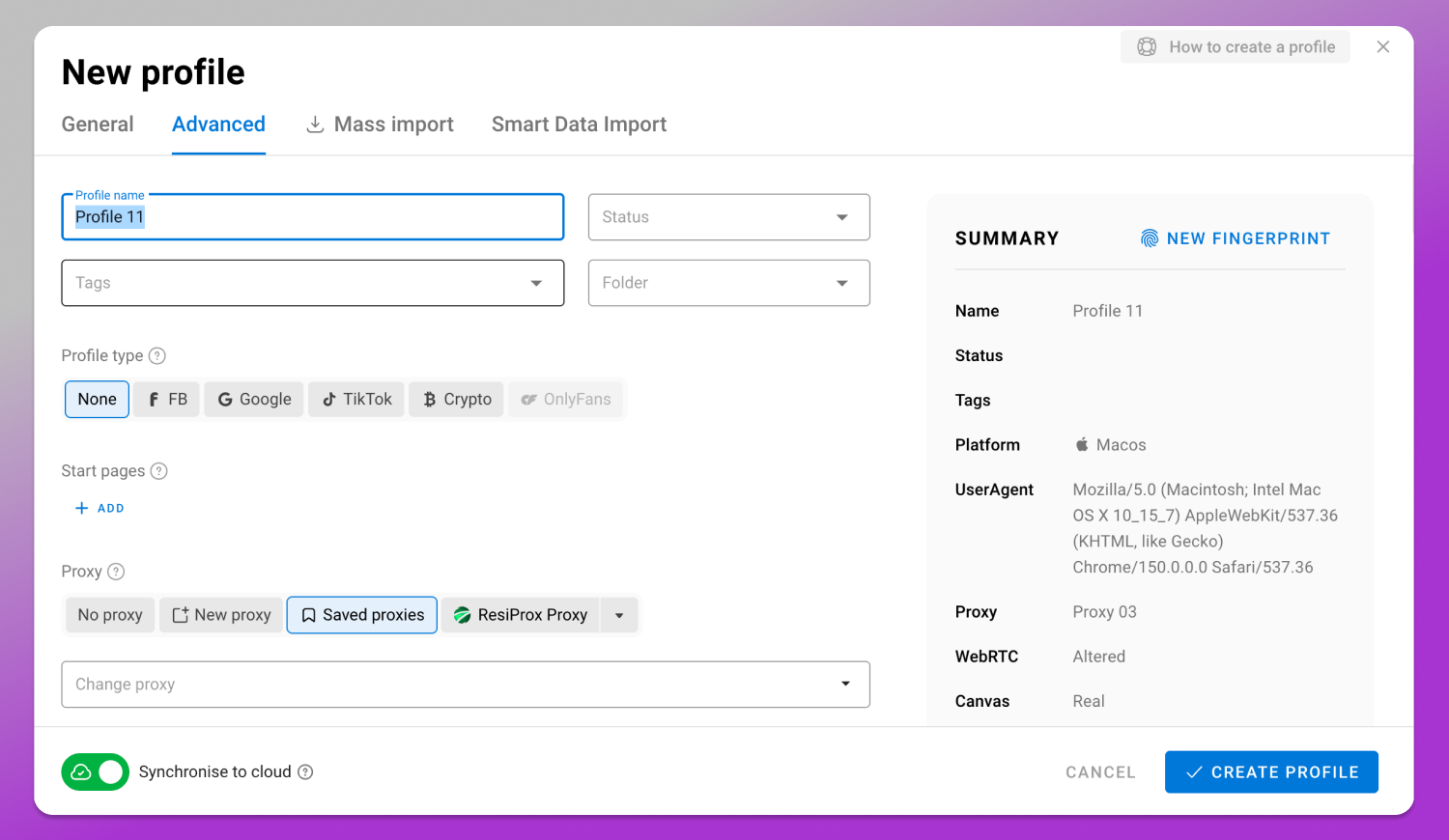
Dolphin Anty also integrates with proxy providers and runs a Golden Partners program, so proxies can be added to profiles without copying strings by hand. The current list of integrations and the terms of the program are on the partners page.
7 Beginner Mistakes With SOCKS5 Proxies
1. Using free public SOCKS5 lists. An unknown operator running a free proxy sees your traffic. On plain HTTP that means reading and modifying it: injected content, swapped responses, harvested credentials. Free lists are also shared by hundreds of strangers, so the IP arrives at your target site already carrying someone else’s history.
2. Local DNS instead of remote DNS. Configure socks5 where you meant socks5h and your resolver quietly reports your real country while your IP reports another. The account sees a contradiction you never intended to send.
3. One IP across dozens of profiles. A shared exit IP is the simplest correlation signal in existence. If ten accounts always appear from the same address, they are one entity as far as the platform is concerned, and enforcement tends to arrive for all of them at once.
4. Changing geography without changing the rest. New IP in Spain, timezone still UTC+3, interface language still Russian. The mismatch is visible in a single page load.
5. Rotating the IP mid-session. An address change between two clicks inside one logged-in session looks like a hijacked session, which is precisely the pattern security systems are tuned to catch.
6. Not fixing the profile-to-IP pairing. Reassign proxies randomly between sessions and you spread every account’s history across every IP you own.
7. Checking only “my IP.” An IP checker showing the right country proves one third of the setup. Without a DNS test and a WebRTC test you have no idea what else the browser is announcing.
How to Evaluate a SOCKS5 Provider (Criteria, Not Names)
No rankings here, no shortlist, no “top 5.” Criteria you apply yourself:
- IP type. Residential, ISP, datacenter or mobile. This determines how the address looks to the destination, and it is a separate decision from the protocol.
- Geographic coverage. Not the headline country count. Whether the specific countries and cities you need are actually available and in reasonable supply.
- Session stability and duration. How long a sticky session holds the same IP, and what happens when it expires.
- Thread and concurrent connection limits. How many simultaneous connections one account may open, and whether that is counted per port or per plan.
- Authentication format. Username and password, IP whitelisting, or both. Teams on changing networks need the first.
- Billing model. Per gigabyte of traffic, or per port for a fixed period. Traffic pricing suits short bursts, port pricing suits profiles that stay online.
- Support and SLA. Response times, replacement policy for dead IPs, and whether there is an uptime commitment at all.
On cost, the useful answer is a method rather than a figure. Estimate the traffic one profile consumes in a normal working day, multiply by the number of profiles and working days, then compare that against per-gigabyte pricing and against a fixed per-port plan for the same period. Whichever is cheaper at your real volume is your model. Provider prices move constantly, so take them from the provider’s own pricing page on the day you buy, and take Dolphin Anty’s own plans and profile limits from its pricing page the same way.
Availability and legality of proxy services differ by country, so check what applies where you actually operate before you buy.
Protocol vs IP Type: Where This Guide Ends
SOCKS5 answers how traffic gets to the proxy server. Residential, ISP, datacenter and mobile answer whose IP the destination site sees. Independent choices, and getting one right does not compensate for the other. A residential IP delivered over a misconfigured connection still leaks DNS. A perfectly configured SOCKS5 tunnel to a datacenter IP still looks like a datacenter IP. Choosing between the IP types is its own subject, with its own trade-offs around price, trust and volume.
Legal and Platform Rules
Using a proxy is legal in itself. What multiple accounts are allowed to do is set by the rules of each individual service and by local law, and responsibility sits with the user. For an English-speaking audience the relevant frameworks include the GDPR in the EU, the UK GDPR, and the CCPA/CPRA in California, alongside platform rules such as the Meta Advertising Policies and Meta Commerce Policies, the Amazon Seller Code of Conduct, and the X Rules. Marketplaces including Amazon, eBay, Etsy, Shopify and TikTok Shop each define their own limits on related accounts.
Read the terms of the platform you actually work with. This guide describes how traffic is delivered and how sessions stay clean. It does not describe how to circumvent anyone’s anti-fraud system.
Frequently Asked Questions
Is a SOCKS5 Proxy Better Than a VPN?
Different tools. A VPN encrypts and routes all system traffic; a SOCKS5 proxy routes only the applications you point at it and adds no encryption. For running many browser profiles with a different IP each, per-application proxying is the right shape. For encrypting a whole machine on public Wi-Fi, it is not.
Does SOCKS5 Encrypt Traffic?
No. The protocol has no encryption of its own. Confidentiality comes from HTTPS/TLS above it, which is why plain HTTP through any proxy remains readable by the proxy operator.
Can a Team Share One SOCKS5 Proxy?
No. A shared exit IP links every account that uses it. Two colleagues working different accounts from the same proxy have handed the platform a ready-made connection between those accounts. One proxy per profile, per person.
Do I Still Need a SOCKS5 Proxy if I Already Use an Antidetect Browser?
Yes. They cover different layers. The antidetect browser gives each profile its own fingerprint; the proxy gives each profile its own IP address. Unique fingerprints arriving from one shared IP still correlate.
What Is the Difference Between a SOCKS5 Proxy and a Residential Proxy?
Different properties. SOCKS5 is the protocol carrying the traffic; residential describes where the IP address comes from. A single proxy can be both at once, so comparing them directly is a category error.
Can SOCKS5 Proxies Be Used for Web Scraping?
Yes, and it is a common use. Scraping favors rotating sessions and high thread counts, which is close to the opposite of the static, one-to-one setup that multi-accounting needs. Pick the mode that matches the job.
What to Do Next
Take the connection string your provider gave you and check three things before anything else. That it uses remote DNS. That the session is sticky rather than rotating. That the profile’s timezone and locale match the IP’s country. Those three cover most of the failures beginners hit in their first month.
Then set up one profile properly, run it through an IP, DNS and WebRTC check, and only scale once that single profile comes back clean. 🔥 Dolphin Anty runs on Windows, macOS and Linux, and current plans and profile limits are listed on the Dolphin Anty pricing page; proxy integrations and Golden Partners promo codes are on the partners page.