

Three terms, three different products, one shared assumption that they protect your accounts. They don’t. A virtual browser isolates the system: the page runs somewhere else, so malicious code never touches your machine. A browser emulator reproduces the display: a faked viewport and user agent string, so a developer can check a layout. “Browser in the browser” delivers someone else’s session into your window, either as a remote session drawn in a tab or as a fake login popup painted in HTML by a phishing kit.
None of the three controls your browser fingerprint. If you’re here to run several accounts on one platform without them being linked, none of these three is the answer: jump to the comparison table. If a security team asked you for isolation, or a QA lead said “test it in the emulator,” the sections below sort that out.
Why These Three Terms Get Confused
Search virtual browser and Google returns three product categories on one page: a throwaway sandbox for pasting a suspicious link, a cross-browser testing farm for QA engineers, and an enterprise remote browser isolation platform sold to CISOs.
Marketing explains part of it: one cloud-rendered session gets sold as a “virtual browser,” a “cloud browser” and a “disposable browser,” depending on the search volume being chased. The bigger cause is that three professions use the words separately. Security people hear isolation. Testers hear reproducible rendering conditions. Everyone else pictures a site where a browser window appears inside the page.
What Is a Virtual Browser?
A virtual browser runs somewhere other than your operating system, with the result streamed or rendered back to you. Whatever the page executes, it executes over there.
Four implementations dominate. A browser inside a virtual machine: a full guest OS on your hardware or a VPS, heavy, slow to start. A browser inside a container: lighter, faster to reset, one container per session, the model behind self-hosted setups such as Kasm Workspaces. Remote browser isolation (RBI): the corporate class, where Authentic8 Silo, Ericom Shield and Cloudflare Browser Isolation render pages in their own infrastructure and return pixels or a sanitized DOM. Different class, different buyer; we explain the difference rather than compete. An online sandbox in a tab: paste a URL, get a rendered session, zero install.
Who needs one: security analysts working a queue of suspicious links, OSINT researchers touching hostile infrastructure, support staff checking a reported page.
What a Virtual Browser Actually Protects You From
Malicious page code, drive-by downloads, browser exploits, scripts that would otherwise run with your local privileges. The protected asset is the device. If a zero-day fires inside a disposable container, the container dies and you go make coffee.
What a Virtual Browser Does Not Do
It does not make your fingerprint unique or consistent. It does not give each session its own IP. It does not keep cookies between launches, which is usually the point of the design. And it does nothing about account linking.
A VM or container fingerprint is conspicuously typical: the same screen resolution on every instance, a near-empty font list, a software WebGL renderer such as SwiftShader rather than real GPU hardware, a timezone stuck on UTC. Dozens of users of one service look identical to a fraud model, because they are identical. Two ad accounts opened from one VM image on one exit IP look more related than two opened from the same laptop.
Are Virtual Browsers Safe?
For your device, yes, that’s what they’re built for. For your data, it depends on who runs the thing. Every keystroke inside a remote session passes through the operator’s infrastructure, and a free sandbox is no place for credentials. The safe use is the designed one: look at something untrusted without logging in.
What Is a Browser Emulator?
A browser emulator reproduces the conditions a page renders under, so a developer can check behavior without owning every device. One clarification: here “browser emulator” means a browser-testing tool, not the console emulators that run retro games in a tab.
Three implementations cover most of the use cases. Device mode in DevTools resizes the viewport, swaps the user agent string, simulates touch and throttles the network. Cross-browser testing farms such as BrowserStack or Browserling give you sessions across browser and OS combinations. Headless engines driven by Selenium, Playwright or Puppeteer run a real browser with no window.
Emulation targets the display, not the environment, which is why it fails at account work. Device mode changes viewport dimensions and the user agent header. The WebGL renderer stays whatever your GPU reports, as do the audio stack, the font list, the timezone, the language headers and the IP. To a detection script, you’re a desktop machine claiming to be a phone.
Emulator vs Simulator vs Real Device
An emulator reproduces the target’s behavior on other hardware by translating instructions. A simulator models only the environment’s surface: fine for layout work, wrong for anything touching hardware. A real device runs the actual browser build on the actual chipset, which is why farms sell real-device sessions at a premium.
Why a Device Emulator Is Not a Mobile Profile
Switching DevTools into iPhone mode does not make your session mobile in any way a platform cares about. The mismatch is the signal: a mobile user agent arriving with a desktop WebGL renderer, desktop screen metrics and desktop font enumeration is a combination no real phone produces. Detection systems only need to notice that your declared and measured identities disagree.
“Browser in the Browser,” Meaning One: A Remote Session Rendered Inside a Tab
The literal reading: a browser interface drawn inside a web page. You open a site, a window with an address bar appears, you type a URL, pages load in it. Nothing installs. Convenient on a machine you don’t administer, or for seeing a site from another country.
The cost is specific. Every click travels to a remote host and returns as a video or event stream, so interaction lags the way local rendering never does. Close the tab and the session is gone with its cookies, and anything you type goes through the operator. Most such services share a small pool of exit IPs, so your address is one thousands of strangers used before.
“Browser in the Browser,” Meaning Two: The BitB Phishing Technique and How to Spot It
The second meaning is an attack. A browser-in-the-browser page draws a fake login popup in HTML and CSS inside the page you’re on, imitating the operating system’s window chrome, title bar and address bar. Usually it copies a Google, Microsoft 365 or Apple ID single sign-on prompt; fake Meta Business Suite and Amazon Seller Central screens follow the same pattern. SSO trained everyone to expect exactly such a popup, so the fake looks routine.
Three checks, in order:
- Drag the “window” past the edge of the tab. A real OS popup moves independently and can leave the browser’s boundaries. A drawn one stops dead at the edge of the page content.
- Try to interact with its address bar. The URL in a fake window is text: no click, no edit, no selection.
- Read only the real address bar. The browser’s own address bar is the one thing page content cannot fake, and better still, sign in from your own bookmark rather than from a popup.
A password manager is a fourth indicator. It matches credentials to the page’s domain, so it stays silent on the attacker’s. If it refuses to autofill a login screen that looks normal, believe it.
Recognition is the whole defense here. The three checks above take seconds and work regardless of which campaign is currently circulating, which is what makes them worth learning instead of a list of past incidents.
Disposable Browsers: Where They Fit
A disposable browser is a session designed to be destroyed. The emphasis is the throwaway, not the isolation. Open it, use it, close it, and nothing survives: no cookies, no history, no cached credentials. That suits a short list of jobs: opening a link from someone you don’t trust, or checking a page without a logged-in session coloring what you see.
The same property makes it bad at multi-accounting, which needs the opposite: an environment the platform recognizes across weeks. Picture an SMM manager logging into a client’s ad account through a throwaway session each morning. Every login arrives with no prior cookies, a new fingerprint and often a new IP, reading as an unfamiliar device. Instead of avoiding security checks, they trigger one daily.
That’s also the honest answer to the “untraceable browser” searches. No such browser exists. Tracking works on the fingerprint your browser emits and the IP you connect from, not the browser’s name. A disposable session discards identifiers after the fact; isolation is not anonymity.
What About Cloud Browsers?
A cloud browser is a browser instance running on a provider’s infrastructure, reached through a thin client or a tab, with compute and network egress on their side rather than yours. It overlaps heavily with the virtual browser and RBI categories above, which is why vendors use the labels interchangeably. The distinctions that decide whether it fits your task, meaning persistence model, IP handling, fingerprint control and pricing structure, deserve their own treatment rather than a paragraph here.
Comparison Table: Which Tool Does What
| Tool | Environment isolation | Fingerprint uniqueness and consistency | Own IP per session/profile | Cookies and sessions persist | Scales to dozens of profiles | Team access | Automation |
| VM / container browser | Yes, strong | No, typical VM fingerprint | No, host IP unless proxied | Partial, if you keep the image | No, one heavy instance each | No | Partial |
| Remote browser isolation (corporate) | Yes, by design | No, uniform across users | No, shared egress | Partial, policy-set | No, not its purpose | Yes, SSO and policy | Partial, admin APIs |
| Online sandbox / disposable browser | Yes | No, shared default profile | No, shared exit pool | No, wiped on close | No | No | No |
| Browser emulator (DevTools, testing farm) | No | No, user agent and viewport only | No | Partial, per test session | Partial, parallel runs | Yes, paid farms | Yes, test frameworks |
| Headless browser | Partial, process-level | No, headless is itself detectable | Partial, per configured proxy | Partial, if you persist the profile dir | Yes, with engineering | No | Yes, native |
| Cloud browser | Yes | No | Partial, provider-dependent | Partial | Partial | Varies | Varies |
| Dolphin Anty (anti-detect browser) | Partial, profile-level, not OS-level; desktop install, not a browser tab | Yes, parameters kept consistent | Yes, proxy per profile | Yes, separate cookie storage per profile | Yes | Yes | Yes, automation API |
Two honest cells in that last row. An anti-detect browser isolates at profile level, not OS level, so it’s no substitute for a sandbox when you open hostile links. And it’s desktop software for Windows, macOS or Linux, not a tab session on a borrowed machine.
How an Anti-Detect Browser Differs From All of the Above
It adds no isolation layer. It solves a different problem: making each browser profile a plausible, stable, separate identity. Three things do that together. Control over the full set of fingerprint parameters (canvas, WebGL renderer, audio stack, font list, screen resolution, timezone, language, hardware concurrency) rather than the user agent alone. A separate cookie store and session per profile, so one you opened last month resumes as the same returning visitor. A proxy bound per profile, residential or otherwise, so the IP stays paired with that identity. 🔥 Dolphin Anty is built on that model.
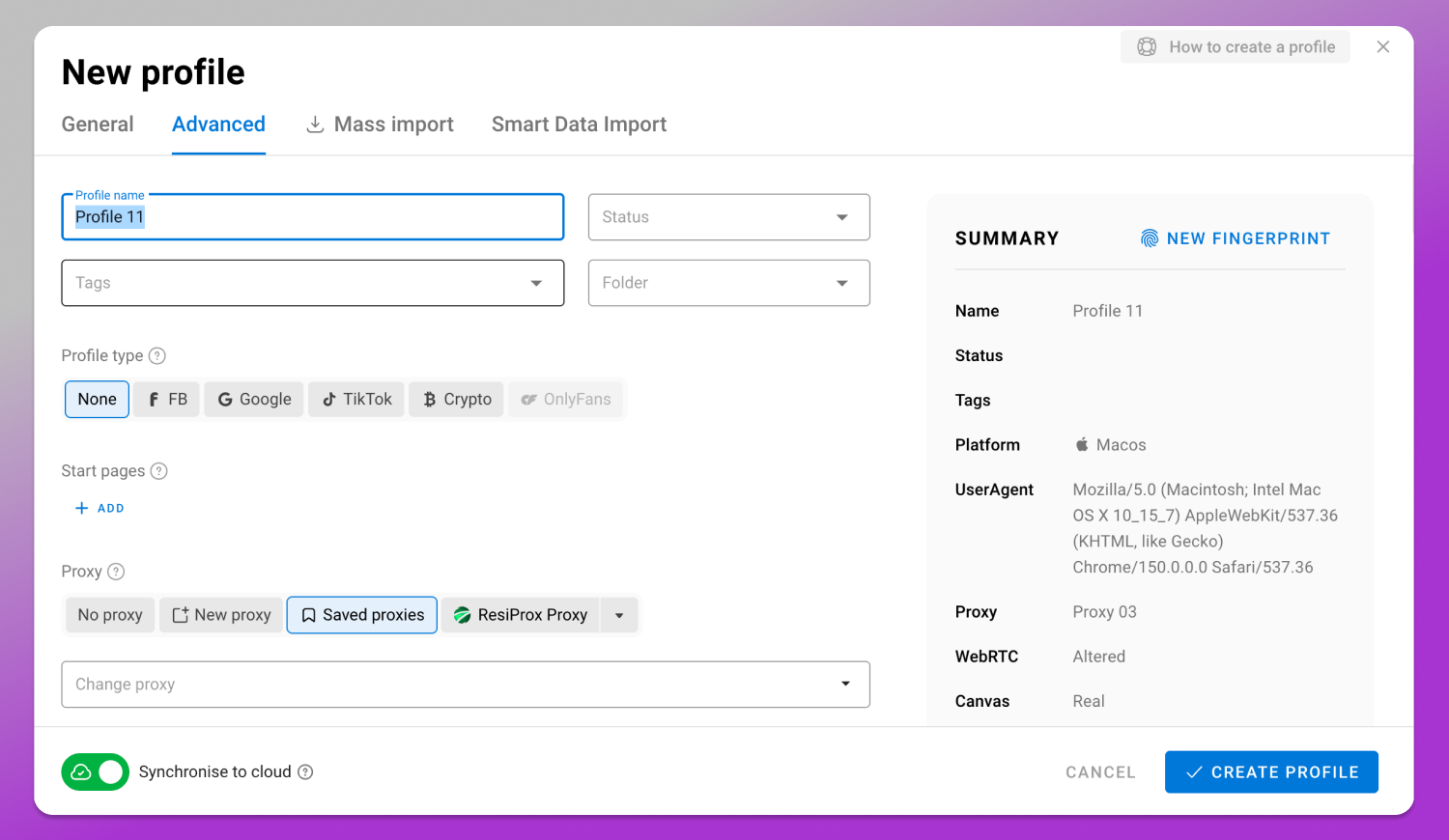
What decides account outcomes is not hidden versus visible. It’s consistent versus contradictory. A profile with a mobile user agent and a desktop WebGL renderer is more conspicuous than an honest desktop one: the first contains an impossibility, the second a person.
Task → Tool Matrix: Pick the Right One in 30 Seconds
| If you need to | Use |
| Open a suspicious link | Disposable or sandboxed browser |
| Protect a workforce from web threats | Remote browser isolation |
| Check a layout in another browser or resolution | Browser emulator or testing farm |
| Run automated tests or scraping | Headless browser |
| Browse where you can’t install software | Online virtual browser in a tab |
| Run several accounts on one platform unlinked | Anti-detect browser |
How to Test Any of These in Five Minutes
Open a fingerprint checker inside the tool you’re evaluating. Pixelscan, CreepJS and BrowserLeaks each show a different slice. Read five values and compare them against each other: IP and geolocation, timezone, language headers, WebGL renderer, screen resolution.
Look for disagreement, not a good score. An IP geolocating to Germany with a timezone set to America/New_York is a contradiction, and no virtual browser, emulator or sandbox repairs it. Then restart and check again. If the values shift, the tool has no persistence, which is what account work depends on.
Rules, ToS and Legal Note
Running multiple accounts is governed by the rules of each service and by the law where you live, and the responsibility sits with you. Meta’s Advertising Standards and Commerce Policies, the Amazon Seller Code of Conduct and the X Rules on multiple accounts each set their own limits, differing by product and region. Data handling brings its own frame: GDPR in the EU, UK GDPR in the United Kingdom, CCPA and CPRA in California, plus national regimes across Southeast Asia. Read the platform’s terms before you scale, whether you work from the US, the UK, the EU or SEA.
Frequently Asked Questions
Are virtual browsers safe?
Safe for your device: hostile page code runs separated from your system. Not automatically safe for your data. Anything you type in a remote session is visible to whoever operates it, so free sandboxes suit untrusted pages, not logins.
What is the best free virtual browser?
It depends on the job, and free tiers change constantly. Judge candidates on three things: whether sessions are isolated per user, whether the operator states what it logs, and whether the exit IP is shared. For credentials, a self-hosted container beats a free hosted one.
How much does a virtual browser cost?
There’s no single range, because the label covers four product classes. Testing farms price per parallel session, enterprise RBI per seat under contract, self-hosting whatever your VPS costs. Multiply the concurrent sessions you need by the per-session price, then check the vendor’s current pricing page.
Is a virtual browser the same as a VPN?
No. A VPN changes the network path and the IP a site sees. A virtual browser changes where the browser process runs. A VPN leaves your fingerprint intact; a virtual browser leaves it typical. Neither addresses account linking.
Can a virtual browser stop my accounts from being linked?
No. Linking runs on fingerprint overlap, IP overlap and behavioral patterns. Virtual browsers usually make it worse, since every instance of one image emits nearly the same fingerprint from one exit IP.
Which browser cannot be tracked?
None. Hardened browsers and privacy extensions reduce how much gets collected, but tracking runs on fingerprint and IP, and every browser has both. Any product promising otherwise can’t deliver.
Is a mobile browser emulator the same as a mobile device?
No. A mobile browser is an app on a phone. Mobile emulation in DevTools or a testing farm changes viewport and user agent on a desktop machine, useful for layout checks and nothing more.
If your task is the last row of that matrix, the tool class you want is an anti-detect browser, and it’s desktop software: you install 🚀 Dolphin Anty on Windows, macOS or Linux instead of opening a session in someone else’s tab. Current plans and profile limits are on the pricing page; the automation API is in the product documentation.