
Yes. You can have multiple stores on Shopify, and it is a normal, supported way to sell, not a gray-area trick. What turns it gray is how you run them: one browser, one admin login, one card, one payout account behind five storefronts. Three things follow. The form the platform allows extra storefronts in, and what each costs in a separate subscription. Why the risk from Shopify and the risk from your payment provider are two different risks, and why the second stops people scaling. And how to separate stores so a problem on one does not drag down the rest.
If you came away from this question confused, that is not your fault. As of August 2026, Shopify’s own community forum carries threads that contradict each other: one says up to 10 stores on a single account, another says Shopify does not support multiple stores under one account at all, a third says you cannot put stores under one account but may own several. They were written in different years about different things: stores, accounts, organizations.
Yes, But “Multiple Stores” and “Multiple Accounts” Are Not the Same Thing
The direct answer: Shopify lets one person own and operate more than one store. Each is a separate entity in the platform’s terms, with its own product catalog, domain name, customer list, theme, apps and monthly subscription fee. On every plan below Plus, a second storefront does not extend the first plan: it starts a new one, billed separately. Plus is the exception, and the difference is contractual rather than a discount. For larger merchants, Shopify offers organization-level management, where several stores sit under one administrative structure. That is a different construction again, with its own commercial terms.
Plan names, prices and whether a hard cap exists on standard plans change often, so read them from Shopify’s own current terms and Help Center rather than from a blog post. Stale numbers are exactly why the forum threads disagree. One figure is published, and it belongs to Plus: Plus merchants get a maximum of ten stores on their contract at no additional cost, one main store and nine expansion stores. Staging stores do not count toward that ten, and anything beyond ten goes through Shopify support. For the other plans there is no published store limit at all, and each store is simply its own subscription.
Three terms get used interchangeably and should not be. Expansion stores are the extra storefronts included in a Plus contract, the nine that sit beside the main store. An organization is the top-level container several stores are administered inside. Multi-entity selling is a different thing again: a Shopify Payments feature for selling under more than one legal entity within a single store, not a way of running several stores.
Why three different answers in search results, then? Because three different questions share the same words. “Can I have several stores?” is about ownership. “Can I have several stores under one account?” is about login and billing. “Can I have several owner accounts?” is about identity.
| Setup | What it actually is | When it fits | Who pays | Main risk |
| One owner, several stores | One person owns several storefronts, each with its own subscription and admin backend | Separate brands or regions, a test shop beside a live one | The owner, once per store | Shared owner identity, so a policy problem on one can touch the others |
| Several staff members with roles in one store | One store, several staff accounts scoped to what each person does | A team, an agency, a contractor | The store owner | Over-broad permissions, access never revoked when someone leaves |
| Several independent owner accounts | Separate businesses, separate owners, separate details and payouts | Partnerships, clients you do not own | Each owner separately | Being treated as one operator anyway if details overlap |
How Many Stores Can You Actually Have?
For anything below Plus, read the current Shopify documentation for the number and note the date you read it. I will not invent one, and I treat any article quoting a figure without a source with suspicion. Plus is the only tier with a published answer: ten stores on the contract, one main and nine expansion. That is how “up to 10 stores” ended up in a forum answer another forum answer contradicts.
The platform’s ceiling is rarely the one you hit anyway. Your practical limit is how many subscriptions you can carry, how many payment profiles a provider will approve, how many customer inboxes you can answer within a day, and how many app renewals you can track. People running several shops at once fail on the last two, not on a rule.
Do You Actually Need a Second Store? An Honest Decision Tree
Before setting one up, check whether a second storefront is the cheapest fix for your problem. Often it is not.
Selling into another country. The instinct is a separate regional storefront with local currency, language and shipping. Shopify Markets and multi-currency exist for exactly that, letting one store show local currencies, translated content and duties by region. If the catalog is the same and only presentation changes, one store with Markets beats two with everything duplicated. A separate regional store earns its keep when the assortment genuinely differs, when a local legal entity has to sit behind the sales, or when fulfillment runs through a different partner.
A second brand. The strongest case for a separate store. Different audience, tone, domain, customer list. Two unrelated brands in one storefront produce a catalog that confuses both audiences.
B2B alongside B2C. Shopify has a wholesale channel and B2B features inside a single store, with customer-specific pricing and catalogs. Test those first. A separate B2B storefront is justified when wholesale terms, tax treatment and buyer approval get complicated enough that mixing them with retail creates errors.
Niche testing in dropshipping. Several small shops in parallel is a normal way to find which niche responds. It also carries the highest payment risk, covered below.
A test store against a live one. Cheap if you keep it small. Expensive the moment it gets real traffic and real support tickets.
Then the question the forums actually ask: is running multiple Shopify stores solo doable, or just a flex? Doable, with a caveat nobody enjoys. A second storefront does not double revenue. It doubles the routine: two subscriptions, two app stacks to keep paid and updated, two support inboxes, two SEO histories starting from zero, two sets of legal pages. One commenter put it well. The first shop should feel almost boring before you add another.
There is also the storefront-versus-marketplace choice. Your own store gives you the customer relationship and the data; a marketplace gives you existing demand and keeps the relationship. If you sell on Amazon, eBay, Etsy or TikTok Shop alongside your shops, those platforms add their own account rules. eBay’s Multiple account policy states that “users may have multiple accounts on eBay” and names no number; what it prohibits is registering accounts to get around a restriction already applied to you. Amazon runs a stricter default: the Seller Code of Conduct is generally read as requiring a legitimate business reason for a second selling account. Check each platform’s own document rather than assuming Shopify’s answer carries over.
Multiple Stores vs Multiple Accounts: Three Setups, Three Different Risks
Look at what each row of that table means when something goes wrong.
One owner, several stores. You hold every store, and payouts go to accounts in your name or your company’s. If a policy issue arises on one, the shared owner identity is visible to the platform, because you declared it at signup. The separation you get here is commercial, not anonymity.
Staff accounts with roles. Shopify’s staff permissions exist so a person can do their job without holding the keys to the business. A support agent needs orders and customers. A media buyer needs discounts and analytics. Neither needs billing, payouts, or the power to add and remove staff.
This is where the most expensive shortcut happens: handing a freelancer the owner login instead of creating a staff account. It reads as saving five minutes. It transfers the risk to every storefront that owner account touches, at once. A staff account can be scoped, audited in the store’s activity log, and revoked in seconds. A shared owner password cannot be scoped, leaves no trace of who did what, and is revoked only by changing it. Write the handover down: who grants access, at what level, and who removes it on the person’s last day.
Independent owner accounts. Separate businesses, separate people, separate payouts. The right structure for a partnership or for stores you do not own. It stops being a real separation the moment the details collapse back together: same phone number, same bank account, same address, same laptop. Then you have one operator with extra paperwork.
How Stores Get Linked to Each Other
One thing needs saying plainly first, because much of the content on this topic blurs it. Shopify does not publish the signals it uses to associate accounts, and neither does any payment provider. What follows is the general mechanics of how online platforms associate accounts. It is not a Shopify policy document, and nobody should present it as one.
The common associations are unremarkable:
- Shared login and browser session. Two store admins open in the same browser share cookies, local storage and one fingerprint.
- Shared contact details. Same email address, phone number, recovery address.
- Shared financial details. Same card on file for the subscription, same bank account for payouts, same tax identity.
- Shared infrastructure. One parent domain, one IP address, the same hosting or DNS setup.
- Shared content. A duplicated theme with the same tweaks, identical policy pages and product descriptions, the same app stack configured the same way.
The signals a payment provider watches overlap heavily with these, but are not identical. That matters later.
The browser side is where people underestimate how much is shared. Two admin sessions opened in the same browser sit on one environment: the same device fingerprint, the same network address, the same cookie storage. Two storefronts in two tabs are, from the outside, one visitor with two tabs.
Association is not automatically a problem. If you legitimately own five stores under one business, they are supposed to be associated. The problem is a restriction on one propagating to the others, which brings us to the part almost nobody writes about.
The Payment Side: Where Multi-Store Scaling Actually Breaks
The message of this whole guide: there are two separate risks, and people treat them as one.
The platform risk is Shopify’s, covering Terms of Service, acceptable use, restricted merchandise and the way accounts get associated. The payment risk belongs to your payment infrastructure: whether a provider serves your country and category at all, what documents it wants, whether it holds a reserve, and what happens to your money when disputes rise. Different companies, different rules, different timelines. The payment risk is the one that stops people scaling, because a store can be fully compliant with Shopify’s rules and still be unable to get paid.
Shopify Payments Availability and Third-Party Gateways
Shopify Payments is not available everywhere, and eligibility depends on the country your business is registered in, not the country you sell to. Check availability for your country of registration on Shopify’s own help pages before you build a plan around it, because that single fact decides whether the extra fee below applies to you.
When it is not available to you, or your category is excluded, you go to a third-party gateway. Shopify charges an additional transaction fee on orders taken through an external gateway: 2% on Basic, 1% on Grow, 0.6% on Advanced and 0.2% on Plus. Use Shopify Payments only, and on Plus that additional fee drops to zero. The payout schedule becomes the gateway’s, disputes are handled in its dashboard, and onboarding is a separate approval for every store you open. Two storefronts means two approvals, not one used twice.
Business Verification, Documents and Restricted Categories
Every provider runs business verification before releasing money to you. Expect questions about who legally owns the business, where it is registered, who the beneficial owners are and what you sell, then the same questions again when volume grows. The document set differs by provider and by jurisdiction, and it is not the same for a sole trader as for a registered company, so ask the provider what it wants before you open the store rather than after a payout is held.
Restricted categories are what people discover too late. Providers maintain prohibited and restricted merchandise lists, and those lists differ between Shopify and the gateway behind it. A product that passes one can be rejected by the other. If your second store exists to sell something the first does not, read the provider’s restricted list before building the storefront.
Payout Holds, Reserves and Chargebacks
A provider can hold payouts, apply a rolling reserve against future ones, or close an account. Usual triggers: a rising chargeback rate, a spike in refunds, a sudden change in volume, a mismatch between what you said you sell and what you sell, an unresolved verification request.
The part relevant to multiple stores: restrictions do not stay inside the store that caused them. If several storefronts share an owner identity, a payout account or a verified business profile, a provider that decides one is a problem has a route to the others. Isolating browser environments does nothing here, because this association is financial and documentary, not technical. To be explicit, since some articles imply otherwise: separating stores operationally reduces the chance of accidental association. It does not guarantee your payouts will never be held.
Tax and Legal Context Depends on Your Jurisdiction
Tax and data obligations follow your business and your buyers, not your storefront count, and differ enough by region that no single answer fits. Factors to work through with an accountant:
- US sales tax, determined state by state, with economic nexus thresholds that vary and change. Treat those thresholds as something to confirm with an accountant for the current year rather than a number to carry from an article. Several storefronts do not create separate thresholds if one legal entity is behind them.
- EU VAT and the distance selling rules, including whether the OSS scheme applies and who acts as merchant of record.
- UK VAT, with its own registration and reporting regime.
- GDPR and UK GDPR. As store owner you are the data controller for customer data; Shopify processes it for you. That responsibility does not transfer, and it applies per store, so each storefront needs its own privacy notice and lawful basis.
- CCPA/CPRA if you have California buyers, with its own disclosure and opt-out duties.
Do not assume a US default. A seller registered in Portugal shipping to Brazil and one registered in Singapore shipping to the UK face completely different versions of this list.
Dropshipping: Why Several Storefronts Raise the Payment Risk
Dropshipping is a legal retail model. It also concentrates every payment risk described above, which is why running several dropshipping stores in parallel deserves its own warning.
The pattern is fast: launch a niche store, test it with paid traffic, keep it if it converts, close it if it does not. That cycle is the exact profile payment providers watch for. New merchant, no trading history, sudden ad-driven volume, long shipping times because stock moves from a supplier abroad, and a refund rate reflecting buyers who did not expect the wait. Chargebacks follow, and they are the fastest route to a payout hold. Five such storefronts means five thin merchant profiles, possibly all linked to you.
The obligations that reduce this are the ones consumer law expects anyway. Tell buyers the realistic delivery window before checkout, not after. Identify the seller, with a real business name and a working contact route. Make the returns process findable and honor it. Do not present a supplier’s stock photo as your product if the item differs. Consumer protection regimes in the US, the EU and the UK all cover shipment timing and the buyer’s right to cancel, with the specifics set by the regulator for the market you sell into.
This article gives no revenue figures, success rates or income claims for dropshipping, deliberately. Numbers of that kind circulate with no verifiable source, describe survivors rather than attempts, and tell you nothing about your own case.
Operational Isolation: One Environment Per Store
If several stores are right for you, separate them from day one. Retrofitting isolation onto four storefronts that shared a browser for months is far harder than starting clean. What separation means in practice:
- One browser environment per store. Its own cookies, local storage, cache and fingerprint, so sessions never bleed between storefronts.
- One stable IP per environment. A consistent address rather than a rotating one, since an admin session that jumps countries mid-login looks worse than one that stays put.
- Staff accounts with scoped permissions, never the owner password, with revocation tied to a person’s last working day.
- Separate credentials and recovery contacts per store, in a password manager.
- Separate content. Do not duplicate a theme and its copy across storefronts and then wonder why they look related. Different brands should read as different brands, which also solves the duplicate content problem for search.
This is where a dedicated tool earns its place. 🔥 Dolphin Anty is a desktop antidetect browser for Windows, macOS and Linux, built so each account lives in its own profile: its own fingerprint across the parameters a site can read, its own cookies and local storage, its own proxy. Here you create one profile per store admin, attach a dedicated IP to each, and open each Shopify backend only in its own profile. Inside a team, profiles are handed out by access rights, so a contractor gets the store they work on and nothing else, and no owner password changes hands.
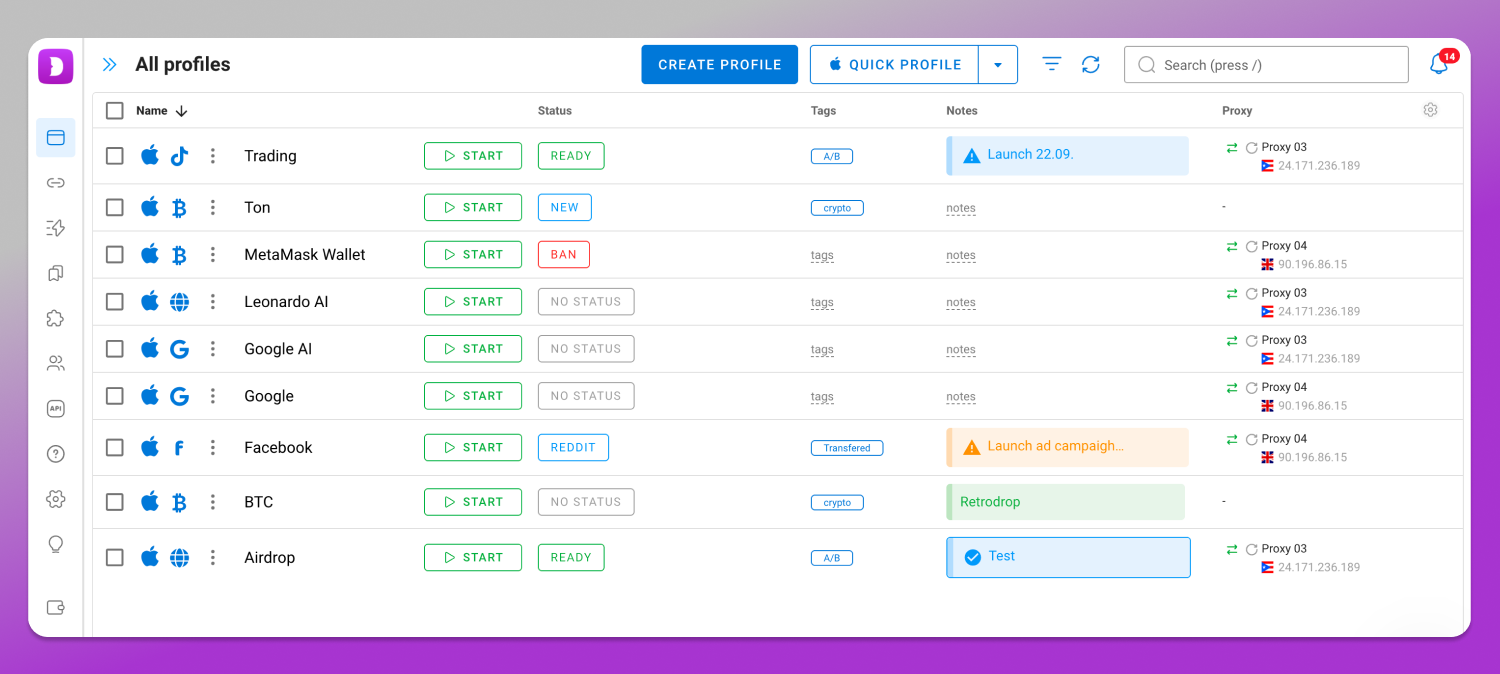
What this does and does not do: profile isolation reduces the chance that two storefronts are associated through a shared browser environment. It does not make you invisible, does not override Shopify’s Terms of Service, and has no effect on associations built from your bank account, tax identity or documents.
Running Stores for a Team or for Clients
Agencies and small teams hit a different version of the problem: many stores, several people, access that moves around without ownership changing hands. Three rules hold up.
The client owns the store. Their account, billing and payouts. You get staff access at the level your work requires. Less convenient than owning it yourself, and it saves the relationship when the engagement ends: handover becomes revoking your access rather than transferring a business.
Access is granted per person, per store. Not per team, not per shared inbox. New joiners get exactly the stores and permissions their role needs. When they leave, one checklist removes staff access on every store, revokes their profile access in the browser tool, and rotates any credential they held.
Keep a record of who did what. Shopify’s store activity log covers actions inside the store. Your side needs its own record of who had access to which environment and when. That is the only way to reconstruct events afterwards.
For repetitive work across many storefronts, Dolphin Anty has a Synchronizer that runs the same actions across selected profiles at once, plus cloud sync so a profile follows the operator between machines. Efficiency for teams handling dozens of environments, not protection against enforcement. For profile limits, plan names and current pricing, check the 📌 Dolphin Anty pricing page rather than a figure quoted in an article.
Frequently Asked Questions
Can you have multiple stores on Shopify?
Yes. One owner may run several storefronts, each on its own subscription, with its own catalog, domain, customer list and billing. What the platform does not offer is a way to make those storefronts look unrelated to each other.
How many stores can I create on Shopify, and how many can you have at once?
Check the current Shopify Help Center and Terms of Service for any documented limit on standard plans; the only published number is the Plus one, ten stores per contract. Your practical limit is how many subscriptions, payment profiles and support inboxes you can carry.
Do I need a separate subscription for each store?
On plans below Plus, yes: each storefront is billed on its own plan with its own monthly subscription fee, and a second store does not extend the first. On Plus, up to ten stores are covered by the one contract at no additional cost. Confirm the current plan structure in Shopify’s billing documentation.
Can I use one email for multiple Shopify stores?
Yes, and it is convenient: one login, and you switch between store dashboards. The trade-off is that a shared login email is also the clearest signal that the storefronts belong to one operator. Stores that are genuinely independent businesses need independent contact details.
Can I use the same payment account for two Shopify stores?
Whether a provider permits it depends on that provider’s terms. The risk people miss: if two storefronts share a payment profile, a restriction on one reaches the other, including a payout hold that catches both. Separate profiles cost more setup and contain the damage better.
Can I have multiple Shopify stores under a single legal entity?
A legal entity and a platform account are different things, and one company can stand behind several storefronts. What varies is the business verification your provider requires, which depends on that provider and on your jurisdiction, and the tax treatment: several stores under one entity do not create separate thresholds. Take the tax question to an accountant in your jurisdiction.
What happens to my second store if the first one is suspended?
It can be affected, and so can payouts. If the stores share an owner identity, contact details or a payment profile, a restriction on one gives both Shopify and your provider a route to the others. Shopify does not publish the signals it uses, so nobody can tell you where the line sits. Assume genuinely connected stores will be treated as connected.
Can I open a new store to replace a banned one?
No. Opening a replacement to get around an enforcement action is a Terms of Service violation in itself, and this guide will not help you do it. The predictable outcome is a second suspension once the association is made, plus a provider that treats you as a repeat risk in businesses unrelated to the banned store. The route back is the appeal process with the platform that suspended you.
Policy here changes without announcement. Verify the platform parts against Shopify’s current Terms of Service and Help Center, and the payment parts against your provider’s current terms, on the day you act on them. This article reflects the situation as of August 2026.