
Yes. You can have multiple Snapchat accounts, and brands, agencies and creators do it every day: one account for the brand, one for a second market, one personal account that nobody at work needs to see. The catch sits one level down. The mobile app is built around a single active account at a time, moving between accounts means logging out and logging back in, and Snap Terms of Service draw a hard line between legitimate separate accounts and abuse.
The thesis of this guide in two lines: content lives on the phone, business lives in the browser. Shooting and posting Snaps stays in the app. Ad accounts, analytics, team access and session management move to a desktop browser, and that is where a multi-account workflow can actually be organized.
Can You Have Multiple Snapchat Accounts by the Rules? What Snapchat Actually Allows
Snap’s own documentation is the only source worth quoting here, because the rules change and third-party blogs copy each other’s outdated numbers.
Three things to read before you create account number two:
- Snap Terms of Service. Covers who may hold an account, expectations around personal use, and the prohibition on automated or bulk registration. Read the current clause on Snap’s own site rather than a paraphrase of it.
- Community Guidelines. These govern content, impersonation and misleading identity. A brand account presenting itself as a private individual is a guidelines problem, not a technical one.
- The Help Center articles on saved logins and on managing more than one Public Profile. Primary source for how a saved account behaves on the login screen, and for what a Public Profile does that a personal account cannot. One thing it does not give you is a number: Snap does not publish how many saved logins a single device holds.
Two constraints are structural rather than policy-based. Only one account is active at a time in the app, so “logged into several at once” is not a state Snapchat offers on a phone. Snapchat’s own wording for the saved account is that “logging in with a saved account lets you log back in to your Snapchat account with one tap”, and that saved account appears on the login screen only after you log out of the current one. The second constraint is contact details: “Although you can have more than one Snapchat account, only one unique email and/or mobile number can be verified per account.” Verifying the same address or number on a new account takes it off the old one.
There is one genuine switcher in Snapchat, and it does not switch accounts. You can manage more than one Public Profile, and a Profile Switcher moves you between the public profiles that belong to a single account. Snapchat adds a caveat worth reading before you plan around it: “Eligibility for creating and managing multiple profiles can vary and may not be available to all Snapchatters.” No maximum number of profiles is published.
Age requirements and content rules also have precise thresholds that differ by region, and those belong in Snap’s own terms for the country you operate in rather than in a summary. Compliance with Snap Terms of Service, Community Guidelines and the advertising policies sits with you, not with any tool you use.
What You Can Do From a Computer and What Stays on the Phone
This is the section most articles skip, and it is the one that decides how you staff the work.
| Task | Mobile app | Snapchat web | Ads Manager | Business Manager |
| Shooting and posting Snaps | Yes | No | No | No |
| Camera, lenses, camera roll | Yes | No | No | No |
| Chat and Stories viewing | Yes | Partly: chat and calls work, and a Snap can be posted to your Story; watching your own Story is app-only | No | No |
| Logging back in with a saved account | Yes | Not documented by Snap | n/a | n/a |
| Creating and editing ad campaigns | No | No | Yes | No |
| Campaign analytics and reporting | No | No | Yes | Partly |
| Managing ad accounts and billing | No | No | Yes | Yes |
| Assigning team members and permissions | No | No | Partly | Yes |
| Owning organizations and Public Profiles | No | No | No | Yes |
One caveat on the two right-hand columns above: Snap does not publish a full breakdown of which capability sits in Ads Manager and which in Business Manager, and the split has moved before. Confirm the current division in the Business Help Center before you design a permissions model around it.
The web version covers a defined slice of the app rather than all of it. Chat and calls work, and you can post a Snap to your Story from the browser. Watching your own Story is app-only. Also unavailable on the web: opening Snaps saved in Memories, managing published Stories or reading their analytics, changing your username, and changing privacy settings.
One thing needs saying plainly, because a lot of vendor content is vague about it: no desktop tool isolates accounts inside the Snapchat mobile app. An antidetect browser gives you separate working environments on a computer. It does not reach into a phone, and anyone implying otherwise is selling you a fiction.
Why This Matters for Agencies and Media Buyers
An agency that plans around “run all client accounts from one window” will discover the gap during the first content sprint, usually at the worst moment. Planning around the real boundary is duller and works better. Creative capture and posting get assigned to a person with a device and the right saved login. Everything with money, permissions or reporting attached goes to a browser session on a workstation, where access is controlled and revocable.
That split also answers a staffing question. You do not need one phone per client. You need a rule about which surface each task lives on.
How Many Snapchat Accounts Does a Brand Actually Need?
Fewer than most teams assume. Every extra account is another email, another recovery path, another thing to hand over when someone leaves.
Four account types cover almost every real case:
- The brand account. One per brand, with a Public Profile if the brand publishes content that should be discoverable.
- The market or language account. Justified when the content genuinely differs by region, not when it is the same campaign translated.
- The test account. For checking how a Story renders, how a link behaves, what a new follower sees. Keep it obviously internal.
- The personal account. Yours, separate from work, and not something the agency should ever hold credentials for.
Before creating a fifth account, check whether the problem is actually about access rather than identity. If two people need to manage the same brand presence, that is a roles-and-permissions question inside Business Manager, not a reason for a second account. Business Manager works by invitation: you add a person and give them a scoped role, and the roles on offer are listed at the moment you send the invitation. Adding a person to an existing account beats sharing one password, and it beats spawning duplicates.
How to Make a 2nd Snapchat Account
The mechanics are the same as the first one: a fresh email address, a phone number for verification where required, a username that does not exist yet. What separates a second personal account from a brand account is intent and disclosure. Keeping business and private presence apart is normal practice. Building an account designed to hide who is behind it, or to present as someone else, runs into the impersonation rules.
Creating Accounts the Right Way
Here is the checklist I would run when opening a client account, in order:
- Create a dedicated work email on the agency or client domain. Never a personal Gmail, never a shared inbox everyone reads. One mailbox per Snapchat account, owned by the client where possible.
- Verify the email immediately. An unverified email is a recovery path that does not exist.
- Decide the phone number owner before you enter one. The number attached to an account is a recovery channel and a claim of control. A departing contractor’s personal number is a future incident.
- Turn on two-factor authentication and record where the second factor lives. If it is an authenticator app, the seed belongs in the team password manager, not on one person’s phone only.
- Write down the recovery map. Who owns the email, who owns the number, who holds the 2FA seed, who is the account owner of record.
- Set the profile fields and ownership in Business Manager before the account starts publishing, not after it has an audience.
Anything skipped here comes back as a lockout later, and Snapchat’s recovery process runs on its own terms with no guaranteed timeline.
Can I Have Multiple Snapchat Accounts With the Same Phone Number?
No. Snapchat states it plainly: “Although you can have more than one Snapchat account, only one unique email and/or mobile number can be verified per account.” Verifying a number that is already on another account moves it to the new one and strips it from the old, which quietly removes a recovery path you thought you had. For business accounts, use a separate number per account regardless, so recovery for one account never depends on another account’s owner.
How Accounts Get Connected to Each Other
Platforms build a picture of who is behind an account from whatever signals they collect. The exact list is not published by Snap, and I am not going to invent one. The categories that any team should assume are visible:
- Device. The same handset holding several saved logins, which is entirely normal for a person with a work and a personal account.
- Network and IP address. Shared office connections, shared VPN exits, addresses reused across unrelated clients.
- Recovery channels. One email domain, one phone number, one recovery contact across accounts that claim to be unrelated.
- Billing. The same card funding several ad accounts, which is visible inside the advertising system by design.
- Browser environment. Fingerprint attributes, time zone and language identical across sessions that should belong to different businesses.
Can Someone Tell if You Have Two Snapchat Accounts?
Another user, generally not, unless you post the same content in both places or your contacts list gives it away. The platform is a different question, and the honest answer is that nobody can promise your accounts will never be associated. Any vendor guaranteeing that is guessing. The defensible position is not concealment, it is legitimacy: run accounts you have the right to run, keep their data clean and separate, and the association question stops being a threat.
Setting Up the Desktop Side: One Profile per Client or Ad Account
Everything in this section is about the browser half of the work: Snapchat web, Ads Manager, Business Manager. Nothing here touches the mobile app.
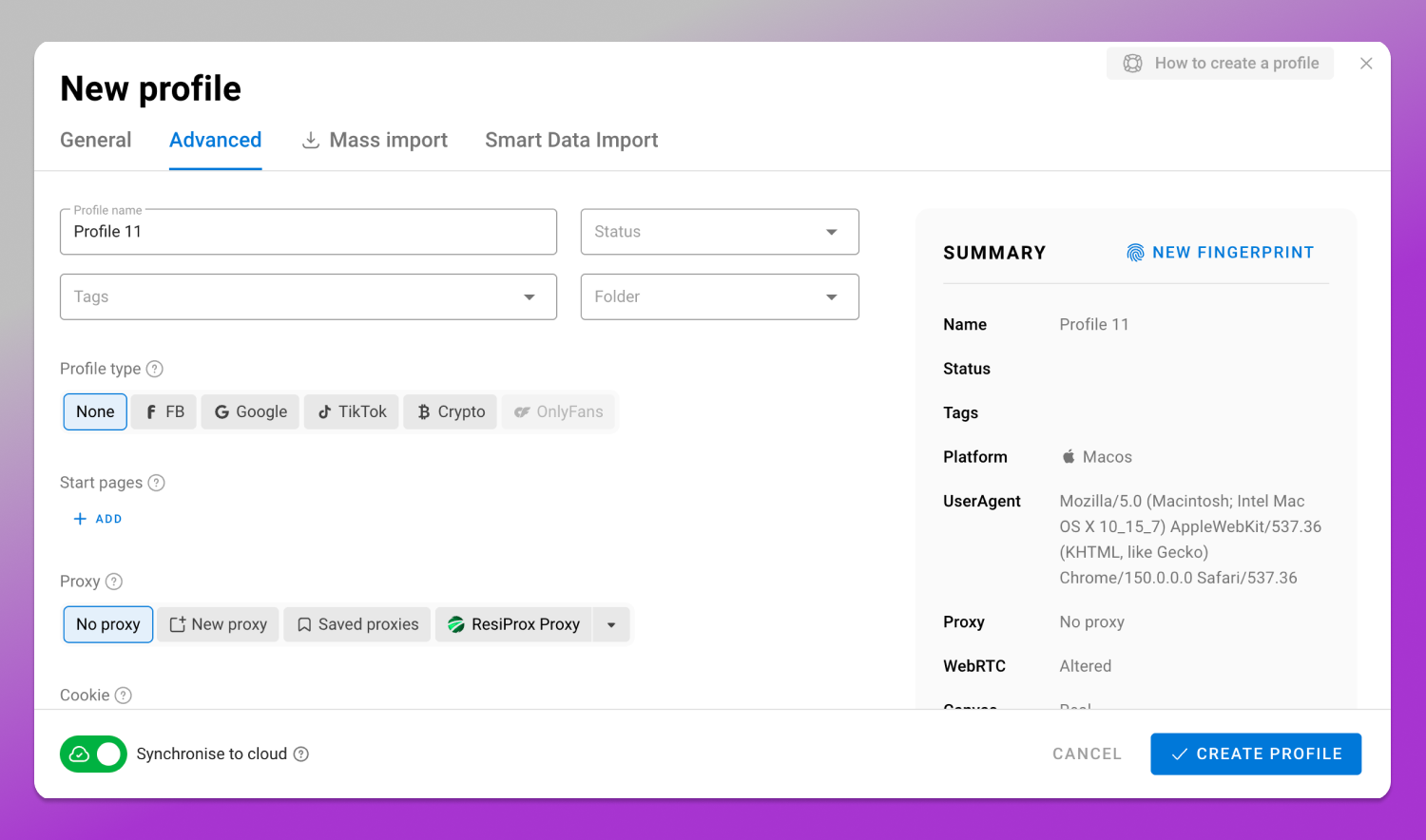
🔥 Dolphin Anty is a desktop antidetect browser for Windows, macOS and Linux. The unit of work is a profile: a separate browser environment with its own fingerprint, its own proxy, its own cookies and session storage. One profile per client or per ad account means a media buyer signing into a client’s Ads Manager is not sharing cookies, cache or a login history with the account next door.
What actually gets configured in a profile:
- User agent and platform, kept consistent with the operating system you are presenting.
- Screen resolution, WebGL and canvas parameters, plus the rest of the fingerprint parameters the profile controls.
- Proxy binding, so the profile always leaves through the same address rather than whatever the office network is using that day.
- Time zone and locale, matched to the proxy’s region so a UK client account does not report a Central European time zone.
- WebRTC handling and language headers, matched to the market the account serves.
A workable sequence for onboarding a new client:
- Create the profile and name it by client and ad account, not “Snapchat 3”.
- Attach the dedicated proxy for that client’s region and confirm the exit address and time zone agree.
- Set language and locale to the account’s market.
- Sign in to Snapchat web, Ads Manager and Business Manager inside that profile, and nowhere else.
- Grant the buyers and the account manager access to that profile through team permissions, instead of circulating the password.
- Record the profile in the client file alongside the recovery map from earlier.
Two limits, stated directly. This does not isolate accounts inside the Snapchat mobile app, and it is not protection against a ban. It gives separate, controlled working environments on a computer for accounts you have the right to operate. Profile limits and plan names sit on the 🚀 Dolphin Anty pricing page, and that is where the current numbers live.
Running Snapchat Ads Across Several Accounts and Legal Entities
An agency running several clients ends up with several ad accounts, often under different legal entities, sometimes in different countries. A few rules keep that from becoming a problem.
Billing details must match reality. The entity paying for the ads is the entity named on the billing profile, with its own tax details and its own payment method. Recycling one card across five clients’ ad accounts creates an accounting mess and an obvious association between accounts you describe as separate businesses.
Advertising policies apply per account and per creative. Restricted verticals carry extra requirements and some are prohibited outright, with rules that vary by country, and the current list of both sits in Snap’s advertising policies. Whether any minimum spend or budget threshold applies is likewise set by the platform, so read it there instead of carrying over what another ad network requires.
Audience data brings a separate legal layer, and which law applies depends on where the audience is, not where you are. For audiences in the EU, GDPR governs custom audience uploads, remarketing pixels and retention. For UK audiences, UK GDPR. For California residents, CCPA/CPRA, including opt-out signals. A UK agency running campaigns for a German client with California traffic touches all three. Document a lawful basis for each audience list before it is uploaded, and keep the client named as controller where that is the arrangement.
Team Process: Ownership, Access and Offboarding
Access chaos causes more lost accounts than platform enforcement does. A role matrix, written once, prevents most of it.
| Role | Can | Cannot |
| Client (owner) | Hold the email and phone, own the Business Manager entity, approve access | Be bypassed when access is granted or revoked |
| Account manager | Add and remove team members, manage profiles and ad account access | Change ownership or recovery details alone |
| Media buyer | Build and run campaigns, view billing and reporting for assigned accounts | Add users, change payment methods, touch other clients’ profiles |
| Content lead | Publish Stories and Snaps from the assigned device login | Access Ads Manager or billing |
| Contractor | Work inside one named profile for a fixed period | Hold credentials, export audience data |
Offboarding is a checklist, not a conversation. Revoke Business Manager access, revoke the desktop profile permission, rotate the account password and reset the 2FA seed, remove the person’s number and email from any recovery slot, and check the login history for sessions still open. Do it on the last day, not the following week.
If access is lost anyway, the route back is Snapchat’s official account recovery through the verified email and phone. There is no timeline anyone can promise, and no side channel worth trying.
Frequently Asked Questions
How many Snapchat accounts can you have on one device?
Snapchat does not publish a limit on how many saved logins one device holds, so treat any number you read elsewhere as unverified. What Snapchat does describe is the saved account itself: after you log out, that account sits on the login screen and “lets you log back in to your Snapchat account with one tap”. One account is active at a time, so moving between accounts is always a log out plus a one-tap log in.
Can you be logged into two Snapchat accounts at the same time?
Not in the sense of both being active at once on one device. Snapchat keeps one account active and asks you to log out before you log back in to another. On a computer, separate browser profiles let you hold separate sessions for the web and advertising surfaces at the same time.
Is there a Snapchat web version and what works in it?
Yes, Snapchat runs in a desktop browser with a subset of the app’s features. Chat and calls work, and you can post a Snap to your Story. Watching your own Story, opening Snaps from Memories, managing published Stories and their analytics, changing your username and changing privacy settings all stay in the app, as does capture.
Do I need Snapchat Business Manager?
If you run ads, hold a Public Profile for a brand, or need more than one person working on an account, yes. It is where ownership, ad accounts and team permissions live. A solo creator posting personal content does not need it.
Pick the boundary before you pick the tools. Decide today which of your Snapchat tasks belong to a phone and a named person, and which belong to a browser profile with proxy, time zone and team permissions attached. The second list is the one you can systemize.