
How Much Data Do 10, 50, 100 or 500+ Browser Profiles Really Need?
A practical way to size proxy usage from real profile activity instead of guessing from account count.
📊 A 500-profile workspace can burn through less proxy traffic than a 100-profile team. It sounds backwards until you look at what actually generates the bill.
Profiles do not consume data because they exist. They consume it when someone opens them – loading pages, refreshing dashboards, checking ads, verifying local results, working through social feeds, running research or firing automated requests. So the honest way to plan proxy traffic in 2026 is not “X GB per account.” It is active profiles × active days × measured traffic per active profile-day.
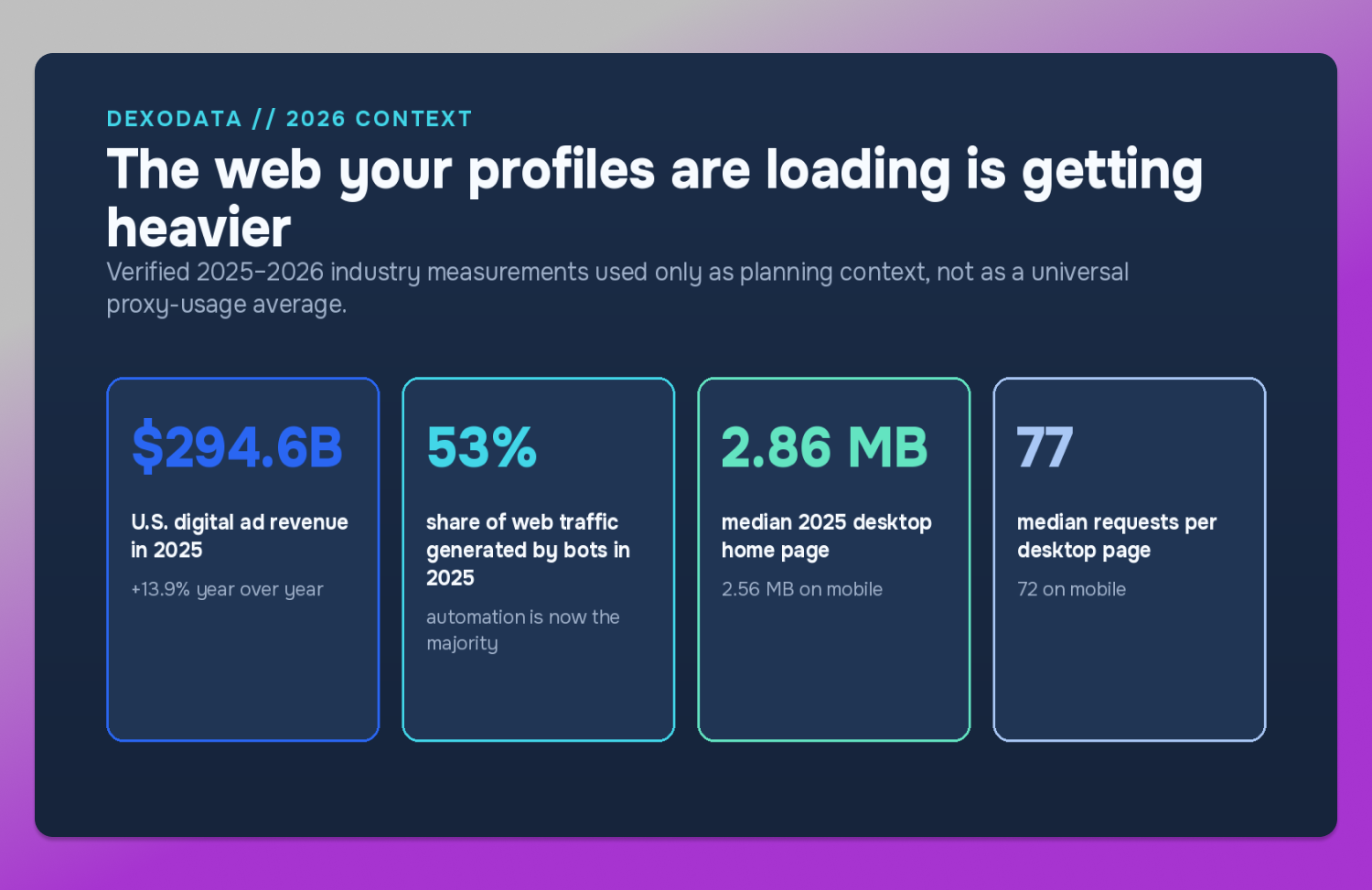
That distinction matters more today than it did a few years ago. In 2025, U.S. digital advertising revenue hit a record $294.6 billion, up 13.9% year over year. Automated activity made up 53% of all web traffic. And the median home page reached 2.86 MB on desktop and 2.56 MB on mobile, with about 77 requests on desktop and 72 on mobile. 🌐 The web is not getting lighter, and a real account session is rarely a single clean page load.
The takeaway is simple: a team that still buys proxy traffic by counting browser profiles is planning from the wrong number.
Start with a small real test, not a monthly guess
🔗 Dexodata makes this easy to test before you scale. Claim a $1 trial credit straight from your dashboard, then move to pay-as-you-go pricing as your measured traffic grows. Dexodata also adds a 25% bonus to your first deposit, on deposit amounts up to $50.
That is 🌱 a natural fit for traffic planning, because the first week should be a calibration period. Instead of deciding in advance that 100 profiles “need” some number of gigabytes, connect the profiles you actually use, run your normal workflow for several days, and calculate your own rate.
Dexodata provides residential, mobile and datacenter IPs in one dashboard on one balance. The network is 100% opt-in, follows strict KYC and AML standards, covers Europe, North and South America and Asia, and delivers 99.9% uptime. The same balance can therefore support different profile groups without forcing the team to build a separate traffic budget for every proxy type.
Why profile count is a bad traffic metric
Take 👥 two teams with 100 profiles each.
Team A keeps 100 profiles in Dolphin Anty, but only 35 are active on a normal working day. Each active profile is opened once or twice, mainly for checks and routine account work.
Team B also keeps 100 profiles, but 90 are active. Operators move through dashboards, feeds, previews, landing pages and research tabs all day long.
The stored profile count is identical. The traffic pattern is not even close.
This is the first rule of proxy traffic planning: count active profile-days, not saved profiles.
One profile used on one working day equals one active profile-day. If 50 profiles are active for 22 days, the month holds 1,100 active profile-days. If 500 profiles exist but only 300 are active over the same 22 days, the month holds 6,600 active profile-days – not 11,000. Once you know that number, everything else becomes measurable.
The formula that actually scales
Monthly proxy traffic = active profiles × active days × measured GB per active profile-day × planning buffer
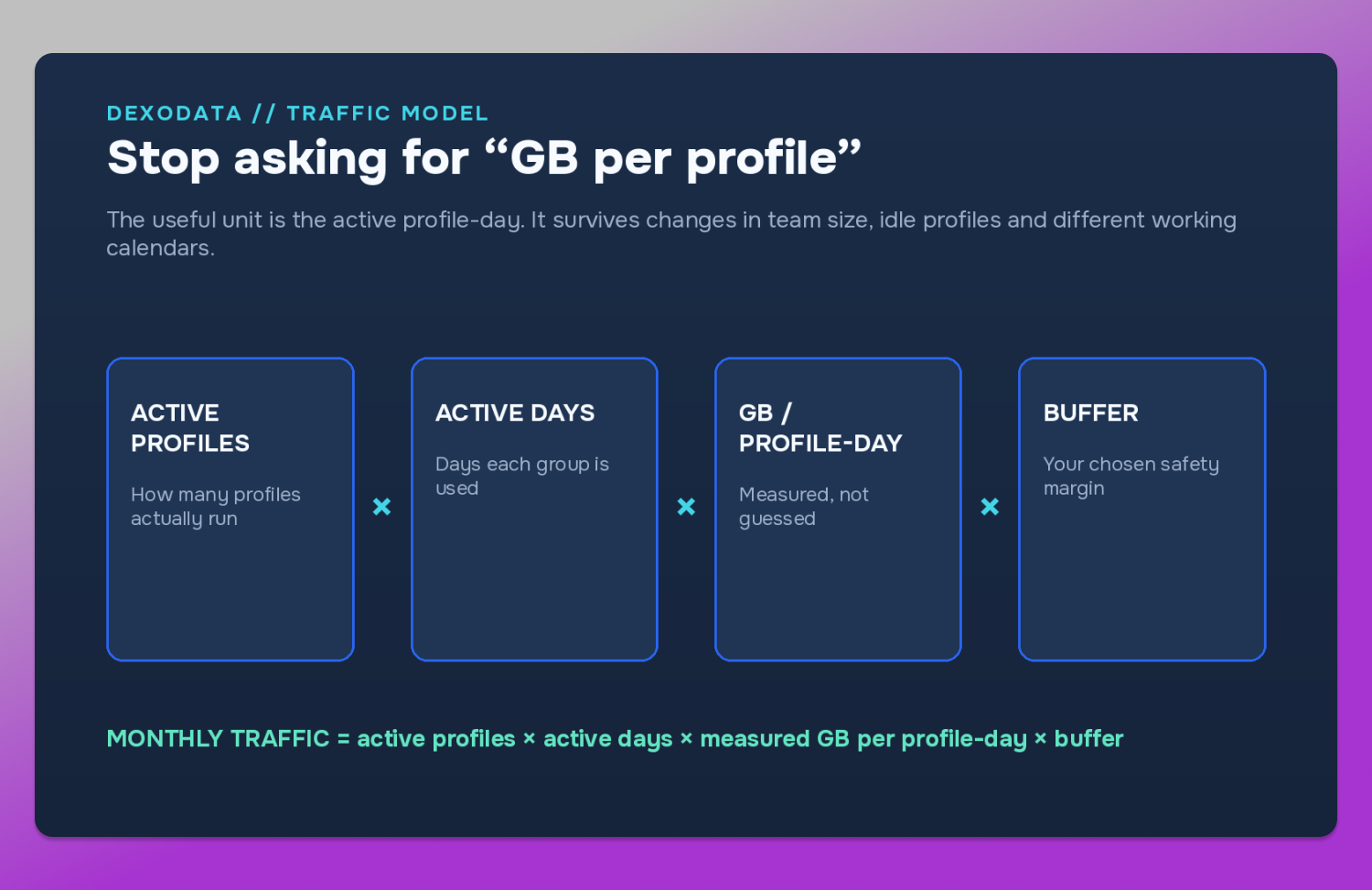
The only input that should never come from a spreadsheet assumption is measured GB per active profile-day. To get it, run a short ⚙️ calibration window:
- Pick a normal group of active profiles.
- Run the real workflow for 5–7 days.
- Record the proxy traffic that group used.
- Divide the traffic by active profiles × active days.
- Use that rate to forecast the month.
📌 Here is a worked example. Thirty active profiles use 22 GB over seven days:
22 GB ÷ (30 × 7) = 0.1048 GB per active profile-day
If the same workflow expands to 100 active profiles over 22 working days, that is 0.1048 × 100 × 22 = 230.6 GB. Add a 20% planning buffer for spikes, rechecks and busier days, and the working forecast becomes 276.7 GB.
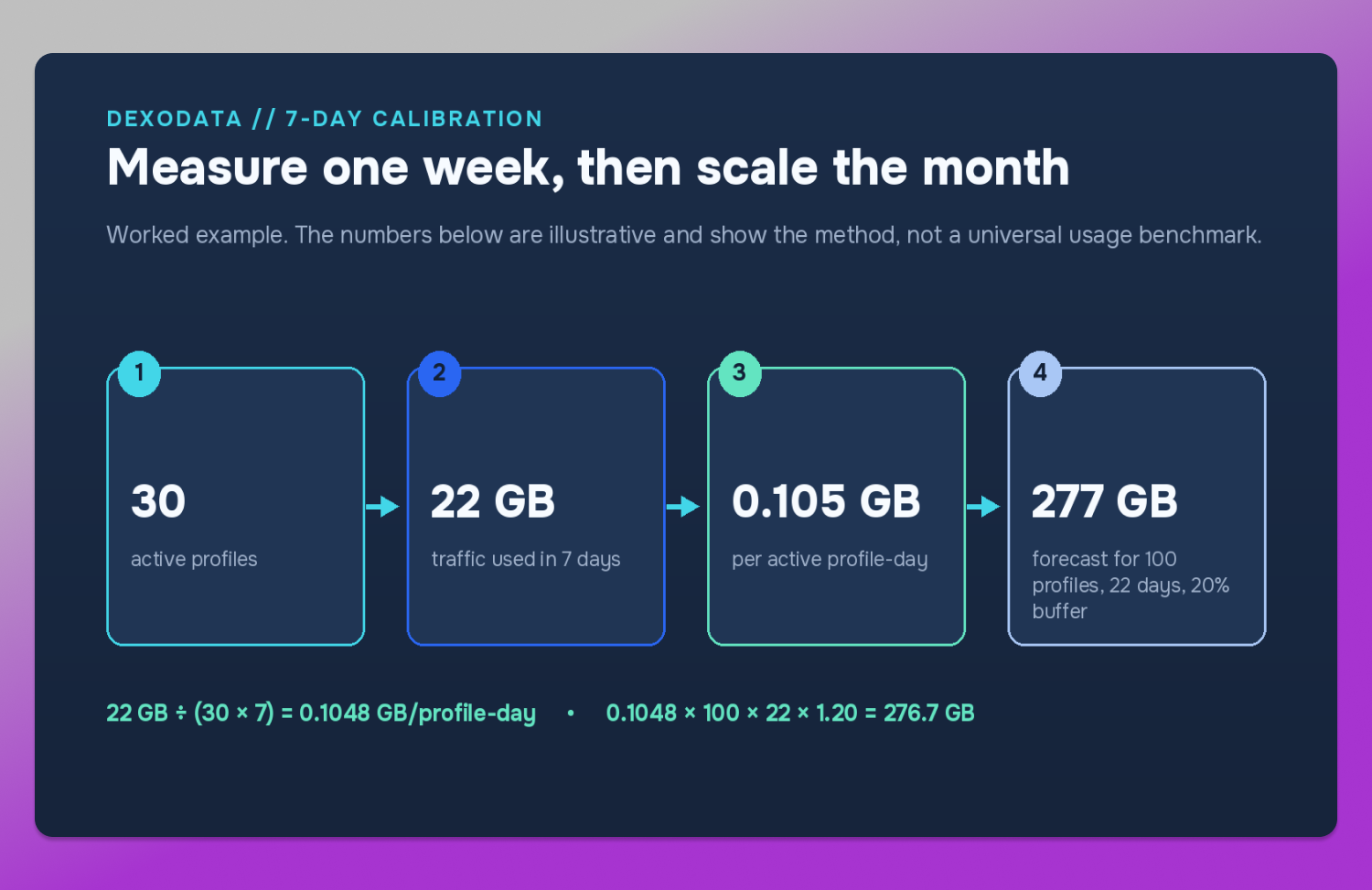
The 20% is not an industry standard. It is simply the buffer used in this example so the arithmetic is easy to audit. A team with very stable usage may choose less; a team with launch days, research bursts or irregular client work may choose more.
What 10, 50, 100 and 500 active profiles can look like
There is no honest universal GB figure for an account. There can, however, be transparent planning bands. The table below uses three example measured rates – 0.05 GB, 0.10 GB and 0.25 GB per active profile-day. Every row assumes 22 active days and the same illustrative 20% buffer.
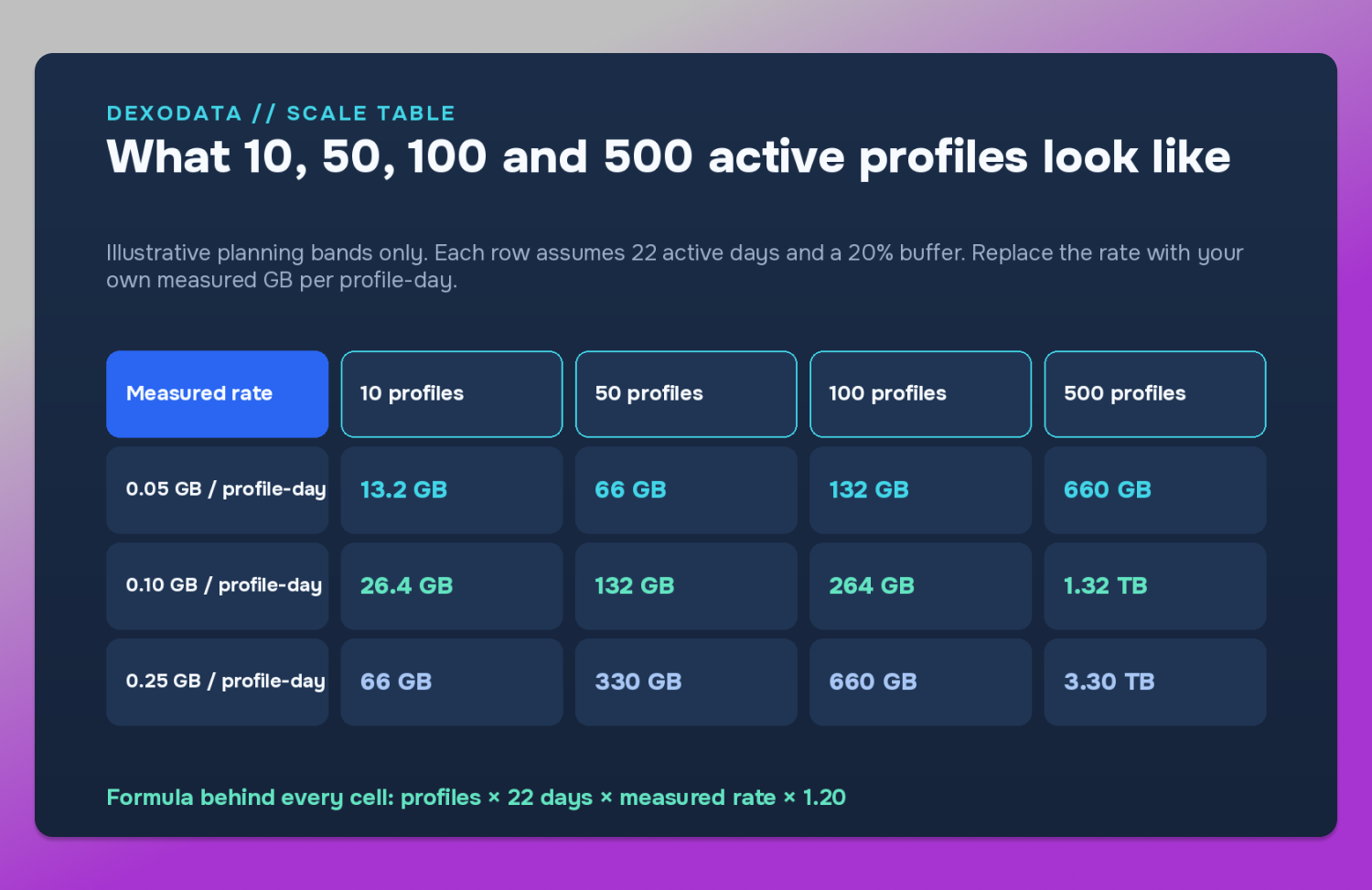
The 🍏 useful part of this table is not the choice between 0.05 and 0.25. It is that every number can be reproduced from one formula. If your first week produces 0.083 GB per active profile-day, use 0.083. If a content-heavy workflow produces 0.31 GB, use 0.31. Your own measured rate is worth more than any generic “GB per account” claim.
Why current page weight still matters
If actual traffic has to be measured, why look at page weight at all? Because it explains why old rules of thumb age so badly.
The 2025 median home page was 2.86 MB on desktop and 2.56 MB on mobile, and the median desktop page made about 77 requests. Images alone accounted for more than 1 MB of the median desktop home page, and JavaScript for almost 0.7 MB.
That does not mean every page opened inside 🔥 Dolphin Anty costs exactly 2.86 MB of proxy traffic. Browser caching, repeated assets, video, background requests, infinite scroll, app shells and platform-specific behavior can move the real number in either direction. But it does show why “one login equals a few megabytes” is no longer a useful planning model. ☝️ A single working session can fire dozens of resource requests before the operator has done anything interesting – which is also why the same account behaves differently from month to month. A week of basic checks is not the same as a week of creative research, feed work, marketplace browsing or repeated regional verification.
Stored profiles versus active profiles: the 500-profile trap
Suppose a team stores 500 profiles in Dolphin Anty, but only 300 are active during the month. At a measured rate of 0.10 GB per active profile-day, 22 working days and the same 20% example buffer:
300 × 22 × 0.10 × 1.20 = 792 GB
If the team wrongly budgets as if all 500 profiles were active:
500 × 22 × 0.10 × 1.20 = 1.32 TB
That is a 528 GB gap created by a single planning mistake.
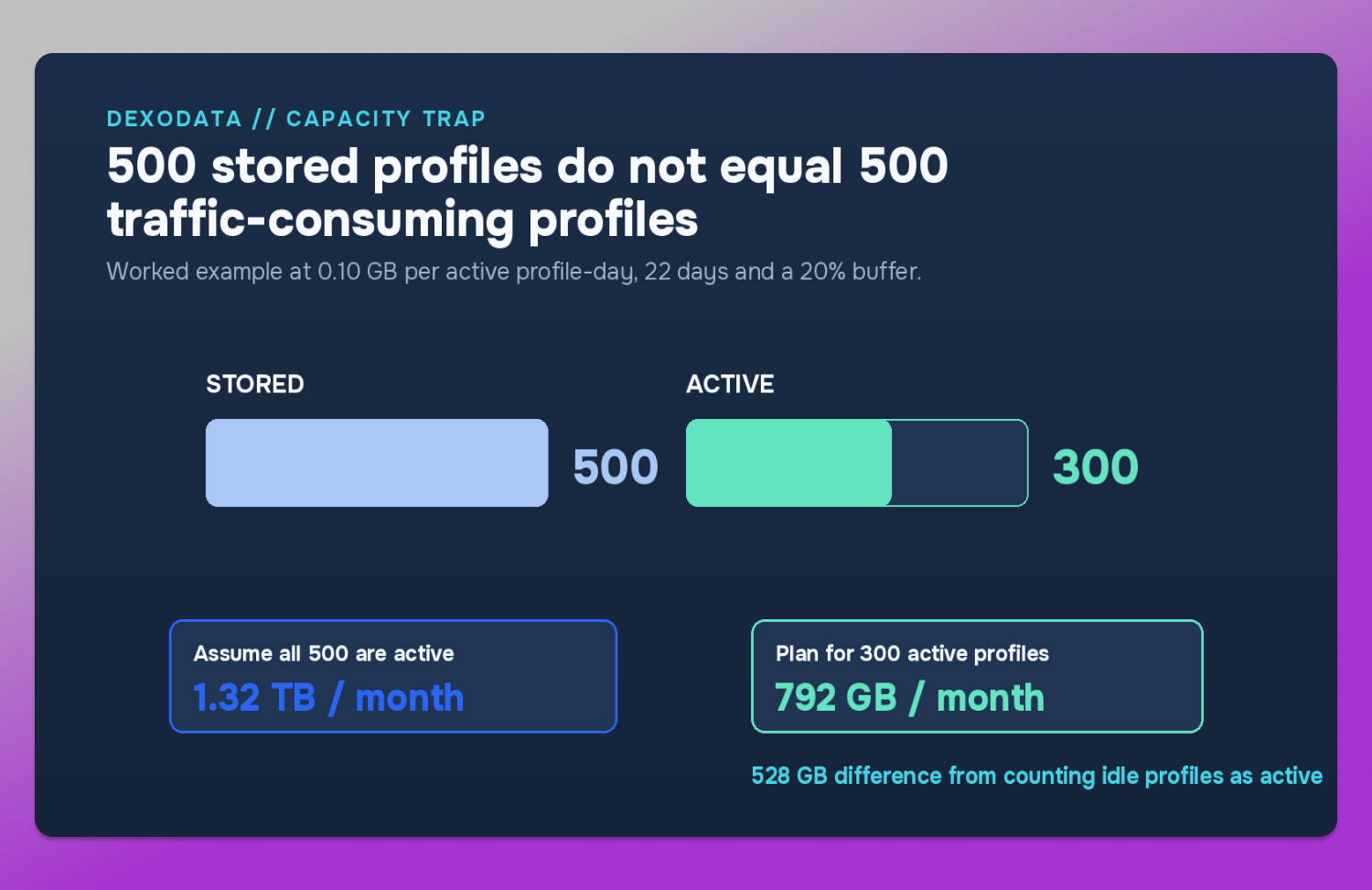
The fix is operational, not mathematical. 🗂️ Keep profile status clean, separate active work from reserve accounts, archive or tag dormant profiles, and recalculate the active share before every large refill.
Dolphin Anty + Dexodata: turn profile organization into a traffic plan
This is where the browser workspace and the proxy network should be planned together. Dolphin Anty already gives teams a structure for managing large numbers of profiles – folders, tags, statuses, profile sharing, proxy sharing and permission controls. Dexodata can follow the same structure on the network side.
The goal is not one giant proxy pool for every profile. 🎯 The goal is to make each meaningful profile group measurable.
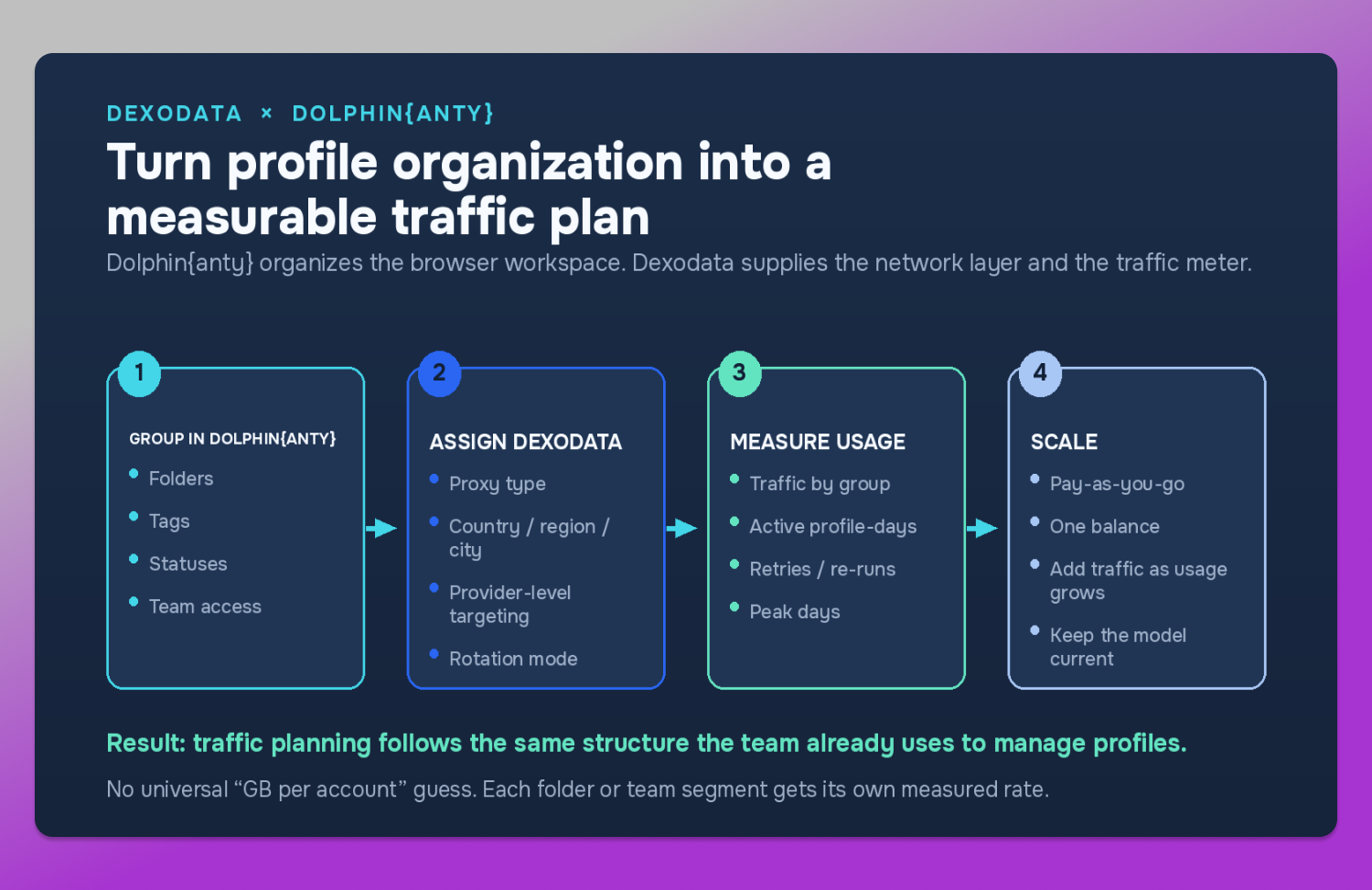
Start with the groups you already use in Dolphin Anty
A team might organize profiles by client, project, traffic source, market or operator. Keep that logic – forecasting proxy traffic is far easier when the browser structure and the traffic structure describe the same work. For example:
- Folder A – U.S. account management
- Folder B – Germany localized research
- Folder C – social media workflows
- Folder D – website QA and public data collection
Now each group can have its own Dexodata proxy type, location settings, active profile count and measured traffic rate.
Choose the Dexodata proxy type by workflow
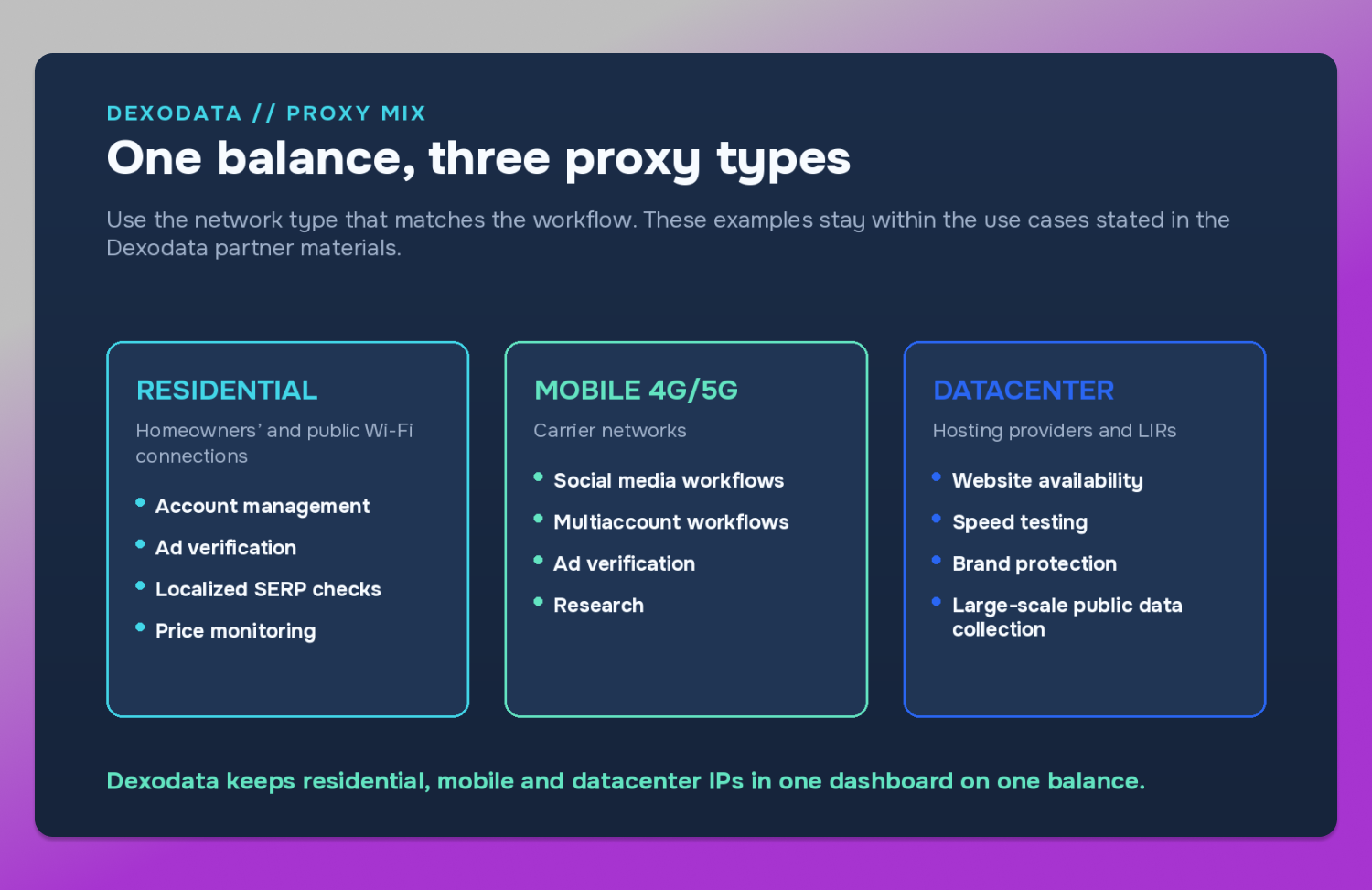
Dexodata offers residential, mobile and datacenter IPs in one dashboard on one balance.
Residential IPs come from homeowners’ and public Wi-Fi connections and blend in more naturally than hosting-based addresses. They suit workflows such as account management, ad verification, localized SERP checks and price monitoring.
Mobile 4G/5G IPs run on carrier networks and earn one of the highest trust levels in anti-fraud systems. They fit social media, multiaccount workflows, ad verification and research where a mobile network is the right environment for the task.
Datacenter IPs are based on hosting providers and LIRs. Dexodata materials position them for structured tasks including website availability and speed testing, brand protection and large-scale public data collection.
The point is not to label one type as universally “better.” The useful question is which network source fits this specific group of profiles and the job it is doing.
Match the location to the market
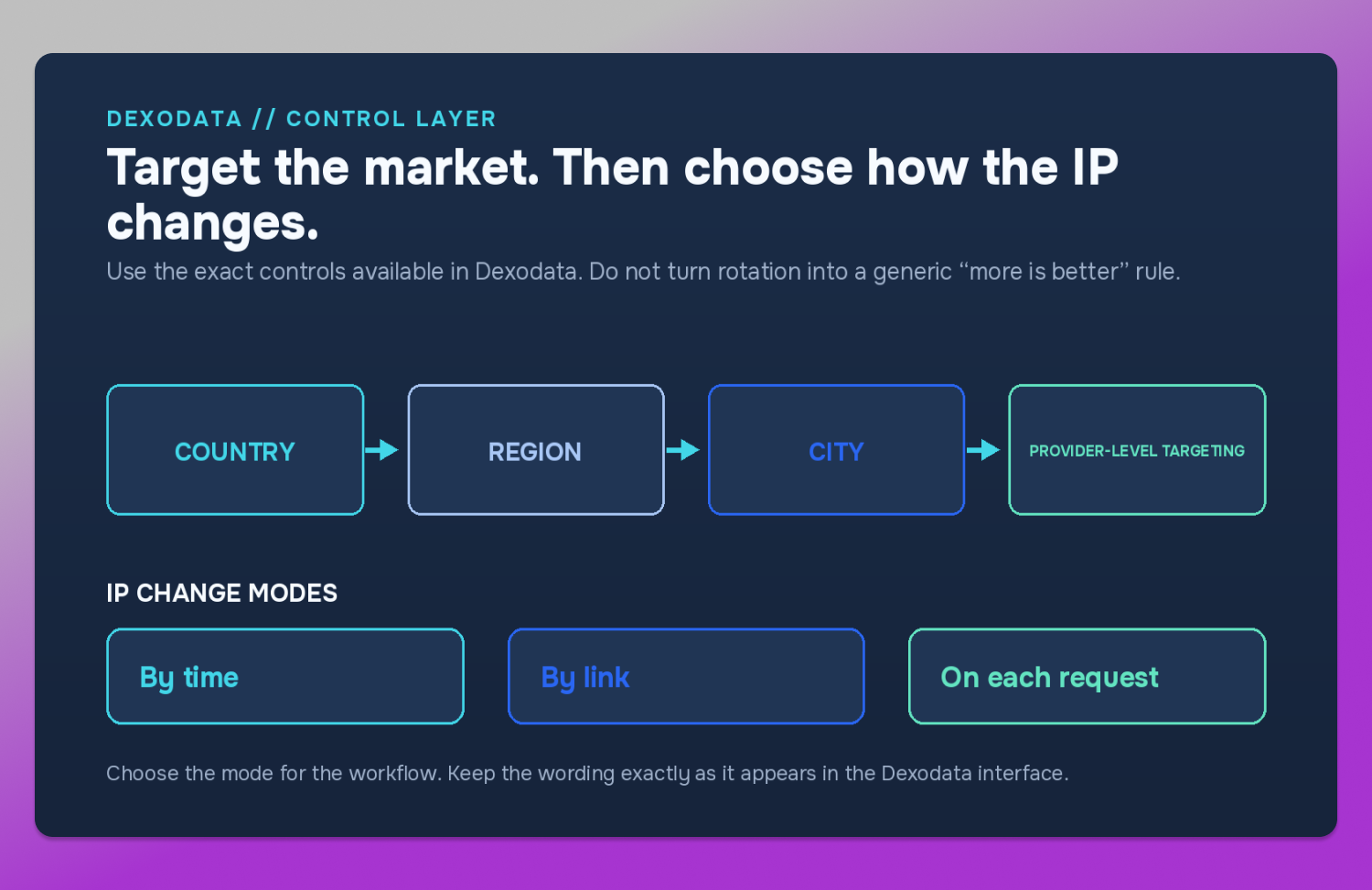
Dexodata lets you target by country, region, city and ISP for provider-level targeting, so the network location stays aligned with the market a Dolphin Anty profile is meant to work in. A Germany research folder can use Germany targeting and narrow to the region or city when the workflow needs it; a U.S. account group can stay inside the U.S. market; a multi-market team can split traffic by location instead of routing every session through one generic country. This matters for planning as well as data quality – if the wrong location forces a team to repeat research or verification, the same job consumes traffic twice.
Use the exact Dexodata IP change controls
Dexodata lets you 🔄 change the IP three ways: By time, By link and On each request. Do not turn this into a rule that more rotation is automatically better. Choose the mode by workflow, then keep it consistent inside the profile group you are measuring – the measured GB per profile-day is only useful while the working pattern stays broadly comparable. If the team changes proxy type, market, rotation mode and activity level all at once, the old rate stops describing the new workflow.
Measure traffic by group, not only by the whole team
A single team-wide GB number can hide useful differences. An illustrative 100-profile Dolphin Anty setup might contain:
- 45 active profiles for residential account management
- 15 active profiles for mobile social media work
- 12 active profiles for datacenter website QA and public data collection
- 28 profiles held in reserve or used only occasionally
Suppose the first three groups measure 0.08 GB, 0.12 GB and 0.20 GB per active profile-day. Over 22 active days the working traffic is 45 × 22 × 0.08 = 79.2 GB, 15 × 22 × 0.12 = 39.6 GB and 12 × 22 × 0.20 = 52.8 GB – a measured workload of 171.6 GB, or 205.9 GB with the same illustrative 20% buffer. Those rates are example inputs, not Dexodata benchmarks. The point is the structure: Dolphin Anty tells you which profiles belong together, and Dexodata traffic measurement tells you how much each group actually consumes.
Use one balance to keep the model flexible
Because residential, mobile and datacenter IPs sit in one Dexodata dashboard on one balance, a team can adjust its mix without rebuilding 💰 the budget from scratch. If a new client adds 20 residential profiles, the network plan expands with that group; if a research project ends, its traffic does not have to stay reserved as a separate monthly package. With pay-as-you-go pricing, spend follows actual use more closely. That is especially useful for teams whose Dolphin Anty profile count moves faster than their headcount: add profiles, transfer them, share them between operators or move work between folders, then update the forecast from active profile-days rather than from the number of licenses sitting in the browser.
Where teams waste traffic without noticing
Traffic waste rarely shows up as one huge mistake. It usually arrives as rework:
- Wrong region – a researcher checks the wrong local version and has to run the task again.
- Partial loads – data is collected but unusable, so the same pages are requested twice.
- Repeated blocks – operators or scripts retry a job that should have completed once.
- Poor profile organization – the same check is repeated because no one can see it was already done.
- Unmeasured bursts – a campaign launch or research day doubles activity while the forecast still assumes a quiet week.
Dexodata’s own approved breakdown puts the hidden cost of a weak pool at roughly 4–8 engineer hours per block wave, 15–40% of collected data discarded because of wrong regions or partial loads, and account lifetime cut from months to weeks.
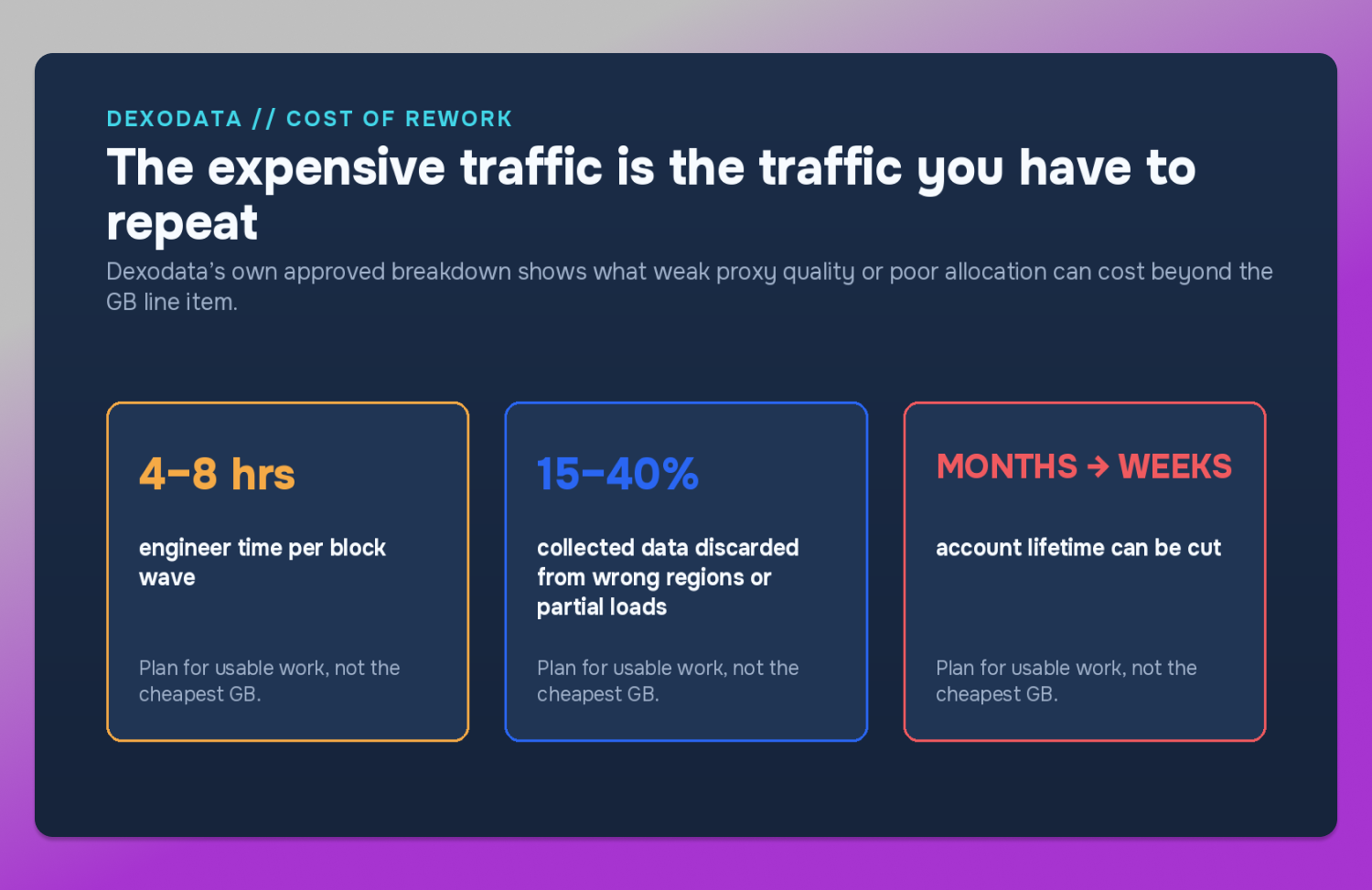
That is why the cheapest GB is not necessarily the cheapest completed job. The useful target is not minimum traffic – it is minimum repeated traffic.
A practical planning routine for 10, 50, 100 and 500+ profiles
For 10 profiles, do not overbuild the model. Run a real week, measure usage and keep a simple active profile-day rate. At this size one unusual session can move the average, so note what happened on high-usage days.
For 50 profiles, split the team into two or three meaningful groups if their workflows differ. Do not average a light account-checking group together with a content-heavy research group unless you are comfortable losing that detail.
For 100 profiles, make the browser organization and proxy organization match. Use Dolphin Anty folders, tags or statuses to define the groups, then track Dexodata traffic against them. A single team-wide rate is still possible, but group rates usually tell you more.
For 500+ profiles, separate stored capacity from active capacity. Track active profile-days by project or market and revisit the rate after major workflow changes. At this scale a small error multiplies fast: a difference of just 0.03 GB per active profile-day across 500 active profiles and 22 days is 330 GB before any buffer.
The 60-second traffic forecast
⏱️ Before the next refill, answer six questions:
- How many profiles are actually active?
- How many days will each group run this month?
- What was the measured GB per active profile-day in the last comparable period?
- Did the workflow change enough to invalidate that rate?
- Which Dexodata proxy type and location does each group use?
- What planning buffer makes sense for this month’s volatility?
Then run one formula: active profiles × active days × measured GB per profile-day × buffer. If you cannot answer question three yet, use the $1 Dexodata trial credit as a calibration stage rather than pretending a generic number is precise.
Bottom line
Proxy traffic planning gets easier the moment you stop treating profiles as identical units. The browser tells you how the team is organized; the traffic meter tells you what the work costs. Put the two together and 10, 50, 100 or 500 profiles become a capacity model instead of a guess.
For Dolphin Anty teams, Dexodata fits that model cleanly: residential, mobile and datacenter IPs in one dashboard on one balance; targeting by country, region, city and ISP; three clear IP change modes – By time, By link and On each request; and pay-as-you-go pricing. Start with the $1 trial credit, measure a real workflow, then scale the number that actually matters: usable traffic per active profile-day.
FAQ
How much proxy traffic do 10 browser profiles need per month?
There is no universal number. With 22 active days, a measured rate of 0.10 GB per active profile-day and a 20% example buffer, 10 active profiles forecast 26.4 GB. Replace 0.10 with your own measured rate for a reliable estimate.
How much proxy traffic do 100 Dolphin Anty profiles need?
If all 100 are active for 22 days at 0.10 GB per active profile-day, the same example model gives 264 GB including a 20% buffer. If only 60 are active, the forecast falls to 158.4 GB. Active profiles matter more than stored profiles.
How do I measure GB per active profile-day?
Run a normal workflow for several days, record total proxy traffic, then divide by active profiles × active days. A seven-day calibration is a practical starting window because it captures several working days without waiting for a full month. If the workflow varies sharply, measure longer.
Which Dexodata proxy types can I use with Dolphin Anty?
Dexodata provides residential, mobile and datacenter IPs. All three live in one dashboard on one balance, so different 🚀 Dolphin Anty profile groups can use different proxy types while the team keeps one traffic budget.
Can Dexodata target different GEOs for separate Dolphin Anty profile groups?
Yes. Dexodata supports targeting by country, region, city and ISP for provider-level targeting, so a team can align the network location with the market assigned to each profile group.
How can I change the IP with Dexodata?
Dexodata provides three interface options: By time, By link and On each request. Choose the mode that matches the workflow and keep it consistent enough for your traffic measurements to stay comparable.
Why is pay-as-you-go useful for multiaccount teams?
Because the number of active profiles changes. Pay-as-you-go pricing lets proxy spend follow actual usage instead of forcing the team to buy a large fixed traffic allowance before it knows what the month will consume.