
If you run more than a handful of accounts, you already know the browser profile is only half the job. 🚀 Dolphin Anty does the hard part of keeping each profile isolated, with its own fingerprint, cookies, and storage. But a clean fingerprint sitting behind the same IP as twenty other profiles still looks like twenty accounts on one connection. The proxy is what finishes the picture.
This guide walks through pairing 🔗 ProxyGen proxies with Dolphin Anty: which proxy type fits which task, how to plug them in, and the settings that keep your profiles stable over time.
Why the proxy matters as much as the profile
A profile in Dolphin Anty controls what a site reads about your browser. The proxy controls where the traffic appears to come from. Platforms look at both, and they cross-check them. A US fingerprint arriving from a German datacenter IP is an easy flag, and so is a dozen well-built profiles all sharing one address.
Getting the proxy layer right 🛠 does a few things for you:
- Keeps each profile on its own IP, so accounts read as separate people on separate connections.
- Matches location to the account, so a profile you run as a US user actually connects from the US.
- Keeps success rates high on sites that are strict about connection quality, which means fewer checkpoints and less wasted time.
This is where the proxy type you choose starts to matter.
Residential vs mobile: picking the right one
ProxyGen offers both residential and mobile proxies, and they suit different jobs.
🏠 Residential proxies route through real home internet connections. They are the default choice for most Dolphin Anty workflows: managing store accounts, ad verification, market research, price monitoring, and general automation. They are the more affordable option per GB, and for the majority of profiles they are all you need.
📱 Mobile proxies run on 4G and 5G carrier connections. Because a single mobile IP is shared by many real users at once, these carry the most trust on the platforms that scrutinize connections hardest, which usually means social media and account creation at scale. They cost a bit more per GB, so the sensible approach is to use them where they earn their keep rather than everywhere.
A simple 👍 rule of thumb:
- Start on residential for most profiles and test your workflow.
- Move a profile to mobile if that specific platform is giving you trouble on residential.
Both types support rotating and sticky sessions, both work over HTTP and SOCKS5, and both are billed pay as you go with no expiry on the traffic you buy.
Setting it up in Dolphin Anty
Here is the flow from a fresh ProxyGen account to a running profile.
1. Grab your proxy details from ProxyGen.
Log into your ProxyGen dashboard and open the proxy you want to use. You will see a host, a port, a username, and a password. Note whether you are using the HTTP port or the SOCKS5 port, since that determines which protocol you select in Dolphin.
2. Open the proxy settings on your Dolphin Anty profile.
When you create or edit a profile in Dolphin Anty, find the proxy section. Choose the protocol that matches the port you copied: HTTP for the HTTP port, SOCKS5 for the SOCKS5 port. Mixing these up is the single most common reason a proxy “does not work,” so it is worth double checking.
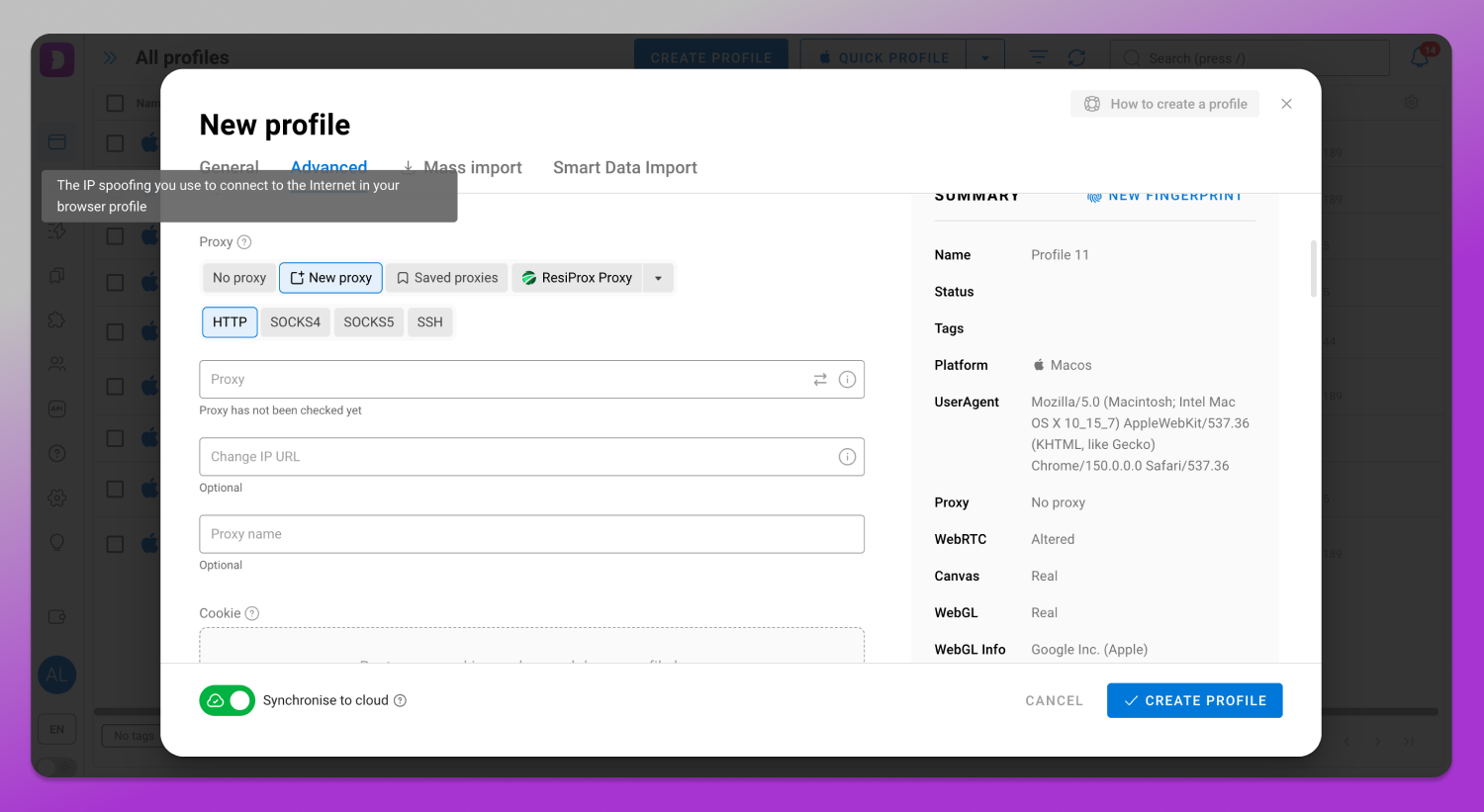
3. Paste in host, port, username, and password.
Enter the values exactly as they appear in your ProxyGen dashboard.
4. Test the connection.
Dolphin Anty has a check button that confirms the proxy responds and shows the IP and location it is connecting from. Run it before you launch. If the location looks right, you are set. If it fails, the protocol or port is almost always the cause.
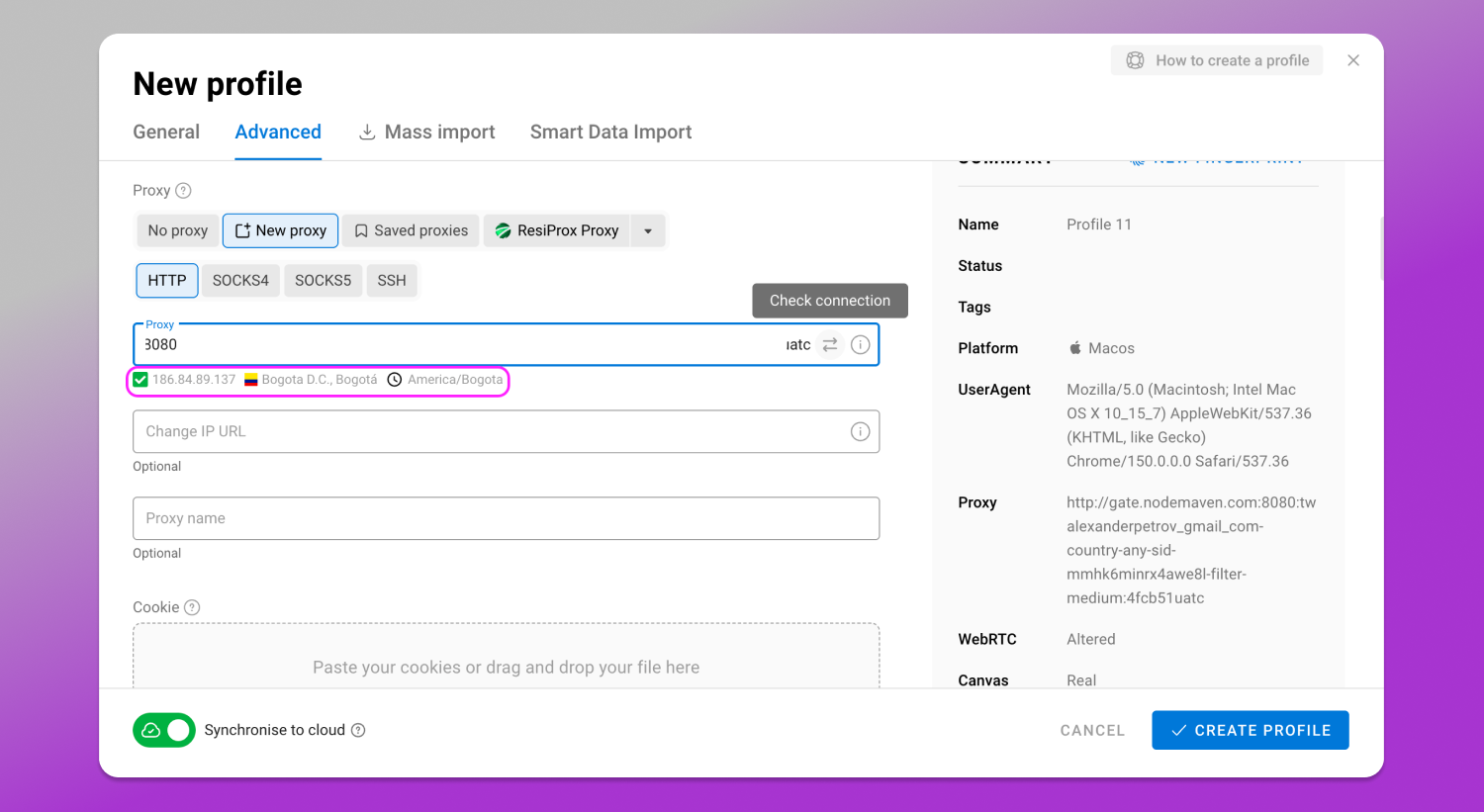
5. Launch the profile.
Once the check passes, open the profile and the browser routes entirely through that proxy.
Sticky vs rotating: which session to use
This choice depends on how long a profile needs to stay on one IP.
- ➡️ Sticky sessions hold the same IP for the life of the session. This is what you want for account management, where a profile logging in from a new IP every few minutes looks wrong. On residential, a sticky IP stays consistent across reconnects, which is ideal for keeping one account tied to one identity.
- 🔄 Rotating sessions hand you a fresh IP on each new connection. These fit tasks where you want variety rather than consistency, like broad data collection or scraping across many targets.
For most Dolphin Anty users running long-lived accounts, sticky residential is the right starting point. Reach for rotating when the job is about volume rather than holding an identity.
A few habits that keep profiles healthy
- One profile, one IP. Do not share a single proxy across several profiles you want to look independent. It defeats the point.
- Match the geo to the account. If the account is meant to be in the US, connect from the US. ProxyGen supports country targeting so you can line these up.
- Test before you scale. Run one profile end to end, confirm the IP and location, then replicate the setup.
- Watch your protocol. Keep a note of which port is HTTP and which is SOCKS5 so you never point the wrong client at the wrong port.
Why ProxyGen works well alongside Dolphin Anty
A few things about ProxyGen make it a comfortable fit for this kind of work:
- Pay as you go, and traffic never expires. You buy GB once and spend them whenever you need to. There is no subscription and nothing resets on you at the end of the month, which suits the uneven pace of multi-account work.
- Residential from $0.83/GB and mobile from $1.39/GB, so you can keep most profiles on affordable residential and only spend more where a platform demands it.
- 195+ countries, with rotating and sticky sessions on both networks.
- HTTP and SOCKS5, so it drops into Dolphin Anty the same way as any provider.
- Full API access if you ever want to provision or rotate proxies programmatically as your operation grows.
Try it with your Dolphin Anty setup
If you want to see how it behaves on your own profiles before committing, ProxyGen has a 🔥 200 MB residential free trial with no card required. It is enough to wire up a profile, run the connection check, and watch how a real workload behaves.
Dolphin Anty readers get 30% off their first order with code DOLPHIN30 at checkout.
Set up one profile, point it at a ✅ ProxyGen proxy, run the check, and you will have a clean, isolated, correctly located identity ready to go in a couple of minutes.