
💲 Paid traffic means paying to get your ads shown on platforms like Google, Meta, and TikTok, delivering results faster than waiting for organic growth. The promise is appealing, but execution is where most beginners stumble. This guide breaks down how to run paid traffic into five stages — the same ones that separate a first-time advertiser from someone managing campaigns with predictability.
What paid traffic is and when it makes sense
Paid traffic is every visitor who reaches your site, profile, or app through an ad you bought. You pay per click, per thousand impressions, or per conversion, and you control how much to spend, who sees the ad, and when delivery starts or stops. Investing makes sense once there is a clear offer, a landing page that receives the visitor without friction, and margin to pay for acquisition.
Step 1: Choose the right platform
The choice is not about preference, it is about purchase intent. Google Ads captures existing demand: someone types exactly what you sell and your ad shows up at that moment. Meta Ads creates demand, sparking interest among people who were not searching for your product yet. TikTok Ads is strong with younger audiences and short video, where the creative has to look like content rather than advertising. Start with one platform and open the second later.
Step 2: Set up the account and payment method
Handle the 👨💻 admin side before building a campaign: an active ad account, a verified business profile, a valid payment method, and tracking installed on the site — the Meta pixel, the Google tag, or both. Leaving tracking for later is the most expensive mistake at this stage, because without conversion events the platform optimizes blind.
Accepted payment methods by country
☝️ Accepted methods vary by country. In Brazil, Google Ads takes Pix, credit cards, and alternative cards, and does not accept boleto, while Meta Ads takes Boleto Bancário and Pix. That Brazilian setup does not carry over to the rest of the region: in Spanish-speaking Latin America, Mexico allows cards and DineroMail, Argentina allows cards plus Banelco and PagoMisCuentas.com, and Colombia, Chile, and Peru accept cards only. Outside Latin America, the pattern is simpler but still country-dependent: in the US and Canada, both platforms widely support credit/debit cards, and Google Ads also supports PayPal and, in the US, bank account direct debit; in Europe, credit/debit cards, direct debit (SEPA), and bank transfers are common, with Google requiring extra card authentication (PSD2) for banks based in the EEA; across Asia-Pacific, options vary more by country and can include local wallets and bank transfers alongside cards. Confirm the exact list for your billing country and currency directly in each platform’s payment settings before building the campaign, since availability shifts by both factors, not just by country.
Personal name or registered business
Advertising through a 📔 registered entity simplifies invoicing, tax treatment, and the separation between personal and business finances. If you are only testing the channel, a personal account is enough; once you sell regularly, migrating later creates rework, because account history does not always transfer cleanly. Several marketplaces also require a registered business to operate as a seller, so it is worth checking the requirements of the sales channel before spending on ads that point to it.
Step 3: Define the objective and the audience
The 🎯 objective shapes the entire campaign setup, from ad format to how the platform optimizes delivery. Choosing “traffic” when what you want is sales is the most common shortcut to plenty of clicks and no orders. On targeting, an audience that is too broad wastes budget and one that is too narrow leaves the platform without enough data to optimize. On Meta Ads, the working rule is to start with an audience the platform estimates at a few hundred thousand people, then tighten it as conversion data comes in.
Step 4: Build the creative and set the budget
Creative has the biggest impact on performance, often more than targeting itself. A good ad communicates the main benefit within the first few seconds, uses direct language, and ends with a clear call to action. Run more than one variation per campaign, changing one element at a time so the result stays readable. On 💰 budget, there is no fixed number for “a month of paid traffic”: what exists is an operational floor, below which the campaign never accumulates enough conversions to leave the learning phase.
The platforms’ technical minimums are close to nothing — Meta Ads accepts as little as $1/day, and Google Ads has no hard minimum either. That number almost never generates enough data for the algorithm to optimize, though: it is a technical floor, not an operational one. For a US-based campaign, a realistic operational floor to actually exit the learning phase runs about $20 to $50 per day on Google Ads (roughly $600–$1,500/month) and $30 to $50 per day on Meta Ads as a starting point, climbing toward $50–$150/day on Meta when the objective is conversions in a higher-CPC niche such as legal, insurance, or real estate. Below that range, the most common outcome is weeks of spend with no data reliable enough to decide anything.
Step 5: Publish, measure, and optimize
Track cost per click, cost per thousand impressions, conversion rate, and return on ad spend. 📊 Looking at metrics daily is natural; deciding daily is what ruins a campaign, because every change resets part of the platform’s learning. Set an analysis window of a few days and only step in earlier if something is clearly off the curve.
ROAS and ROI are not the same thing
- ROAS (return on ad spend) = revenue generated ÷ media spend. Measures campaign efficiency.
- ROI (return on investment) = (profit − total investment) ÷ total investment. Accounts for product cost, operations, and tax.
A campaign can post a strong ROAS and a negative ROI if product margin is thin. That is why the decision to scale has to look at both numbers, and why budget increases should be gradual: sharp jumps push the campaign back into learning.
Common paid traffic mistakes beginners make
- Switching campaigns too early: new campaigns need a few days to stabilize, and judging the first 48 hours leads to premature decisions.
- Getting targeting width wrong: both an overly broad and an overly narrow audience hurt delivery, for opposite reasons.
- Ignoring the creative: all the effort goes into technical setup and too little into the ad that has to grab attention.
- No proper landing page: sending paid traffic to a slow, confusing page with no call to action wastes the spend.
- Skipping conversion tracking: without a correctly configured pixel and events, you optimize blind.
How to run paid traffic across multiple ad accounts without bans
Anyone who decides to work with paid traffic for several clients hits a problem campaign tutorials never mention: platforms associate accounts by the environment they are accessed from. The same browser, the same cookies, the same IP, and the same device fingerprint are enough for two accounts to be treated as one — and when one goes down, the other usually follows.
That is the scenario an antidetect browser solves. 🚀 Dolphin Anty creates an isolated profile for each account, with its own fingerprint across more than 20 parameters and separate proxy and cookies, so each session presents itself to the platforms as a distinct device.
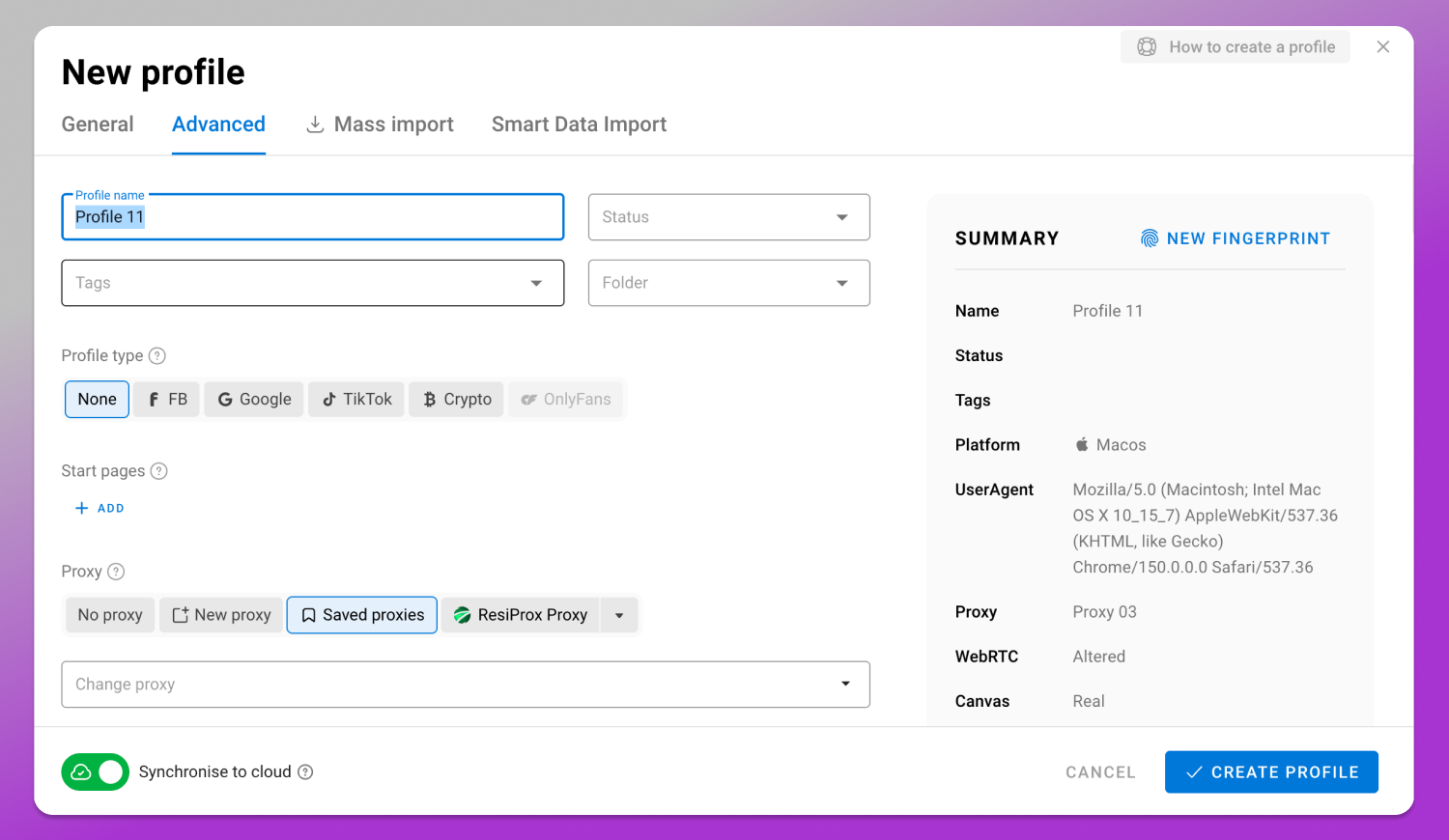
For agencies, Dolphin Anty team management grants access per user, with different permissions for whoever builds campaigns and whoever only reviews results, without sharing a client’s password. API automation covers the repetitive part: creating profiles in bulk, distributing proxies, and launching sessions without manual work.
Tools for running several accounts
- Dolphin Anty — the best option for anyone managing several ad accounts at once: its own fingerprint per profile across more than 20 parameters, isolated proxy and cookies, per-user permissions, and API automation. Signup includes 5 free profiles, no card required. Plans run from Free $0 (5 profiles) and Starter $10/month (20 profiles) to Base $89/month (100 profiles), Team $159/month (300 profiles), and Enterprise $299/month (1000 profiles), plus Custom with unlimited profiles priced on request. It runs on 64-bit Windows, macOS (Intel and M-series chips), and Linux.
- Multilogin — an alternative in the same segment: Free forever with 5 profiles, deleted after 7 days, Pro at $11/month or $85/year, and Business at $89/month. It is 64-bit only, requires Windows 10+, macOS 14 Sonoma+, or Linux Ubuntu 22+, and does not support Windows on ARM.
Frequently asked questions
What is the best paid traffic platform for beginners?
Meta Ads tends to be the most accessible starting point: the interface walks you through setup step by step and lets you test with small amounts. Anyone selling something people already search for by name usually sees a faster return on Google Ads.
How much does it cost to start with paid traffic?
There is no universal floor, but there is a practical reference: the platforms technically accept campaigns for as little as $1/day, though that amount almost never generates enough data to optimize. In practice, $20 to $50 a day (roughly $600–$1,500/month) tends to be the real operational floor to exit the learning phase, with higher-competition niches needing more.
Do I need a registered business to advertise?
You do not need a registered business to open an ad account, but registration becomes close to mandatory as the operation grows: without it there are no invoices, and several sales channels reject individual sellers. Registering before you scale avoids migrating the account mid-campaign.
Can you learn paid traffic on your own?
Yes, you can learn paid traffic on your own. The platforms themselves maintain free certifications, such as Meta Blueprint and Google Skillshop, and many countries run public digital training programs for small businesses. What cannot be replaced is hands-on practice with a real budget, however small.
Can you run paid traffic without a website?
Yes, you can run paid traffic without a website. On Meta Ads the click can open a WhatsApp conversation, land on your profile, or fill in a form inside the platform itself. Without a site, tracking is limited to what the ad records, and comparing channels gets harder.
Conclusion
Paid traffic works when every stage is treated as a decision rather than a setting: platform chosen by purchase intent, billing resolved before the campaign, and budget measured against what the business can absorb. Start small, measure with correct tracking, and scale only what has already proven it works.