
How many Gmail accounts can I have? Google does not publish a numerical cap, and it does not publish one for how many accounts a single phone number may confirm either. What gets limited is the way accounts are created and used. So the fourth mailbox you open may not open at all: instead of an empty inbox, you get a verification screen. This guide is for freelancers juggling personal, work and project mail, agencies with a mailbox per client, and sellers with a mailbox per storefront. You will leave with a working setup, not a number.
The Short Answer: Is There a Limit on How Many Gmail Accounts You Can Have?
There is no official limit on how many Gmail accounts one person may hold. There are three real constraints, and they are different things:
- The Google Terms of Service. Accounts have to be created and used by a real person for legitimate purposes. Bulk registration for spam or engagement farming breaches the rules, and enforcement can reach the accounts Google associates with each other.
- The inactivity policy. Google treats an account as inactive after 2 years and may delete it along with its content. The published exceptions are narrow: an active subscription or purchase, a gift card balance, a published app with active transactions, a Family Link child account, and purchased digital content.
- Creation-time checks. This is where most people actually stop.
One definition clears up half the confusion here. A Google account and a Gmail address are not the same object. The Google account is the identity: Drive, YouTube, Play, Ads, payment methods, security settings. The Gmail address is the mailbox attached to that identity. A second mailbox that is genuinely separate means a second Google account, with its own password, recovery data and security history.
You will find confident figures elsewhere: so many mailboxes per account, so many accounts per phone number. Those are community estimates repeated until they sound official. Google publishes neither, and building a workflow on them is how people get locked out. This guide names no such number.
What Is Actually Limited: How Accounts Are Created
Registration is the checkpoint. Google asks for a phone number during sign-up in many cases, and one number stops confirming new accounts after a point Google never states in advance. Treat that threshold as a wall you hit, not a budget you plan against.
The second check is behavioral, and it catches people who did nothing wrong. Sign-ups made back to back from one environment look like one entity mass-registering, because from the outside they are indistinguishable. One IP address, one browser fingerprint, one shared cookie pool, one device: three accounts open smoothly, and the fourth suddenly demands a phone number the previous three never asked for. Same laptop, same session, same ten minutes.
Fingerprint here is not a metaphor. Screen resolution, timezone, language headers, fonts, canvas and WebGL output, hardware concurrency and a long list of other parameters combine into a value stable enough to recognize a browser across sessions. Cookies tie those sessions together.
Verification Hold: What It Is and What to Do
This is the state most guides skip, and the one that costs the most time.
What Verification Hold Looks Like
You sign in with the correct password and land not in the inbox but on an interstitial. Wording varies, the pattern does not: Google says it needs to confirm it is you, and offers a channel. A code to a phone. A prompt on a device already signed in. A recovery email. Sometimes a form asking questions only the owner can answer.
During a hold you cannot read the mailbox, and anything wired to that mailbox stops with it: password resets, two-factor codes delivered by email, ad platform notifications, marketplace messages from buyers.
Hold vs Suspension vs Deletion
Three states, three responses, and mixing them up leads to the wrong action.
| State | What happened | What it means |
| Verification hold | Google wants proof of ownership | Access is paused. Complete the check; account and data are intact |
| Suspension | Restricted for a policy breach | Access withdrawn. The route is an appeal, not a retry |
| Deletion for inactivity | Nobody signed in for the period set by policy | Content can be gone permanently. Prevention is the only fix |
The hold is the recoverable one. People escalate it into a disaster by treating it as a ban.
What Google Asks For and What to Do by the Book
The requested proof depends on what the account has on file: a code sent to the recovery phone or address, an approval tap on a device already signed in, backup codes saved when two-factor was set up, or the account recovery form when none of those still works.
Do the check from where you normally use the account. Same device, same browser, same network, same profile. Familiar context helps; an unfamiliar one gives the system a reason to ask for more. Answer with accurate data, including the approximate creation date and the last password you remember.
Then wait. Some checks clear immediately, others go into review, and Google publishes no promised turnaround for the second kind. Nobody can guarantee an outcome, and no tool changes it.
What Not to Do
- Do not open a replacement account. Registering a new mailbox from the same environment while one sits under review associates the two and multiplies the problem.
- Do not enter someone else’s data. Borrowed identity details fail the check and turn a recoverable hold into a policy case.
- Do not attempt the check from a different environment. Switching device, network or country mid-verification looks like the thing the check exists to catch.
- Do not hand credentials to anyone promising a fix. There is no back channel.
Legitimate Reasons to Keep Separate Mailboxes
Multi-accounting is normal work, not a trick. Sellers keep one mailbox per storefront across Amazon, eBay, Etsy, Shopify and TikTok Shop, because each platform ties recovery, payouts and buyer messages to that address. Media buyers keep Meta Ads and Google Ads mail away from personal correspondence. An agency opens a mailbox per client so access to that client’s ad account and analytics can be withdrawn cleanly when the contract ends. A freelancer runs three: personal, business, and one for the noisiest project.
The limits come from platform rules, not an arbitrary count. Google Terms of Service govern the accounts. The Amazon Seller Code of Conduct governs how many selling accounts you may operate and on what grounds. Meta Advertising Policies govern advertiser behavior.
One legal note: mail you send and store carries personal data, and the applicable regime follows your recipients. Correspondence and mailings involving people in the EU fall under the GDPR, in the UK under the UK GDPR, and for California residents under the CCPA as amended by the CPRA.
When an Alias Is Enough (And When It Isn’t)
Gmail supports plus addressing (yourname+shop@gmail.com) and ignores dots in the local part, so first.last@gmail.com and firstlast@gmail.com reach the same mailbox. One exception catches people out: that rule is for @gmail.com addresses, and “if you use Gmail through work, school, or other organization” on its own domain, dots do change your address. Both are useful for filters and labels: route everything tagged +shop into one label, and see which sign-up form leaked your address.
Here is the limit that matters. An alias is the same mailbox and the same account. It shares the password, the recovery data, the cookies and the enforcement history. If the account is restricted, every alias goes with it. Aliases organize; they do not isolate.
When You Need a Domain, Not Ten Mailboxes
For a team, ten personal mailboxes is the wrong shape. Email on your own domain through Google Workspace gives each person an account you administer: you create it, you set the recovery data, you revoke it the day they leave. Shared addresses such as support@ let several people work one stream without anyone passing a password around, and delegated access lets a colleague read and send from a mailbox under their own login instead of yours: delegation works even in a free @gmail.com account, for up to ten delegates, and scales far higher inside Workspace.
That solves ownership. It does not solve isolation between accounts on external platforms, which is a browser-side problem.
Managing Several Gmail Accounts Day to Day
One mailbox, one role. The moment a mailbox serves two purposes, recovery gets tangled and handover becomes impossible. Name them so the role is visible, and keep a register:
| Mailbox | Role | 2FA | Recovery email | Backup codes |
| personal | private only | yes | secondary personal | stored |
| studio.work | invoices, contracts | yes | owner mailbox | stored |
| studio.clienta | Client A ad accounts | yes | studio.work | stored |
| studio.clientb | Client B ad accounts | yes | studio.work | stored |
| studio.sandbox | testing, sign-ups | yes | studio.work | stored |
Fill that table before you need it. The day an account asks for proof is not the day to discover the recovery address points to a mailbox you closed.
Delegation instead of shared passwords. Gmail can grant another account permission to read and send on behalf of a mailbox, which is how an assistant handles billing@ without knowing the password. It is available on free accounts too, with published ceilings: a personal @gmail.com account can add up to 10 delegates, a work or school account up to 1,000. Revoking a delegate takes seconds.
Two-factor on every mailbox, including the boring ones. The sandbox account is the one attackers reach first, and it is the recovery address for the others.
The account switcher and Gmail’s multiple inboxes help you read faster. Neither separates anything.
Why the Account Switcher Is Not Isolation
Signing in to several accounts in one browser puts them in one profile. One cookie store, one fingerprint, one IP address, one device history. Google’s services correlate sessions inside that profile by design, which is what makes the switcher instant.
The consequence shows up under pressure. An agency operator flips between eight client mailboxes in a single window all day. Google raises a security check on one, and it arrives across the linked set, each needing its own confirmation, several tied to phone numbers belonging to clients abroad. Nothing was violated. The environment presented eight accounts as one operator.
Convenience and separation are opposite goals. Pick one per mailbox.
Separate Environments: A Profile per Mailbox (or per Role)
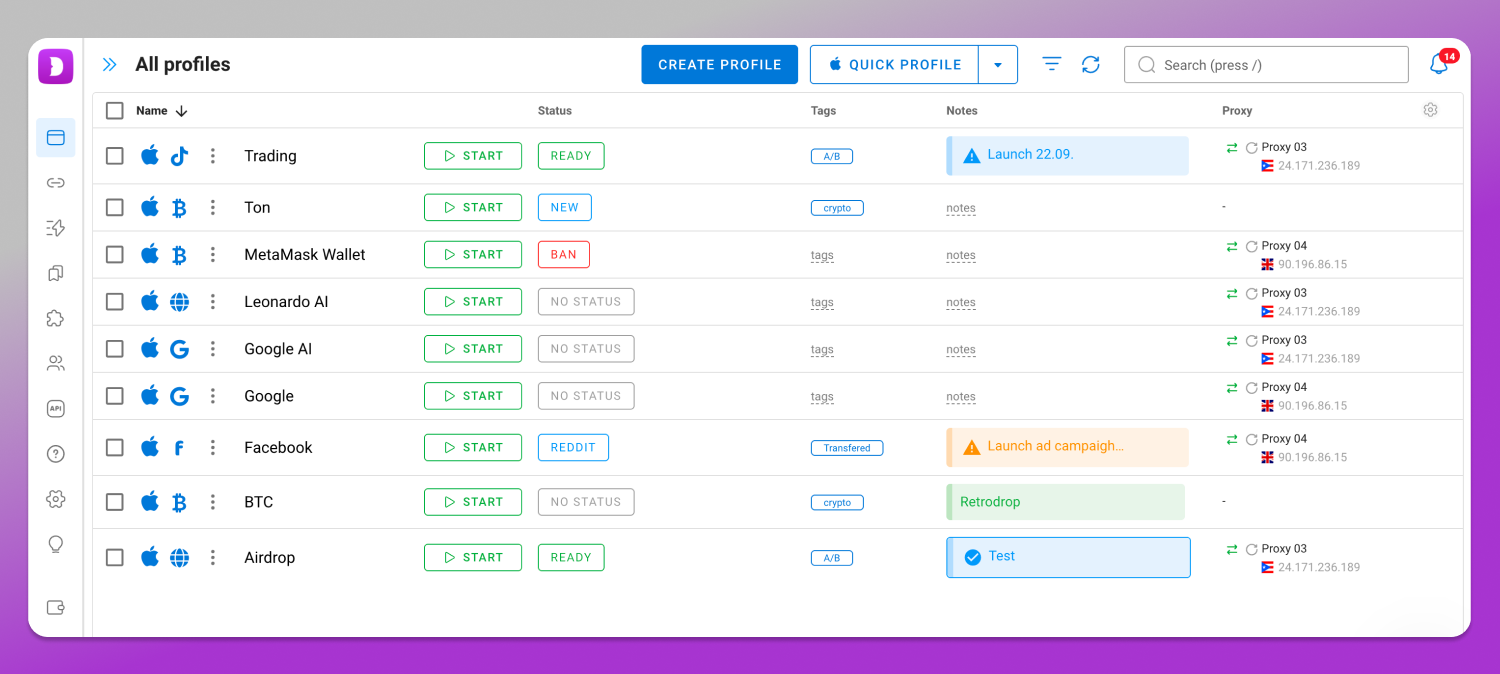
If sessions are linked because they share an environment, give each mailbox its own. That is what an antidetect browser does, and where 🚀 Dolphin Anty fits: one profile per mailbox or per role, each with its own fingerprint, its own proxy, its own cookie storage, and timezone and language matched to that proxy. Profiles do not bleed into each other, so switching contexts does not drop sessions, and a project moves to a new team member as an access right rather than a password over chat. Dolphin Anty runs on Windows, macOS and Linux; profiles live on the desktop, not on a phone. For current plans and profile allowances, check the Dolphin Anty pricing page.
Be clear on what this is for. Separate environments are working conditions for mailboxes you are entitled to run. They do not register Gmail accounts for you, they do not lift or speed up a verification hold, and no tool guarantees that platforms will never associate accounts.
If You Lose Access or an Account Gets Stuck on Review
Start with Google’s official account recovery form and answer from memory rather than guesswork: the last password you recall, roughly when the account was created, the recovery address and phone on file, devices already signed in. Try from a device and network you have used with that account before.
A second submission with better details can still succeed. There is no queue to jump, and no support channel overrides the form.
Prevention is cheaper, and it is the register above: current recovery email, current phone, backup codes stored outside the mailbox they protect.
Frequently Asked Questions
How many Gmail accounts can I have with one phone number?
Google does not publish that figure, and the practical answer depends on the number’s history. At some point a number stops confirming new accounts. Google Account Help is where to check the current wording on phone verification before you plan around any number you read elsewhere.
How do I create an additional Gmail account?
From an existing session, open the account switcher and choose to add another account, then follow the standard sign-up. Google may ask to verify with a phone number, and the same number can cover a limited number of accounts before it stops being accepted. If you plan to run several mailboxes side by side rather than switch between them, decide the separation before you create the second one: one profile per mailbox is easy to set up on day one and tedious to retrofit after ten.
Can I create 200 Gmail accounts?
The blocker is not a counter. Mass registration from one environment triggers verification long before any number matters, and bulk creation for mailings or engagement farming breaches the Terms of Service and puts the associated accounts at risk.
Can I have two Gmail accounts on the same device or computer?
Yes. Adding both to the browser or to a mail client is fine for personal and work mail. In one browser profile they share cookies, fingerprint and IP, so a security check on one tends to surface on the other.
Does an alias count as a separate account?
No. Plus addressing and dot variations route to the same mailbox and the same Google account. They share credentials, recovery data and enforcement history. The one caveat: dots are ignored on @gmail.com addresses, but on a Workspace account using an organization’s domain they do change the address.
What happens if I create 10 accounts in a row?
Expect phone verification partway through, then stricter checks, then failed sign-ups from that environment. Accounts created in a burst are also associated with each other, so a problem on one draws attention to the rest.
How do I keep my two Gmail accounts separate?
Give each one a role and never mix them, set independent recovery data and two-factor on both, and give each its own browser environment if the platforms attached to them care about account separation. Sharing a window is what links them.
How do I check how many Gmail accounts I have?
Open the account switcher to see accounts signed in on the current device, then search your password manager and recovery mailboxes for Google sign-up notifications. No single page lists every account a person ever opened.
Is it worth having two Gmail accounts?
For most people, yes. Personal mail and business mail have different retention needs, different recovery risk and different notification noise, and separating them costs one setup session.
A note on the rules: staying inside the Google Terms of Service and each platform’s program policies is your responsibility. Registering mailboxes in bulk for mailings or engagement farming violates those rules and can take the linked accounts down with it.
Looking for Google Services, Not Gmail?
This guide covers mailboxes: how many you can hold, what stops you at creation, and how to run several without them collapsing into one tangled identity. Managing the wider Google account and the services hanging off it, such as Ads, Drive, YouTube and Play, is a separate subject with its own access model and rules.