
When an account is suspended, the ads stop serving and access is restricted. Campaign history stays visible, spend stops, nothing you edit takes effect. The phrase people type into search right after that email is short: google ads suspended. What the email always contains is a named reason, and the name is the whole story. Circumventing systems, Suspicious payment activity, Unpaid balance, Unacceptable business practices are four different problems with four different fixes, and confusing them is why appeals get rejected twice. Below, each reason from Google’s official list is explained in Google’s own wording, followed by the appeal procedure and the workflow that keeps it from happening on the next account. This guide does not promise reinstatement and does not describe ways around a sanction.
Suspension vs. Disapproved Ad vs. Policy Warning: What Actually Happened to Your Account
Three states get mixed up constantly, and they carry different consequences.
A disapproved ad is a single creative or keyword blocked at review. The rest of the account runs. You fix the asset, resubmit, and the item goes back into rotation.
An account-level policy warning is a notice that something in the account violates Google Ads Policies. Delivery continues. Repeated disapprovals of the same policy type usually produce these, and ignoring them is how accounts move to the next state.
Between the warning and the suspension sits a strike system, and it applies to a defined list of policies rather than to everything in the rulebook. The first violation of a covered policy brings a warning with no strike attached. A first strike pauses the account for 3 days. A second strike within 90 days pauses it for 7 days. A third strike within 90 days is a permanent account suspension.
An account suspension is an administrative action at account level. Every campaign stops. For a subset of policies that Google calls egregious policy violations, the suspension arrives with no prior warning at all.
The reason is visible inside the account, not just in the email. Google Ads reports policy issues by type and by affected item, and a suspended account carries a notice in the interface with a link that opens the appeal path. Interface labels shift between releases, so work from the policy name in the notice rather than from the wording of the banner.
Why Google Ads Suspends Accounts: The Official Reason List
Google groups suspension causes into a handful of categories: billing and payment requirements, Google Ads Policy requirements, unauthorized account activity, age requirements, and Ads Grant policy requirements. Inside the policy group sits the egregious list, where enforcement is immediate and arrives without warning. Google defines an egregious violation as “a violation so serious that it is unlawful or poses significant harm to our users or our digital advertising ecosystem,” and names ten categories: circumventing systems, coordinated deceptive practices, counterfeit, malicious software, prescription opioid painkillers, promotion of unauthorized pharmacies, unacceptable business practices, trade sanctions violation, sexually explicit content, and child sexual abuse material.
Suspicious Payment Activity
This one is triggered by the payment profile, not by the ads. Signals that draw attention: a card issued to someone other than the account owner, a billing country that does not match the payment profile or the business entity, frequent changes of payment details, and the same card used across several accounts.
The last one catches agencies constantly. A media buyer sets up three client accounts and pays for all of them with the company card, because that is the fastest way to get campaigns live. Those accounts now share a payment identifier. The legitimate version is slower: each client account carries the client’s own billing entity, with a verifiable payer and a billing country that matches the business behind the advertising.
Unpaid Balance, Chargebacks and Billing Issues
Outstanding debt, a declined card that is never replaced, Requesting a chargeback on a Google Ads charge, and Promotional code abuse all fall under billing and payment requirements. A chargeback is treated as a payment dispute rather than a policy question, and reversing it has to happen before anything else moves.
Reinstatement for a billing cause follows a different route from a policy appeal, and Google documents that route separately in its help center. There is no public “you owe more than X” threshold to plan around, and no published timetable for how quickly a reactivated account starts serving again.
Circumventing Systems: The Reason Behind Most Repeat Bans
Circumventing systems covers any attempt to get around Google’s review or enforcement machinery. Cloaking, where the crawler sees one page and the user sees another. Redirects that land on content different from what was declared. Destination mismatch between the ad and the landing page. And, most relevant here: opening a fresh account to replace a suspended one.
That last point deserves to be said flatly, because half the advice on this topic says the opposite. Registering a new account after a suspension is itself a violation. Not a workaround: the trigger for a second enforcement action, and it reaches linked accounts as well as the new one. Each replacement account is one more enforcement target, and the earlier ones do not come back. While a suspension is under appeal, the suspended account is the only one you should be touching.
Misrepresentation and Unacceptable Business Practices
Misrepresentation covers claims the advertiser cannot substantiate, omission of relevant information, and offers that differ from what the landing page actually delivers. Unacceptable business practices sits on the egregious list and covers scamming users out of money or personal information.
Most of what gets flagged here is fixable on the site. A landing page that survives review has real contact details, a named legal entity, a privacy policy, terms describing the actual offer, and a refund policy where money changes hands. Pricing on the page matches the ad. A trial that converts to a subscription says so before the card is entered.
Policy Violations by Vertical: Where Certification Is Required
Several verticals require the advertiser to be certified before ads run at all, and financial services, healthcare and gambling are the ones advertisers hit most often. The set is not fixed and not uniform across markets: certification obligations, licensing evidence and outright restrictions are defined country by country and revised on Google’s own schedule. A permission granted for one country says nothing about the same product in another, so read the policy pages for every country you target rather than working from a list someone assembled once.
Treat this as a legal question about what you are allowed to advertise where, not as a review-passing question. Remarketing has its own regime: audience collection and ad personalization fall under GDPR in the EU, UK GDPR in the United Kingdom, and CCPA/CPRA in California, with consent and disclosure obligations sitting on you rather than on Google.
Unauthorized Account Activity and Security Flags
Unauthorized account activity covers logins Google reads as anomalous, compromised credentials, and malicious software or hidden scripts on the advertised site. It also catches accounts where access went to a contractor who then did something the owner never saw.
The response is unglamorous. Review the user list and revoke everyone who no longer needs access. Check access levels rather than assuming, since admin rights get handed out casually and never taken back. Turn on two-factor authentication for anyone with billing or admin rights. Scan landing pages for injected scripts, especially on sites running third-party plugins.
Linked Accounts: How Google Connects Your Ad Accounts to Each Other
Suspensions often arrive for several accounts at once, which surprises people who thought their accounts were unrelated. Payment instruments, advertised domains and user access are connections Google sees without any inference at all: a shared card or a shared login is a recorded fact. What Google uses beyond those recorded facts is not published, so the safe assumption is that anything two accounts share can connect them, and the working rule is to share nothing between accounts you need kept apart.
The agency scenario is the common one. Five client accounts, one manager account, one buyer logging into all of them from the same machine and the same browser profile, one corporate card covering the shortfall when a client’s payment fails. Those five now share a payment identifier, a cookie store, an IP address and a login pattern. When one client’s landing page triggers Misrepresentation, enforcement rarely stops at that client.
One structural note for agencies, because these numbers are published. A manager account can be linked to a maximum of 85,000 non-manager accounts. Separate ceilings apply to how many of those can be active, based on spend across a rolling 12 months: up to $10,000 a month allows 50 active accounts, $10,000 to $499,999 a month allows 2,500, and from $500,000 a month there is no separate limit.
Google Ads Suspended: What to Do, Step by Step
- Read the email and find the reason in the interface. The email names the policy; Policy Manager shows which items were affected. Both matter, since the email is short and the interface is specific.
- Fix the violation before you appeal. An appeal filed while the problem is live is a wasted attempt. Take down the offending page, replace the payment method, remove the compromised user, whatever the named reason calls for.
- Write down what changed. Dates, URLs, screenshots of the corrected pages. Specifics beat assurances.
- Submit through the official form. The “Contact Us” link in the suspension notice inside the account opens the appeal.
- Wait for the decision by email. The account shows an “Appeal pending” status while review is underway. There is no published cap on how many appeals you may file, but volume works against you: “If you file too many appeals for the same account suspension, we may not process them,” and Google can pause processing your appeals for 7 days.
There are no guaranteed outcomes here, and anyone selling one is selling something else. What is predictable is what makes it worse: opening a replacement account, buying or renting someone else’s, swapping the payment method to slip past a billing flag. All three read as Circumventing systems.
Advertisers established in the EU have additional procedural rights under the Digital Services Act, including a statement of reasons for enforcement decisions. What Google publishes about how those rights work on its own services sits in its help center, and that is where to read the current wording before you file anything.
Prevention: Separate Working Environments per Account
Prevention here means process, not insurance. Nothing stops enforcement against an account that breaks policy. What a clean setup does is keep one client’s problem from becoming five clients’ problem.
The working rules: one environment per account or client, never shared. A stable IP and geography consistent with the entity behind the account and the market it targets. No shared sessions or cookies between accounts. Defined access levels per team member, with a record of who logged into what. Fingerprint, time zone and browser language that agree with each other and with the account’s stated location. Honest billing and legal details under each account.
This is where a tool like 🔥 Dolphin Anty fits: one account gets one browser profile with its own fingerprint, its own proxy and its own cookie storage, plus team permissions so a buyer sees only the accounts assigned to them. It runs on desktop — Windows, macOS and Linux. It organizes work across accounts you have the right to operate. It is not a way to hide linked accounts, evade a suspension, or guarantee that nothing gets blocked.
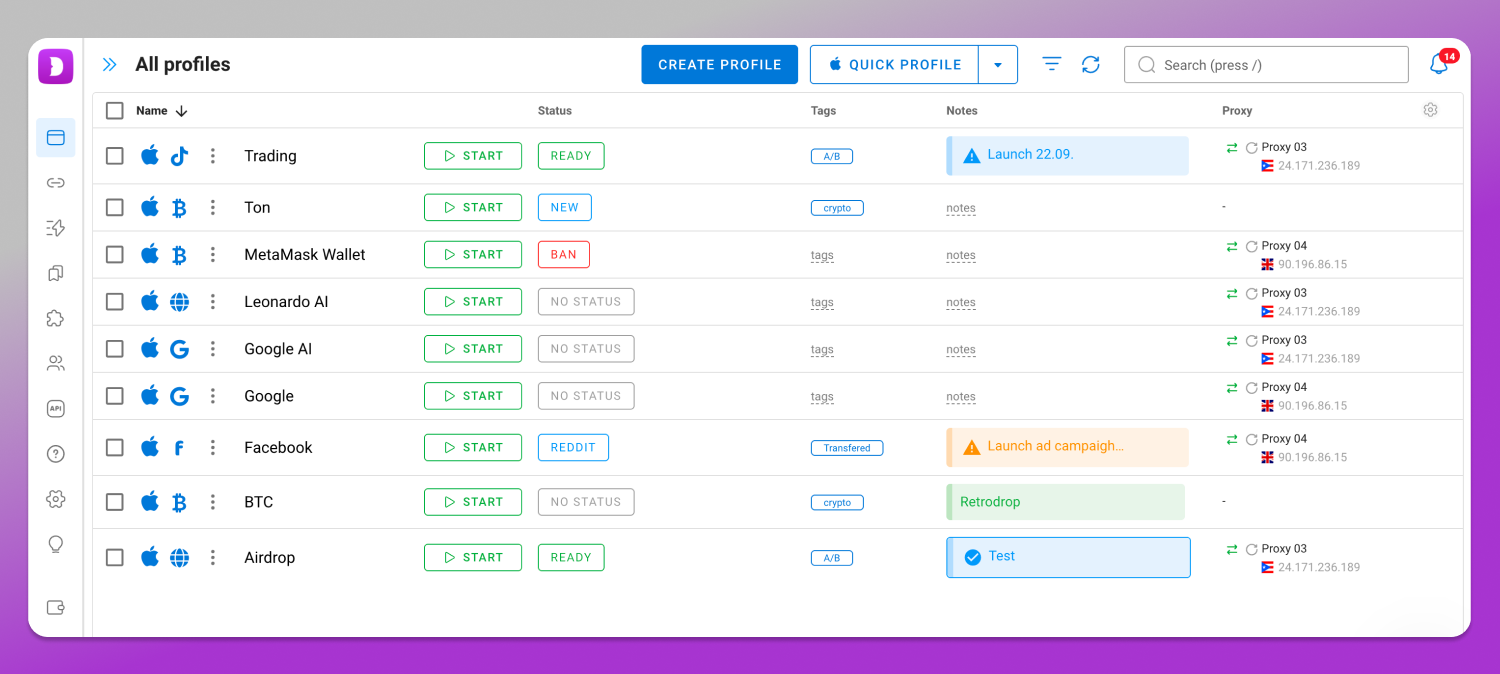
In practice, setting up one client account looks like this: create the profile, pin the fingerprint parameters that matter for consistency (WebGL, canvas, screen resolution, time zone and language among them), attach a proxy in the client’s country before the first login, then sign in and let that profile hold the session permanently. The buyer assigned to that client gets that profile and nothing else. For limits, check the current plans on the Dolphin Anty pricing page.
Frequently Asked Questions
How do I unsuspend my Google Ads account?
You cannot unsuspend it yourself. Identify the named reason, correct the underlying problem, then appeal through the “Contact Us” link in the suspension notice. Google reviews it and sends the decision by email. Appealing without fixing the cause is the most common reason appeals fail.
How long does a Google Ads suspension last?
It lasts until an appeal succeeds or, for some violations, permanently. Google does not publish a fixed duration, nor a committed turnaround for reviewing an appeal, and the outcome depends on the policy involved and on whether the violation was corrected.
Is a Google Ads account suspension permanent?
For egregious policy violations, enforcement can be permanent and extends to associated accounts. For billing causes and correctable policy issues, reinstatement is possible once the problem is resolved. The distinction sits in the reason named in your notification, which is why reading it precisely matters.
Why did Google say my account was suspended when I didn’t change anything?
The trigger usually sits outside the ads. A card that expired, a chargeback filed by your finance team, a plugin injecting scripts into your site, a login from an unfamiliar location, or a policy update applied to existing campaigns. Automated review runs continuously against live accounts.
What happens if my appeal is rejected?
Read the rejection for what it says was still unresolved, since a second appeal repeating the first adds nothing. Fix what remains, gather evidence, and use the official channel again. Do not open a replacement account while any of this is in progress.
Is this the same thing as an AdSense suspension?
AdSense is the other side of the business: it is the product for publishers who show ads on their own site, app or channel and get paid for it, while Google Ads is the product for advertisers who pay to run those ads. This page covers the advertiser side only. If the email you received came from AdSense, the policies, the reasons and the appeal form are all different ones, and nothing here applies to it.
Where This Leaves You
Open the suspension notice, take the exact policy name it gives, and treat that name as the specification for what to fix. Everything else is guesswork. For the accounts still running, separate the environments now, while it is a scheduling problem and not a recovery problem.
Responsibility for complying with Google Ads Policies and with the law in each market you target sits with the advertiser. Regulated verticals can require certification, licensing, or both before a single ad runs.
If separating those environments is the next task, Dolphin Anty runs as a desktop application on Windows, macOS and Linux, with one profile per advertising account and its own proxy attached to each. Current plans and profile limits are listed on the 🚀 Dolphin Anty pricing page.