
Yes, you can have multiple Pinterest accounts, and no workaround is involved. Pinterest’s help center describes creating an additional account using a different email address, and the profile menu carries an Add Pinterest account item for exactly that. Linked accounts switch inside the interface, without logging out. The native path runs out somewhere else: an agency holding a dozen client accounts, or a multi-brand seller with separate billing details and separate claimed domains per storefront. Below is the native mechanism step by step, the test for when it’s enough, and how separate browser environments work when it isn’t.
What Pinterest Officially Allows: The Native Multi-Account Setup
The flow on desktop:
- Click your profile picture or the chevron in the top right corner.
- Choose Add Pinterest account.
- Pick Create for a new account, or Log in to attach one you already own.
- When creating, choose a personal account or a business account.
- Enter a different email address from the one on your first account.
That same chevron menu now lists both accounts, and one click moves between them. In the mobile app the switcher sits in profile settings and works the same way, which answers the “two accounts on one phone” questions circulating on Reddit and Quora. Everything below about separate environments is a desktop workflow (Windows, macOS, Linux).
Converting a personal account into a business account is the other supported move: conversion keeps your pins and followers, and it’s reversible. One thing is no longer on the menu, and it catches people out: “It’s no longer possible to link a personal account to a business account. If you previously linked your accounts, they’ll remain connected unless you unlink them.” Pinterest also documents a way to merge accounts, which matters if you’ve collected three half-used profiles and would rather consolidate than juggle. What a merge carries across and what it leaves behind is set out in Pinterest’s own help pages, so read that first: consolidating is a decision about content, not just about logins.
What the documentation doesn’t state is a ceiling. Pinterest publishes no maximum number of accounts per person, per device or per IP address. Members on the Pinterest Business forum report running three or four accounts from one laptop without trouble. That’s participant experience, not a rule.
Can You Use the Same Email for Two Accounts?
No. Each Pinterest account needs its own email address. That settles the “two accounts under one Gmail” question.
You’ll find advice recommending Gmail plus-aliases (name+pinterest@gmail.com). Plenty of people do it and report success. It’s user practice, not a documented method, and Pinterest has never confirmed it. What Pinterest does state is the requirement an alias has to satisfy: “Each email address can only be linked to one Pinterest account at a time.” If an account matters commercially, give it a real mailbox you control, with its own recovery options and two-factor authentication.
Personal vs Business Account: What You Actually Get
A personal account pins, saves and follows. A business account adds the machinery you need to sell. Pinterest Analytics reports impressions, saves and outbound clicks per pin and per board. An ad account runs paid campaigns and handles Pinterest Ads billing. A claimed website attributes pins from your domain back to you and enables Rich Pins, which pull live product data (price, availability, title) into the pin. For a Shopify store or an Etsy shop, that claimed-domain link is the reason to hold a business account at all.
Conversion isn’t automatically right. If your personal account holds five years of recipe boards and your new brand sells lighting fixtures, the follower base works against you. A clean business account on its own email and claimed domain starts slower and ends up healthier.
The Agency and Multi-Brand Layer Pinterest Already Covers
Most guides skip the part that matters for anyone managing accounts they don’t personally own.
Pinterest Business Manager organizes business accounts into a hierarchy of parent and child accounts. The parent holds the structure; child businesses keep their own ad accounts, audiences and data, invisible to each other. One appointment is mandatory: “You are required to add at least one Organization Manager to your account, who will act as an administrator across all child accounts.” Below that sits the per-business role list — Account Owner, Manager, Employee and Partner — with access granted per business rather than globally. Organization Manager belongs to the organization level, not to that list. Partner access and employee access are separate: an agency attaches to a client’s business without the client losing control, and either side can revoke the relationship.
Pinterest’s business documentation also sets an invitation ceiling: “You can add up to 20 businesses at one time.” That’s a batching limit on a single round of invitations, not a cap on how many accounts you may own or manage.
Set this up first if you run an agency. Ten browser windows and ten stored passwords don’t substitute for a permission model with an audit trail.
Where the Native Mechanism Stops Being Enough
Business Manager solves ownership and permissions. It doesn’t solve the browser. Four situations where the account switcher runs out:
Separate payment identities. Two brands, two entities, two cards funding two ad accounts. One browser session across both means the platform sees one device paying for everything.
Agency work with a real perimeter. Each client has a different specialist assigned, and access has to end cleanly when the contract does. A shared password on a shared machine is the opposite of that.
Geo-targeted storefronts. You pick country/region and language at registration, and that setting sticks. The browser doesn’t follow it: IP address, time zone and accepted languages stay whatever the operator has. A German storefront run from a Manila IP with a Manila clock is a mismatch you created yourself.
A distributed team on one account. Three people in three cities produce a login log that looks like a compromise, because structurally it is one.
Why a Regular Chrome Profile Doesn’t Separate Anything
Chrome profiles separate bookmarks and saved logins. They don’t separate you. Every profile on the machine exits through the same external IP, and the device fingerprint is identical across all of them: canvas and WebGL rendering, installed fonts, screen resolution, hardware concurrency, time zone, language list. Signing profiles into Google accounts syncs history and extensions in ways you didn’t plan.
A question on r/Pinterest captures the moment this matters. Someone running several accounts asks whether people log out to switch, “or use a different browser profile for each.” Both answers are the same answer, because a Chrome profile and a logout differ only in convenience.
Platforms correlate signals across sessions to link accounts: IP address and its history, device fingerprint, cookies and logged-in sessions, shared payment instruments, shared phone numbers and recovery emails.
What Pinterest Treats as a Violation
Owning several accounts is fine. What you do with them is where the rules apply. Pinterest’s Community Guidelines and Terms of Service address spam and inauthentic behavior, artificially inflated saves or followers, misrepresentation, and automation outside what the platform permits. Duplicating content across accounts is the trap multi-brand sellers fall into without meaning to: identical pins, identical descriptions, identical destinations, posted in parallel. That reads as spam regardless of intent.
“Pinterest jail” is community slang for a sudden drop in reach or a suspension after unusual activity. It isn’t a Pinterest term and has no official definition.
Multiple Accounts Pointing to the Same Domain
An open thread on the Pinterest Business community forum keeps circling this, but the help center settles it: “A website can only be claimed by one Pinterest account.” So the friction isn’t the number of accounts, it’s the claimed website. A second account pinning heavily to a domain claimed by the first gets no attribution and no Rich Pins, and its pins can read as republished content. The clean structure is one brand, one domain, one claimed account. Regional storefronts get their own subdomain or domain, claimed separately.
How to Set It Up Properly: One Account, One Environment
The operating principle is boring and it works. One account gets one environment: its own browser fingerprint, IP address, cookie store, email and payment method. Team members get access to the environments they work in, and nothing else.
🔥 Dolphin Anty is a desktop antidetect browser (Windows, macOS, Linux) built for that shape of work. Its role here is narrow: a separate profile per Pinterest account, fingerprint parameters set per profile, cloud sync so a distributed team opens the same profile from different machines, and access rights issued per profile rather than across the workspace. For bulk routine actions there’s Synchronizer, which mirrors your input across several open windows. Whether any given use of it fits Pinterest’s rules depends on what you do with it. For current plans and profile limits, check the Dolphin Anty pricing page.
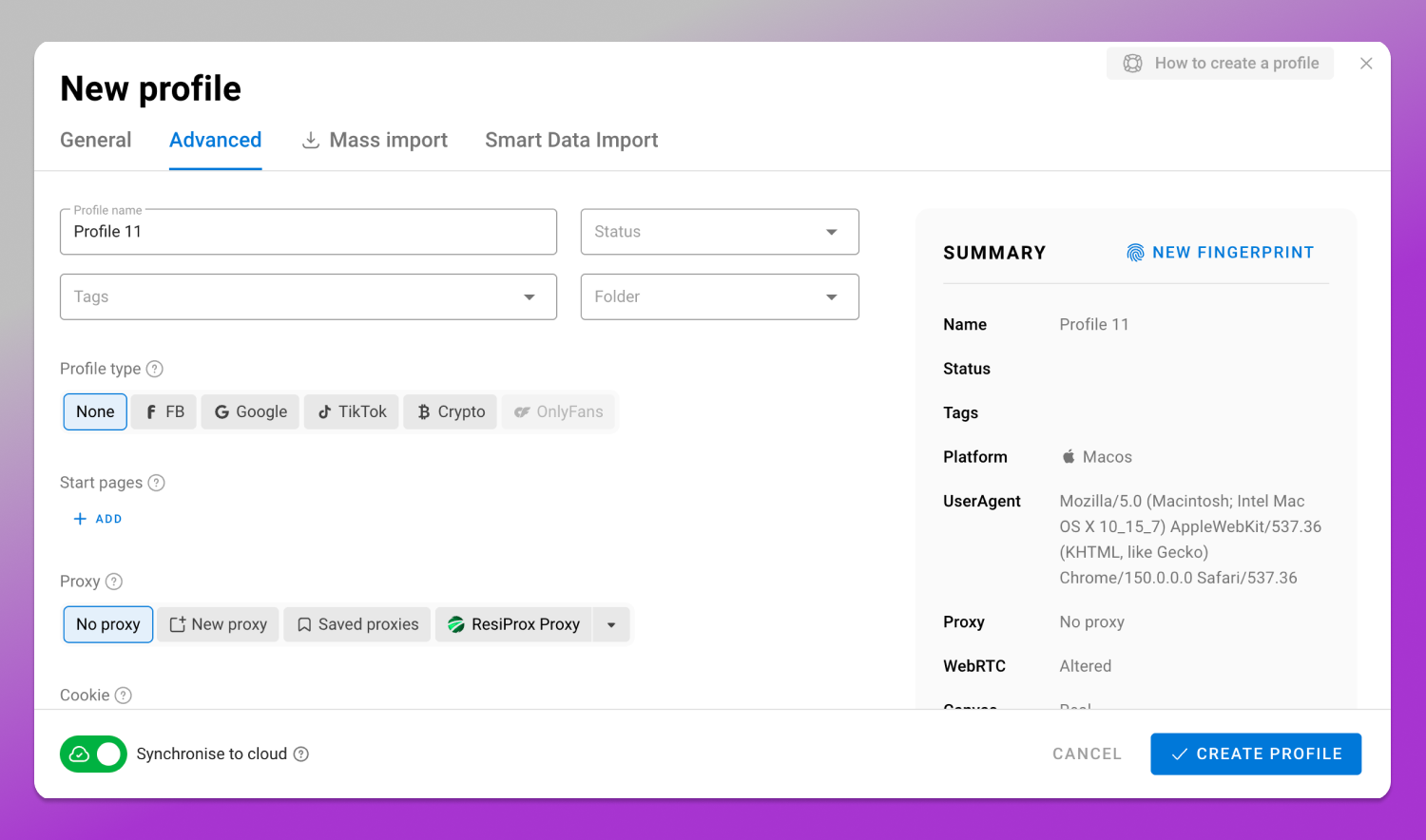
Per profile, the settings that matter for a storefront:
- Proxy in the country the storefront sells to, residential and stable rather than rotating per request.
- Time zone matched to that proxy’s country.
- Interface and accepted languages matched to the same country and to the account’s registration settings.
- A dedicated cookie store, never copied between profiles.
- Access rights granted to one employee for one profile, revocable when the contract ends.
Mobile is out of scope: there are no mobile profiles here, and phone-based switching is Pinterest’s own app feature.
Content Hygiene Across Multiple Brands
Separate environments keep sessions apart. Content still gives you away. Each brand needs its own boards, keyword set and pin descriptions, and its own claimed domain. Copy-pasting a pin between accounts is the most common cause of a multi-brand setup getting flagged.
Images carry legal weight on a visual platform. Pinterest operates a DMCA notice-and-takedown process, and repeat copyright complaints put an account at risk regardless of how well it’s isolated. Use your own photography, licensed stock with the license retained, or supplier images you have written permission to use.
Checklist: Launching Your Second (and Tenth) Account
Before registration:
- A dedicated email with its own recovery options and two-factor authentication.
- Payment details belonging to the entity that owns the brand.
- A domain ready to claim, verification method chosen.
- A proxy in the target country, assigned to that profile only.
- Correct country/region and language selected at signup.
After setup, verify:
- Time zone, language and IP geolocation all point to the same country.
- The fingerprint reads as one consistent device in a fingerprint checker.
- Business Manager roles reflect who actually needs access.
- The login log shows only expected sessions.
Don’t:
- Register a replacement for a suspended account instead of appealing.
- Buy, rent or sell accounts.
- Copy pins between your own accounts.
- Inflate saves or followers.
- Run posting schedules no human would produce.
Frequently Asked Questions
Can You Have Multiple Pinterest Accounts With the Same Email?
No. Each account requires its own email address. Gmail plus-aliases circulate as a workaround and are not documented or confirmed by Pinterest.
Can My Followers See My Other Accounts?
Linked accounts aren’t shown to your followers as a set. Anything you connect publicly, a claimed domain or the same website in your bio, is visible to anyone who looks.
How Many Pinterest Accounts Can I Use on One Device?
Pinterest doesn’t publish a per-device or per-IP limit. The practical answer depends on whether those accounts look like one person’s or like an operation.
How Do I Switch Accounts on Desktop Versus in the App?
Both use the linked-account switcher: the chevron by your profile picture on desktop, profile settings in the app. Separate browser environments are a desktop practice and don’t apply to the app.
Why Won’t Pinterest Let Me Switch Accounts?
Usual causes: the account was never linked, a session expired, the email is unconfirmed, or one account is restricted. Log in to the problem account directly and read the notice on it.
Is It Against Pinterest’s Terms of Service to Have Multiple Accounts?
Having several accounts is supported by the platform’s own tooling, and Pinterest’s rules are written around conduct rather than around a headcount. Spam, inflated engagement, duplicated content and misrepresentation are what the Terms of Service and Community Guidelines prohibit.
Where the Responsibility Sits
Multi-accounting is acceptable where it doesn’t breach the platform’s rules or the law that applies to you. Agencies need a documented basis for access to client accounts: a contract, and access granted through Business Manager by the client, not shared credentials.
If you run Pinterest Ads with custom audiences or the Pinterest tag on your site, data protection law applies to that processing. Which law depends on where your users are, not where you are: GDPR in the EU, UK GDPR in the United Kingdom, CCPA/CPRA in California, plus local regimes across Asia-Pacific and Latin America. Consent notices, tag configuration and audience uploads have to match the strictest regime your traffic falls under. Settle that before your second storefront collects anything.