
Pick the wrong proxy for a profile and nothing looks broken. The profile opens, the site loads, everything’s fine, and then the account dies three weeks later for no reason you can point at.
📋 This article is about the choice you make in the Proxy row when you create a profile: which of the three products on the market fits which job, what each one really costs per profile once you’re running fifty of them, and what to ask a seller before you pay. The numbers below come from the 🔗 Сaproxy catalogue, which compares 55 proxy providers grid by grid, so none of it rests on a single vendor’s landing page.
Here’s the short version, and the rest of the article is the reasoning behind it:
- Dedicated mobile ports for work that can’t afford a ban.
- ISP proxies for accounts that have to live for months.
- Rotating residential for accounts you expect to lose anyway, for profiles with light daily activity, and for the early stage of farming.
Why the IP is the one thing you can’t fake
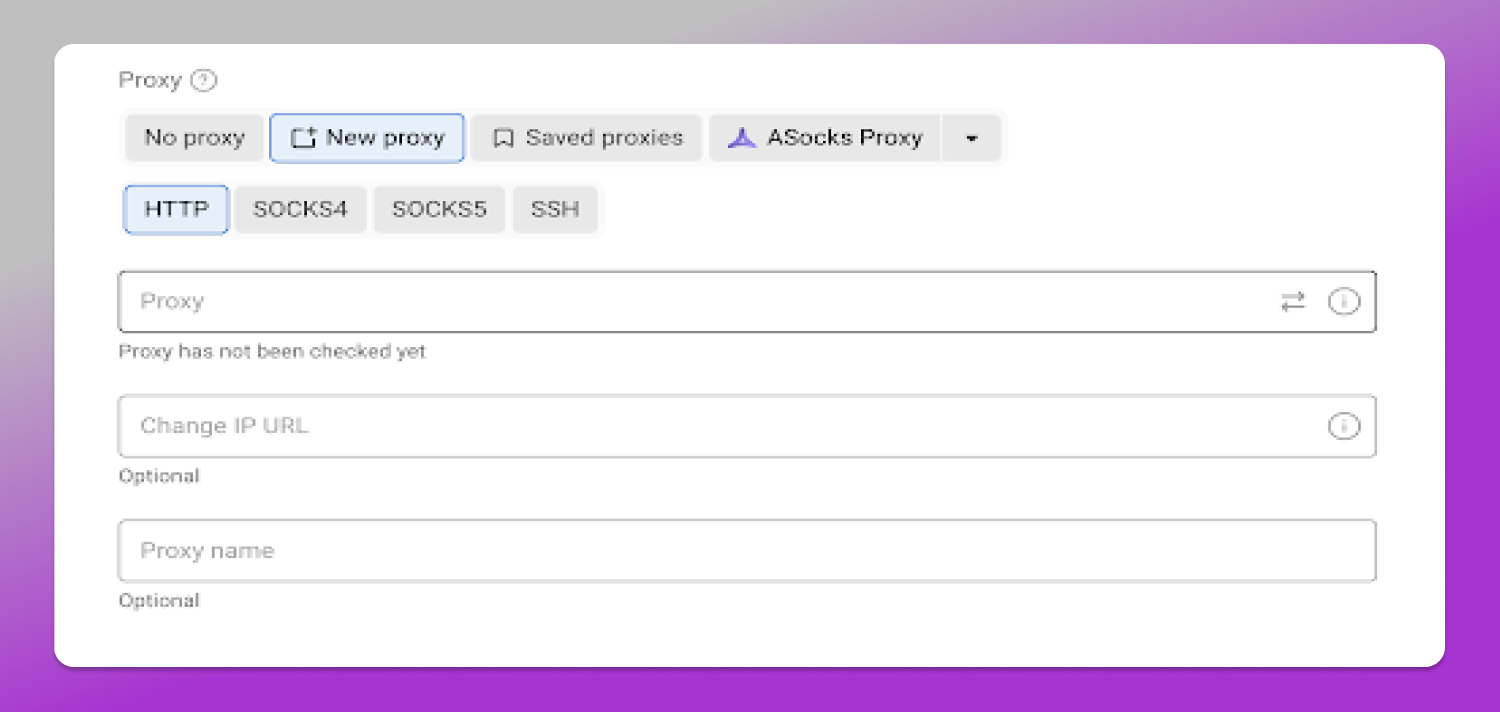
Everything else in that dialog is yours to shape. Screen size, fonts, canvas, WebGL, timezone, user agent. You write whatever story you like, and a different story for every profile. That’s the whole point of an antidetect browser.
The IP isn’t part of that story. It’s an address, and it either belongs to this profile or it belongs to whoever else is on it right now. You can’t spoof your way out of a shared address.
Which gives you the one rule everybody repeats, and everybody’s right about: two profiles must never sit behind the same address at the same moment. That’s the signal that links accounts, and linked accounts die together.
Now look at what the market actually sells. Out of those 55 providers:
- 46 sell rotating residential traffic
- 37 sell ISP proxies (often labelled static residential)
- 26 sell rotating mobile traffic
- 13 sell dedicated mobile ports
The product that gives your profile an address of its own is the rarest thing on the shelf. The one that hands it a shared address from a pool is three and a half times as common.
That’s not a conspiracy, it’s just arithmetic. One pool of residential IPs serves a thousand customers out of the same inventory, metered by the gigabyte. Nobody shares your address with you while you’re on it, to be clear. You just don’t hold it long, and the moment you let go it belongs to whoever asks next. A dedicated port sells to one customer and stays sold. You can guess which business model attracts more sellers.
Sticky sessions help, but only so far. They’re a genuinely useful feature on rotating proxies: your address holds for a window instead of changing on every request, which is enough for a login, a checkout, a scraping run. The window is the problem. A couple of hours is typical at the generous end, and after that the address goes back in the pool and someone in another country inherits it. If your work needs the same address next week, a sticky session was never the answer to that question.
Datacenter proxies aren’t the clever shortcut either, and the reason isn’t the one you’d expect. They’re not even cheap. A dedicated datacenter address runs about $1.50 a month against $2.35 for ISP. You save eighty-five cents per profile and hand every platform an ASN that reads as a rack in a hosting facility.
Mobile ports: for work that can’t afford a ban
A dedicated mobile proxy isn’t sold as an address at all. It’s sold as a 👉 port, a modem reserved for you, and the IP behind it changes when you tell it to, through a link, an API call or a timer.
That changes how you use it, and it’s where most price comparisons go wrong.
The cycle is sequential. A profile does its session, you rotate the IP, the next profile comes in on a fresh address. One port serves a queue of profiles across a day, and the rule still holds, because no two of them are ever in there at the same time.
Worth running the numbers. Say you’re warming forty accounts with twenty minutes of activity each per day. That’s about thirteen hours of work spread across your profiles. Three ports cover it at four and a half hours apiece. Three ports at the market median of $50 is $150 a month, so $3.75 per profile.
You’ll find plenty of pages insisting the only safe setup is one account per mobile proxy. Look at who publishes them. The rule that matters is about simultaneity, not ownership: never two live sessions on one address. Cycling profiles through a port isn’t what links accounts.
🤔 So why pay for mobile at all? Because carrier IPs sit behind CGNAT with real subscribers sharing them. A platform that blocks one is also blocking a chunk of somebody’s mobile network, which is an expensive thing to do by accident, and both sides know it. That’s why media buyers and ad account farmers treat a port as cheap.
Two practical notes. Mobile plans nearly always include unlimited traffic, so the port price is the whole price. And the rotation link isn’t optional. The Change IP URL field in the profile has to have something to call. No link from your seller means your tidy sequential cycle becomes a person clicking a button.
ISP: for accounts that have to live for months
An ISP proxy is an address registered to an internet provider but hosted in a datacenter. Household ASN, server uptime.
If you’ve ever wondered whether ISP and static residential are two different things, they’re not. When a seller advertises static residential, an ISP address is what you’re getting. Same product, two names, depending on which one the marketing team preferred.
This is what you want under a long, stable session. An Etsy shop that’s been trading two years. A live ad account past its warm-up. An exchange account with real money in it. Anywhere the address has become part of the account’s history, and swapping it looks like a stranger walking in.
The arithmetic is boring, which is the point. At $2.35 a month, holding one address for a shop costs $28.20 a year. Put that next to a verification round, or next to the shop. Nobody who’s lost a two-year-old store goes shopping for a cheaper IP afterwards.
One caveat before you pay. An ISP address isn’t a home line, and some of that space is recycled datacenter ranges re-registered under a provider’s name. Anti-fraud reads what an ASN has been doing, not just what it’s called this year. Two questions with real answers: is this address exclusively mine, and how long has it been in service?
Rotating residential: for volume, light profiles and early farming
Rotating residential proxies come by the gigabyte out of a big pool. The address is a draw, not a possession, and your next request might come from another continent.
For a shop that’s 🙅 disqualifying. For volume it’s exactly right: one-off registrations, mass farming, airdrop claims, anything where a single account is a consumable.
It also fits two cases people forget. A profile that does very little each day, where paying monthly rent on a dedicated address is money sitting idle. And the first stage of farming, before an account has any history worth protecting, when what you need is a plausible address rather than the same one every time.
Some numbers. Two hundred wallets claiming an airdrop, roughly 100 MB of browsing each, is 20 GB. At the market median of $1.75 that’s $35 for the whole run. Lose thirty of those wallets on the way and nothing changes, because you weren’t renting an identity. You were buying traffic.
Three products, three ways to count
This is where comparisons fall apart, because people line up three prices and pick the smallest. You can’t. They’re three different units.
ISP is priced per address. Median across 37 providers is **$2.35 per IP per month**, with the middle of the market between $1.50 and $4.75. One profile, one address, so that median is your cost per profile. It doesn’t move.
Mobile is priced per port. Median across 13 providers is **$50 per port per month**, most of the market between $41 and $65. Divide by however many profiles you cycle through it: ten profiles puts you at $5 each, twenty at $2.50.
Rotating residential is priced per gigabyte. Median across 46 providers is $1.75 per GB. What a profile burns depends on the platform, the warm-up routine and what the account actually does. A light profile might sit under half a gigabyte a month, a heavy one on an image feed will sail past three. Call it $0.90 to $5.25, and put your own consumption in, because nobody can measure this for you.
Side by side, per profile, per month:
| Product | Cost per profile | What moves it |
|---|---|---|
| ISP | $2.35 | Nothing, it’s flat |
| Dedicated mobile | $2.50–$5.00 | How many profiles share the port |
| Rotating residential | $0.90–$5.25 | How much traffic the profile burns |
All three land in the same one-to-five-dollar corridor. No cheap option, no expensive one: one flat product, and two whose cost you set yourself by how disciplined you are.
Before you pay
Six things, all answerable before money moves.
- Protocol. Dolphin Anty profiles take HTTP, SOCKS4, SOCKS5 and SSH. Check your seller hands you the one you need and not only HTTP.
- The rotation link. For mobile, no link means no automated cycle. Get it in writing.
- City targeting. 47 of the 55 claim it, four say plainly they don’t have it. If your profile carries a city in its locale and timezone, the address has to agree with it.
- Country coverage, but only for mobile. For residential it’s a non-question: every geo we checked is available from all 45 providers that publish a country list, so a “195+ countries” badge tells you nothing. Mobile is where the gaps are. Of the 26 selling it, Mexico turns up at 58 percent, Nigeria and the Philippines at 65, Brazil at 69.
- An API. 45 of the 55 have one. Three hundred addresses aren’t going into three hundred profiles by hand.
- Exclusivity. Is the address sold to you alone? A seller who won’t answer has answered.
One in the negative: IPv6 is offered by 10 providers out of 55, and account work isn’t what it’s for.
Test it before you scale it
📣 Dolphin Anty tells you whether a proxy answers. Connectivity is a different question from what the site on the other end sees.
Before a new batch goes onto fifty profiles, run one through a WebRTC leak test. There’s a free one at webrtc.caproxy.com that needs no account. WebRTC is the leak that fingerprint work can’t save you from. The browser hands over your real address through a side door while the proxy sits there doing everything right. It stays silent until an account dies.
🕓 Takes a minute, and it catches the mistake that no amount of fingerprint work will.
So what do you put in the field?
Run the decision the other way round from the price list. Ask what happens when this account dies, because sooner or later one of them will.
“The campaign pauses and I start another” means a mobile port, plus the discipline to cycle profiles through it one at a time. “Two years of history go with it” means an address that belongs to that profile alone, for as long as the account lives. “I’ll register another one tonight” means traffic, and it means you should stop paying rent on addresses you don’t need.
Three products, one to five dollars a profile, and the cheapest one is only cheap until it costs you an account. The Proxy row is a small field. It’s still the only one in that dialog you can’t talk your way around.