
Today managing multiple YouTube channels isn’t a prerogative of large media companies. Affiliate marketing teams, SMM agencies, content studios and brands running projects across multiple countries also rely on multi-accounting. It helps expand reach, test new content formats and spread risk across accounts.
Google, on the other hand, aims to prevent users from gaining an unfair advantage through multiple accounts. That’s why the platform relies on much more advanced algorithms than simply checking IP addresses 🥊 to combat Youtube multi accounting . Google’s antifraud systems analyze the browser fingerprinting, including Canvas, WebGL, WebRTC, AudioContext, system fonts, device characteristics and other signals. If multiple profiles share a similar combination of these attributes, the algorithms may link them together, increasing the risk of account restrictions, shadow bans or even the suspension of the entire account network.
To manage multiple YouTube channels without ban, each one needs to appear as 💻 a separate device with its own settings and browsing history. This is exactly what antidetect browsers are designed for. They create isolated browser profiles with unique digital fingerprints, allowing you to manage any number of accounts safely.
In the article we’ll review the 10 best antidetect browsers for YouTube in 2026 and cover their key features. To explain how these tools work, we’ll use 🚀 Dolphin Anty as an example as it is one of the most popular solutions for SMM and YouTube multiaccounting.
Why Proxies Alone Won’t Protect Your YouTube Channels
Just a few years ago, using different proxies was enough to run multiple YouTube accounts. Today, Google analyzes far more than just your IP address. It also evaluates a range of other parameters that together make up your browser fingerprint.
How Google Detects Multi-Accounting Beyond IP Addresses
A browser fingerprint includes device and browser characteristics, graphics-related parameters, the operating system, network environment and many other signals. Individually, these rarely trigger restrictions. However, if these parameters contradict each other or are identical across multiple accounts, YouTube anti-fraud detection systems can determine that the profiles are running on the same device and controlled by the same user.
Google also uses its own HTTP headers to perform additional browser verification. One of them is X-Browser-Validation. It contains information that Google can compare against browser parameters such as the User-Agent, Client Hints, TLS, device characteristics and other signals. If any inconsistencies are detected, they may be treated as one of the indicators of fingerprint spoofing.
In addition, Google has the resources to analyze user behavior, including how and when they interact with the browser. This takes multiaccount detection to an even higher level, since these behavioral patterns are genuinely unique.
Canvas, WebGL, and AudioContext: The Real Trackers
Although a browser fingerprint consists of many different parameters, Canvas, WebGL and AudioContext are among the core components used to build it.
📌 Canvas fingerprinting allows websites to render graphics in the background and analyze the resulting output. Even with the same browser version, the rendered image may vary slightly due to differences in the graphics card, drivers, operating system and installed software.
📌 WebGL provides access to the GPU’s capabilities. It allows websites to collect information about the graphics card, drivers and supported graphics features. This data helps identify the device configuration more accurately.
📌 AudioContext analyzes how the browser and operating system process audio. Differences in the audio stack also create unique device characteristics that become part of the browser fingerprint.
Key Features to Look for in a YouTube Antidetect Browser
A quality anti-detect browser offers more than just digital fingerprint spoofing. When choosing a solution, it’s important to consider additional features that directly affect security and workflow efficiency: proxy management, profile warm-up options, YouTube automation tools and team collaboration features. These capabilities largely determine how effectively you can manage multiple accounts.
Deep Fingerprint Spoofing
For a profile to appear as a separate device, an antidetect browser must correctly spoof and align all parameters used to create a digital fingerprint.
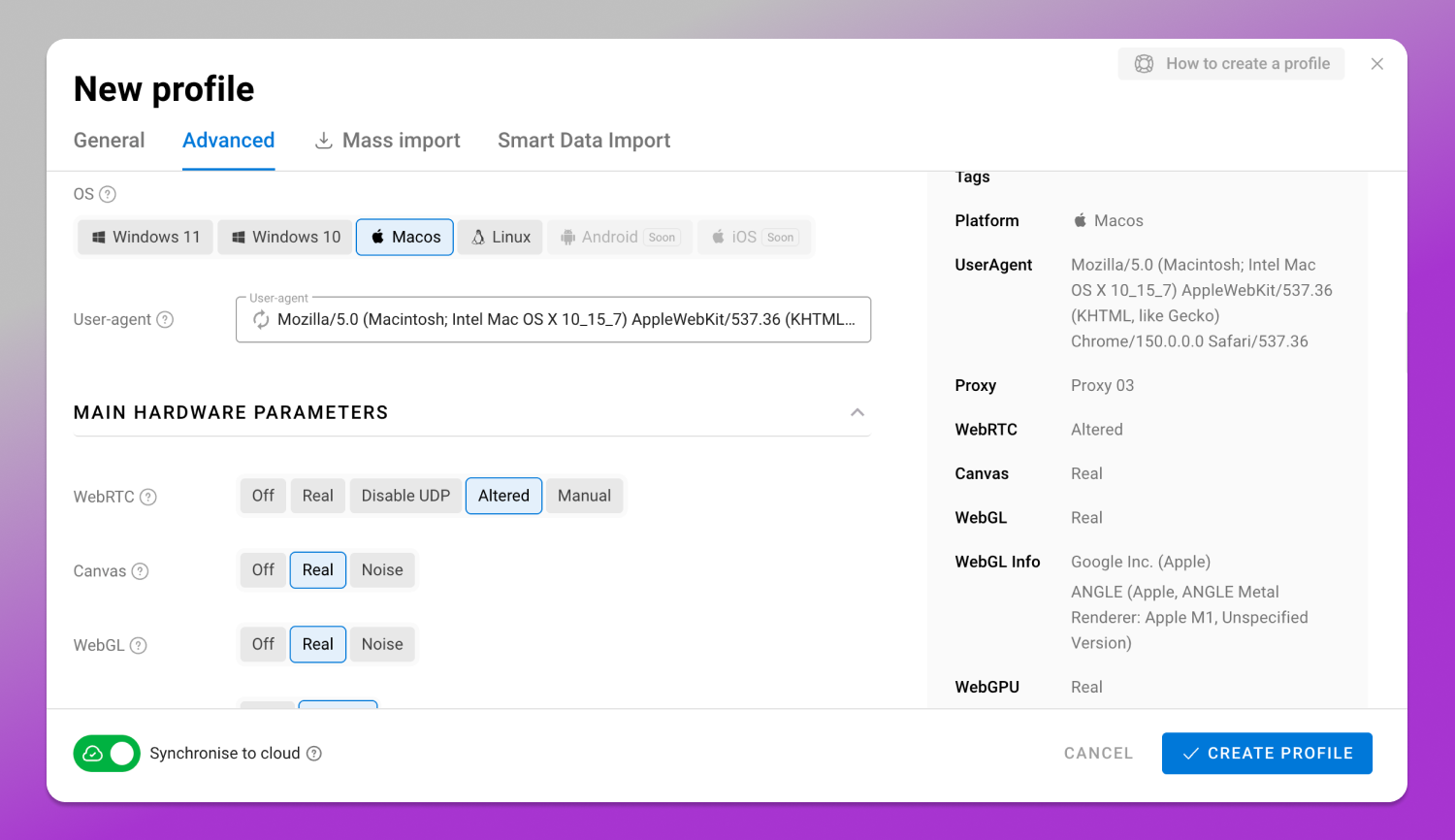
The key parameters include:
- Canvas;
- WebGL;
- WebRTC;
- AudioContext;
- System fonts;
- Client Hints;
- User-Agent;
- Geo;
- Screen resolution;
- Time zone…
…and other characteristics that are relevant to modern antifraud systems.
Built-in Cookie Warmup Tools
A regular user’s browser gradually accumulates cookies, browsing history and other data over time. A new profile doesn’t have any usage history. That’s why it is first 🔥 “warmed up” before logging into YouTube, helping build a browsing history and make it look more like a real user profile.
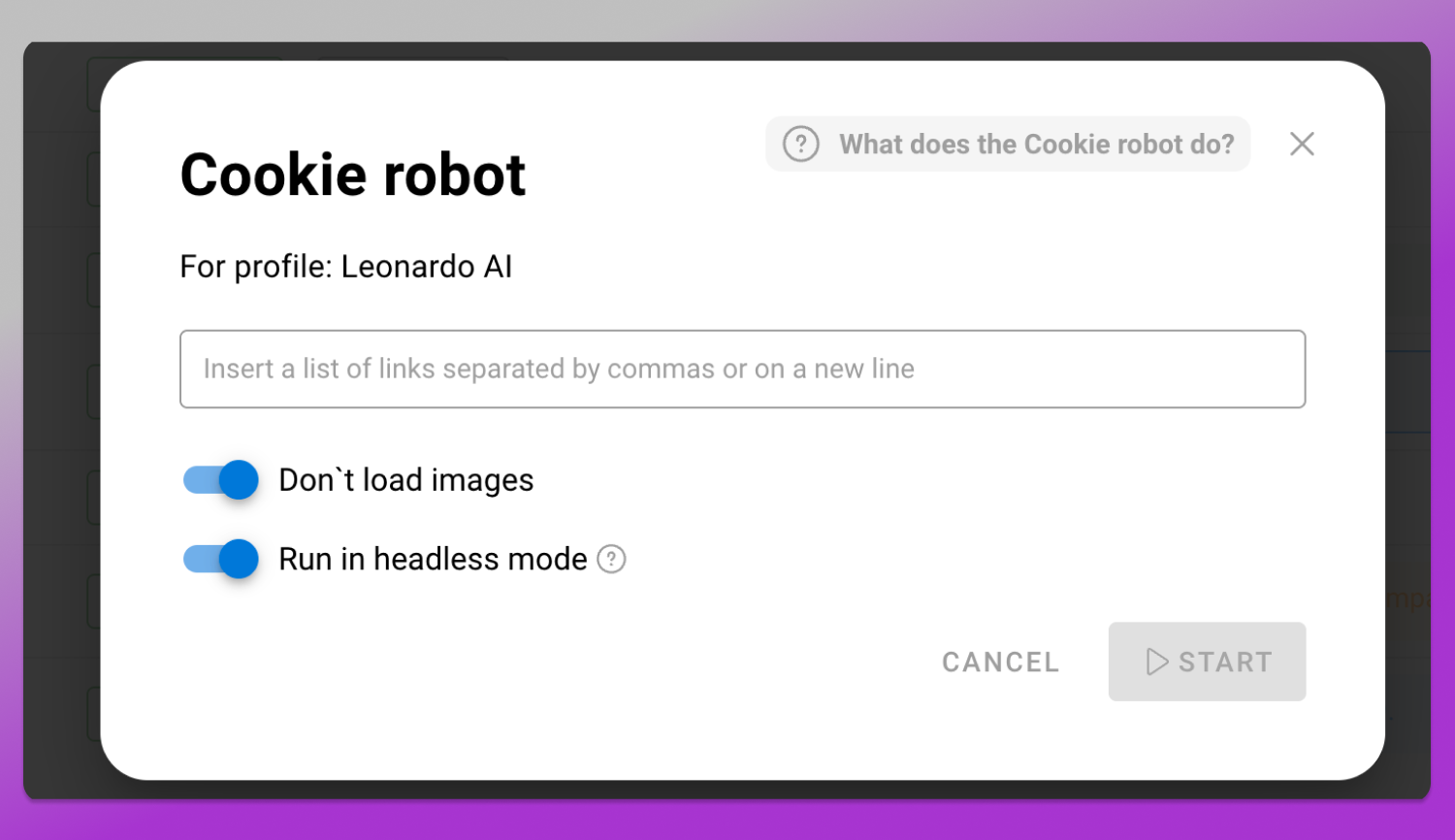
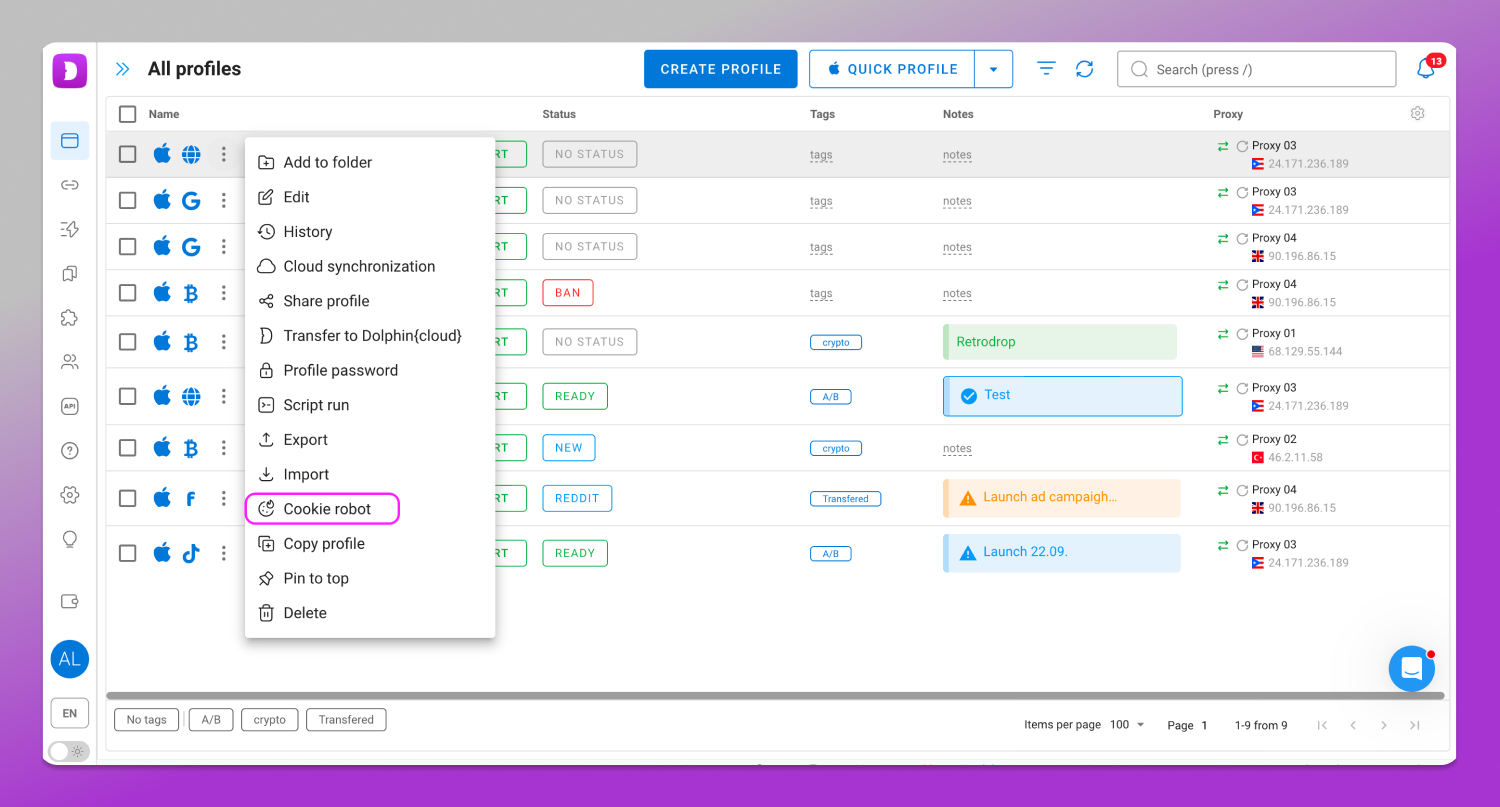
To do this, some anti-detect browsers offer profile warm-up tools. For example, a cookie robot is a cookie farmer that can automatically visit websites, collect cookies and build browser history, saving users from having to perform these actions manually.
Proxy Management and Auto-rotation Alignment
For secure workflows each profile should use 🔗 its own proxy. A good antidetect browser allows you to manage proxies in one place, import them in bulk, quickly assign them to profiles and check connections.
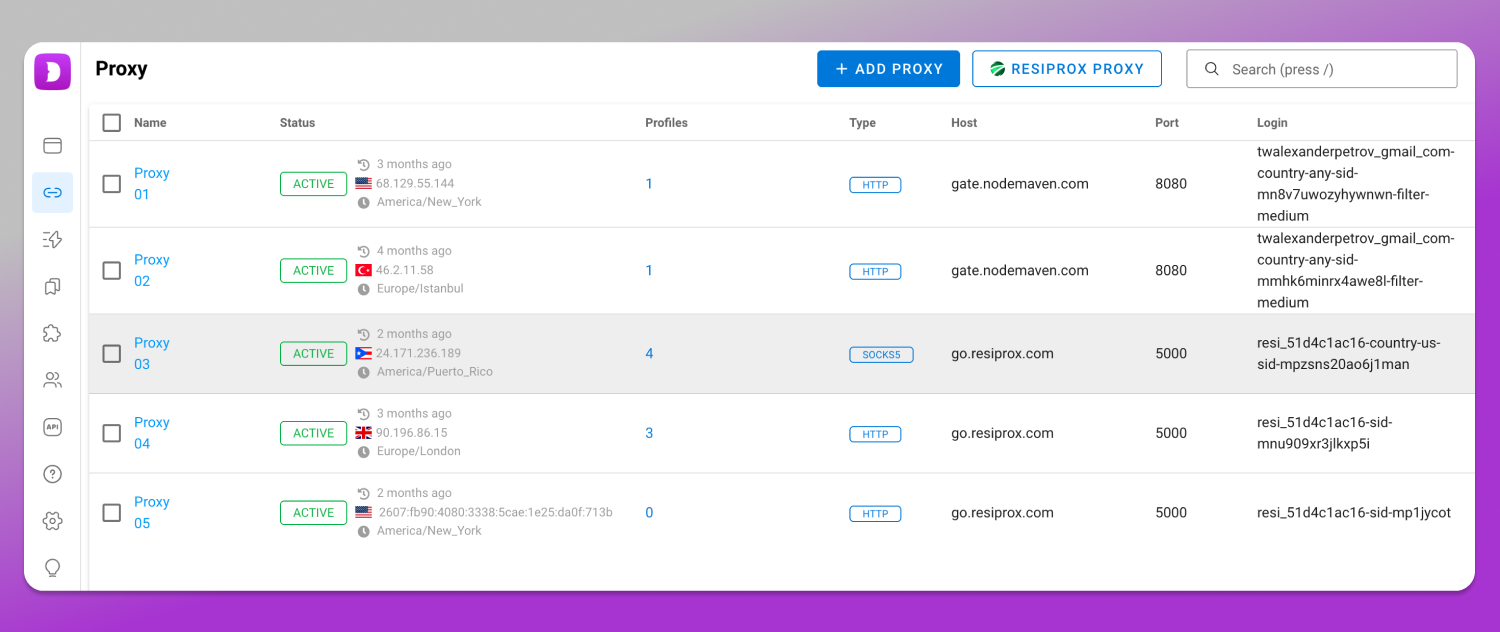
Some solutions also support automatic 🔄 IP address rotation. This feature can be useful for tasks related to automation or web scraping.
Automation Capabilities
When working with a large number of YouTube channels, manual management quickly becomes inefficient. That’s why antidetect browsers offer 🛠 automation tools that allow users to create profiles, launch them and perform repetitive actions without manual involvement.
The API allows you to connect an antidetect browser to your own applications and internal management systems. For example, it can be used to automatically create new profiles, assign proxies and manage browser settings from a single interface.
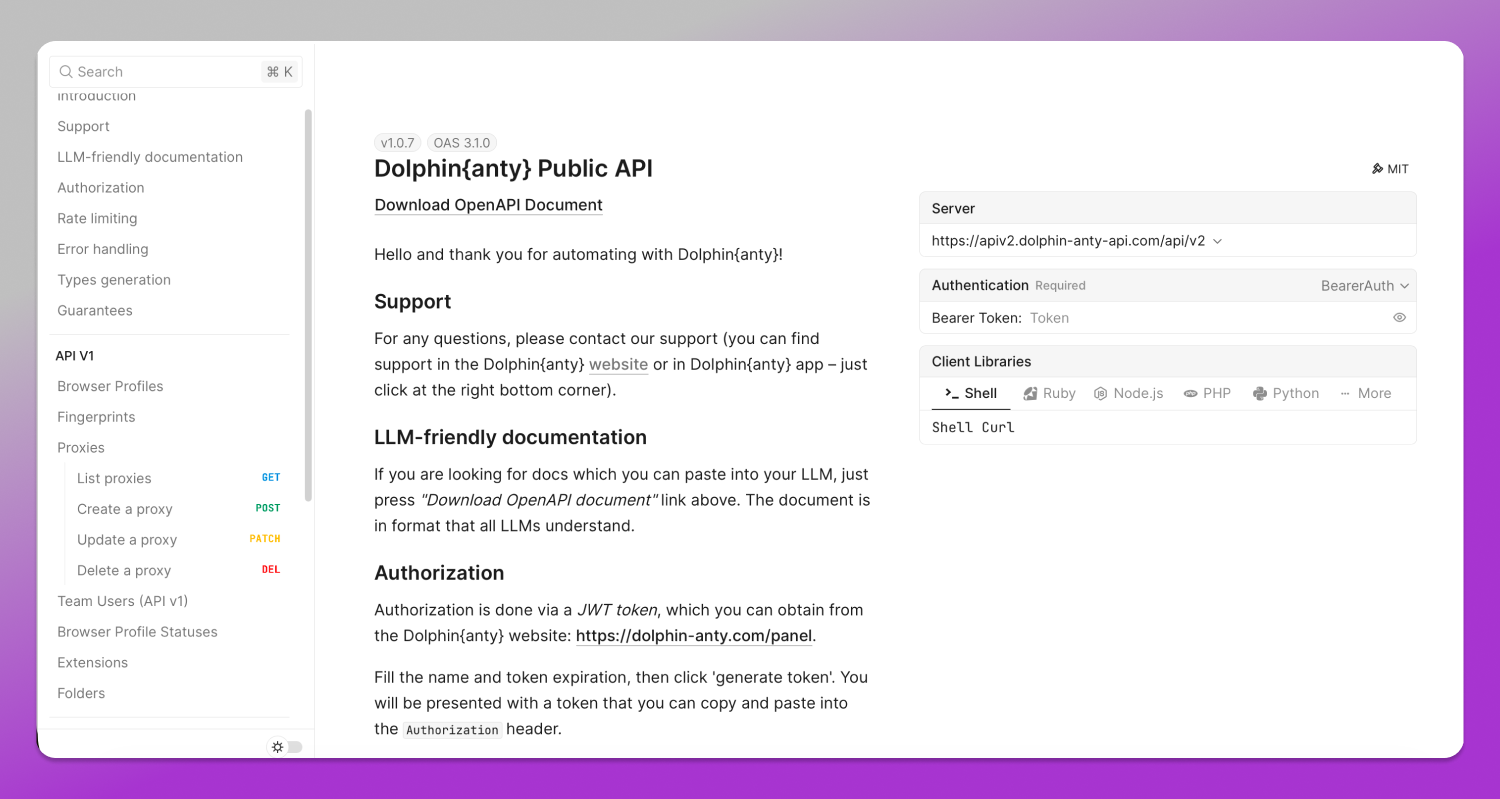
Browser automation tools such as Selenium / Puppeteer / Playwright APIs are used for more advanced scenarios . They allow you to run preconfigured action sequences, such as opening pages, performing routine tasks and managing network sessions through code.
Team Collaboration Features and Profile Sharing Permissions
If multiple people work with the accounts, it is essential to have a secure way to manage and assign access permissions between team members.
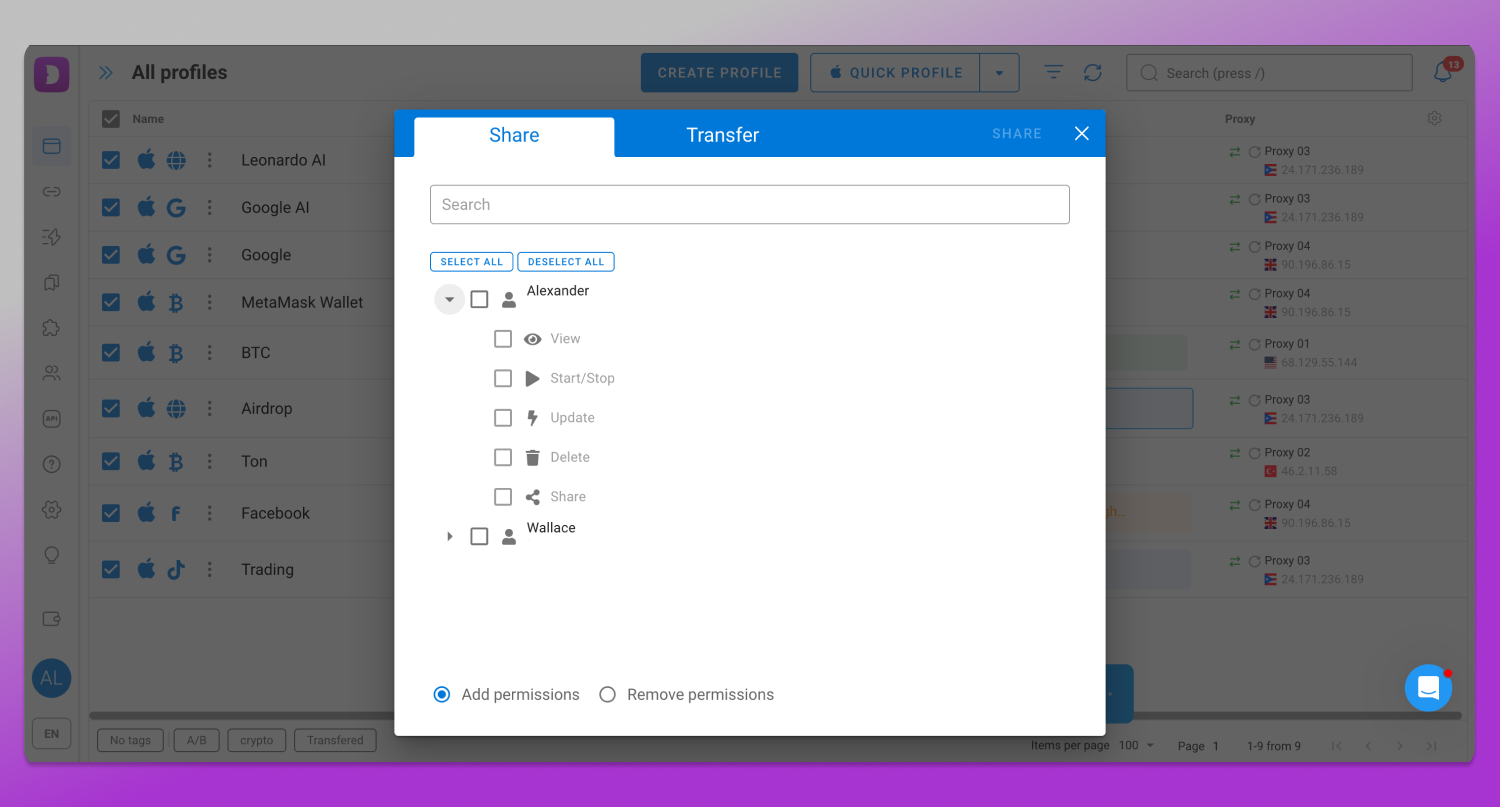
Modern antidetect browsers allow you to assign roles, provide access only to specific profiles with specific permissions and share folders and proxies between team members.
Top 10 Antidetect Browsers for YouTube Automation in 2026
The market currently offers a wide range of antidetect browsers, but they differ in terms of features and usability. Some solutions are better suited for small teams, while others are designed for agencies and projects with a large number of profiles.
Let’s take a look at the top 10 antidetect browsers for working with YouTube and explore what tasks each of them helps solve.
1. Dolphin Anty – Best Overall for YouTube Automation & Scale
✅ Dolphin Anty is one of the most popular antidetect browsers for working with social networks and multiaccounting. It is developed on Chromium-based architecture and combines an intuitive interface, extensive fingerprint customization options, automation capabilities and team collaboration tools.
Dolphin Anty allows users to create isolated profiles with unique digital fingerprints. The browser lets you configure not only basic parameters such as User-Agent, Canvas, WebRTC, WebGL & AudioContext spoofing, but also additional ones, including device name and X-Browser-Validation. This comprehensive approach to digital fingerprint configuration helps make profiles appear more natural when working with all Google services, including YouTube.
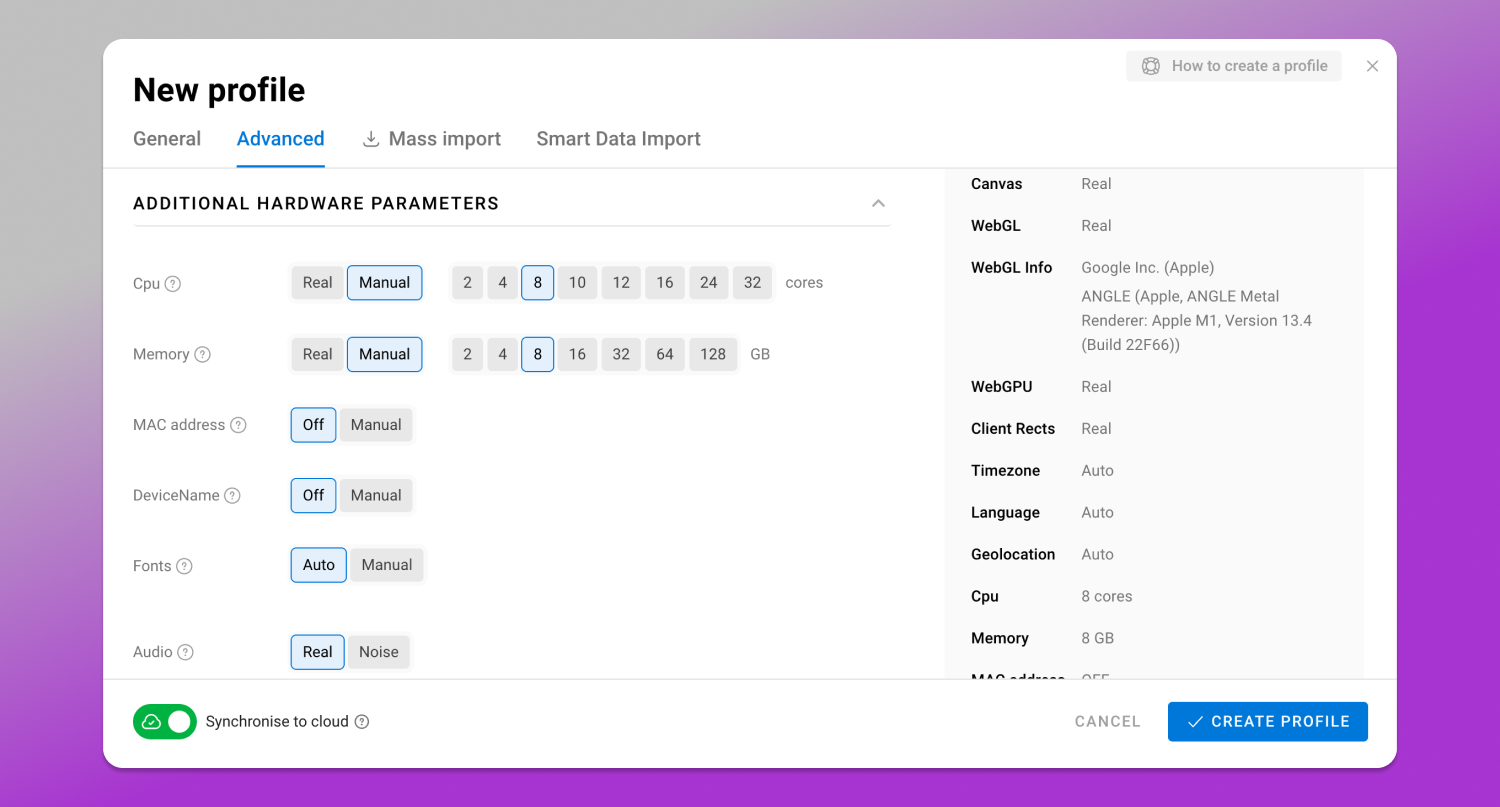
Dolphin Anty also makes it easy to manage any number of accounts. It offers a systems of tags, statuses, notes and folders. These tools allow users to organize accounts by projects, geos or clients, track the current work status, add internal comments and quickly find the required profiles using the built-in search.
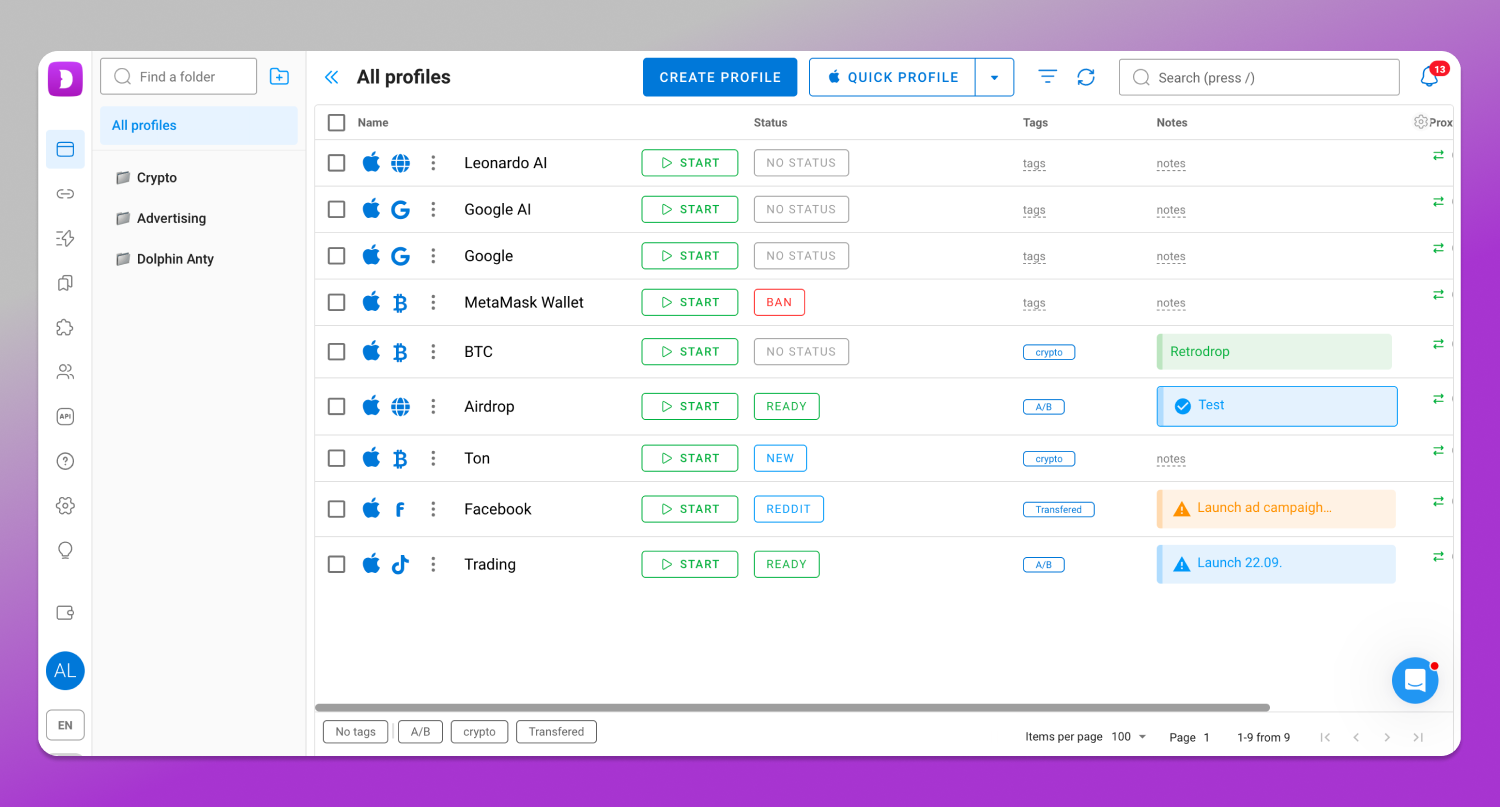
Dolphin Anty allows users to manage proxies in several ways:
- Add proxies directly when creating a new profile;
- Add proxies through a dedicated proxy management section, either individually or in bulk;
- Connect proxies from partners directly within the browser. Some of them offer free traffic.
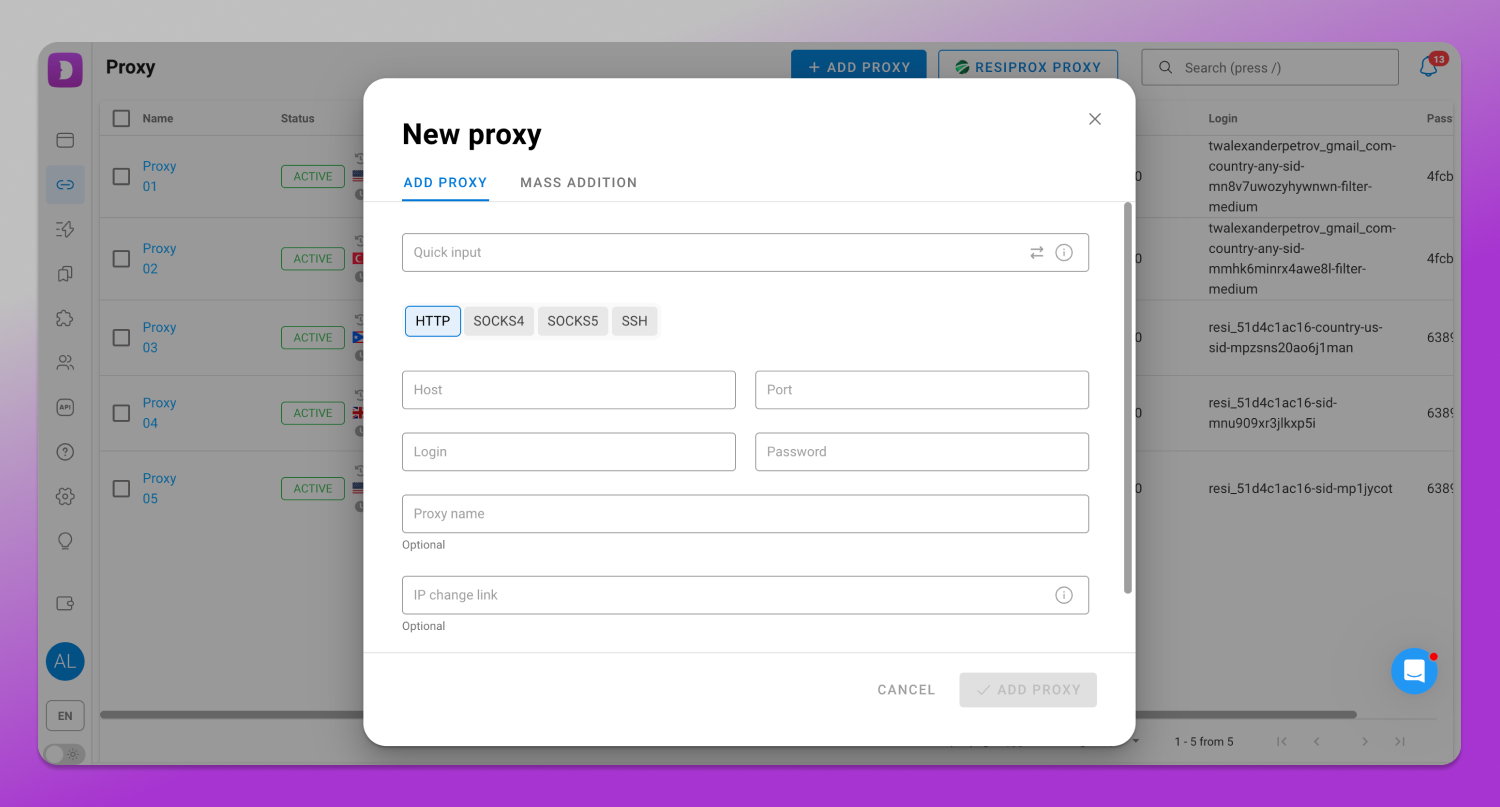
Language and time zone as well as IP geolocation alignment are automated.
Another feature of Dolphin Anty is its built-in automation tools. In addition to the API and Puppeteer, Playwright and Selenium frameworks, it also offers Scenarios and Cookie Robot.
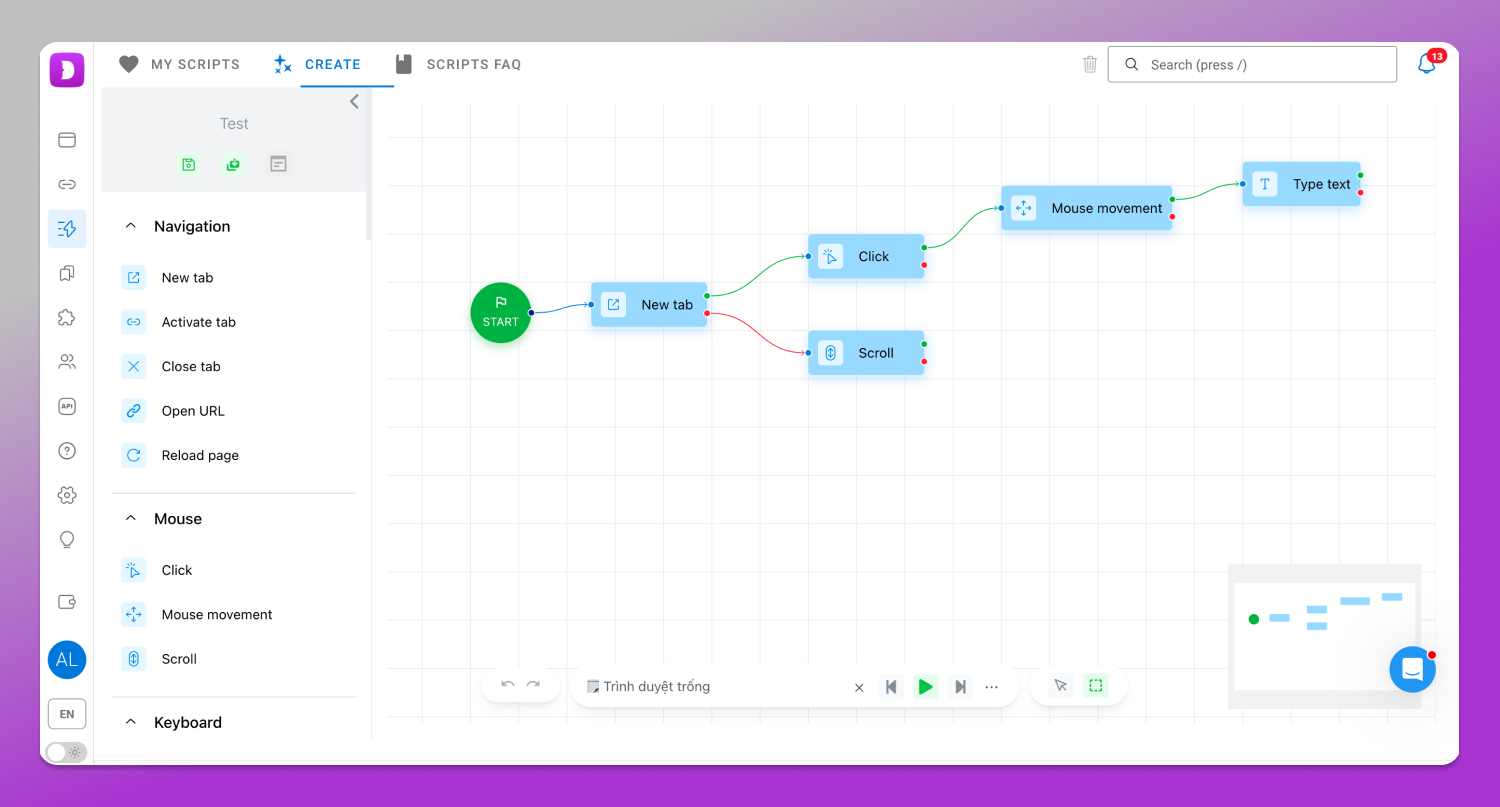
📹 Scenarios allow users to create browser automation scripts on an interactive map and run them in browser profiles.
🤖 Cookie Robot, which automatically collects cookies, can also run in the background without loading images.
Another advantage of Dolphin Anty is its 💲 flexible pricing system. The browser offers plans for different use cases from small teams to large-scale projects with hundreds of profiles.
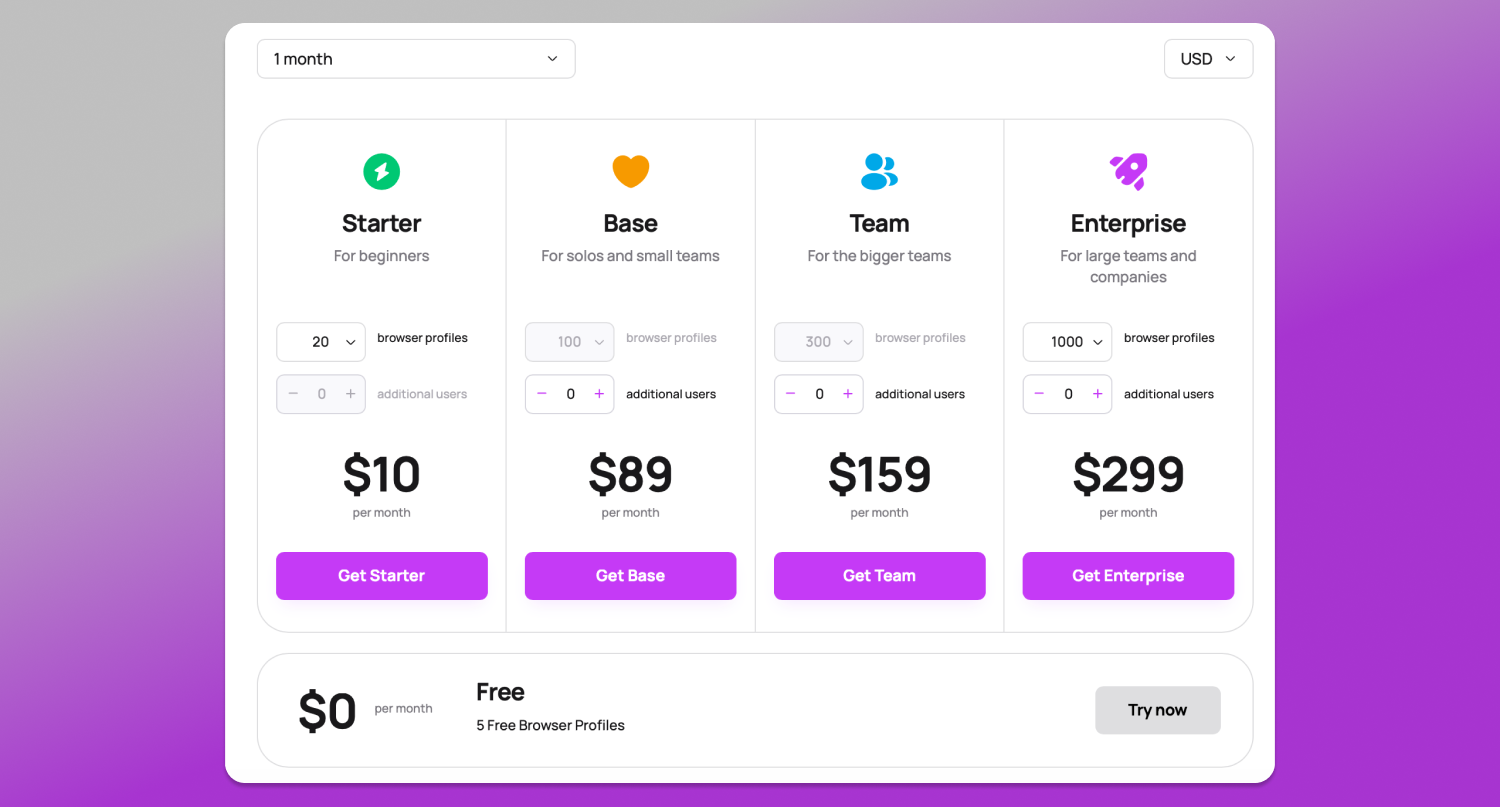
This allows users to avoid paying for unnecessary features at the start and gradually scale as their projects grow. This is proved by multiple positive Dolphin Anty reviews.
2. Multilogin
Multilogin is one of the oldest antidetect browsers on the market, used for multiaccounting, affiliate marketing, e-commerce and other tasks. It is designed for professional users and offers a wide range of tools for profile management.
Advantages:
- High-quality digital fingerprint spoofing that passes checks from popular fingerprint testers;
- Support for team collaboration and API for task automation;
- Available for Windows, macOS and Linux.
Among the disadvantages, users most often mention the lack of a free plan and a full-featured trial period. A subscription is required for testing.
3. Undetectable
Undetectable is an antidetect browser launched in 2021 and used for multiaccounting across different industries, including affiliate marketing, crypto and e-commerce. It offers a basic set of tools for account management.
Advantages:
- A free plan with support for up to 5 profiles;
- Built-in extension manager and team collaboration tools.
However, it’s important to note that some features are only available on paid plans. For example, Cookie Robot is included in the $49/month plan. It is also worth considering that passing some fingerprint checkers successfully may require additional digital fingerprint configuration.
4. AdsPower
AdsPower is one of the popular antidetect browsers on the market used for multiaccounting. The solution offers a wide range of tools for profile management, digital fingerprint configuration and automation.
Advantages:
- A large number of features for working with profiles;
- Support for automation through RPA, API, Selenium and Puppeteer;
- A free plan with support for up to 5 profiles.
Among the limitations, it is worth noting that some automation tools may require additional time to master. Some features, such as Cookie Robot and profile copying, are only available on paid plans.
5. Incogniton
Incogniton is an antidetect browser for multiaccounting. It allows users to create profiles, configure digital fingerprints, use proxies and automate some processes.
Advantages:
- Tags, statuses, synchronizer and bulk profile import;
- Support for API integration and automation through third-party tools.
The main drawback is that some features are not implemented very conveniently: the interface feels overloaded and some tools require additional steps to configure. Automation capabilities and overall management convenience also lag behind competitors.
6. GoLogin
GoLogin is an antidetect browser that focuses on simple access to profiles through a web interface. This is its main advantage: the cloud-based model allows users to manage profiles without being tied to a single device.
The main drawback is that automation capabilities are limited and some features are hidden within the interface. Users also note the high subscription cost compared to some competitors.
7. Octo Browser
Octo Browser is an antidetect browser for YouTube automation focused on specialists who need stable work with a large number of profiles and flexible digital fingerprint configuration. It has gained popularity among affiliates thanks to simple management and successful fingerprint checker results.
Advantages:
- Supports advanced digital fingerprint customization;
- Offers profile templates and scheduled tasks.
The main drawback is that Octo Browser does not have a free plan or trial period – users need to pay the full price right away.
8. Kameleo
Kameleo is one of the oldest antidetect browsers on the market, launched in 2017 and offering advanced digital fingerprint customization options.
Advantages:
- Supports mobile profiles;
- Offers an API for integration with external automation tools.
However, limited workspace capabilities and the lack of some tools for bulk profile management make it less convenient when scaling.
9. VMLogin
VMLogin is a YouTube antidetect browser that offers a basic set of tools for profile management and digital fingerprint configuration.
Advantages:
- Tools for working with fingerprints, proxies and shared access;
- Supports API integration with external solutions.
Disadvantages:
- The interface and workspace feel less modern compared to newer solutions;
- A limited set of built-in tools for automation and scaling.
10. MoreLogin
MoreLogin is a YouTube channel farm browser that offers a basic set of tools for working with profiles while focusing on affordability.
Advantages:
- Lower entry-level pricing compared to most competitors;
- Support for team collaboration even on lower-tier plans;
The ability to use built-in proxies without connecting third-party services.
Disadvantages:
- A limited set of tools for managing a large number of profiles at scale;
- Some features are less convenient than those offered by more advanced solutions.
Comparison Table: Top YouTube Antidetect Browsers Compared
For a quick comparison, we’ve summarized the top antidetect browsers in the table below.
| Browser | Free Plan / Trial | Key Feature | API for Automation | Best For |
|---|---|---|---|---|
| Dolphin Anty | Free plan with up to 5 profiles, no time limit or card required | Advanced profile management, deep fingerprint customization, Scenarios, Synchronizer, team collaboration | Yes | Affiliate teams, affiliates and professionals managing a large number of accounts |
| Multilogin | Trial period | One of the oldest antidetect browsers with a mature infrastructure | Yes | Companies and professional teams |
| Undetectable | Limited free access | Profile management and digital fingerprint customization | Yes | Users looking for a simple account management tool |
| AdsPower | Free plan with limitations | Convenient profile organization, team collaboration and automation | Yes | Affiliates, marketers and teams |
| Incogniton | Free plan with profile limits | Simple profile management and basic multiaccounting tools | Yes | Beginners and small teams |
| GoLogin | 7-day trial | Cloud-based profile management and a simple interface | Yes | Users who need a basic set of features |
| Octo Browser | No | Stable profile management and digital fingerprint customization | Yes | Experienced users and teams |
| Kameleo | Limited trial access | Advanced fingerprint customization and mobile profile support | Yes | Users who need mobile profiles |
| VMLogin | Limited trial access | Profile creation and digital fingerprint configuration | Yes | Users looking for basic antidetect browser functionality |
| MoreLogin | Limited free plan | Affordable pricing, team collaboration and built-in proxies | Yes | Beginners and users managing a small number of profiles |
How to Safely Set Up a YouTube Channel Farm Using Dolphin Anty (Step-by-Step)
For safe multiaccounting each profile should have its own fingerprint settings and network environment. Let’s go through the key setup steps using Dolphin Anty for YouTube as an example.
Step 1. Choose High-Quality Proxies
When choosing YouTube proxy for the browser, it’s important to consider not only the connection type but also their location, speed and stability. For example, if a YouTube channel targets a specific country or region, the proxy should match that location.
Static proxies are commonly used for YouTube because they keep the same IP address over time. This means the account doesn’t change its geo or network environment with every login, which matches typical user behavior.
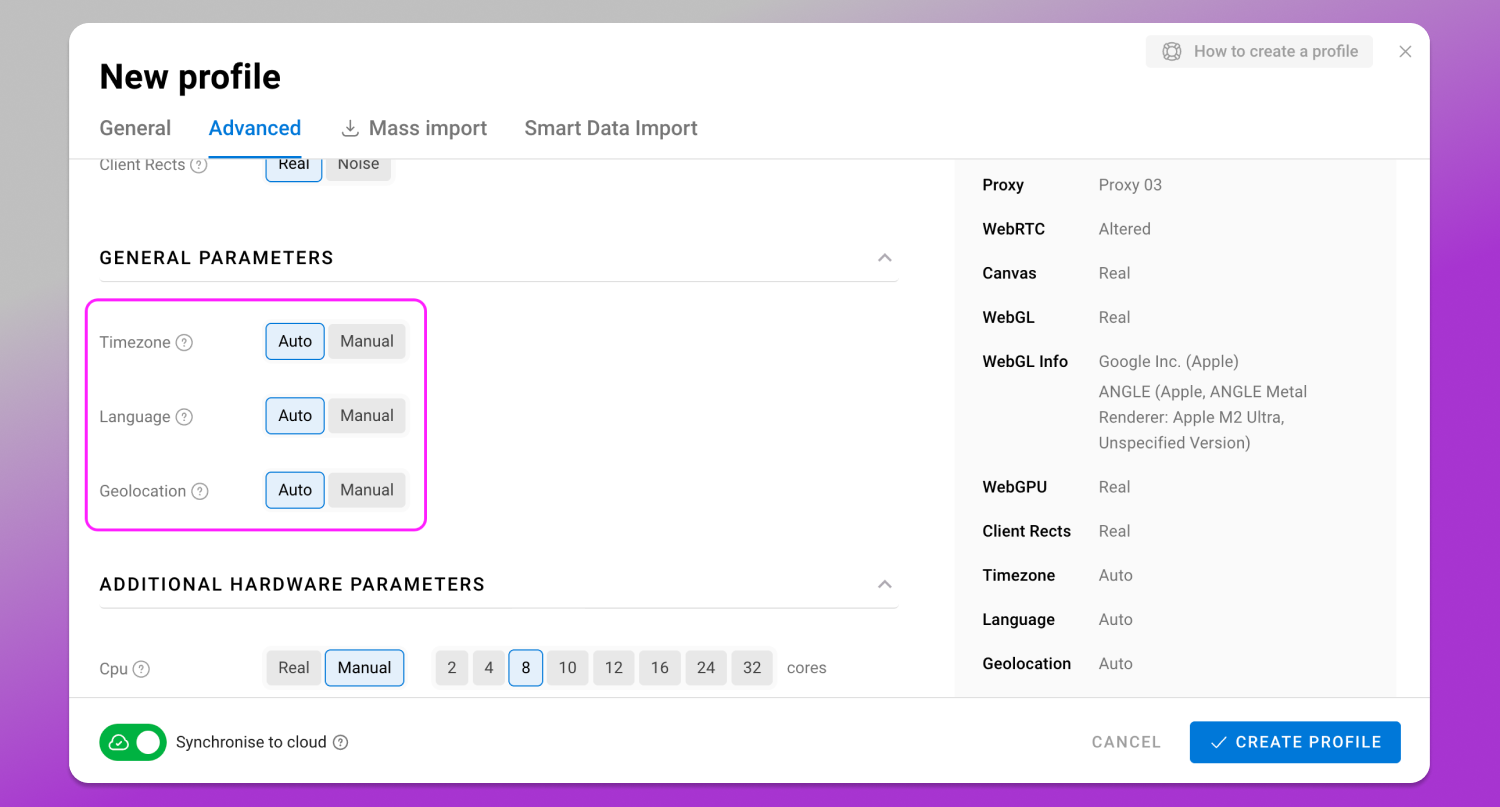
When you add a proxy to a profile in Dolphin Anty, the time zone, geo and language settings are automatically adjusted to match it.
Step 2. Create and Configure a Profile in Dolphin Anty
After choosing a proxy, create a separate browser profile in Dolphin Anty. Each profile operates independently and has its own digital fingerprint settings, cookies, local storage and browser configuration.
Step 3. Collect Cookies with Cookie Robot
A new browser profile has no browsing history, which normally builds up over time. Cookie Robot in Dolphin Anty automates this process: simply specify a list of websites and choose the cookie collection mode.
Step 4. Sign In, Verify Your Account, and Publish Videos
Once the profile has been warmed up, you can start working with YouTube. Sign in to the platform or create a new account. Your login credentials will be saved in the profile, so you won’t need to enter them every time you login.
You can now publish videos and engage with your audience.
Conclusion
In 2026, scaling on YouTube requires more than just high-quality content. It also requires the right software. Antidetect browsers make it possible to create isolated profiles, manage proxies, automate tasks and build efficient workflows for any number of accounts.
🎯 Dolphin Anty offers 💯 everything you need : profile and proxy management, digital fingerprint customization, Cookie Robot, API integrations and team collaboration features. All these features make it the best browser for YouTube for users looking to grow and scale.
FAQ
Can YouTube detect antidetect browsers?
Modern antidetect browsers make it possible to create profiles with fingerprints that match real devices. When combined with high-quality proxies, each profile is fully isolated. As a result, YouTube treats them as separate devices.
That said, Google has sophisticated systems for detecting multiaccounting, so restrictions and bans can still happen.
Why is Dolphin Anty recommended as the top multi account browser for YouTube?
Dolphin Anty is the best antidetect software for YouTube growth as it offers a user-friendly interface, digital fingerprint customization, profile and proxy management, Cookie Robot, API integrations and team collaboration features.
Is a free VPN enough to manage multiple YouTube channels?
No. A VPN only changes your IP address and encrypts your internet connection. It does not modify other browser parameters. Since antifraud systems analyze the device’s digital fingerprint as a whole, using a single VPN for multiple accounts does not provide proper profile isolation.
How many YouTube accounts can I run per antidetect profile?
The safest approach to account linking protection is one profile per channel with one dedicated proxy for each profile. This provides the highest level of isolation that helps to avoid YouTube shadowban for multi accounting.
What proxies are best for YouTube automation with antidetect browsers?
For YouTube static proxies and rotating residential proxies that match the channel’s target geo are the best choice. They provide a higher level of trust for each profile.