
🥷 Dark web browsers are the ones that actually hide what you do online — not the private window, which only clears local history on your own machine. The answer depends on what you are trying to protect: your IP address, the data advertisers collect, or the fact that your ISP sees every site you open.
This guide covers the best private browsers for reaching .onion sites with real network anonymity, explains whether the Tor browser is illegal, and separates two things people keep confusing: browsing anonymously and running many work accounts without them falling together.
The three layers of online anonymity
Almost every article on this topic blends three things that are not equivalent: erasing local traces, hiding your traffic from the network, and isolating identities from each other. Separating the layers is what lets you pick the right tool.
A private window hides less than you think
A private window in Chrome or Firefox does not save history or cookies on your device once you close it. That is all. Your ISP, the site you visit, and any public Wi-Fi network still see the address you opened and your real IP.
VPNs and the Tor network: what each one actually fixes
A VPN hides your real IP from the destination site by routing traffic through its own server. The catch is that the ❗ VPN now knows who you are and what you open: you shifted trust, you did not remove it.
The Tor network works differently. Traffic passes through at least three relays, and each one knows only part of the path: the first knows who you are but not your destination; the last knows the destination but not who sent it. No single point sees both ends. That is why only Tor Browser, or something built on the same network, delivers anonymity instead of cosmetic privacy.
The best dark web browsers in 2026
The search shows up in a dozen forms — uncensored browser, hidden browser, unrestricted browser — but the shortlist barely changes. The order below answers one simple question: separate your identities, or hide your traffic from the network?
Dolphin Anty: the best option for managing multiple accounts
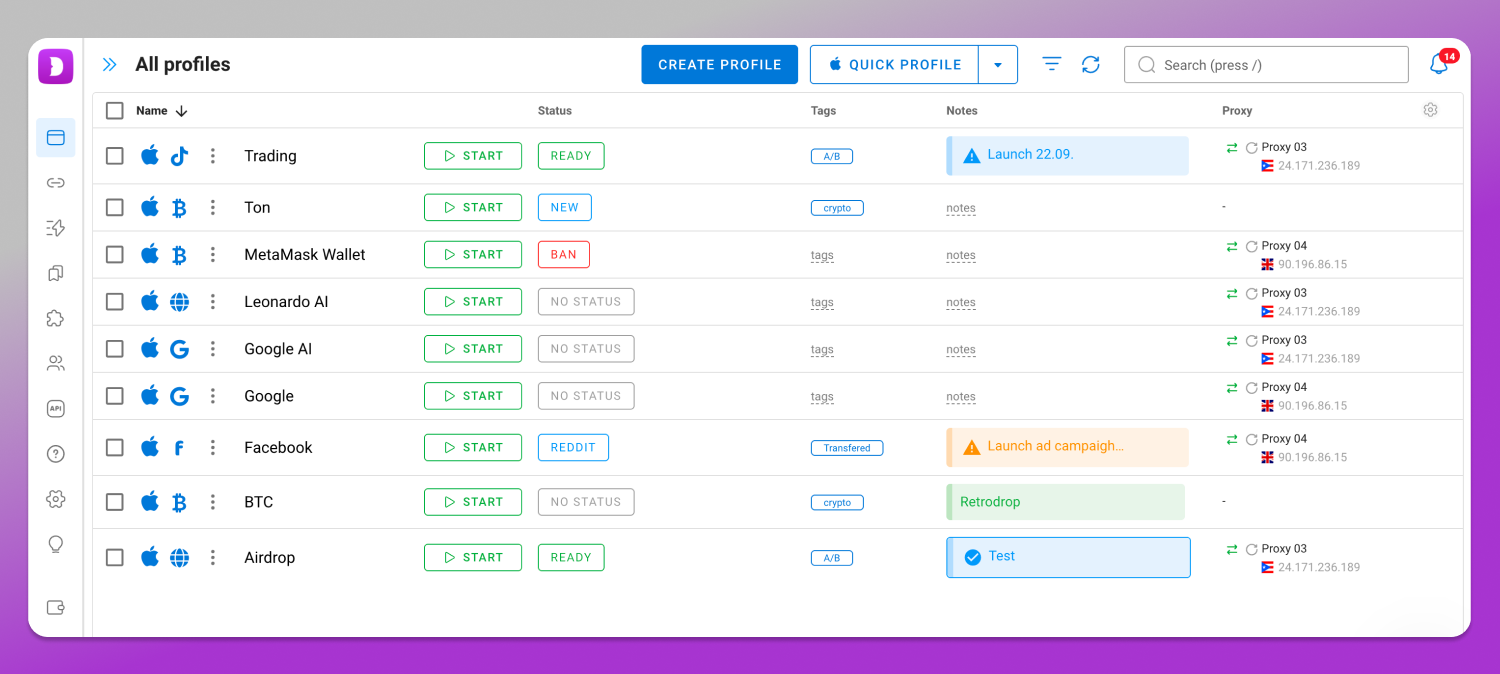
When the problem is isolating identities from each other rather than disappearing from the network, the category of tool changes. 🚀 Dolphin Anty is an antidetect browser: instead of hiding you from the entire internet, it separates browser identities. Every profile carries its own fingerprint, kept consistent across more than 20 parameters — canvas, WebGL, installed fonts, timezone, resolution, reported platform, and others. Proxy and cookies are isolated per profile too, so account A and account B share no technical signal that could tie them to the same operator.
In practice, that is what separates a ten-account ad operation that survives from one banned in a chain reaction. There is team management with per-user permissions, so specific profiles can be granted to each operator without handing over passwords, plus API automation for creating and maintaining profiles in bulk. 🔐 Signup unlocks 5 free profiles with no card.
Browsers built for network anonymity
📌 Tor Browser. Firefox ESR rebuilt to route through the Tor network by default, with tracker blocking and a fingerprint identical across users. It gives access to .onion sites and is maintained by the Tor Project. It is slow, and several banks block traffic coming from known exit nodes.
📌 Mullvad Browser. Built through a partnership between Mullvad VPN and the Tor Project, it uses the same uniform fingerprint as Tor Browser but without routing through the Tor network by default. The idea is to pair it with a paid VPN to gain speed.
📌 Brave, with its Tor window. It bundles Tor into a browser many people already have installed. Because it is Chromium-based, its fingerprint surface is larger, and that mode has been audited less than the Tor Project’s own software.
📌 LibreWolf. A Firefox fork with aggressive tracker blocking and telemetry disabled from install. Good for daily use, but on its own it does not hide your IP: it has to be paired with a VPN or Tor.
Full systems for high-risk scenarios
Tails is not a browser but an operating system that boots from a USB drive and forces all machine traffic through the Tor network, leaving nothing behind on the computer used. Whonix splits the environment into two virtual machines: one handles Tor routing, the other runs your applications isolated from it, so not even a compromised app leaks your real IP. Both are the choice of people facing concrete risk.
Is the Tor browser illegal? What the law says
In the United States, using Tor is not a crime and no law bans the network or the browser. The confusion exists because Tor also opens the dark web, where legitimate content — journalism, whistleblowing, privacy forums — sits alongside illegal marketplaces. The browser is neutral: what changes the legal status is what you do with it.
Outside the US the picture varies. China, Iran, Russia, Belarus, and Turkmenistan block or heavily monitor access to the Tor network, and using it there can draw attention even without a law naming Tor specifically.
What most dark web browser guides leave out
Speed, captchas, and bank blocks
The three relay hops of the Tor network 🕓 cost real load time, and it shows on video, large downloads, and script-heavy sites. Plenty of banks and online stores block or challenge with captcha any IP leaving a Tor exit node, because that traffic pattern is associated with fraud.
The mistakes that undo your own anonymity
If you log into your personal Gmail or Instagram account while using Tor, you have just undone the anonymity: the network hid your IP, but the platform knows who signed in. Resizing the Tor Browser window or installing extensions also weakens protection, because it breaks the uniform fingerprint that makes you disappear among other users — the Tor Project itself advises against both.
Personal anonymity is not the same as managing multiple accounts
Wanting to disappear from advertiser surveillance is one thing. Needing to run 10, 30, or 100 ad accounts, marketplace stores, or social profiles without the platform tying them all to the same operator through browser fingerprinting is another.
Tor and VPNs do not solve that second problem: they were made for one person hiding their own traffic, not for keeping dozens of work profiles separated. Worse, the uniform fingerprint of Tor Browser makes all your accounts look like the same device — the opposite of what a multi-account operation needs.
Dolphin Anty and Multilogin: plans and systems side by side
Dolphin Anty has a Free plan at $0 with 5 profiles, Starter at $10 per month with 20 profiles, Base at $89 per month with 100 profiles, Team at $159 per month with 300 profiles, Enterprise at $299 per month with 1,000 profiles, and a Custom plan with unlimited profiles priced on request. It runs on Windows 64-bit, macOS with Intel and M-series chips, and Linux via AppImage, .deb, and .rpm.
Multilogin has a Free forever plan with 5 profiles, deleted after 7 days; Pro at $11 per month (10 profiles), with higher Pro tiers at $29/month (50 profiles) and $40/month (100 profiles); and Business starting at $89 per month, which already includes 300 profiles at that entry price and scales up (at a higher price) to 10,000 profiles for larger operations. It requires Windows 10 or later, macOS 14 Sonoma or later, or Linux Ubuntu 22 or later, 64-bit only, with at least 4 GB of RAM and 1 GB of disk; Apple Silicon M1 to M4 is supported and Windows on ARM is not.
Privacy law and the data already collected
Browsing anonymously reduces collection at the source, but it does not erase what was already gathered. In the US there is no single federal statute, so what you can demand depends on your state: California’s CCPA and CPRA allow requests for access, correction, and deletion of personal data, plus opting out of its sale. The request goes to the company’s privacy contact, and under CCPA/CPRA the business must respond within 45 calendar days of receiving a verifiable request, extendable by one additional 45-day period (90 days total) if the business notifies the consumer of the extension and the reason within the initial window. It is worth attacking both fronts: future collection and what is already stored.
Frequently asked questions
Which is the most anonymous browser?
Tor Browser is still the reference, because it routes traffic through three relays and makes every user’s fingerprint look the same. Mullvad Browser is the alternative when speed matters more, and Tails and Whonix come in when the risk is genuinely high.
Can you be 100% anonymous online?
Total anonymity online does not exist. What exists is layered exposure reduction: the Tor network or a trustworthy VPN, the habit of never signing into personal accounts during anonymous browsing, and attention to the metadata you hand over yourself, such as photos and activity times.
Is using the Tor browser a crime?
In the United States, no. No law bans the network or the browser, and the use itself is legal. What can be a crime is the content you access or the activity you carry out with it, exactly as it would be in any other ordinary browser.
Does an anonymous browser hide my IP from my ISP?
Tor does: your ISP only sees that you are connected to the Tor network, not the final sites you open behind it. A regular private window hides nothing from your ISP, because it only clears history and cookies inside your own device.
Which browser should I use to manage multiple accounts?
An antidetect browser, not an anonymity browser. Dolphin Anty is the most direct choice: each profile gets its own fingerprint, proxy, and cookies, with per-user permissions for the team and API automation on top. Signup gives you 5 free profiles, with no card required.
How long does a business have to respond to a CCPA/CPRA data request?
45 calendar days from receipt of a verifiable request, extendable once by another 45 days (90 days total) if the consumer is notified of the extension and the reason within the first 45-day window.
Conclusion: which one to pick for your case
If you only want the best browser for dark web access, download Tor Browser and use it for a week: among dark web browsers, nothing else matches it. If the real problem is keeping dozens of work accounts separated without chain bans, no anonymity browser solves it: the path is a stealth browser, an antidetect browser like 💯 Dolphin Anty.