
For most 🚀 Dolphin Anty profiles, static ISP proxies are the right default: one dedicated IPv4 that stays the same in every session, which is what a long-lived browser profile needs. Rotating residential suits geo checks, research and short tasks. Datacenter suits scraping and internal tooling rather than logged-in profiles. Thunderproxy static ISP starts at $1.79 per IP. Dolphin Anty accepts credentials in the IP:PORT:LOGIN:PASSWORD format and adjusts timezone, language and geolocation from the proxy IP.
Which proxy type should you use for Dolphin Anty?
Pick static ISP if the profile stays logged in. Pick residential if the profile needs to appear in a specific city, or if you only need the connection for a short job. Pick datacenter if there is no login involved at all.
The reason is consistency over 🕓 time. A Dolphin Anty profile is a persistent identity: same cookies, same local storage, same settings every time you open it. If the network address behind that profile changes on every request, the profile stops looking consistent with itself. A static ISP proxy gives you one IPv4 registered to a consumer internet provider that stays assigned to you, so the profile keeps the same network footprint across sessions.
Rotating residential is the opposite tool. It is built to hand you a different address per request or per session, which is useful when you are checking how a page renders in another country, collecting public prices, or running a task that finishes in minutes. It is a poor fit for an account you sign into every day.
Datacenter addresses resolve to hosting ranges rather than consumer providers. IP2Location classifies those ranges under the DCH usage type, and IP intelligence services read that classification directly. That is fine for internal tooling and for targets that do not care, and it is the wrong layer for a logged-in social or advertising profile.
❗The rule: match the lifetime of the IP to the lifetime of the profile.
Static ISP, residential and datacenter compared
| Proxy type | Best for | IP behavior | Price | Bandwidth |
| Static ISP | Logged-in profiles | Same IP every session | $1.79 per IP | Unlimited |
| Residential | Geo checks and short tasks | Rotating or sticky | $1.89 per GB at 25 GB | Metered |
| Datacenter | Scraping and internal tooling | Rotating or sticky | $1.29 per GB at 25 GB | Metered |
These are list prices for August 2026. The residential rate is the price at the 25 GB tier with the BF50 code applied at checkout. Static ISP and datacenter are not covered by that promotion and are priced by volume tier only.
Independent testing supports the same split. Proxyway’s Proxy Market Research 2026 reports a median response of 0.43 seconds and a 99.88 percent success rate for shared datacenter proxies against an infrastructure endpoint, against 0.93 seconds globally and 99.28 percent for residential. On real targets such as Amazon, Google and Instagram, the median residential success rate falls to 74.43 percent with a median response of 3.21 seconds. Those numbers are directional, not a promise, and they describe the market rather than any single plan.
How many Dolphin Anty profiles can share one proxy?
For any profile you sign into, plan on one dedicated IP per profile. Putting several logged-in profiles behind one address is the most common reason a group of profiles starts behaving differently from the rest of your setup.
There is a second, more practical reason to hold that ratio inside Dolphin Anty. Many provider plans cap concurrent sessions per port, so if you open ten profiles pointing at the same port, some of them can return an authentication error even though the credentials are correct. Static ISP plans at Thunderproxy do not cap threads, but the one to one ratio still matters for how consistent each profile looks.
Profiles that never sign in are a different case. If you are only opening pages to read public data, a single rotating endpoint can serve many profiles at once. The full breakdown by use case is in our guide on how many accounts you can run per proxy.
How to add a proxy to a Dolphin Anty profile
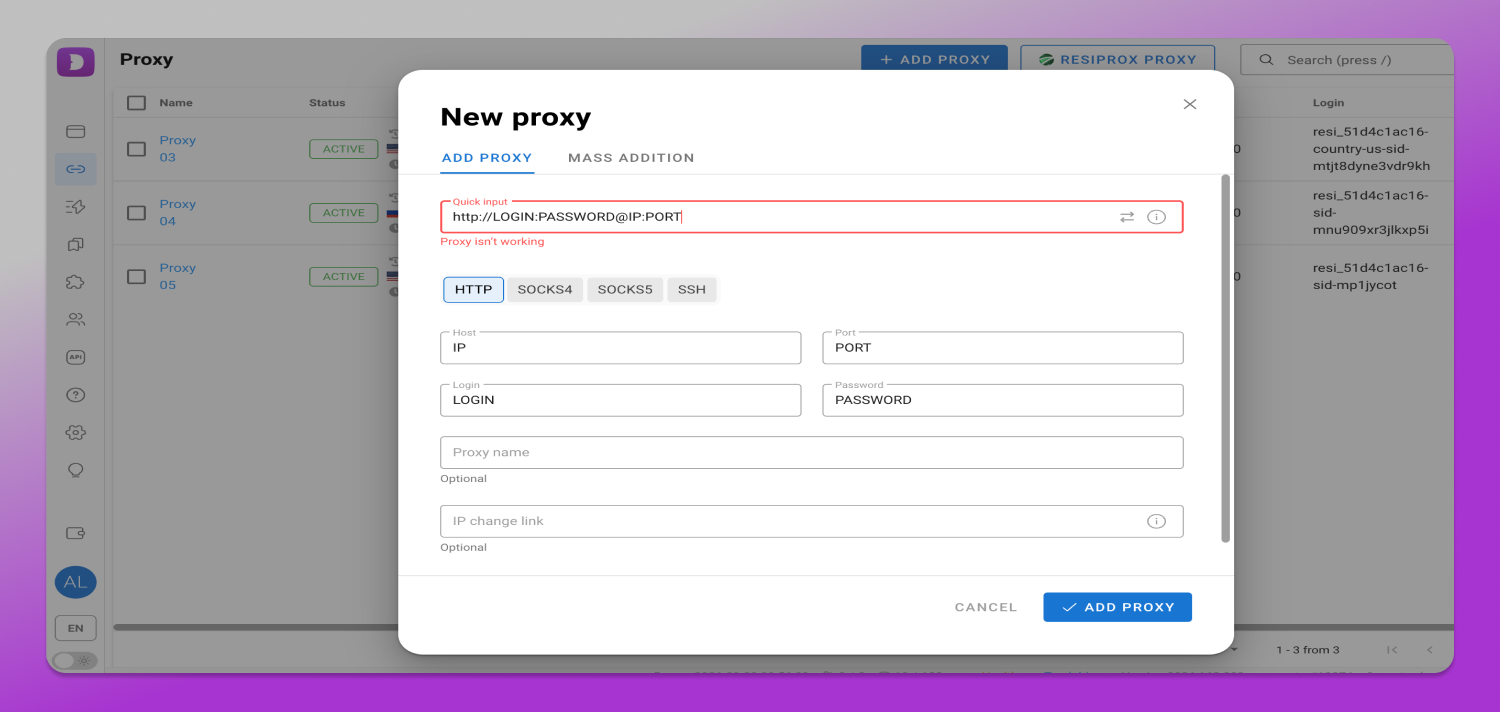
Dolphin Anty accepts proxies in the IP:PORT:LOGIN:PASSWORD format and supports HTTP, SOCKS5 and SSH. There are three ways to attach one.
- During profile creation. Open the proxy selector in the new profile screen and either pick a saved proxy or paste a new one. The proxy is bound to that profile only.
- From the Proxies section. Paste the full credential string into the quick input field and confirm with Add Proxy. Dolphin Anty splits the string into host, port, login and password on its own, so you do not fill four fields by hand.
- By bulk import. Paste or upload a list with one proxy per line in the same format. This is the fastest path once you are setting up more than about ten profiles.
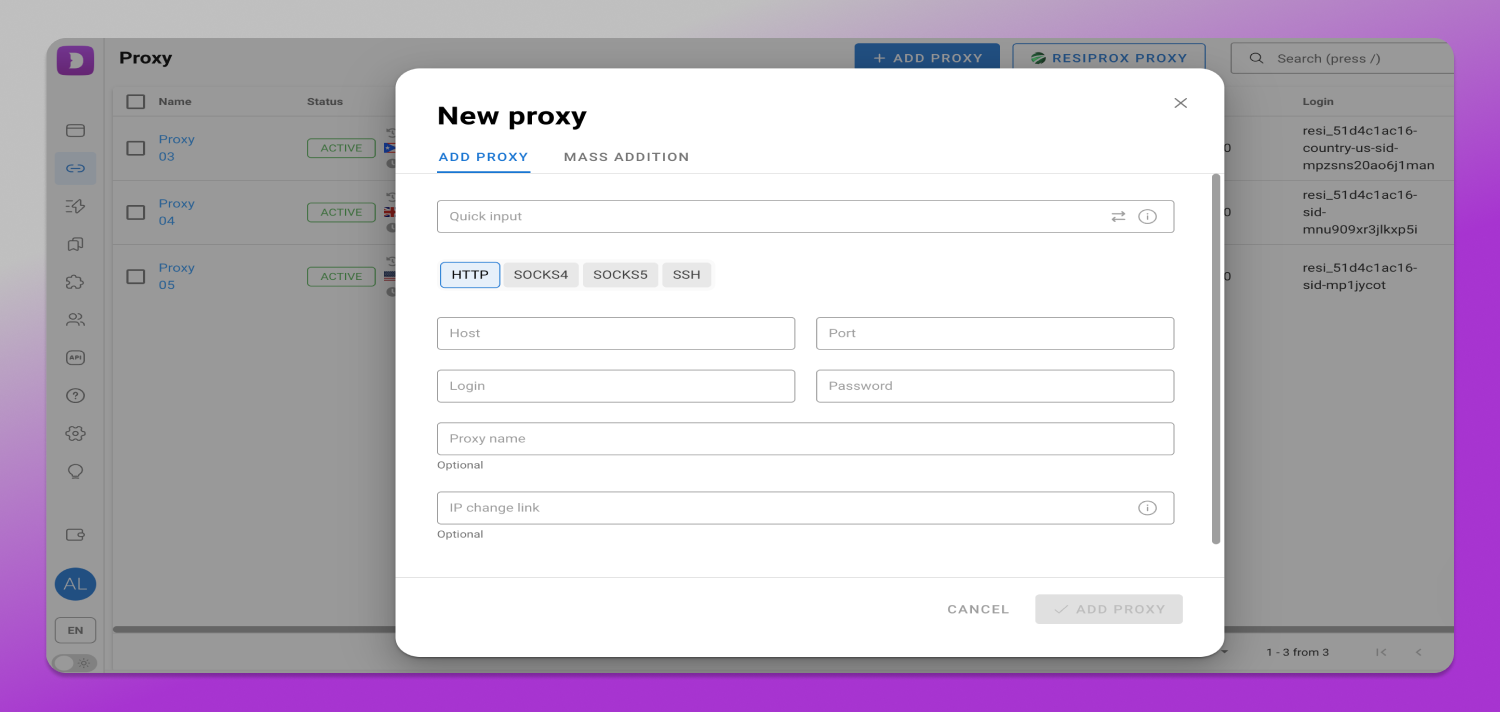
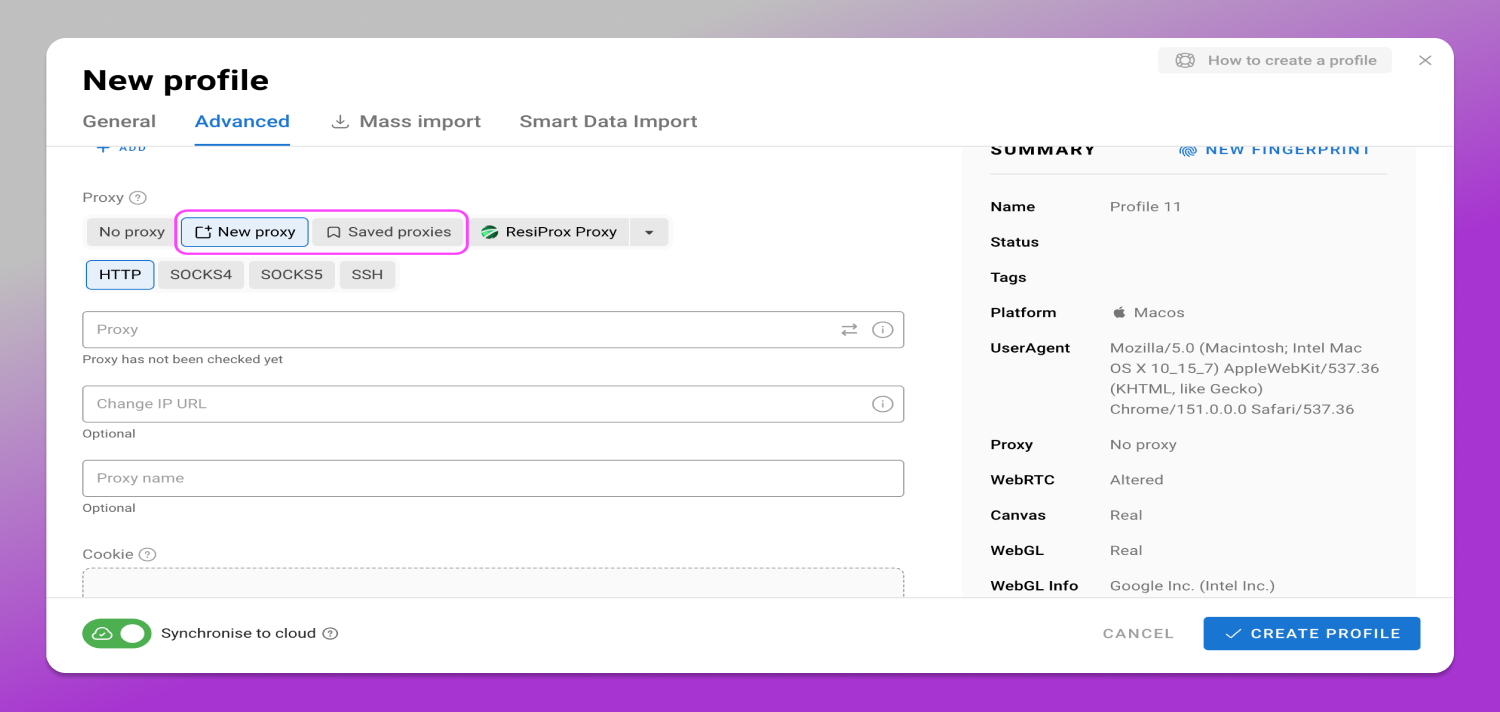
Your Thunderproxy credentials come from the dashboard under Quick Access. A static ISP entry is issued as a host, a port and a user and password pair, which maps one to one onto what Dolphin Anty expects, so no reformatting is needed.
How to assign proxies to many profiles at once
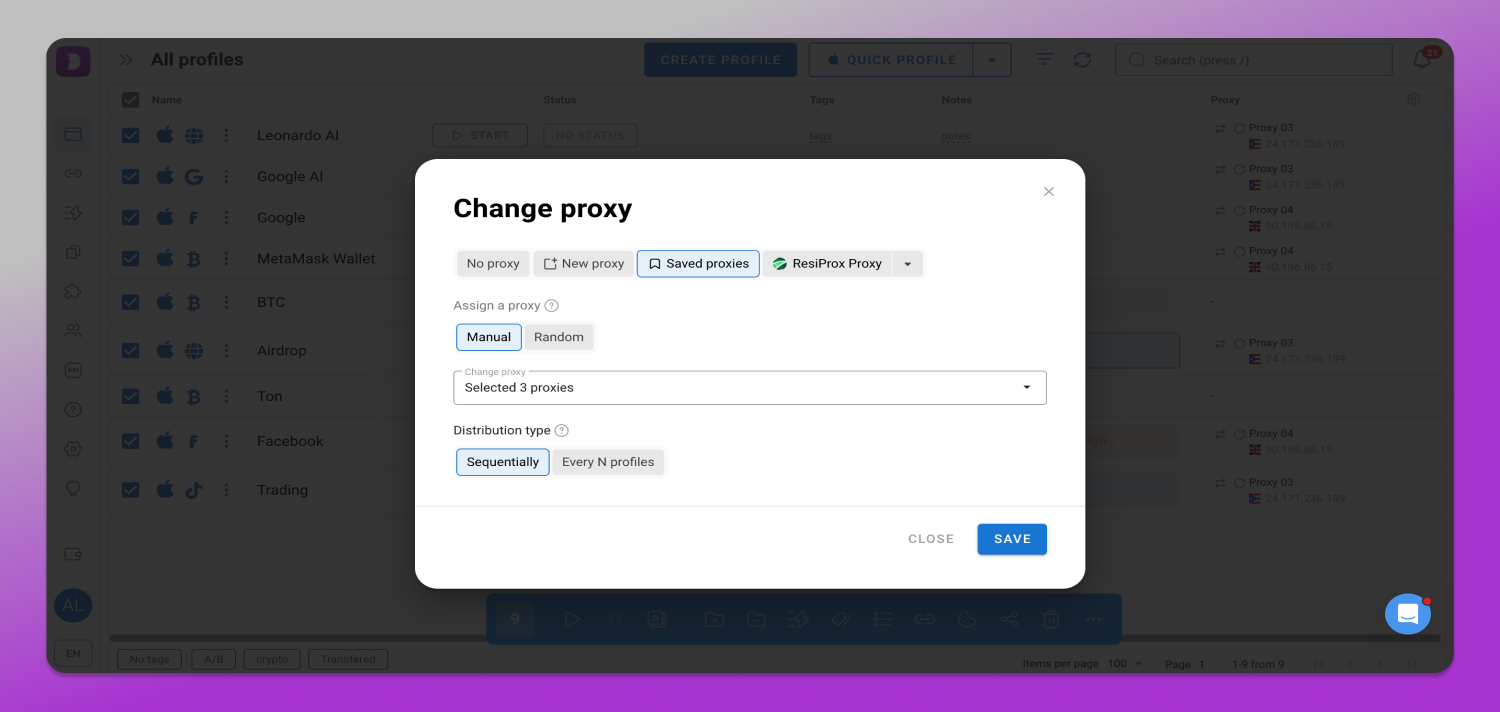
Select the profiles in the list, open the bulk actions panel and choose Change Proxy. You can assign manually, assign at random from your saved list, or assign sequentially so each profile receives the next address in order.
Sequential assignment is the option to use when you have bought one static IP per profile, because it guarantees a one to one mapping without checking each row by hand. There is also an option to change the proxy every N profiles, which only makes sense for profiles that are not signed in.
How to check that your proxy works in Dolphin Anty
✅ Dolphin Anty has a built-in check that reports the exit IP and the detected location. When it fails, the profile shows a red Error status and the message “Error checking connection to proxy”.
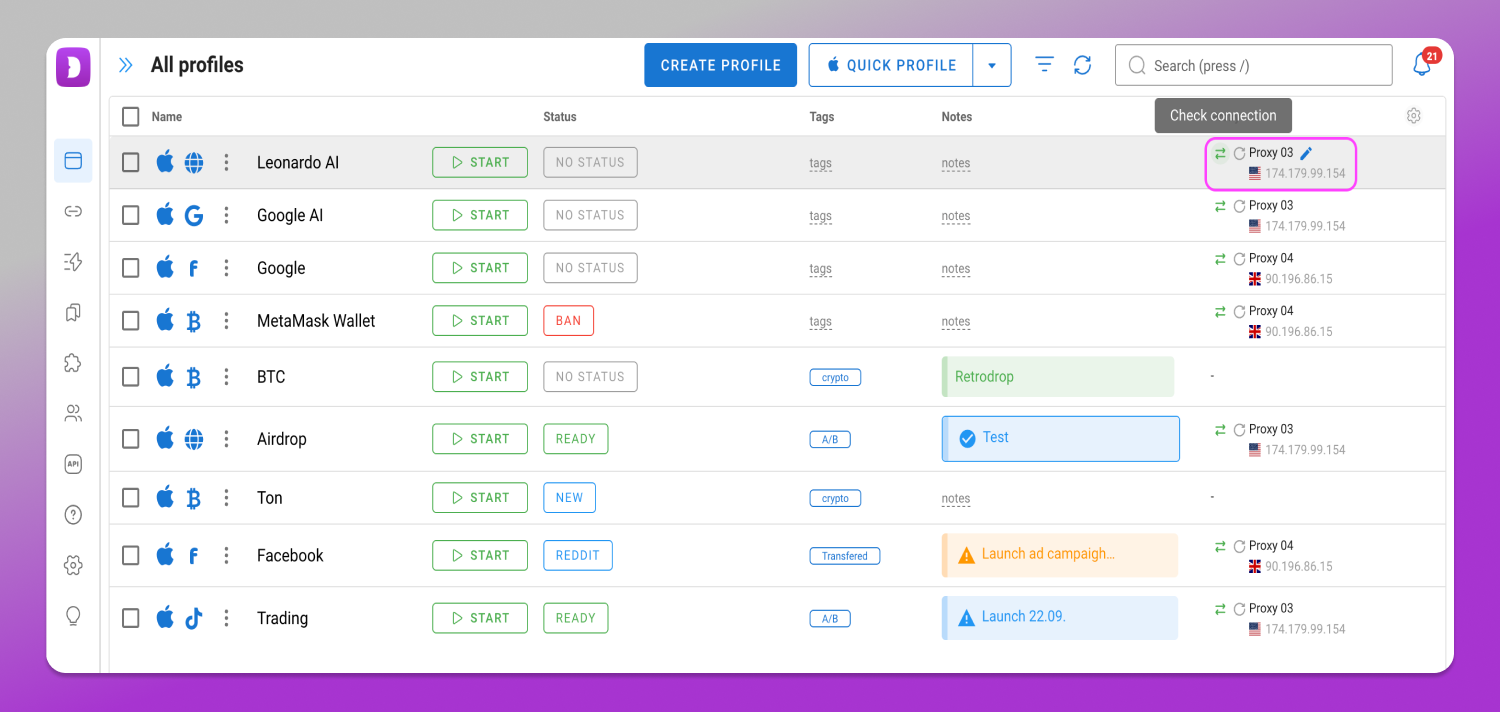
The official documentation lists three causes for that message: your own network cannot reach the proxy, the proxy server is not responding, or the checker itself cannot connect from where it runs. That third case is the one people miss, because it means a proxy can be marked as failing inside the app while working correctly from your machine.
The way to tell them apart is to test the same credentials outside the app. Run them through an independent proxy checker and compare the result. If the external test passes and Dolphin Anty fails, the problem is the route between the checker and the proxy, not the proxy itself. If both fail, look at the credentials, the IP allowlist or the plan status.
What Dolphin Anty adjusts automatically from the proxy IP
Once a proxy is attached, Dolphin Anty aligns the profile timezone, language and geolocation with the proxy IP. That removes the most common configuration mismatch in multi-account workflows, which is a profile reporting one timezone while exiting through an address on the other side of the world.
☝️ There are two things it does not do for you. It does not choose the city, so if an account belongs to a specific metro area you select that location on the provider side before assigning the proxy. And it does not change how the address is classified, so a hosting range stays a hosting range no matter how carefully the profile is configured.
What it costs to run 10, 50 and 100 profiles
Static ISP is priced per IP, so the arithmetic is direct. At the entry rate of $1.79 per IP, ten profiles cost $17.90 per month. The volume discount starts at ten IPs and brings the rate to $1.74 per IP, so a ten IP order is $17.36 in total. Applying that same rate, fifty profiles come to $87.00 per month and one hundred to $174.00 per month, and the dashboard shows the exact per IP rate for the quantity you select before you pay.
Residential is priced by traffic, so the cost follows what the profiles do rather than how many exist. The formula is monthly gigabytes multiplied by your tier rate. At the 25 GB tier with the BF50 code the rate is $1.89 per GB, so a 25 GB workload costs $47.37 for the month whether it is spread across ten profiles or a hundred.
The comparison that matters is this. A profile that stays signed in all day is cheaper on a fixed IP, and a profile that runs short bursts in many locations is cheaper on metered traffic.
Full country pricing is on the static ISP plans page. The $1.79 entry rate covers twelve countries including the United States, Germany, France, Italy, the Netherlands and Canada, while eight countries including the United Kingdom, Japan and Brazil are priced at $2.29 per IP.
A note on compliance
📋 Platform terms decide what you are allowed to do; proxies only decide how cleanly things stay separated on the network. Nothing in this guide changes the rules of the platforms you work with, and no network setup puts an account outside them. If you manage accounts on behalf of clients, check each platform’s policy on delegated access before scaling the number of profiles.
FAQ
Which proxy type is best for Dolphin Anty?
Static ISP proxies are the best default for Dolphin Anty profiles that stay signed in, because the profile keeps the same IPv4 in every session. Rotating residential is better for geo checks and short tasks, and datacenter is better for scraping and internal tooling where no login is involved.
Can I use one proxy for multiple Dolphin Anty profiles?
For profiles you sign into, plan on one dedicated IP per profile. Putting several logged-in profiles behind one address makes them look related at the network layer. Profiles that only read public pages can share a rotating endpoint, since there is no session identity to keep separate.
What proxy format does Dolphin Anty require?
Dolphin Anty accepts proxies as IP:PORT:LOGIN:PASSWORD and supports HTTP, SOCKS5 and SSH. Pasting the full string into the quick input field in the Proxies section splits it into host, port, login and password automatically. Bulk import uses the same format with one proxy per line.
Do I need mobile proxies for Dolphin Anty?
Mobile proxies are not required for most Dolphin Anty workflows. They exit through carrier networks shared by many real users, which suits a small number of high-value profiles. For everyday multi-account work the cost per profile is hard to justify against a dedicated static ISP address at $1.79 per IP.
Why does Dolphin Anty show “Error checking connection to proxy”?
That message means the built-in checker could not reach the proxy. The documentation lists three causes: your network cannot reach it, the proxy server is not responding, or the checker cannot connect from where it runs. Test the same credentials in an external proxy checker to tell the three apart.
Does Dolphin Anty change timezone and geolocation automatically?
Yes. Once a proxy is attached, Dolphin Anty aligns the profile timezone, language and geolocation with the proxy IP. It does not choose the city for you, so if an account belongs to a specific metro area you select that location on the provider side first.
Set up your Dolphin Anty profiles on a stable IP
Static ISP proxies start at $1.79 per IP with unlimited bandwidth and unlimited threads, in 20 countries. Create an account and pull your credentials from Quick Access, then paste them straight into the Dolphin Anty Proxies section in the format above.