Astro infrastructure guide for 2026
A practical framework for matching residential, mobile, and datacenter proxies to each social platform – with rotation modes, density baselines, and configuration checks.
Running multiple social media accounts is, at its core, an infrastructure problem. The browser side of it – fingerprint isolation, persistent profiles, cookie hygiene – is solved by 🚀 Dolphin Anty. The network side – which IP each profile uses, how often it rotates, where it geographically resolves – is solved by the proxy provider.
When a workflow runs into rate limits, verifications, or account flags, the root cause is rarely a single mistake. It is almost always a ☝️ mismatch between the type of proxy in use and the platform’s expectations for the kind of traffic it sees. A residential IP rotating on every request looks suspicious to LinkedIn. A datacenter IP looks suspicious to Instagram. A single mobile IP shared across many profiles looks suspicious to anyone.
This guide is a baseline framework for matching Astro’s three proxy types – 🔗 mobile 4G/5G, residential rotating, and datacenter – to each major social platform, plus a clear mapping of Astro’s three rotation modes to specific operational scenarios inside Dolphin Anty.
We previously published a step-by-step guide on connecting Astro proxies to Dolphin Anty at the technical level. This article is about what to choose and why.
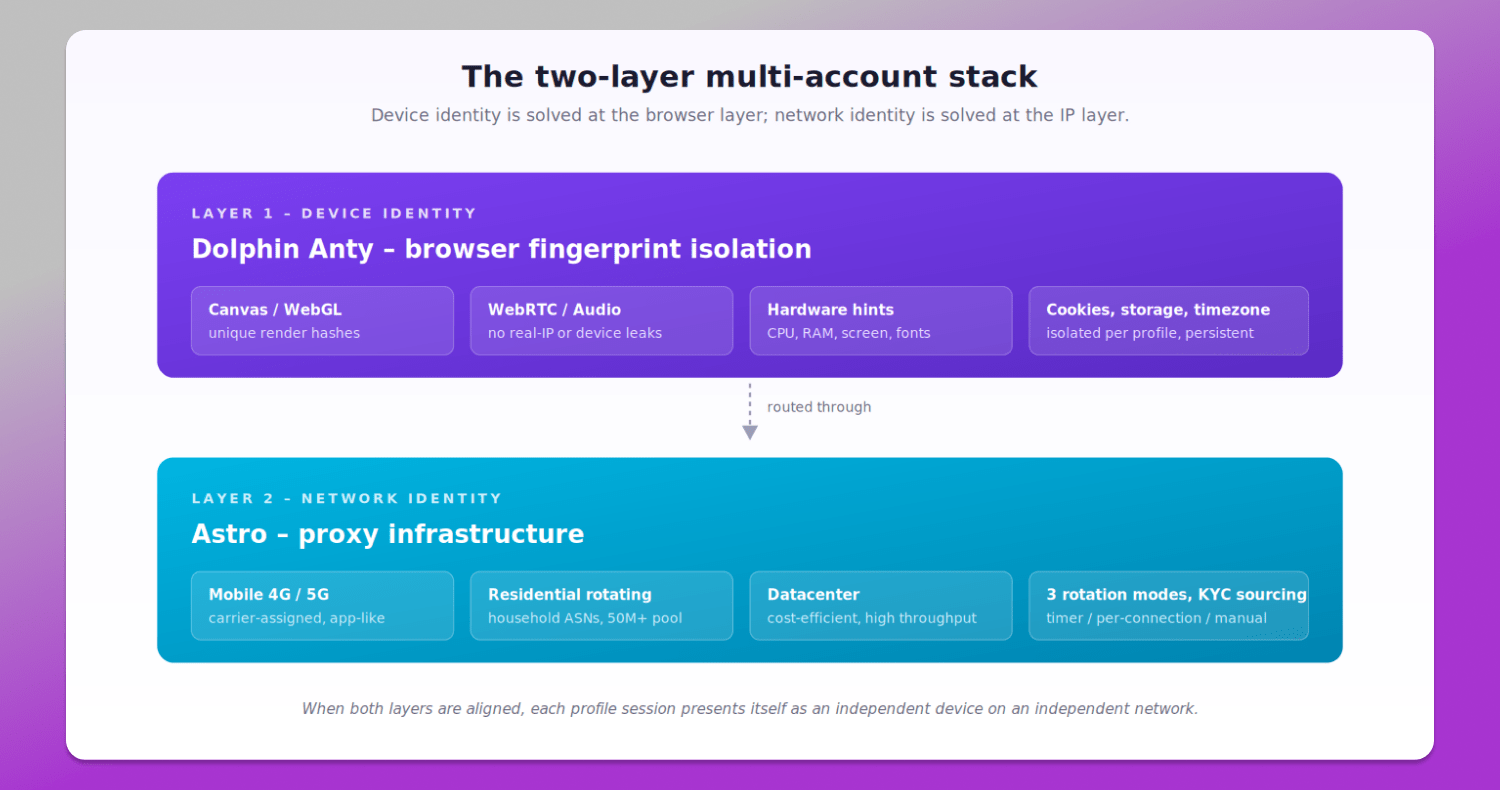
Figure 1. The two-layer multi-account stack.
The two-layer model: device identity + network identity
Modern social platforms evaluate accounts across two independent layers.
The 💻 device identity layer is what the browser exposes: canvas and WebGL render hashes, WebRTC and audio context signatures, hardware hints (CPU cores, RAM, screen resolution), installed fonts, timezone, language, and persistent storage. Dolphin Anty manages all of these, generating internally consistent fingerprints per profile and keeping them isolated across sessions so each profile builds a realistic history.
The 🌐 network identity layer is what the IP address exposes: ASN (whose network the IP belongs to), geolocation, carrier or hosting class, IP age, and rotation behaviour. This is where the proxy provider matters.
If both layers say “same person, different sessions,” accounts get correlated regardless of cookies or logins. If both layers say “different people, different devices, different networks,” accounts behave independently. This is the entire premise of multi-account work in 2026 – and it is also why simply assigning any proxy to any profile is insufficient.
Matching Astro’s three tiers to social platforms
Astro provides three proxy tiers, each with a clear best-fit category. The comparison below summarises the trade-offs.
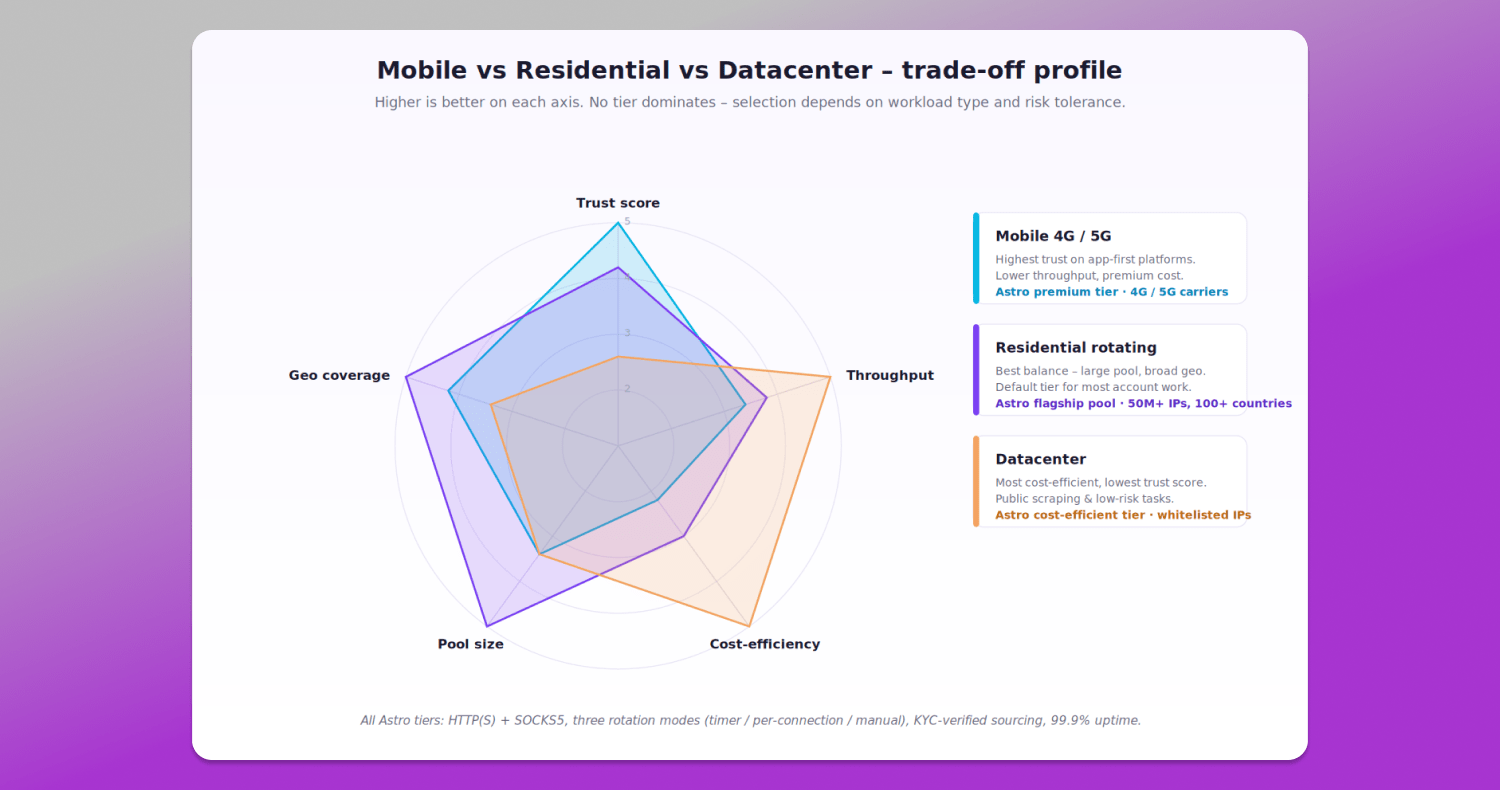
Figure 2. Mobile vs Residential vs Datacenter – trade-off profile.
Mobile 4G / 5G
Mobile IPs are issued by cellular carriers and shared, by design, across thousands of real subscribers behind carrier-grade NAT. From a platform’s perspective, blocking a mobile IP risks affecting many genuine users at once – so detection systems treat mobile-origin traffic with a higher baseline trust score.
This makes mobile proxies the right choice for app-first platforms where the platform actively expects mobile traffic – Instagram, TikTok, and sensitive Facebook ad accounts. They are also the safer option for re-authentication, two-factor verification, and recovery flows.
The cost is the trade-off. Astro’s mobile proxies start from $1.31 per 100 MB (equivalent to $13.14 per GB) on the prepaid plan. They are not the tier to use for bulk scraping or anywhere mobile-origin traffic is not specifically required.
Residential rotating
Residential IPs come from real household networks. They are the default tier for the majority of multi-account work – Facebook business accounts, X, LinkedIn, YouTube channel management, Pinterest, Threads, and most outreach automation.
Astro’s residential pool draws from over 50 million IPs across 100+ countries, with all sources KYC-verified and ethically allow-listed. Pricing starts from $0.73 per 100 MB (equivalent to $7.30 per GB) on the prepaid plan, and the pool size means city- and ISP-level targeting is realistic in most major markets.
For agency and team workflows that span multiple accounts across mixed platforms, residential is the workhorse tier.
Datacenter
Datacenter IPs are hosted in commercial server facilities. Their ASN is identifiable as a hosting provider, which means platforms with strong anti-bot systems can flag them sooner. In return, they are the most cost-efficient option – Astro’s datacenter proxies start from $0.37 per 100 MB (equivalent to $3.65 per GB).
The right use cases are public-data scraping, SERP and ad verification, low-risk content checks, and any task where the target site does not aggressively fingerprint by ASN. They are the wrong choice for any logged-in account work on major social platforms – Astro’s own published guidance for Reddit, Google Ads, and similar workflows specifically recommends against datacenter IPs for that reason.
The full platform matrix
The matrix below consolidates ✅ recommended tier, rotation mode, and account density for each major platform. These are starting baselines – actual settings should be tuned based on workload type and observed metrics.
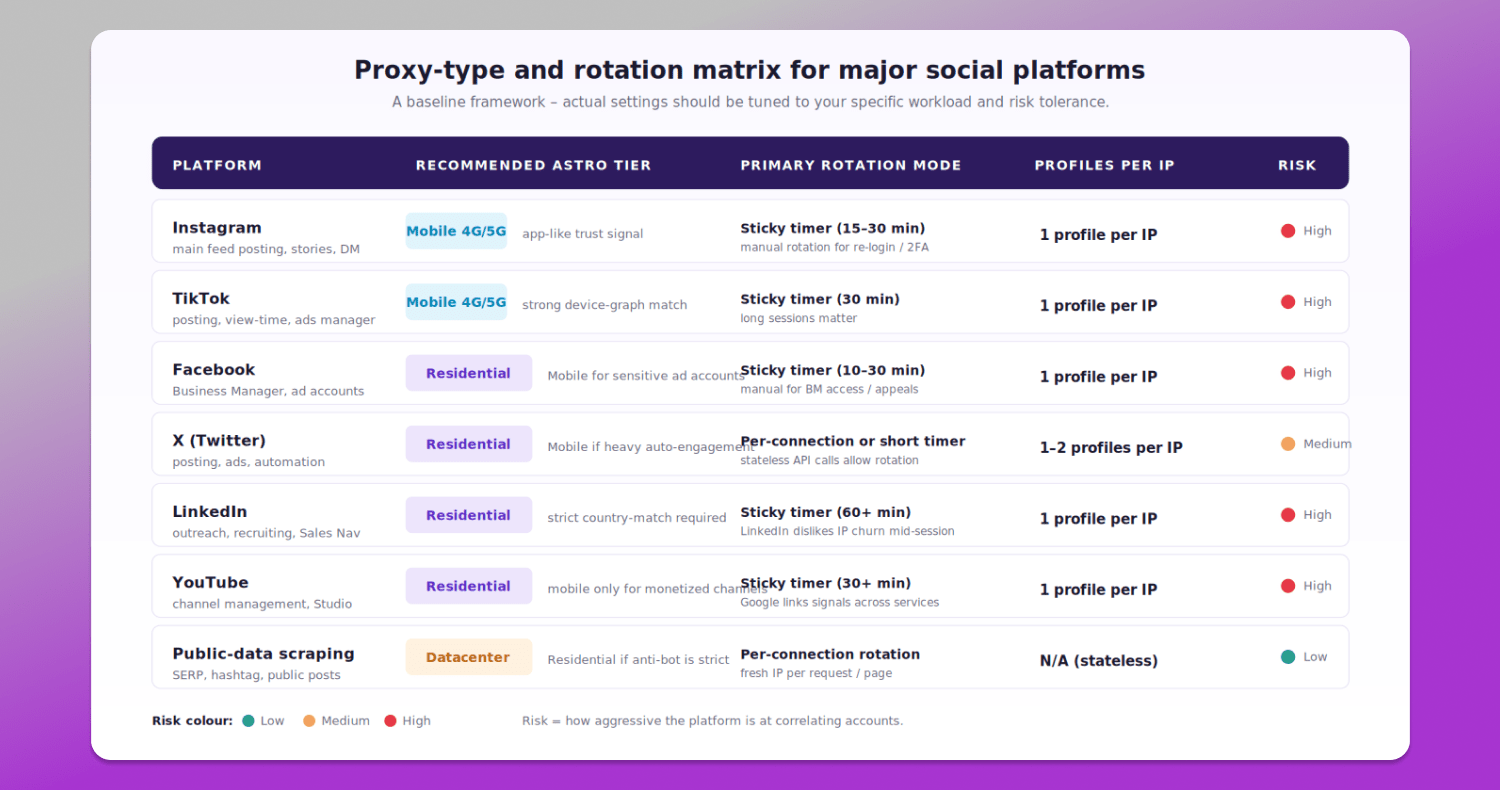
Figure 3. Proxy-type and rotation matrix for major social platforms.
A few patterns are worth highlighting:
- One profile per IP is the safe default for any logged-in workflow on a major platform. Astro’s published guidance puts it plainly: 1 proxy = 1 account for multi-accounting. The “save money by stacking five accounts on one IP” approach is the single most common reason for cluster-wide bans.
- Scraping is the only category where per-connection rotation is the right answer. For account work, frequent IP churn during a session is itself a detection signal.
- LinkedIn is the strictest on country-match. A US-registered LinkedIn account routed through a German residential IP is a typical trigger for additional verification or restriction.
Astro’s three rotation modes
Astro offers three 🔄 rotation modes, all configurable from the dashboard or via API:
- On a timer – the IP rotates at a configurable interval.
- A new IP address for each new connection – a fresh IP is assigned per request.
- Manual IP rotation via link or dashboard button – the IP changes only when the operator triggers it.
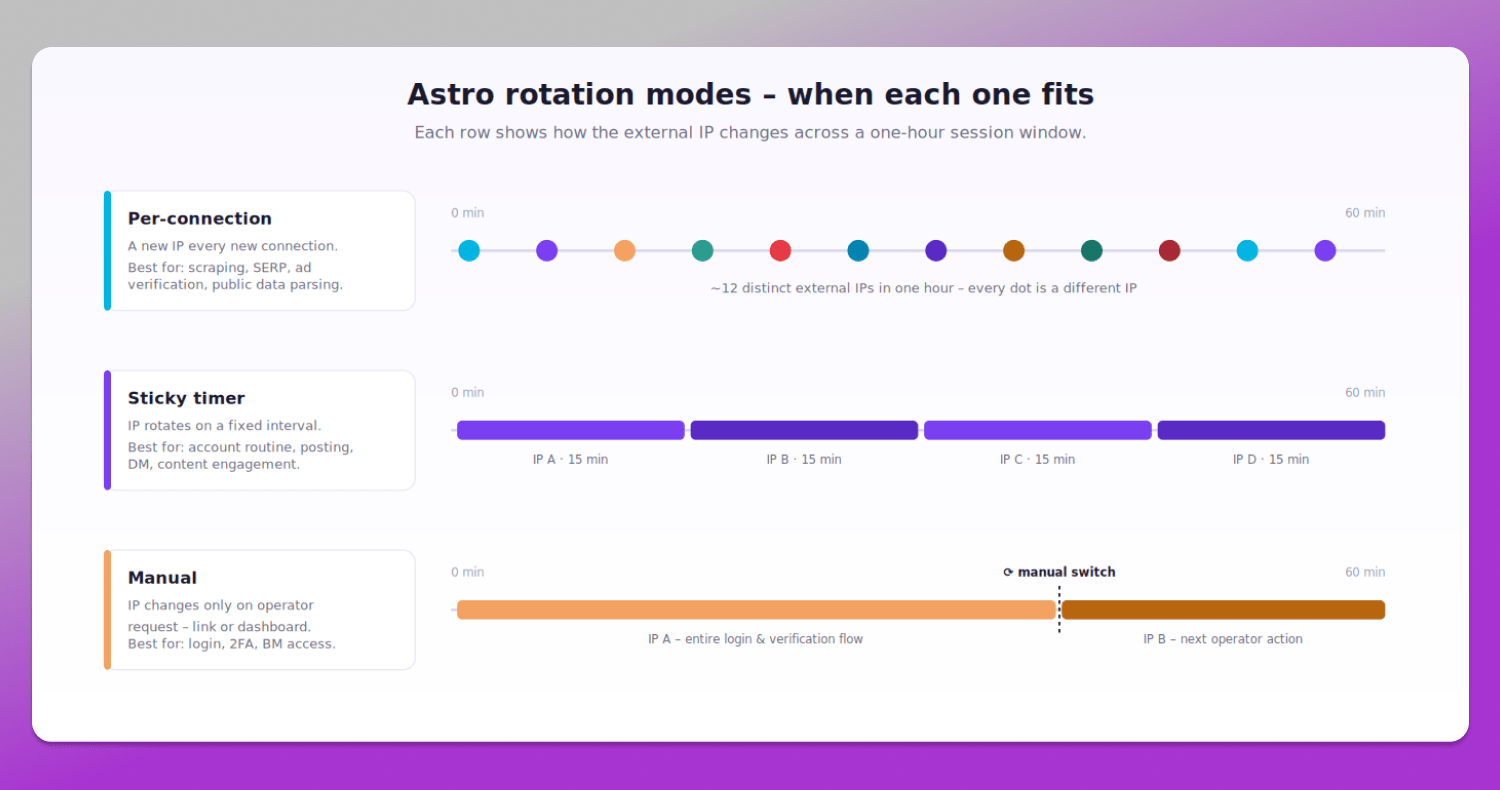
Figure 4. Astro rotation modes – timer, per-connection, and manual modes over a one-hour window.
All three modes are available across Astro’s residential, mobile, and datacenter tiers. The choice of mode is often more important than the choice of tier: per-connection rotation suits stateless work (public-data scraping, SERP collection, ad verification), timer-based rotation suits account routine inside a Dolphin Anty profile, and manual rotation suits sensitive operations where the operator needs full control over when the IP changes.
Five common configuration mistakes
These are the avoidable errors behind most account-level issues we see in support conversations.
- Timezone vs IP geo mismatch. A Dolphin profile set to America/New_York routed through a Madrid residential IP is an instant correlation signal. Dolphin Anty supports automatic timezone detection from IP – enable it.
- Too many profiles per IP. Industry-friendly defaults are one profile per IP for logged-in social platforms. Pushing density to save on traffic is a false economy: one banned IP brings down every account it touches.
- Per-connection rotation on logged-in accounts. Aggressive rotation during a session looks nothing like real-user behaviour. For account work, timer-based or manual rotation is correct.
- Datacenter IPs on Instagram, TikTok, or Facebook. These platforms flag commercial-hosting ASNs by default. The lower per-GB cost is offset many times over by shorter account lifespan.
- WebRTC leaks. Even with a high-quality proxy in place, a WebRTC leak inside the browser can expose the real IP. Dolphin Anty replaces the WebRTC IP with the proxy IP by default – verify this is active before first login. Disabling WebRTC entirely is not a safe alternative: it creates a fingerprint anomaly that anti-fraud systems can detect on its own.
Astro pricing structure and cost-control mechanisms
Astro’s positioning in the 🔝 premium-proxy market is built on infrastructure, compliance, and operational economics rather than the lowest list price. Two factors shape the effective rate: how the discount structure stacks, and how the available billing models (prepaid traffic vs Pay-As-You-Go) match the actual workload pattern.
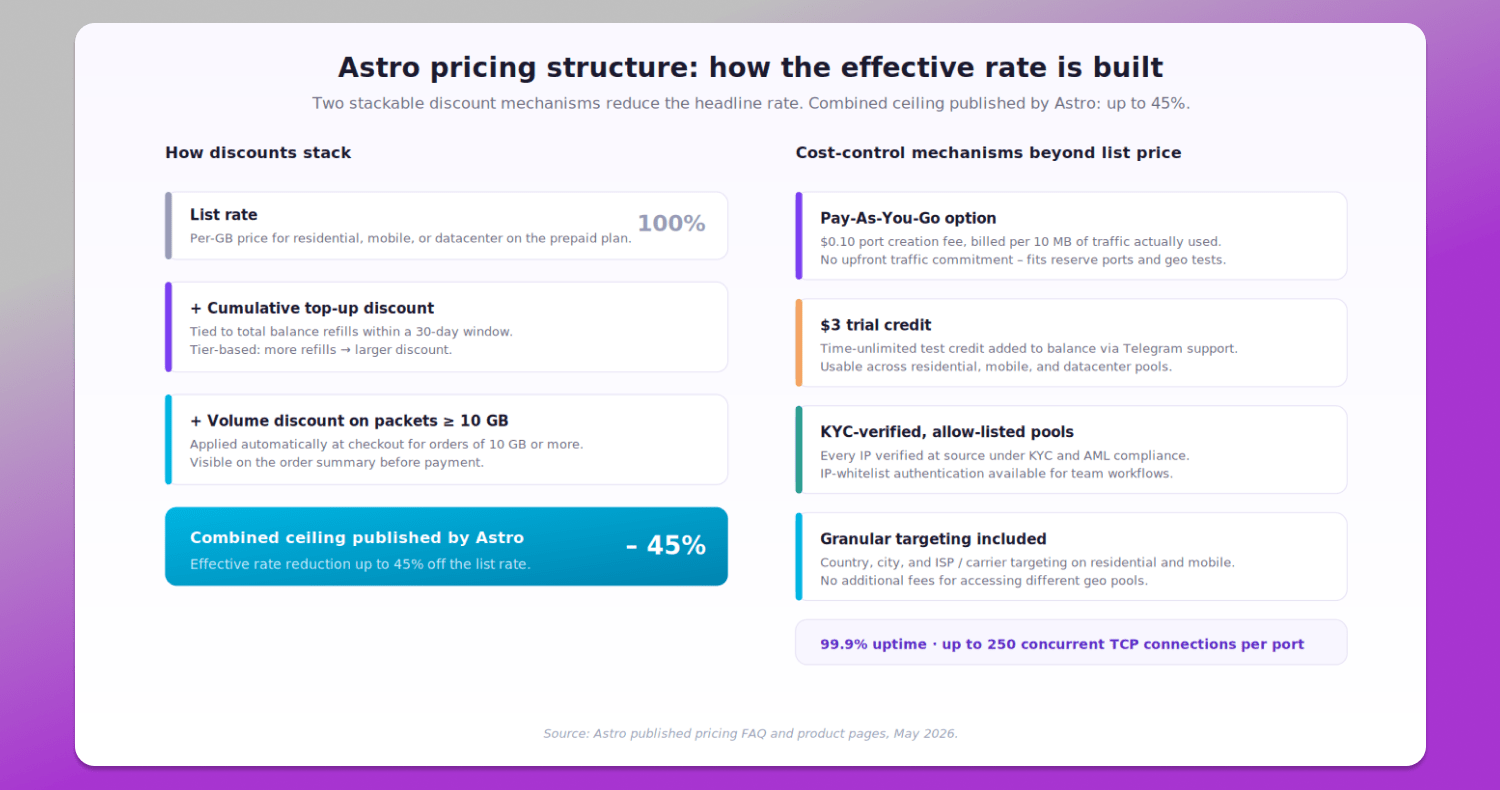
Figure 5. Astro pricing structure and cost-control mechanisms.
A few specifics worth flagging beyond the headline per-GB rate:
- Stacked discount structure. Astro applies cumulative top-up discounts (based on 30-day balance refills) and volume discounts on orders of 10 GB or more. The published ceiling for combined discounts is up to 45%, which materially shifts the effective per-GB rate for active teams while retaining KYC-verified sourcing.
- Pay-As-You-Go option. Charged per 10 MB used, with a port creation fee of $0.10 and no upfront traffic commitment. PAYG fits reserve ports, geo tests, and irregular scraping workloads where traffic per port stays low; the prepaid plan fits ports with consistent monthly traffic such as active posting infrastructure.
- Time-unlimited $3 trial credit. Added directly to the account balance via the Astro Telegram support team, the credit is usable across residential, mobile, and datacenter pools. There is no time window: the credit sits on the balance until consumed, which makes it realistic to evaluate the service against actual workloads before any commitment.
- KYC-verified sourcing and allow-listed pools. Every IP in the network is verified at source under KYC and AML compliance. For agency and team workflows, IP-whitelist authentication is available as an additional access-control layer – a meaningful operational factor when account-level losses are the dominant cost.
- Infrastructure capacity. Astro’s published baseline is 99.9% uptime with up to 250 concurrent TCP connections per port, three rotation modes available across all tiers (timer / per-connection / manual via link or API), and HTTP(S) + SOCKS5 protocol support. Rotation can be configured as frequently as every 30 seconds.
A short pre-launch checklist
Before launching a new batch of profiles in 🔥 Dolphin Anty:
- One profile per IP for logged-in accounts on Instagram, TikTok, Facebook, LinkedIn, YouTube
- Mobile 4G/5G for Instagram and TikTok; residential rotating for everything else logged-in; datacenter only for public scraping
- Timer-based rotation as the default for account routine; per-connection for scraping; manual for login and 2FA
- Profile timezone matches IP geolocation
- Profile language and Accept-Language headers match the country of the IP
- WebRTC, DNS, and Canvas leak-tested before first login (Dolphin Anty’s built-in checks cover all three)
Trying Astro with Dolphin Anty
Astro provides a $3 test credit that can be requested via the Astro Telegram support bot. The team can also recommend the right pool type and rotation mode for a specific workflow before any commitment.