
There is no product category called an undetectable proxy. Platforms do not ask “is this a proxy, yes or no” and stop there. They score the address, the session and the browser behind it, then decide whether the combination looks normal for this account. That is why a media buyer paying premium rates for residential IPs still hits a verification prompt on every ad account login: the address is fine, everything around it is not.
Here is what actually gets assessed when you connect:
- The type of IP: datacenter, ISP, residential or mobile
- The ASN and who owns the subnet the address sits in
- Reputation and history of that address, including past abuse
- How many neighbors share the same IP right now
- Whether the IP geo matches the profile timezone and language
- WebRTC and DNS leaks that expose the real route
- Internal consistency of the browser fingerprint
- Session stability: does the address hold, or jump mid-session
Most “undetectable” claims cover the first two items and nothing else.
“Undetectable Proxy”: What Sellers Mean and What You Actually Get
Read the landing pages here and the vocabulary repeats: “100% undetectable IPs”, “never banned”, “95% clean IP rate”. Underneath sits one real technical property. A high-anonymity (elite) proxy does not attach the giveaway HTTP proxy headers and does not pass your originating IP downstream. That is all the promise covers. It says nothing about subnet reputation, address history, the people routed through it right now, or whether the fingerprint behind it matches the address.
So, the honest version. Any proxy can be identified as a proxy if the platform cares enough to look; elite proxies raise the cost of that check without removing it. The question that decides your outcome is different: does this traffic look normal for this account? A datacenter address on an account that logged in from the same consumer ISP for two years is a contradiction. So is a flawless residential address carrying a fingerprint cloned from another profile.
What a Platform Actually Sees When You Connect
None of this is secret: anti-fraud vendors publish their detection techniques openly, because selling detection means explaining it. Read that material from the other side of the table and you have a map of what you are measured on.
The IP Itself: Type, ASN and Who Owns the Subnet
The first filter is cheap and automatic: an ASN lookup. Every IP belongs to an autonomous system with a known owner. If that owner is a hosting company, the address is a datacenter IP and carries the label before anything else loads. ISP proxies sit on consumer-registered ranges hosted in a data center. Residential IPs come from subscriber lines. Mobile IPs come from carrier ranges behind CGNAT, which is why hundreds of people share one. That ownership data is public; look up any address yourself.
Reputation and History of the Address
An IP carries a record: blacklist membership, an IP fraud score from a commercial reputation feed, abuse from the address last month, how many accounts already authenticated from it. Residential does not mean fresh. An address resold through a peer-to-peer network was used by whoever held the session before you, and their behavior is part of your context now.
Network-Level Signals
HTTP proxy headers such as X-Forwarded-For and Via give away low-anonymity setups instantly. TLS and TCP/IP fingerprints reveal a stack that contradicts the browser and OS you claim. Latency and ping tests expose an address nowhere near where it claims to be. Open port scans look for the signature ports of proxy software. Behavioral analysis, session context, velocity checks and headless browser detection sit on top inside the anti-bot system.
Geo, Timezone and Language Consistency
This is where most self-inflicted damage happens. An IP geolocating to Frankfurt, a profile reporting America/New_York, and an Accept-Language: pt-BR header make three stories out of one request. No single signal is fatal. The combination is a flag, and it costs nothing to compute.
What Makes an IP “Clean” and Why That Word Is Relative
Clean is relative to the job. Datacenter IPs are fast, cheap, stable, and the first thing a serious anti-bot system challenges. ISP proxies keep that speed on consumer-registered ranges and suit long sessions on strict platforms. Residential IPs blend into ordinary traffic best, with quality that varies by how the pool was sourced. Mobile IPs get the most tolerance because carrier NAT makes them ambiguous, and cost the most per gigabyte.
Three other variables matter as much as type. How many users share the address, since your neighbors’ behavior becomes your reputation. Rotating versus sticky session: account work needs an address that holds, scraping often wants the opposite. And geographic fit, an IP in the country the account claims to operate from.
Take a scraping job that returns a captcha on every request. The instinct is to hunt for a more “undetectable” address. Usually the target challenges entire hosting ASNs by policy, so the fix is a different class of IP, not a better brand of the same class. Dolphin Anty does not sell proxies. Addresses come from providers, and pricing, traffic allowances and pool sizes differ between them, so compare current price lists directly rather than working from figures quoted second-hand.
Why the IP Alone Is Never Enough (And Why a “Browser That Hides Your IP” Is Half a Solution)
Take a seller opening a second marketplace account. New proxy, different country, all paid for. The profile is a copy of the first: same fingerprint values, timezone, language list, cookies and storage. The platform links the two within days, and the IP was never the deciding evidence.
Changing your route changes one attribute and isolates nothing. A “hide my IP” extension reroutes traffic and leaves you in the same browser profile, sharing cookies, storage, canvas and WebGL characteristics with every other tab. Two accounts on different IPs with one shared storage layer are one account with a proxy attached. The unit of work is the pair: profile plus proxy, configured together, never separately.
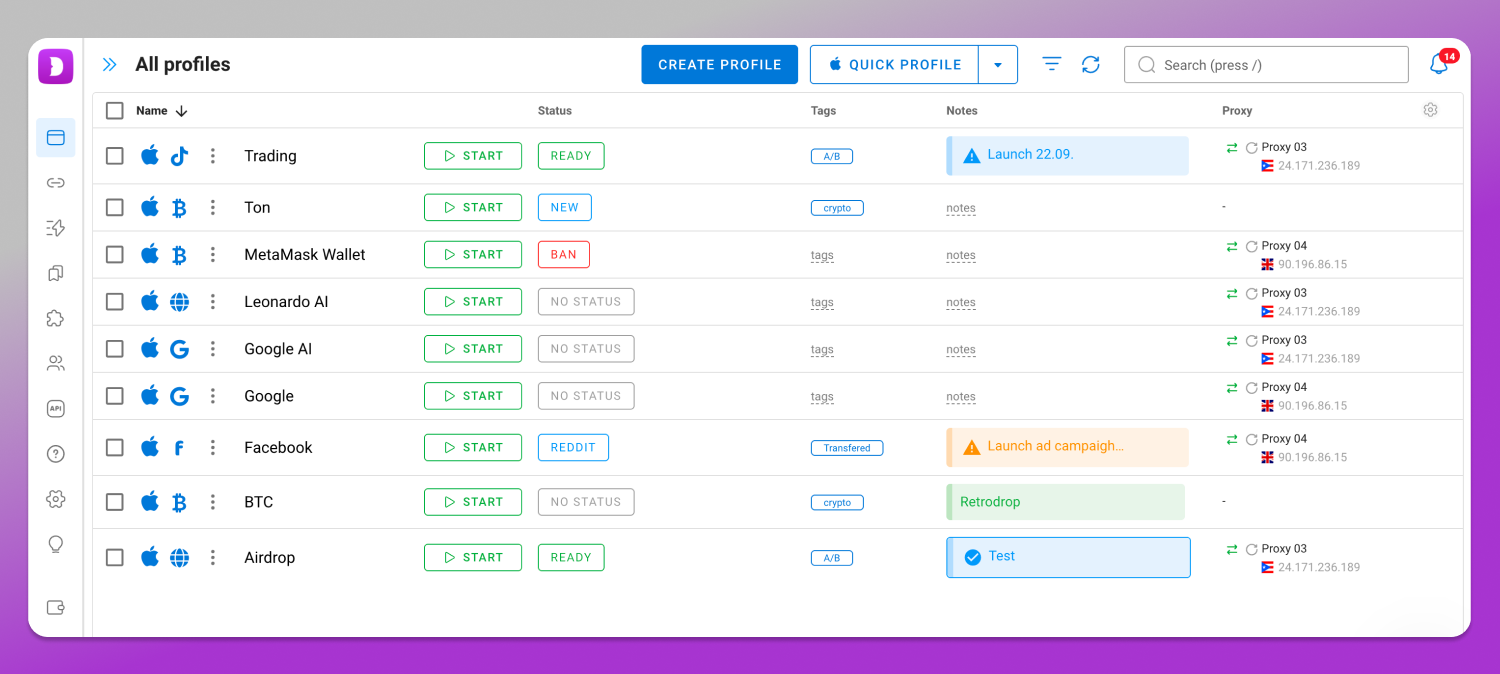
That pairing is the layer 🔥 Dolphin Anty covers, a desktop anti-detect browser for Windows, macOS and Linux where the proxy is set at profile level and lives alongside that profile’s fingerprint, cookies and storage, with its fingerprint parameters under browser profile isolation. We do not sell proxies and we do not promise undetectability. What you get is an environment where the profile and the IP tell one story instead of two.
How to Check Your Profile + Proxy Pair Before You Start Working
Run the profile through a checker before the first login, not after the first ban. Use CreepJS, Pixelscan, BrowserLeaks, BrowserScan or Whoer. Four checks decide whether a profile goes live.
- Geo and timezone. The IP’s country and city against the profile timezone. A US East Coast IP with a European timezone is a stop.
- Leaks. WebRTC must not report an address behind the proxy, and DNS must not fall back to your own resolver. An IP leak test showing two addresses means the profile is not ready.
- Language and locale. Accept-Language, the JavaScript locale and the proxy country should agree.
- Declared versus real OS. A profile claiming macOS while the stack reports something else fails on fingerprint consistency, not on IP analysis.
Read the checker’s output for contradictions rather than for a score. The IP’s country against the reported timezone. The declared operating system against what the graphics and font stacks say. The language list against the locale. And whether any local address shows up in the WebRTC section. One disagreement between those is enough to trigger a verification request, so treat any mismatch as a blocker and fix it before you log in, not after.
What People Are Really Looking For When They Search “Undetectable Proxy Manager”
Almost nobody typing that phrase wants a magic address. They want a manager for pairs: one place where proxies are stored, bound to specific profiles, and verified before work starts.
At scale the requirements get specific. Hard binding between address and profile, so a proxy cannot drift onto the wrong account. Bulk import and replacement, because rotating a hundred addresses by hand produces errors. An automatic connection check before launch. Team access roles, so an employee sees only their own pairs. An API for mass operations.
Picture a team tracking three hundred pairs in a spreadsheet. The failure is undramatic: someone copies a row, a profile launches on an address belonging to another account, and two accounts kept apart for months are linked. Dolphin Anty covers that with proxy provider integrations, mass assignment and checking, team permissions, and Local and Remote API access. Plan limits sit on the Dolphin Anty pricing page.
Red Flags When Buying Proxies
Treat these as risk classes, not accusations against any named vendor:
- “100% undetectable”, “never banned”, “no bans guaranteed”: outcomes no seller controls
- Percentage claims about clean IP rates with no stated measurement method
- No disclosure of IP type or how addresses were sourced
- Free proxy lists, which are addresses with a history and usually already blacklisted
- One subnet resold to everyone, so your neighbors’ behavior lands on you
- No clear answer about rotation policy and sticky session duration
If a provider cannot state the ASN class and the rotation behavior in one sentence, that is your answer.
“Undetectable Proxy” vs the Undetectable Browser: Two Different Things
These are unrelated. “Undetectable proxy” is a generic marketing label for a high-anonymity proxy. Undetectable is the name of a specific anti-detect browser. Most traffic searching for “undetectable proxy manager” wants a feature inside that product, not a category of goods. A separate comparison of the two products exists in this blog; this article makes no claims about the other product’s features.
Rules, Jurisdictions and Where the Line Is
Multi-accounting and proxies are legitimate working tools inside platform rules and local law. Those rules are published: the Amazon Seller Code of Conduct, Meta Advertising Policies, the X Rules. Read the ones that apply to you before scaling.
Data protection law applies independently of platform terms. GDPR in the EU, UK GDPR, and the CCPA as amended by the CPRA in California govern personal data you touch while working through proxies or collecting data at scale, and the regime follows where you and your data subjects are, not where your IP claims to be. Which of them lands on your operation is a question for a lawyer who knows your markets.
Nothing here endorses evading platform rules, scraping against a site’s terms, circumventing geographic licensing, or working around payment anti-fraud controls.
Frequently Asked Questions
Is a Residential Proxy Undetectable?
No. Static residential addresses blend into consumer traffic better than datacenter ranges, which is why they cost more. They still carry reputation, history and neighbors, and one resold last week through a peer-to-peer network arrives with someone else’s record attached. Camouflage, not immunity.
Can Websites Always Detect a Proxy?
A determined platform with commercial detection data can usually tell that a connection is proxied. Detection by itself is not what costs you the account. What follows depends on whether the rest of the session is consistent, and on the risk that platform tolerates for the action.
Do Google, Meta and Amazon Detect Proxies?
Large platforms run their own anti-fraud stacks and buy external reputation data, acting on mismatches rather than on the presence of a proxy. Expect IP reputation checks, device fingerprinting, session context and velocity checks. Their exact methods are not published, so specific claims about them are speculation.
Does a Mobile Proxy Always Help?
No. Mobile IPs get more tolerance because carrier NAT puts many real subscribers behind one address, making blanket blocking expensive. That advantage disappears if the profile behind it is inconsistent, and mobile pools get flagged when abused. A mobile proxy is also not a mobile profile: Dolphin Anty is a desktop product with no Android or iOS profiles.
What Is the Difference Between a “Hide My IP” Extension and a Proxy Set at Profile Level?
An extension changes the route for a browser you already share across every account, so cookies, storage and fingerprint stay common. A proxy assigned at profile level belongs to one isolated profile with its own storage and fingerprint, so accounts stay separated at every layer, not at the network alone.
Is Using a Proxy Legal?
Using proxies is lawful in most jurisdictions, though some countries restrict or license traffic-anonymizing services, so confirm the position where you operate. What you do through the proxy carries the risk: platform terms, data protection law such as GDPR, UK GDPR and CCPA/CPRA, and local regulation apply.
Proxy, Web Proxy or VPN: Which One Do I Need?
They solve different problems. A VPN routes an entire device, a web proxy handles one page in a browser tab, and a proxy configured per profile is the only one of the three that isolates accounts. For account work, per-profile is the answer.
Is “Undetectable Proxy” the Same as the Undetectable Browser?
No. One is a generic marketing term for a high-anonymity proxy, the other a branded anti-detect browser. The overlap exists only in search results, which is why “undetectable proxy manager” mostly returns pages about that product.
Where to Go From Here
Stop shopping for an address that cannot be identified. It does not exist. Pick the IP type that fits the task, check its reputation and stability, then spend the rest of your attention on the pair: a profile whose timezone, language, fingerprint and storage agree with the address it runs on.
To build those pairs properly, download 📌 Dolphin Anty for Windows, macOS or Linux and check the current plans on the Dolphin Anty pricing page.