Instructions for Connecting Thordata to Dolphin Anty
Blog » Instructions for Connecting Thordata to Dolphin Anty
In today’s frequent bans and strict anti-scraping online environment, ordinary IPs and browsers can no longer guarantee stability and anonymity in accessing.
By combining 🔗 Thordata proxy services with 🚀 Dolphin Anty fingerprint browser, we can effectively bypass bans and avoid tracking, achieving secure and continuous online operations.
In this article, we will delve into the powerful features of the combination of proxies and fingerprint browsers in tackling online bans, and provide a complete operational guide to help users easily achieve high anonymity and high efficiency in online access.
What is Thordata?
Thordata is a professional service provider focused on ethical proxy networks and data access solutions, dedicated to providing users with stable, real, and sustainably usable proxy resources. Its proxy IP sources are clear and compliant with authorization, emphasizing high anonymity and high availability under legal and controllable conditions.
In addition to basic proxy service plans, Thordata also provides web scraping tools like SERP API and Web Scraper API, as well as ready-to-use datasets focused on search engines and large-scale data acquisition scenarios, helping users efficiently acquire structured data in complex network environments.
Product Suite 📌
- Residential Proxies: Based on real home network IPs, able to highly simulate the access behavior of ordinary users, providing rotating and sticky sessions, and suitable for scenarios with high anonymity and success rate requirements, effectively reducing the risk of being banned and identified.
- Static ISP Proxies: Provide fast static IPs and unlimited bandwidth, with IPs maintaining 99.9% uptime, suitable for tasks requiring consistent identity, such as account management.
- Datacenter Proxies: Designed for high-concurrency tasks, offering fast and stable IP addresses, achieving a 99.99% request success rate, ideal for AI training, data collection, and SEO monitoring.
- Mobile Proxies: Provide 600K+ real mobile IP resources, with IP availability up to 99%, making them very suitable for solving complex anti-crawling issues.
- SERP API: Real-time scraping of search result data from Google, Bing, etc., with response times of less than 1 second to output structured data without the need for secondary parsing.
- Web Scraper API: Seamless integration without the need to crawl infrastructure, with built-in Scraper templates, easily scrape structured data from over 120 global websites, saving development and maintenance costs.
Why choose Thordata?
Among many proxy services, Thordata stands out because it precisely addresses the core pain points of high-end application scenarios. Here are its ✅ most competitive aspects:
- High anonymity: The IP addresses provided by Thordata come from real household devices, making it difficult for target websites’ defense systems to distinguish this traffic from regular users, significantly reducing the risk of IPs being flagged or banned.
- Refined IP management: It offers users flexible IP binding options, achieving perfect isolation of “one task corresponding to one fixed IP (static ISP proxies),” which is crucial for managing multiple platform accounts that require independent identities.
- Stable sessions and rotation options: Choose between sticky sessions (long-term online) and rotating IPs (automatic IP switching), adapting to the flexible characteristics of your tasks.
- Global IP coverage: Proxy nodes are distributed across over 190 countries and regions, providing targeting at country, city, state, continent, and ASN levels to meet various operational needs.
- Outstanding stability: A response time of 0.41 seconds means your automated scripts or browsers can run smoothly without interruptions due to frequent proxy disconnections, saving a lot of time and debugging costs.
- Flexible usage plans: Supports billing based on traffic or the number of IPs, allowing both enterprise and individual users to choose plans flexibly according to their budget.
The Powerful Features of Dolphin Anty
Dolphin Anty is a professional anti-detect browser designed for high-risk control scenarios. Its core value lies in ensuring that each browser profile possesses “authentic and untraceable” user characteristics. In today’s environment where platforms widely adopt multi-dimensional risk control detection, relying solely on proxy IPs can no longer completely solve the ban issue. Dolphin Anty is designed to fill this critical gap.
Core Advantages of Dolphin Anty
- Complete Browser Fingerprint Isolation
- Independently generate unique fingerprint parameters for each browser profile, eliminating any risk of account association.
- Controllable Fingerprint Parameter System
- Support fine-tuning of critical parameters including User Agent, operating system, screen resolution, language, time zone, and more.
- Real Environment Simulation Mechanism
- Ensure logical consistency of all fingerprint parameters through rigorous consistency checks, mimicking genuine user behavior patterns.
- Multi-Profile Management
- Efficiently create and run multiple browser environments simultaneously, perfect for large-scale operations and team collaboration.
- Advanced Anti-Detection Technology
- Effectively counter common fingerprint recognition, behavioral analysis, and sophisticated risk control detection mechanisms.
- Seamless Proxy Integration
- Native support for HTTP, SOCKS5, and other proxy protocols, enabling smooth integration with ISP proxies and residential networks.
- Cookie Automation
- Powerful cookie and browser profile management capabilities, allowing for seamless session persistence and automated workflows.
- Team Collaboration Features
- Built-in team access controls and profile sharing, enabling efficient collaboration while maintaining security.
Thordata + Dolphin Anty: The Perfect Combination
Integrating Thordata with Dolphin Anty achieves superior levels of anonymity and access stability.
Real IP + Unique Fingerprint
Thordata provides authentic and stable residential IPs, ensuring high credibility at the network layer, while Dolphin Anty generates independent and logical browser fingerprints for each session, fundamentally reducing identification and association risks.
Network Layer Stability + Fingerprint Layer Consistency
Stable proxy IPs combined with a consistently maintained browser fingerprint environment prevent abnormal judgments by risk control systems due to frequent switching, significantly extending account and session lifespan.
Multi-Account Operations + Zero Association Risk
Each Dolphin Anty profile binds to an independent Thordata proxy, achieving “one account, one environment, one IP” architecture, effectively preventing cross-association issues common in bulk operations.
Global Proxy + Custom Browsing Environment
Thordata’s extensive global IP coverage combined with Dolphin Anty’s advanced customization capabilities for language, time zone, and system parameters can highly accurately replicate the access patterns of real users in target regions.
Lower Risk Control Trigger Rate + Higher Access Success Rate
Authentic online identities combined with reasonable fingerprint parameters work in harmony, making access behavior align with platform expectations, greatly reducing the frequency of CAPTCHA challenges, two-factor authentication prompts, and account bans.
Streamlined Operations + Maximum Efficiency
The integration requires no complex development, making it suitable for long-term operations, large-scale data collection, and enterprise-level workflows.
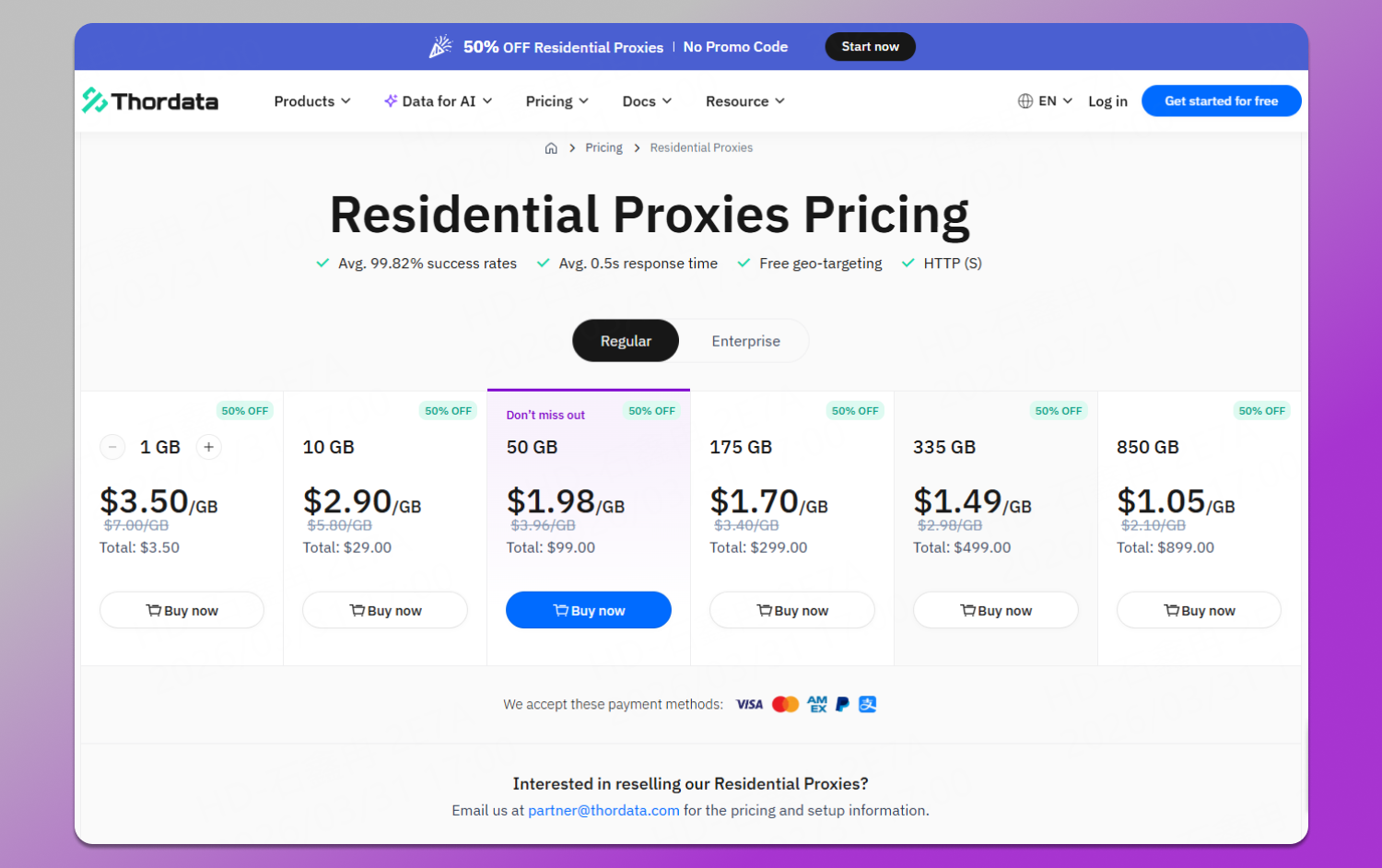
Thordata’s Pricing Plans
Thordata’s residential proxies utilize a 💳 pay-as-you-go pricing model, allowing users to flexibly choose a plan based on their actual needs. The following are the details of the plans:
How to Set Up Proxy Connection in Dolphin Anty?
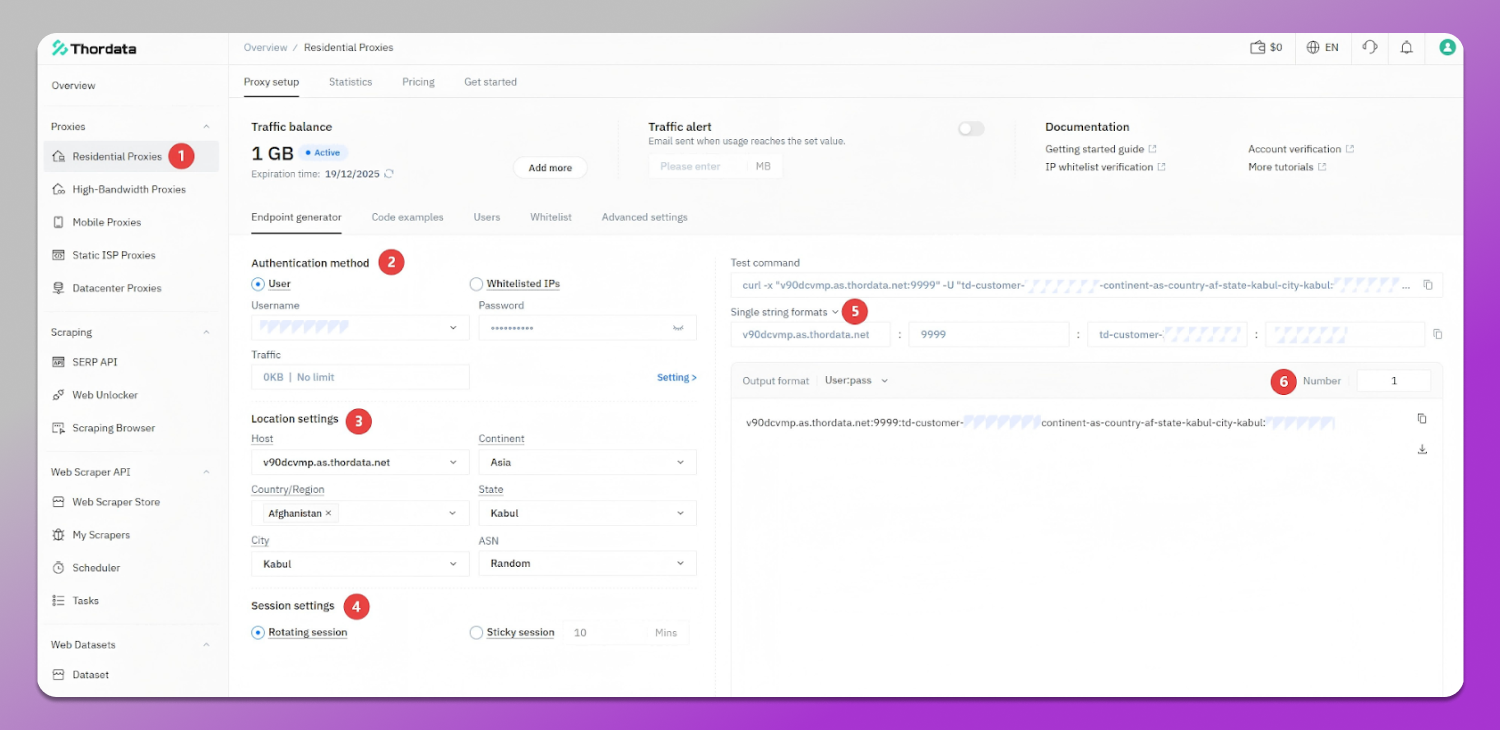
The setup process is divided into two parts: first, generate proxy information in the Thordata backend, and then configure the connection in Dolphin Anty.
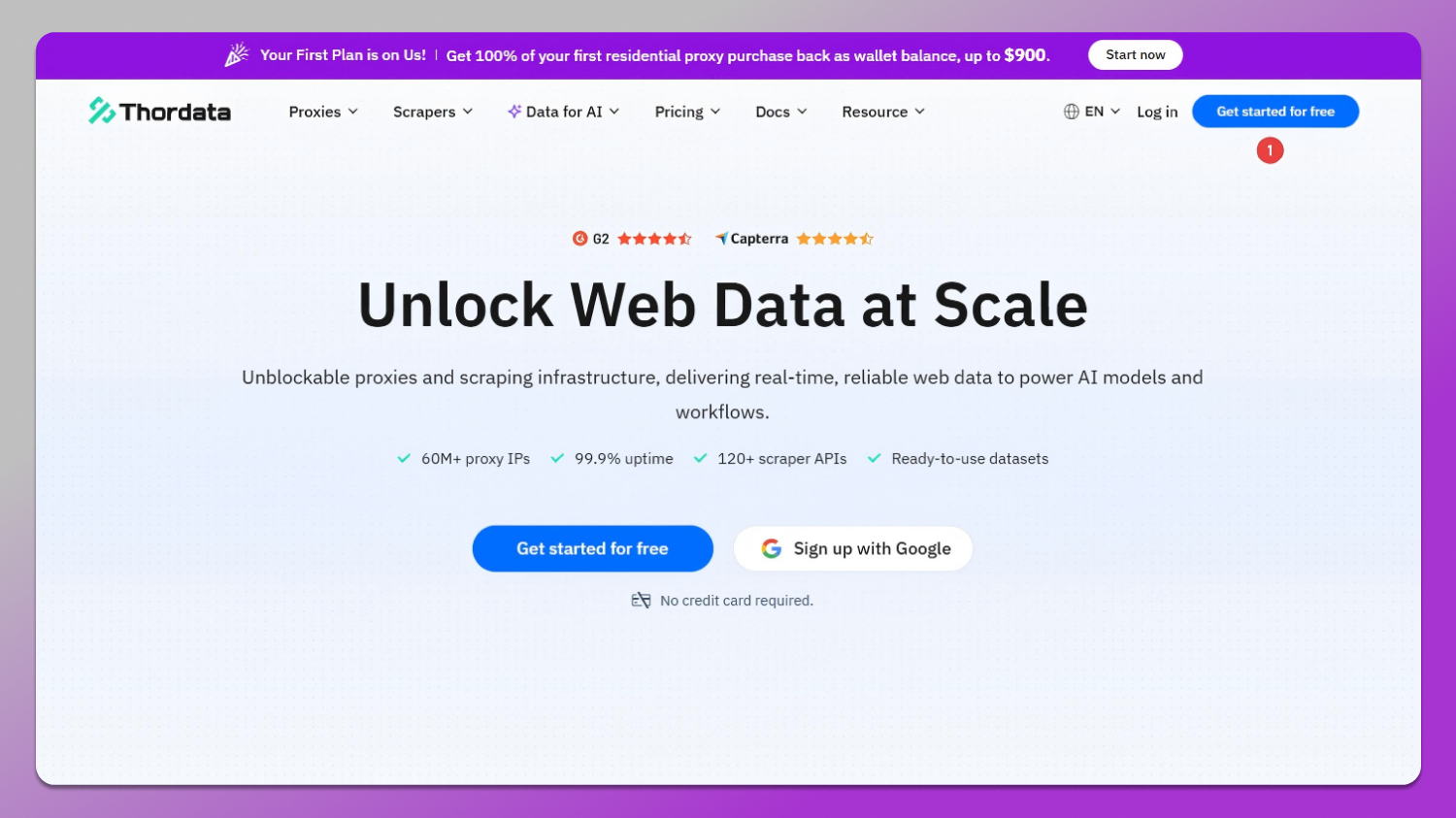
Step 1: Generate Proxy Information in Thordata Backend
1. Log in to your Thordata account
- Access the Thordata dashboard with your credentials
- Navigate to the proxy management section
2. Create a new proxy
- Select your desired proxy type (HTTP, SOCKS5, or residential proxy)
- Choose the target location/region for your proxy
- Set any additional parameters based on your needs
3. Retrieve proxy credentials
- Copy the proxy address (IP)
- Note the port number
- Save your username and password for authentication
Step 2: Configure Proxy Connection in Dolphin Anty
1. Open Dolphin Anty
- Launch the Dolphin Anty application on your device
- Log in to your Dolphin Anty account
2. Create or select a browser profile
- Create a new browser profile or select an existing one
- Navigate to the profile settings
3. Access proxy configuration
- Find the “Proxy” or “Connection” settings tab
- Click on “Add Proxy” or “Configure Proxy”
4. Enter Thordata proxy details
- Proxy Type: Select the protocol matching your Thordata proxy (HTTP/SOCKS5)
- Proxy Address: Paste the IP address from Thordata
- Port: Enter the port number provided by Thordata
- Username: Input your Thordata username
- Password: Enter your Thordata password
5. Test the connection
- Click “Test Connection” or “Verify Proxy”
- Wait for the connection status confirmation
- Ensure the proxy is working correctly before proceeding
6. Save and apply settings
- Click “Save” to store your proxy configuration
- The browser profile will now use the Thordata proxy for all connections
Verification✅
- Launch the browser profile with the configured proxy
- Visit an IP detection website to verify your new IP address
- Ensure the location matches your Thordata proxy settings
- Test browsing functionality to confirm stable connection
Tips for Optimal Performance
- Use dedicated proxies for each browser profile to maximize isolation
- Regularly test proxy connections to ensure stability
- Keep your Thordata proxy credentials secure and updated
- Consider using residential proxies for enhanced anonymity in high-risk scenarios