Dolphin Anty and Mobile Proxies by Proxies.sx
Blog » Dolphin Anty and Mobile Proxies by Proxies.sx
AI-Native Mobile Proxies You Can Manage by Chat (MCP)
If you’re using 🚀 Dolphin Anty, you already know the game: the browser profile is only half the story. The other half is IP hygiene — clean IPs, correct geo, stable sessions when you need them, and rotation when you don’t.
🔗 Proxies.sx is built for exactly that, but with a twist: it’s not just a proxy network — it’s an AI-native proxy network. With our MCP Server (Model Context Protocol), you can manage ports, rotate IPs, run speed tests, and even purchase bandwidth by simply telling your AI assistant what you want (Claude/Cursor/Cline). No dashboard hopping, no manual API scripting.
What Proxies.sx is (in Dolphin Anty terms)
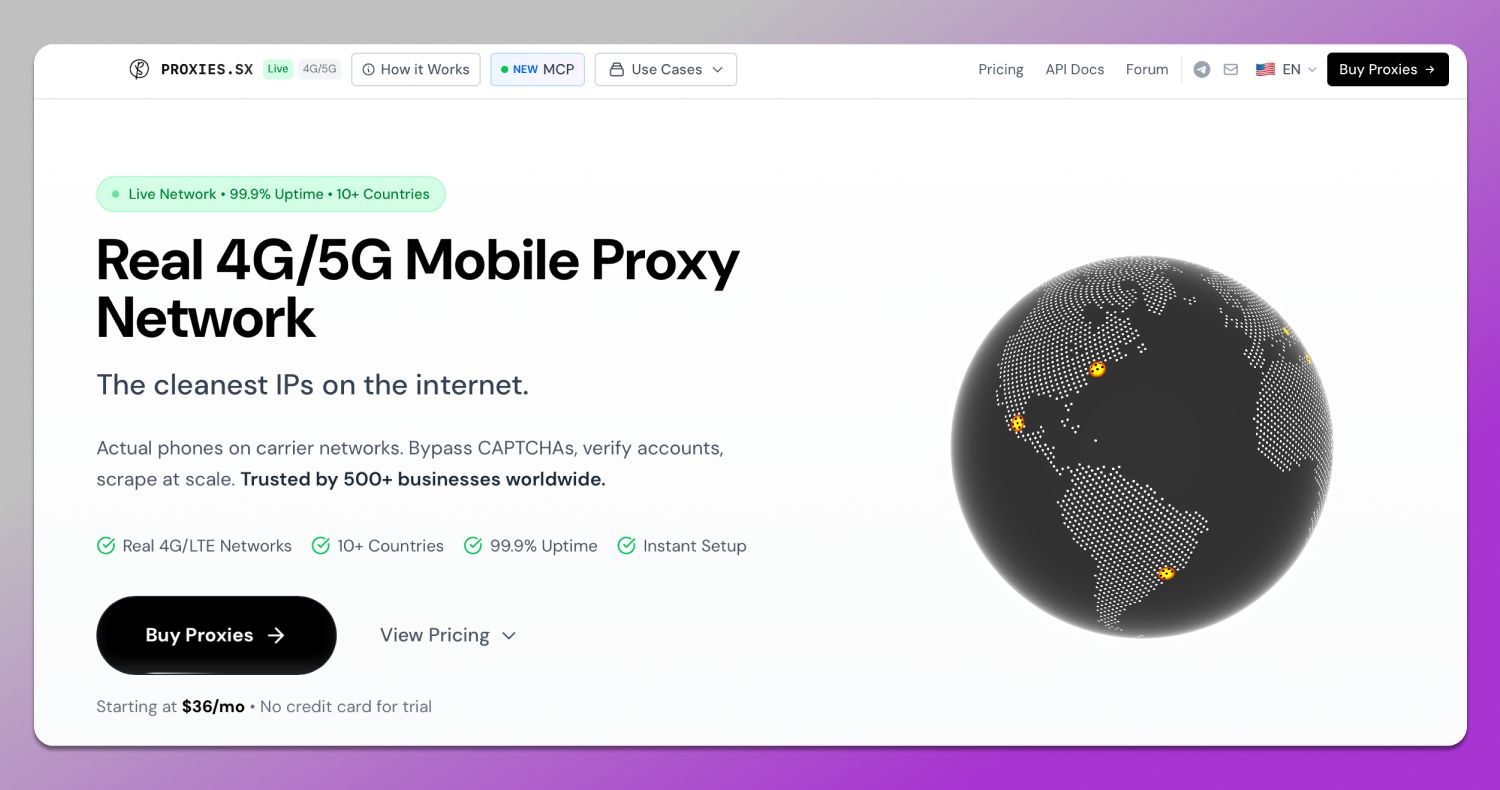
Proxies.sx provides real 4G/5G mobile proxies from physical devices on carrier networks. For Dolphin users, that translates to:
- Higher trust than datacenter or residential IPs
- More “normal looking” traffic patterns (mobile carrier behavior)
- Better results for workflows that trigger bot defenses
You get HTTP(S) + SOCKS5 endpoints you can paste straight into Dolphin Anty.
Two-tier model (choose per workflow):
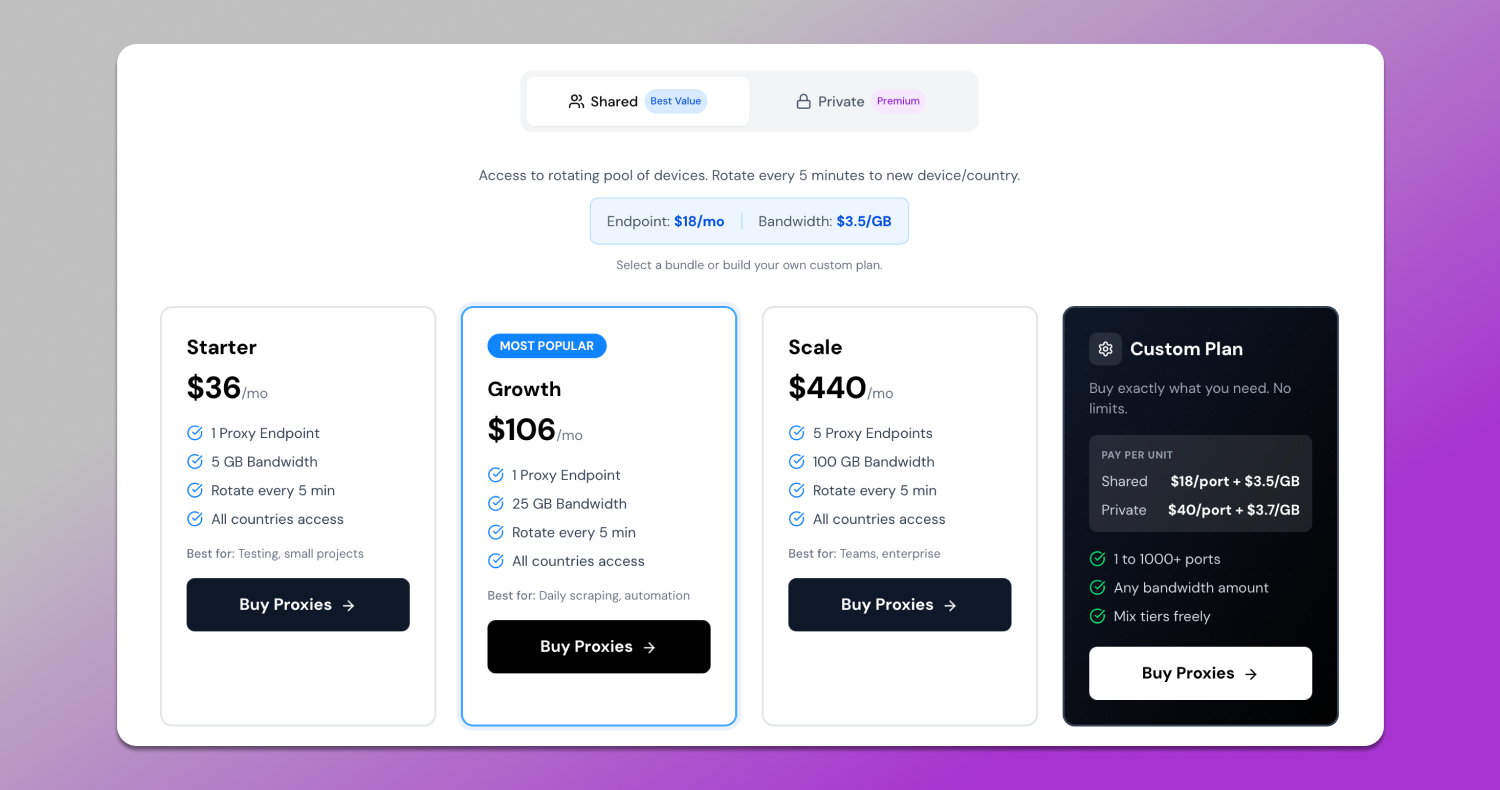
- Shared tier: rotating pool; rotate to a new device/country on a schedule (rotation ~every 5 minutes)
- Private tier: dedicated modem reserved for you; rotate as fast as ~every 1 minute (airplane-mode style reset)
The Billing Model (simple once you map it to usage)
Proxies.sx uses a model that fits teams and automation:
- Endpoints (ports) renew monthly → think “how many concurrent profiles/tools do I run at once?”
- Bandwidth (GB) is prepaid and never expires → buy once, use whenever; unused GB rolls over
This matters for Dolphin Anty users because you don’t always burn bandwidth evenly. Some weeks you run heavy flows, other weeks you barely touch the setup — your GB doesn’t vanish.
The “AI-Native” part: MCP Server (the real differentiator)
MCP (Model Context Protocol) is an open standard that lets AI assistants securely use tools. Proxies.sx ships an MCP server with 35+ tools for proxy ops, so instead of clicking around dashboards or writing glue code, you can run proxy operations through conversation.
That means you can 👍 do things like:
- “Create a shared proxy in Germany”
- “Rotate the IP on my main proxy”
- “Set auto-rotation every 30 minutes”
- “Speed test my proxy and show me the current IP”
- “How much traffic do I have left?”
- “Buy 25GB bandwidth”
Security note: the API key stays local on your machine (you control it), and the AI only uses the tools you enable via scopes.
✅ Where this Helps Dolphin Anty Users the Most
Dolphin Anty users typically manage many profiles and need repeatable operations. MCP makes that workflow clean:
- Spinning up proxies in bulk (one per profile)
- Rotating IPs at the right time (after tasks, not randomly)
- Checking health (ping, speed test) before running tasks
- Keeping OS/profile alignment with proxy settings (more below)
- Monitoring spend without guessing (bandwidth + endpoints)
Recommended Dolphin Anty Setups (Shared vs Private)
Shared tier: best for rotation-heavy workflows
Use Shared when you want to 🔄 rotate identities frequently and don’t need one persistent “device feel”:
- scraping & data collection
- geo testing across many regions
- short bursts of account tasks
- automation where each task can be isolated
❗ Rotation: ~5 minutes between device/country changes (good for broad coverage).
Private tier: best for persistence & consistency
Use Private when you want one reserved device and consistent carrier “shape”:
- long-lived social accounts
- workflows where you want fewer moving parts
- high-value logins / verification flows
- sessions where consistency beats randomness
❗ Rotation: as fast as ~1 minute, while keeping the dedicated modem reserved for you.
Step-by-step: Dolphin Anty × Proxies.sx Workflow
1) Create an endpoint (port)
You can create ports in the dashboard — or do it via MCP with a single prompt like:
- “Create a shared proxy in Germany”
- “Create a private proxy in the US with AT&T”
You’ll receive connection strings (HTTP + SOCKS5) you can paste into Dolphin.
2) Assign one endpoint per Dolphin profile (cleanest baseline)
The simplest ☝️ rule that avoids headaches:
- 1 Dolphin profile → 1 proxy endpoint
- Keep that mapping stable unless you’re intentionally rotating
This prevents “profile cross-contamination” where multiple identities share the same exit at the same time.
3) Match “profile OS feel” to the proxy (important for stealth)
In Proxies.sx MCP tools, there’s an option to set OS fingerprint on a port (useful for aligning behavior across stacks).
A practical Dolphin Anty approach:
- If the Dolphin profile is “mobile-like” or iOS-styled, keep the proxy settings aligned.
- If the profile is desktop-like, don’t randomly switch OS signals mid-flow.
4) Rotate strategically (don’t over-rotate)
A lot of people lose accounts not because they didn’t rotate — but because they rotated at the wrong time.
👍 Good rotation triggers:
- after completing a task batch
- after rate limiting / CAPTCHA spikes
- after a profile is “done” for the day
👎 Bad rotation triggers:
- mid-session while logged in
- randomly every few minutes without reason
- during sensitive verification steps
With MCP, you can set rules like:
- “Enable auto-rotation every 30 minutes”
- “Rotate only after task completion” (agent-side logic)
Example prompts Dolphin Anty teams actually use (copy/paste)
- “Create 10 shared proxies in Germany and output them as a table: profile name → proxy URL”
- “Set auto-rotation every 45 minutes for these ports and keep the same carrier when rotating”
- “Show me the SOCKS5 strings for my active proxies”
- “Ping and speed-test each proxy and flag anything slow”
- “Rotate the IP on port #3 now and tell me the new IP”
- “How much bandwidth do I have remaining? If low, purchase 25GB”
Promo code for Dolphin Anty users
Promo code: DOLPHINANTY
Offer: 15% off 3 purchases
Quick conclusion
🚀 Dolphin Anty is best when every profile has clean separation: fingerprint, cookies, and IP. 📌 Proxies.sx gives you real mobile carrier exits — and MCP gives you something most proxy providers don’t: AI-controlled operations so you can create, rotate, monitor, and scale your proxy layer like infrastructure, not busywork.
If your team already runs Dolphin Anty, this is an easy upgrade: fewer manual steps, fewer mistakes, and a cleaner workflow for managing many identities at once.