Multi-account Operations Without Limits: TikTok and Dolphin Anty
Blog » Multi-account Operations Without Limits: TikTok and Dolphin Anty
How to Attract Traffic from TikTok in 2025 Using Dolphin Anty
TikTok is steadily becoming one of the top traffic sources for affiliate marketers. And that’s hardly surprising: the Chinese tech giant delivers massive volumes of fresh, not-yet-exhausted audience segments. On top of that, TikTok remains a real goldmine for conditionally-free (CFT) traffic.
Why marketers create multiple accounts in TikTok
TikTok has several ✅ major advantages that make it a valuable traffic source — both paid and semi-free.
First, the platform offers a lower average cost per click and cost per lead compared to Meta and Google.

According to Metricool’s 2025 Advertising Report.
Second, TikTok provides a highly developed creative library — its built-in “spy tool” which is often more convenient to use than the FB Ad Library.
Third, conditionally-free traffic from TikTok is far more diverse and therefore converts across many verticals. For example:
- CFT from Facebook and YouTube Shorts converts mostly in dating and casino;
- Twitter (now X) and Reddit are used primarily for adult / OnlyFans offers.
But CFT from TikTok converts on dating, gambling, betting, adult, nutra, crypto, and many other verticals. In general, TikTok traffic performs well for impulse-purchase products (like nutra) and for mass-market goods. This is why affiliate marketers, media buyers, and business owners aim not just to get TikTok traffic — but to get it in large volumes.
What Makes Working With TikTok Ads Difficult?
Despite all the advantages, the platform has its ❌ downsides. TikTok’s algorithms have never been particularly friendly to media buyers — and lately they’ve become even stricter and, in some ways, more “temperamental.”
First, ad moderation is done manually, and it’s much harder to trick a real person than an automated filter.
Second, having a trusted profile or ad account does not reduce the risk of bans. Even if you’ve been running ads for months without a single violation, one major mistake can lead to a permanent suspension. A ban can also occur due to sudden budget spikes.

To keep campaigns running and avoid downtime after bans, marketers turn to multi-accounting. But T-Tok’s policies explicitly prohibit it as well.
Antidetect Browsers as a Solution
To safely manage profiles and ad accounts on TikTok, marketers use 🥷 antidetect browsers. Each TikTok account is placed inside its own browser profile — a fully isolated digital environment with a unique set of characteristics: browser version, user-agent, operating system, interface language, hardware fingerprints, and many other parameters.
The combination of these attributes forms a browser fingerprint. On top of that, each profile is routed through a separate proxy, which replaces the user’s IP address. Because every account operates from a distinct digital environment, TikTok cannot detect that they belong to the same person.

However, TikTok’s anti-fraud systems become more advanced each year — which means that creating new accounts after bans and scaling ad campaigns is getting increasingly difficult.
If in 2024 the system was mostly comparing one fingerprint to another, then in 2025 it performs deep analysis of every individual parameter. Uniform, “template-like” fingerprints — as well as synchronous behavior (such as launching and stopping campaigns at the same time across accounts) — are now major triggers for anti-fraud.
Dolphin Anty to the Rescue
Fortunately, antidetect browsers are evolving too. They regularly roll out updates to fingerprint parameters and browser engines — and among all antidetect solutions, 🚀 Dolphin Anty updates the most frequently.
This makes it suitable for working with TikTok at scale — both with TikTok Ads and with conditionally-free traffic.
Generating Conditionally-free Traffic: Nothing Could Be Easier
To work with UBT and TikTok profiles, you don’t need a separate phone or multiple OS emulators. You can work entirely from your desktop 💻, and this won’t negatively affect video reach or promotion. The only nuance: if you register accounts manually, you’ll need phone numbers for SMS verification.
If you buy ready-made accounts and log in through a browser, you’ll need access to the email linked to that profile — TikTok sends a login code to the inbox. Keep in mind that the browser version of TikTok is resource-heavy, so if you plan to run multiple profiles at once, your computer needs to be powerful enough.
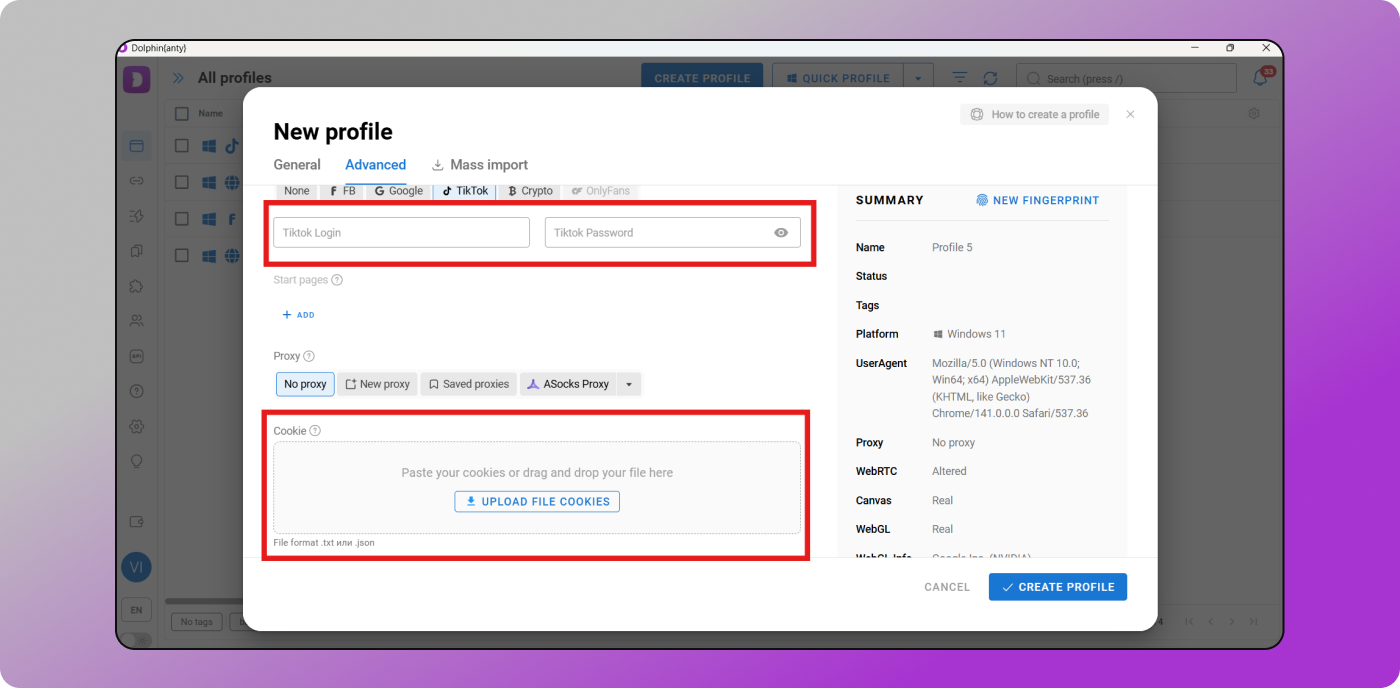
How to manage TikTok social profiles through Dolphin Anty? First, you create a browser profile and choose the appropriate TikTok profile type (highlighted in red on the screenshot below).
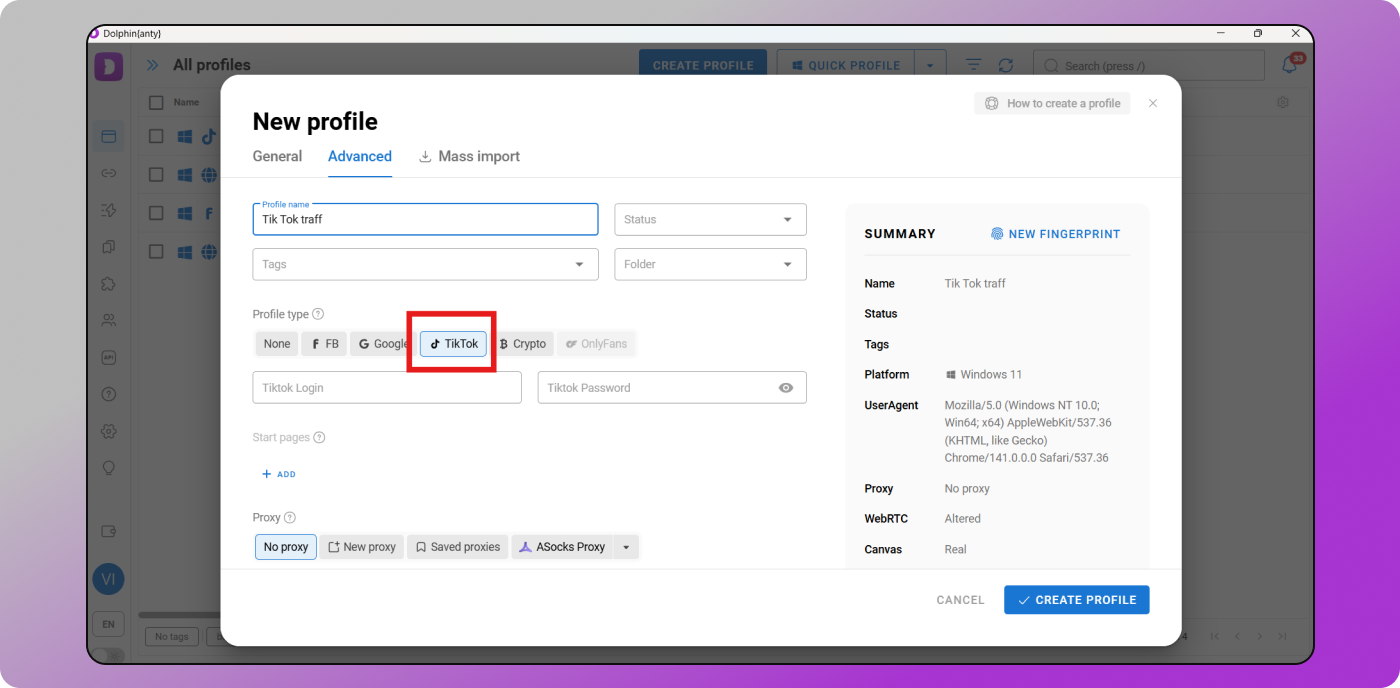
This ensures that the browser automatically loads the necessary bookmarks: links to the TikTok registration page, trending section, homepage, and other useful shortcuts.
Next, you’ll need to 🍪 build cookies using the automated robot. Without a cookie set, the browser profile looks “empty,” which makes it suspicious to anti-fraud systems.
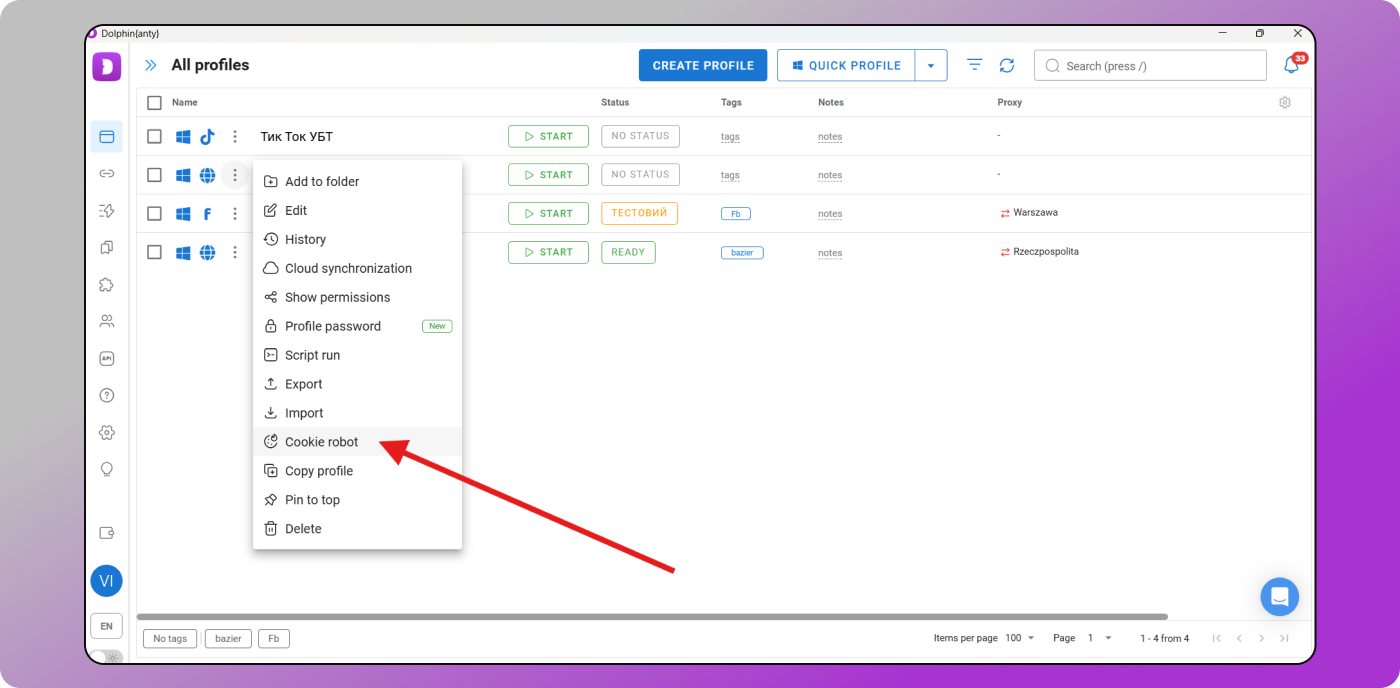
To generate cookies, you’ll need a list of URLs. Use regional websites that match the GEO of your proxy — this makes the digital environment of your TikTok account look realistic and increases trust from TikTok’s anti-fraud.
Interestingly, your cookie set can influence your recommendation feed. For example, if your browser profile contains fragments of automotive websites, TikTok will more likely show you car-related content.
Once the profile is created, register or log into your TikTok account. You’ll see that everything looks correct: the bookmarks appear at the top panel, and the key features — uploading videos, messages, livestreams — are available just like in the mobile app.

This means that you can grow accounts and generate semi-free traffic from the desktop just as effectively as from a phone.
Working with TikTok Ads
To launch ad campaigns, you must either buy ready-made accounts or register and warm them up manually. When buying accounts, it’s better to choose aged, 🔥 well-warmed profiles with history. Yes, they cost more — but long-term, they absolutely justify their price.

If possible, buy cookie files together with the account. This reduces the risk of bans. After that, follow the standard onboarding process to prepare a TikTok Ads account for work.
1. Create a “TikTok” profile type in Dolphin. When creating the browser profile, you can immediately enter the login/password and attach cookies.
If needed, go to the Bookmarks & Extensions section and add useful links and tools for TikTok Ads.
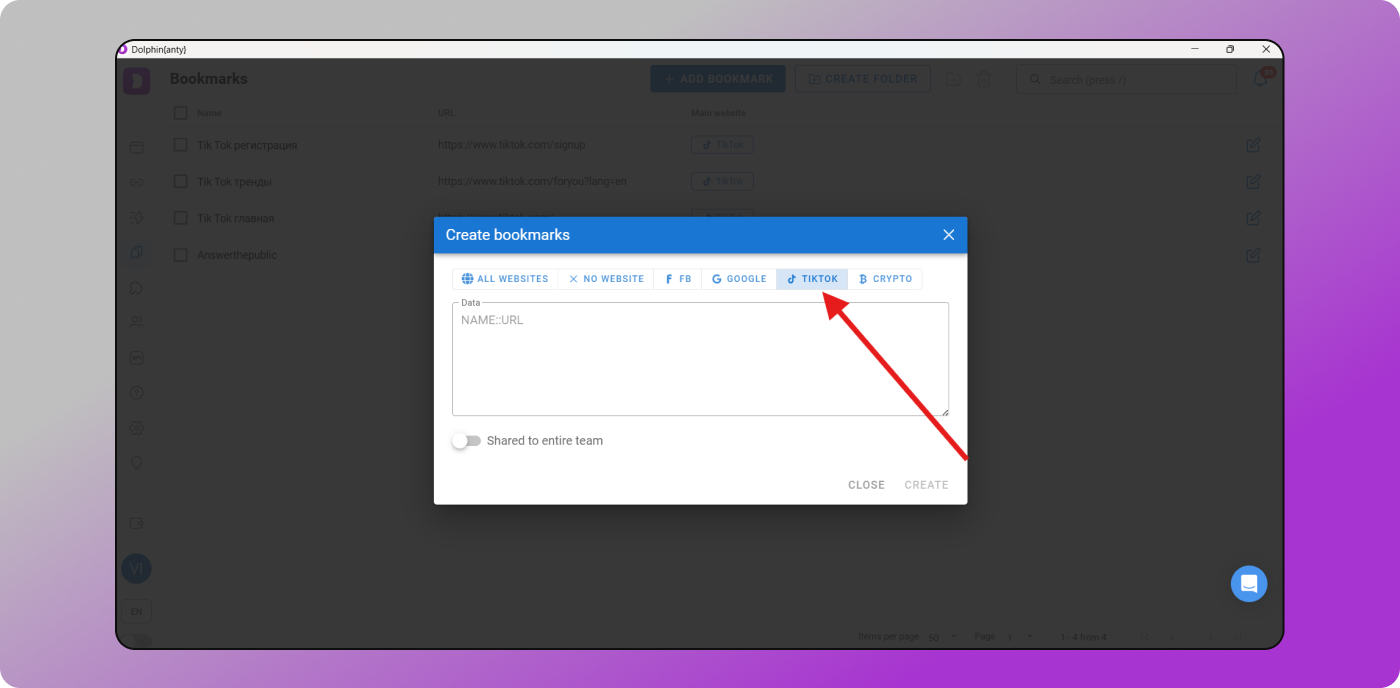
Later, all these bookmarks and extensions will automatically appear in every new TikTok browser profile.
2. Purchase proxies and add them to the browser. Buy proxy ports matching the GEO of the ad account. If the seller offers proxies together with the account, it’s better to purchase both — this prevents TikTok’s anti-fraud from detecting suspicious environment changes after you log in.
3. Start with minimal activity inside TikTok Ads. Click around the interface, create a campaign but do not launch it, attach payment methods. Only after that should you launch a small test campaign. If everything looks good, you can gradually increase budgets.
Important! When logging in and warming up accounts, avoid rigid templates. Don’t behave identically across multiple accounts. TikTok’s anti-fraud tracks behavioral patterns, so repetitive, synchronized actions are a clear trigger.
Dolphin Anty: Useful Features for Working With TikTok
A modern antidetect browser is not just about generating high-quality fingerprint substitution. It’s also a set of tools that simplify workflow and make it easier to scale. ❗ Dolphin Anty offers several powerful features specifically useful for working with TikTok.
Scenarios
Scenarios are chains of simple actions that can be launched and executed automatically. They are assembled inside the antidetect interface and then run inside a browser profile.
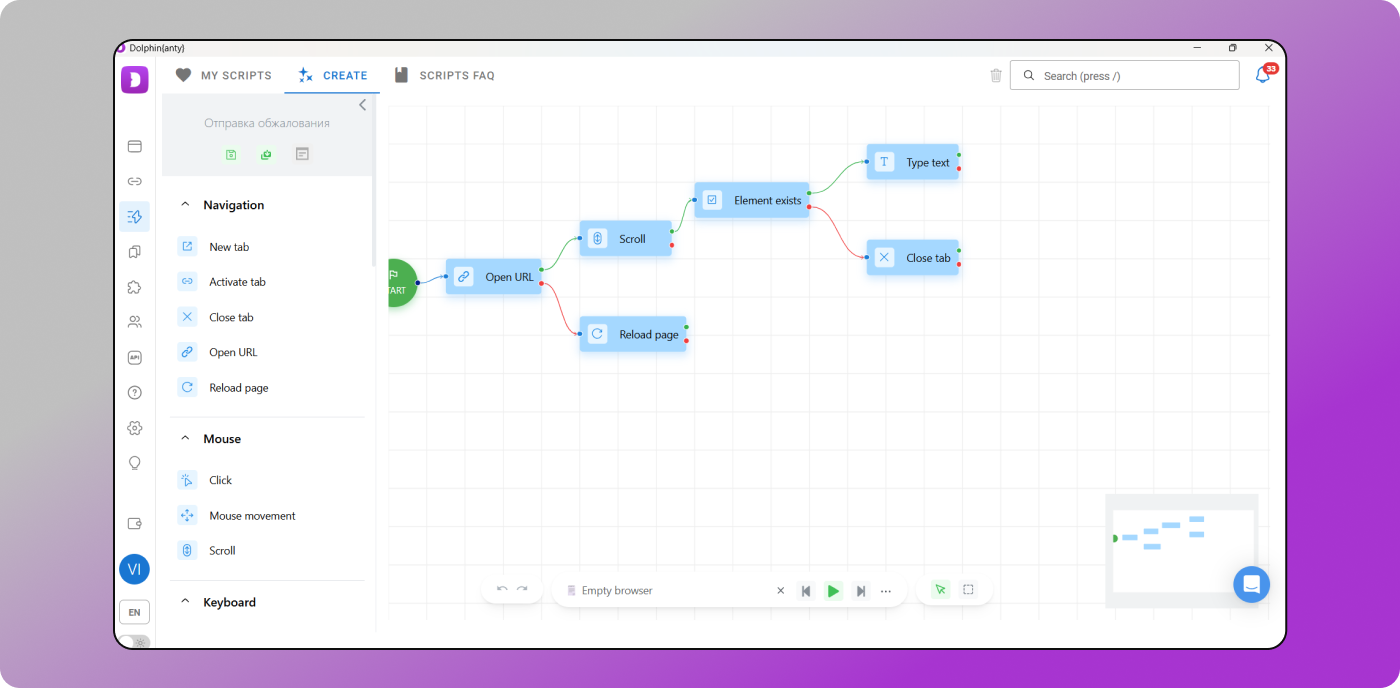
Scenarios help you:
- warm up accounts;
- upload videos to profiles;
- like posts to simulate activity;
- perform routine actions at scale.
With a single click, you can automate multiple small but necessary tasks.
Synchronizer
The Synchronizer replicates your actions across several browser profiles simultaneously.

For example:
- you open several profiles and launch an ad campaign in one of them;
- The same actions will be mirrored in the other profiles — allowing you to start campaigns across multiple accounts at once.
This feature is especially valuable when several of your accounts get banned and you need to submit appeals simultaneously to unfreeze them.
Important: Scenarios and the Synchronizer should be used carefully. Repetitive and synchronized activity patterns may trigger freezes or bans.
Teamwork
This feature is extremely useful when multiple people need access to account management with different permission levels.
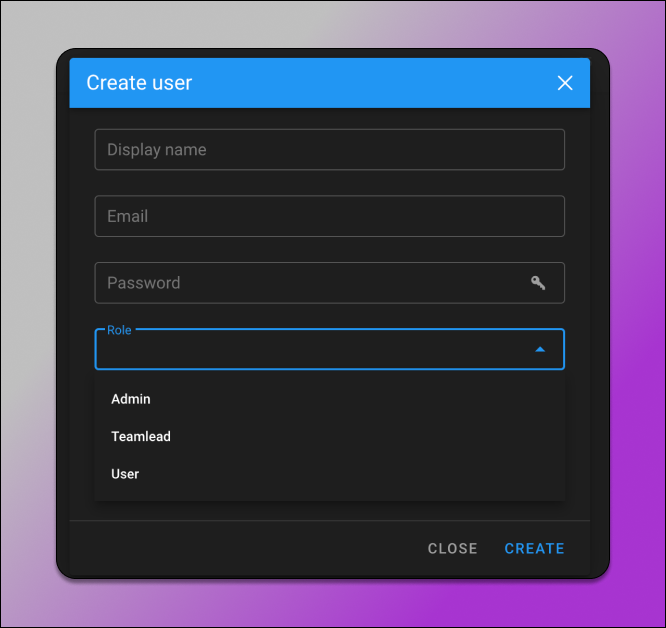
Depending on their assigned role, team members can receive limited or full access to tools and browser profiles.
Dolphin Anty also offers 👍 additional profile management tools, including:
- mass fingerprint rotation;
- profile duplication;
- exporting profiles to a computer;
- importing profiles back;
- password protection for individual browser profiles.
Conclusion
TikTok’s verification algorithms update frequently — and fast. An antidetect browser must keep pace, and Dolphin Anty consistently delivers high-quality fingerprint spoofing along with regularly updated features. These tools streamline and accelerate work not only with TikTok, but with many other traffic sources as well.
And there’s much more to come — including new features designed specifically for TikTok workflows. So download ✌️ Dolphin Anty and try it on the free plan, which supports up to 10 browser profiles.