Dolphin Anty Updates in the Past Three Months
Blog » Dolphin Anty Updates in the Past Three Months
The year has just begun and the 🚀 Dolphin Anty team has already rolled out a solid pack of updates designed to make the browser more convenient, secure and efficient to work with. In this overview we’ve gathered the key improvements from the first quarter: from technical upgrades and expanded API automation to new security features and overall interface enhancements that make daily workflows smoother.
Technical Improvements ⚙️
Not every update is visible in the interface, but these are the changes that directly impact the browser’s stability and reliability. We’re talking about backend improvements — the technical foundation responsible for performance, security and the consistent operation of browser profiles.
Chromium Update to Version 144
Dolphin Anty’s browser engine has been upgraded to Chromium version 144. This update matters not only for performance and compatibility with modern websites, but also from a security standpoint.
As part of the release, our engineers 👨💻 integrated 10 patches addressing various CVEs (Common Vulnerabilities and Exposures) — publicly documented software security flaws. In simple terms, we closed security gaps that could potentially be exploited by malicious actors or antifraud systems to detect non-standard user environments.
With this update, the browser 🔐 is protected against a range of recent vulnerabilities, making profile activity more stable and secure.
Bulk Profile Fingerprint Updates
Working with large numbers of profiles just got easier: 👣 fingerprints can now be updated in bulk without the necessity to open each profile individually. Just select the required profiles, choose the appropriate option from the mass actions panel and initiate the process.
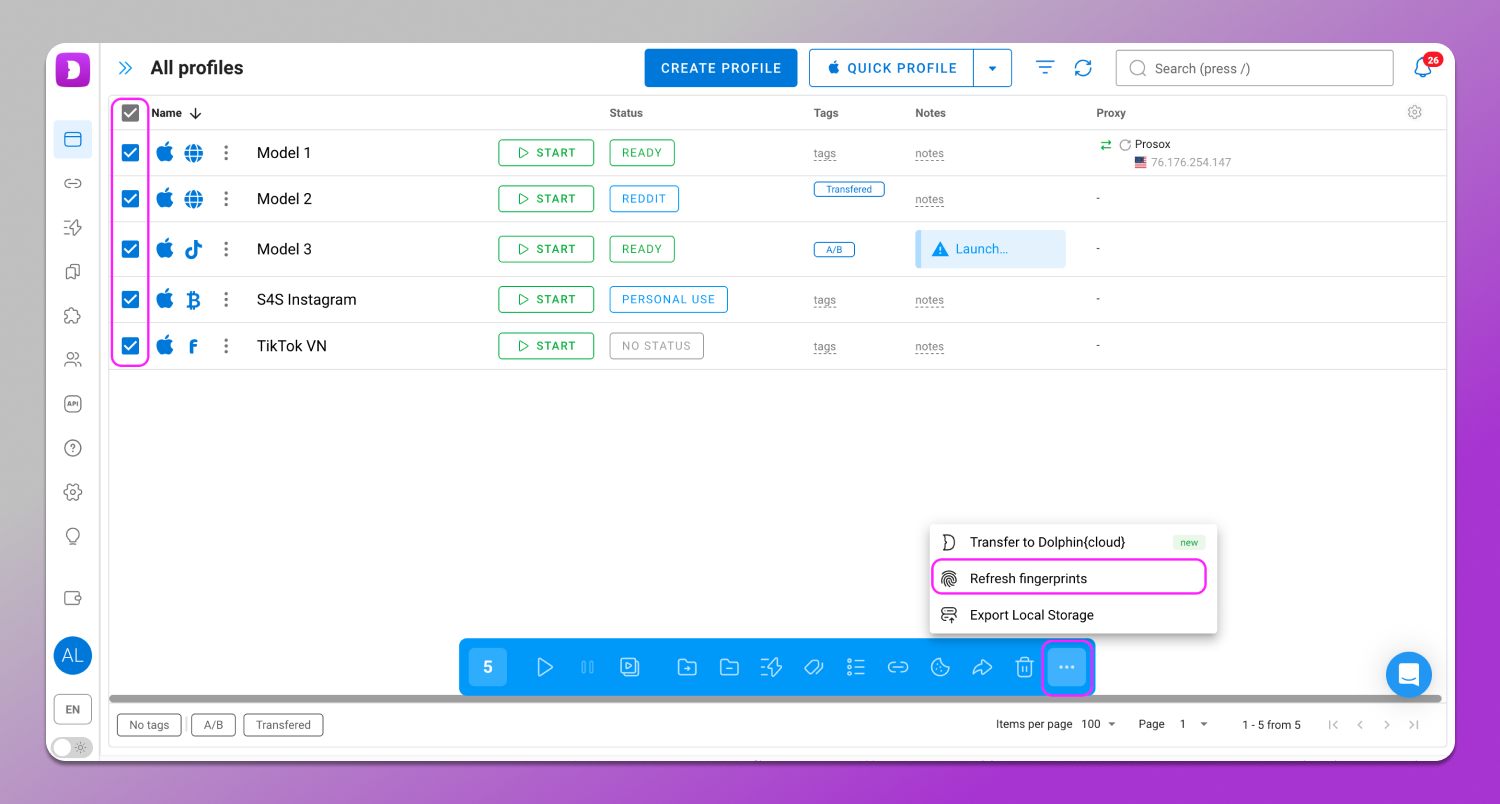
This feature is available on the Base plan and higher.
Team Folder Sharing
We’ve expanded team collaboration capabilities. Users can now share not only individual profiles but entire 📁 folders with flexible access settings.
When creating a folder you can immediately grant access to other team members and assign permission levels for each person: view only, edit or manage the folder structure.
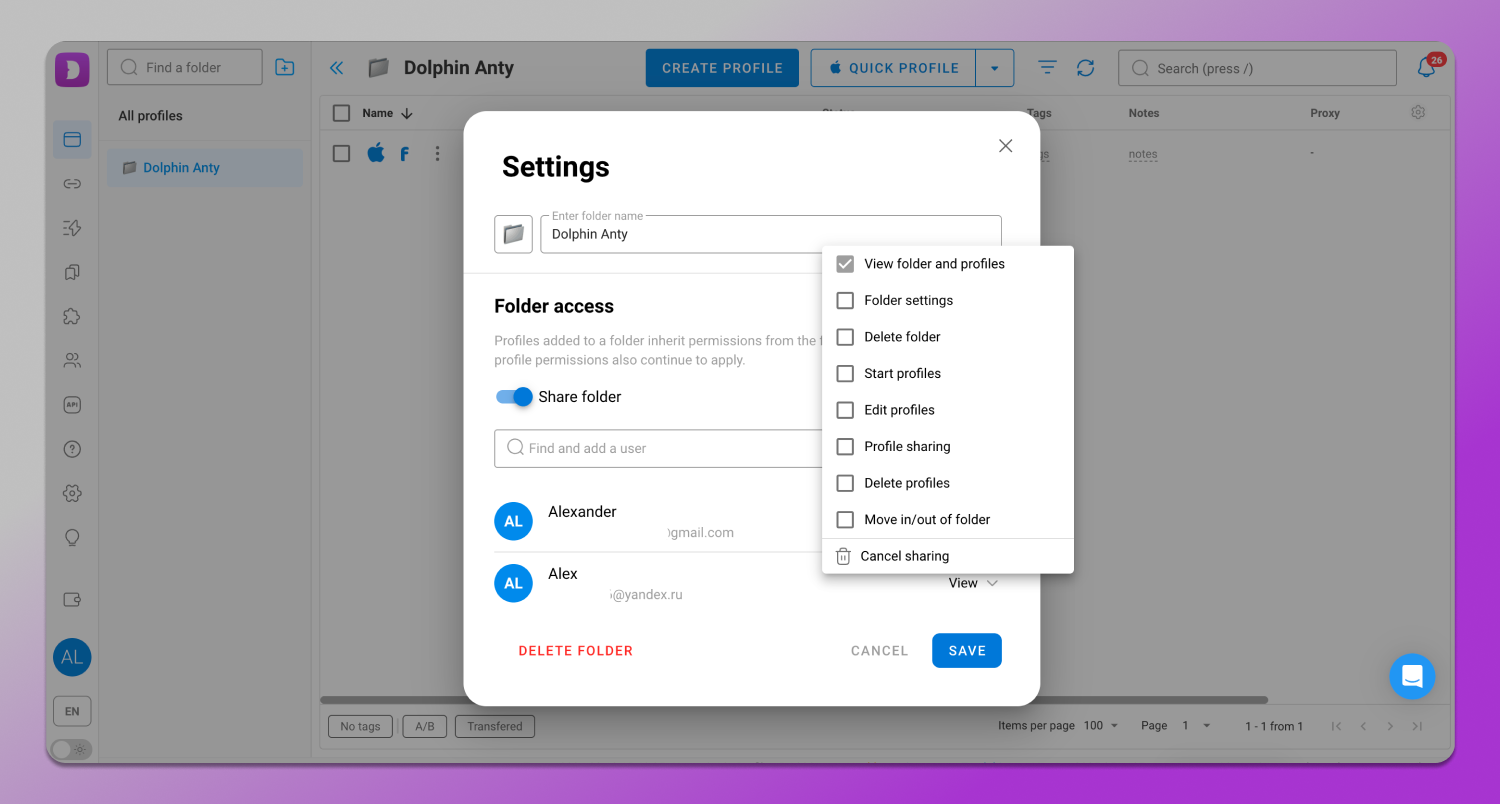
All profiles created within a shared folder automatically appear for users who have been granted access. This approach makes collaboration more transparent and simplifies responsibility allocation within the team.
It’s important to note that ☝️ a profile can belong to only one folder at a time which helps avoid confusion in structure and access permissions.
Launching Profiles via API Without Prior Creation
This update will be especially useful for those who heavily rely on 🔄 automation. Profile management through the API has become more flexible. Dolphin Anty now allows you to launch a browser profile without creating it in the interface beforehand. In essence, these are disposable profiles similar to test profiles from the builder, but now available directly through the API.
Previously, the process was more complex: you had to obtain a fingerprint separately, convert it into the required format, create a profile and only then launch it. Now this flow has been reduced to a single step: a profile can be created and launched instantly at the start of a session.
This approach is particularly convenient for automation, testing and temporary tasks where long-term profile storage isn’t necessary. It reduces clutter in the workspace and simplifies integration logic.
You can find more details about this update in our documentation.
Updated API Documentation
We’ve also completely 👨🔧 updated the API documentation. The main goal of this update is to make browser profile automation through scripts, services and custom tools simpler and faster.
The documentation has been migrated to the OpenAPI/Swagger format — a widely supported standard across programming languages and development tools. This makes it much easier to integrate Dolphin Anty into existing workflows and internal systems.
In practice this brings several key ✅ benefits:
- You can automatically generate client libraries for your preferred programming language;
- Open the documentation in any Swagger-compatible tool and start working with API methods right away;
- Upload the documentation file into tools like ChatGPT to quickly generate ready-to-use code for our API or get answers about specific endpoints.
Through the API, users can automate nearly all core processes: launching and stopping profiles, managing their statuses, working with proxies and cookies, configuring team access and more. This opens up broad possibilities for building custom profile management systems, automated account warm-up flows and scaling routine operations.
The updated documentation lowers the entry point for automation and reduces the time required to build integrations from scratch.
The documentation is available via the link.
Proxy 🔗
Another proxy provider has been added to the list of integrated services — 911Proxy. Proxies can be connected using an API key, either when creating or editing a profile or through the general proxy management section.
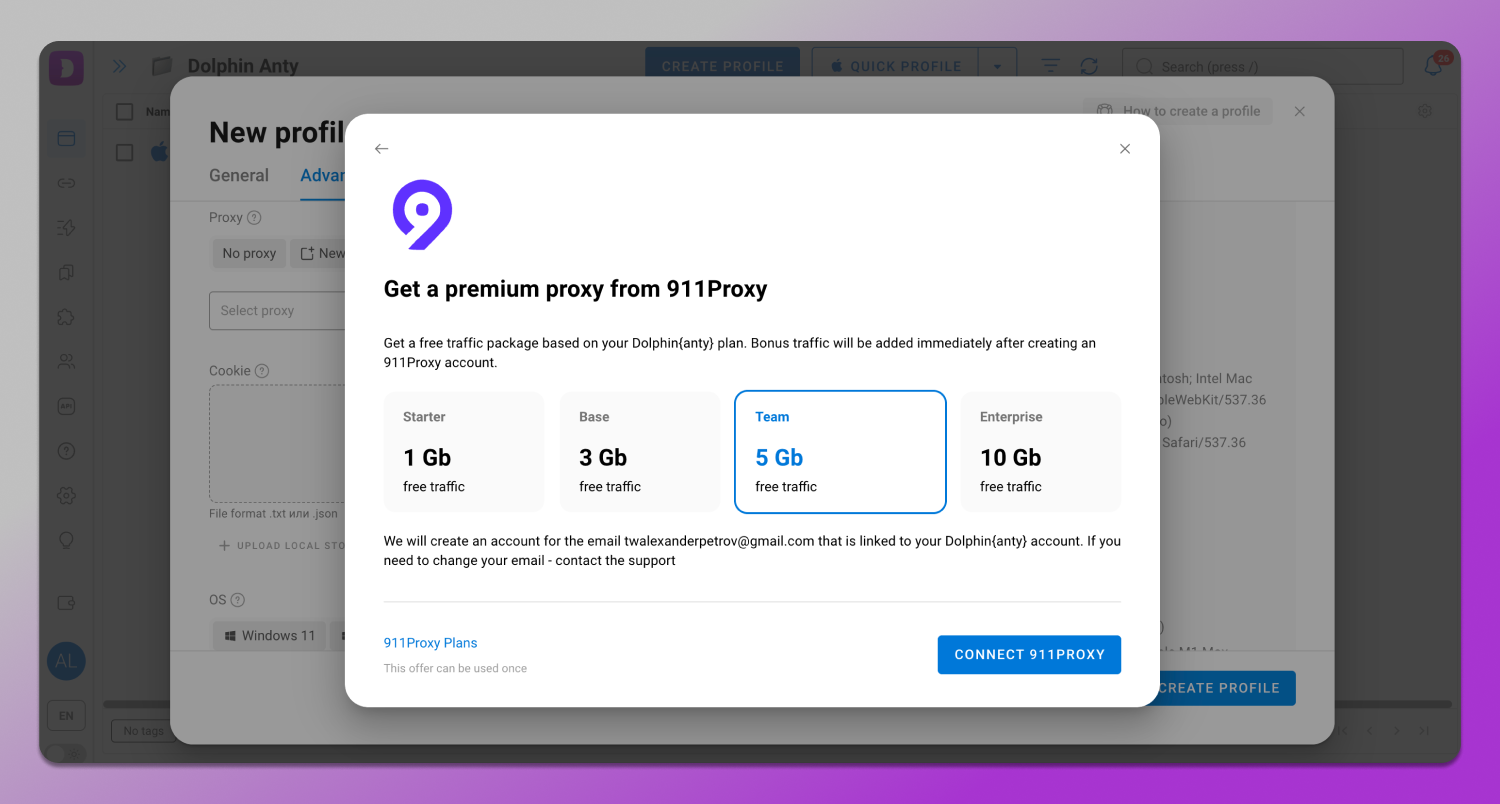
Additionally, we’ve included a 🎁 bonus for our users: on subscription plans starting from FREE+, you get free traffic from the provider. This offer is available to new 911Proxy users who have not previously registered on the partner’s site using the same email as in their browser.
Usability and Interface 🛋
In addition to technical updates, Dolphin Anty has introduced several improvements over the past three months aimed at making the browser more comfortable and convenient to use.
Restoring Profiles from the Trash Bin
The process of restoring profiles from the trash bin 🗑 has become faster and more stable. Previously restoring a large number of profiles could put extra load on the system causing the operation to take longer.
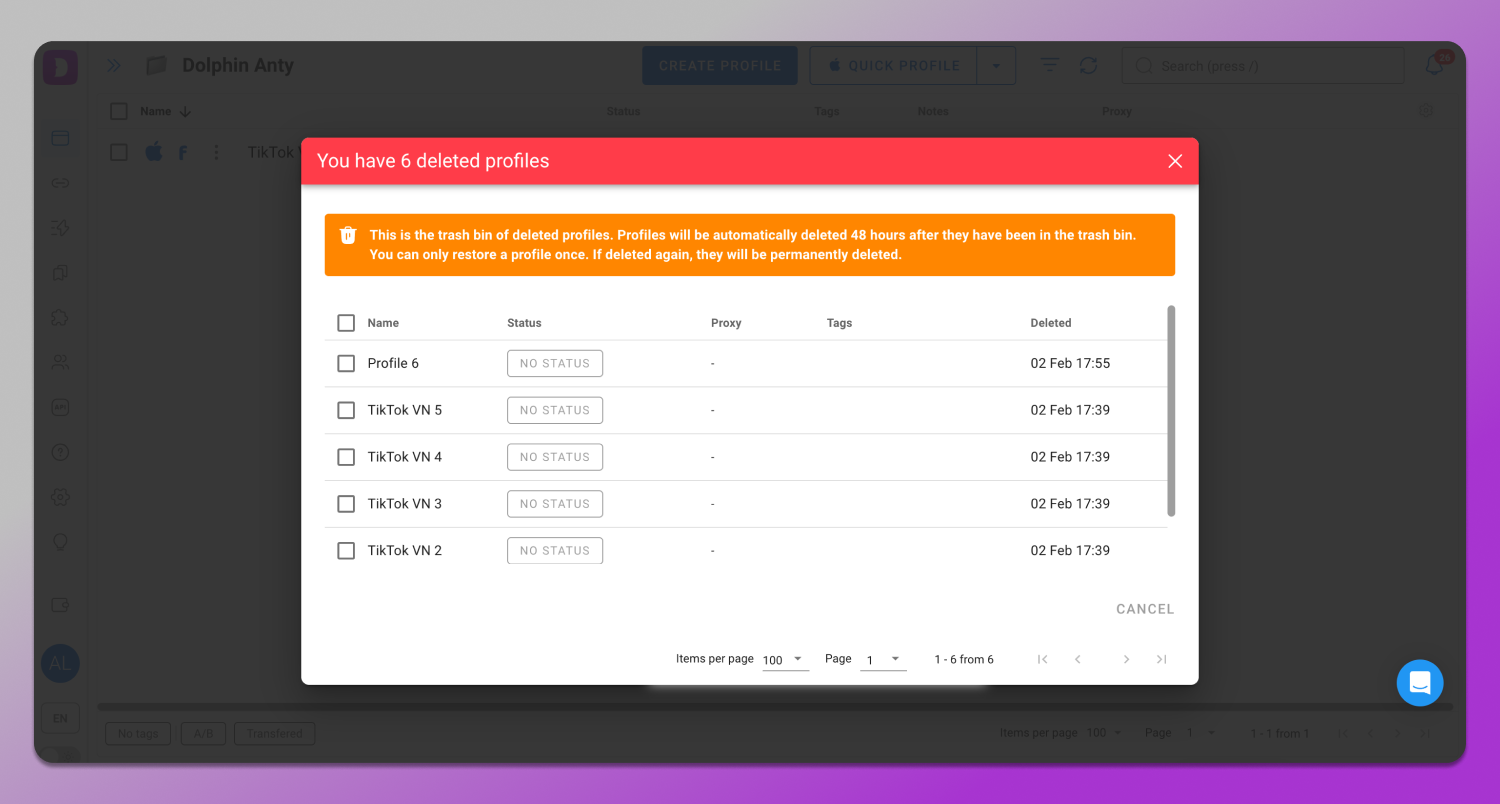
Now, restoring profiles is more efficient and this change is especially important for teams and users working with large numbers of profiles.
Improved Stability Thanks to a Facebook Issue
During browser engine testing the Dolphin Anty QA team discovered a bug that caused the Facebook settings feed to scroll incorrectly when using a mouse. The issue occurred at the browser level and could directly affect the usability of the platform’s advertising and business tools.
The team promptly 🛠 reported the bug and collaborated with Chromium developers to investigate. The issue was quickly flagged as critical. Later a Meta developer joined the discussion and it was determined that the problem originated on Facebook’s side. The bug has now been fully resolved.
This case is a clear example: we don’t just use Chromium as a foundation, but we actively help identify issues that could affect users’ experience with key services.
This is also why engine updates sometimes roll out slightly later than other solutions on the market. Before release, each 🔎 Chromium version undergoes additional testing within the product including checks on popular platforms like Facebook. This approach helps minimize the risk of unexpected failures during critical moments of use.
Creative Collections in the Tyver Spy Service
A new tab for creatives has been added to the 📁 Arbitrage Perks bookmarks folder: all collections from 🔎 the Tyver spy service are now gathered in one place. This makes it easier to find and use ready-made materials for advertising campaigns.
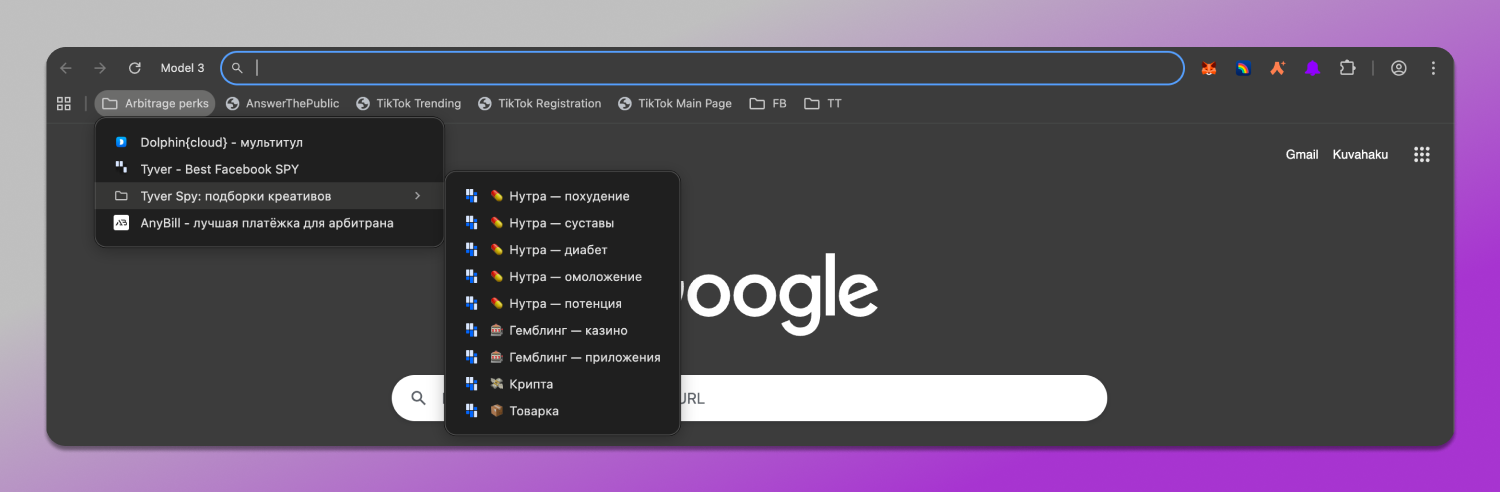
To open a collection simply launch a profile, go to Arbitrage Perks → Tyver Spy: Creative Collections and select the desired set.
One-Click Profile Transfer from Dolphin Anty to Dolphin Cloud
Previously transferring profiles from 🐬 Dolphin Anty to ☁️ Dolphin Cloud required additional extensions. Now, you can transfer a single profile or a whole group of profiles directly through the mass actions panel. Just select the profiles you need, click the three dots and send all the data to Dolphin Cloud in one click.
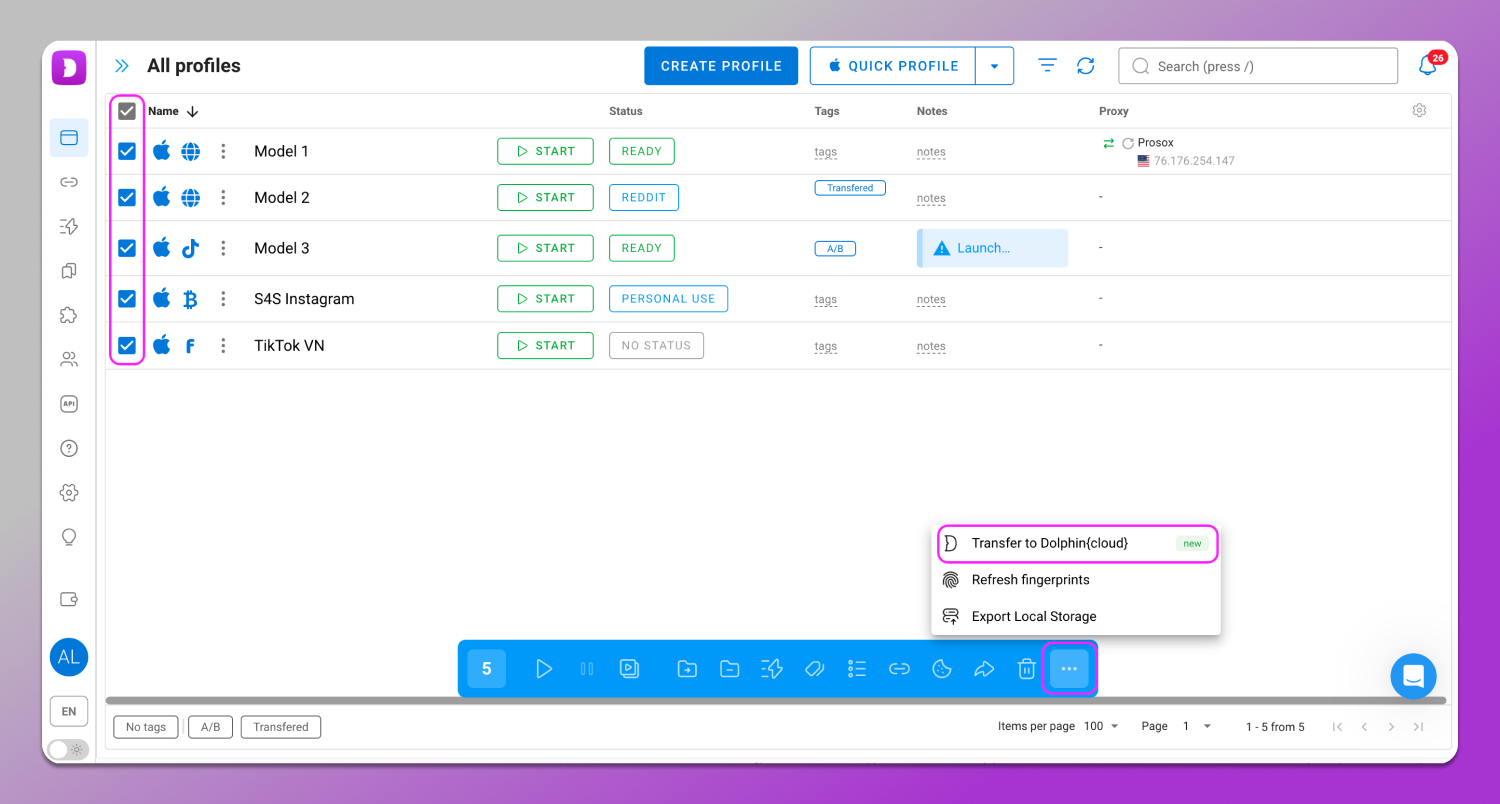
Available on Free+ plans and above.
Email Verification for Additional Users
When adding additional users, the system now automatically ✅ verifies email addresses and ❌ blocks temporary email accounts. This helps keep your data accurate and improves overall security.
Tabs Are Saved When Reopening Profiles
Some users experienced an issue where previously opened tabs would disappear when reopening a profile. You had to manually find the pages again, even though all data like cookies, logins, etc., remained intact.
Now, profiles are fully restored exactly as they were at the end of your last session. All previously opened tabs are saved automatically, making your workflow faster and more convenient.
Profile Name in Window Preview Title
We’ve improved the way you can distinguish multiple open profiles in the taskbar. Now, the profile name appears in the browser window preview title.
- Windows — works out of the box.
- Linux — depends on the desktop environment and preview extensions.
- macOS — possible using third-party utilities or window managers that display lists or previews with titles.
Security 🔐
Dolphin Anty has introduced several important features aimed at 🏰 enhancing security. They help protect your data and minimize risks when working with web services.
Enhanced Local Network Protection
We’ve boosted user security by integrating LNA (Local Network Access). This feature is designed to prevent websites from abusing access to your local network, for example, scanning the LAN for fingerprinting or attempting CSRF attacks on routers and other IoT devices.
From now on any requests to local private addresses are blocked by default. Access is granted only after explicit approval via a pop-up prompt. Any attempts to scan ports or processes are immediately flagged, significantly improving browser security in both corporate and home networks.
Improved Media Spoofing
We’ve updated the 🔄 media spoofing system covering microphones, webcams and headphones. The browser now presents a list of devices that looks as realistic as possible by using actual device labels, while maintaining consistency with the operating system selected in the profile settings.
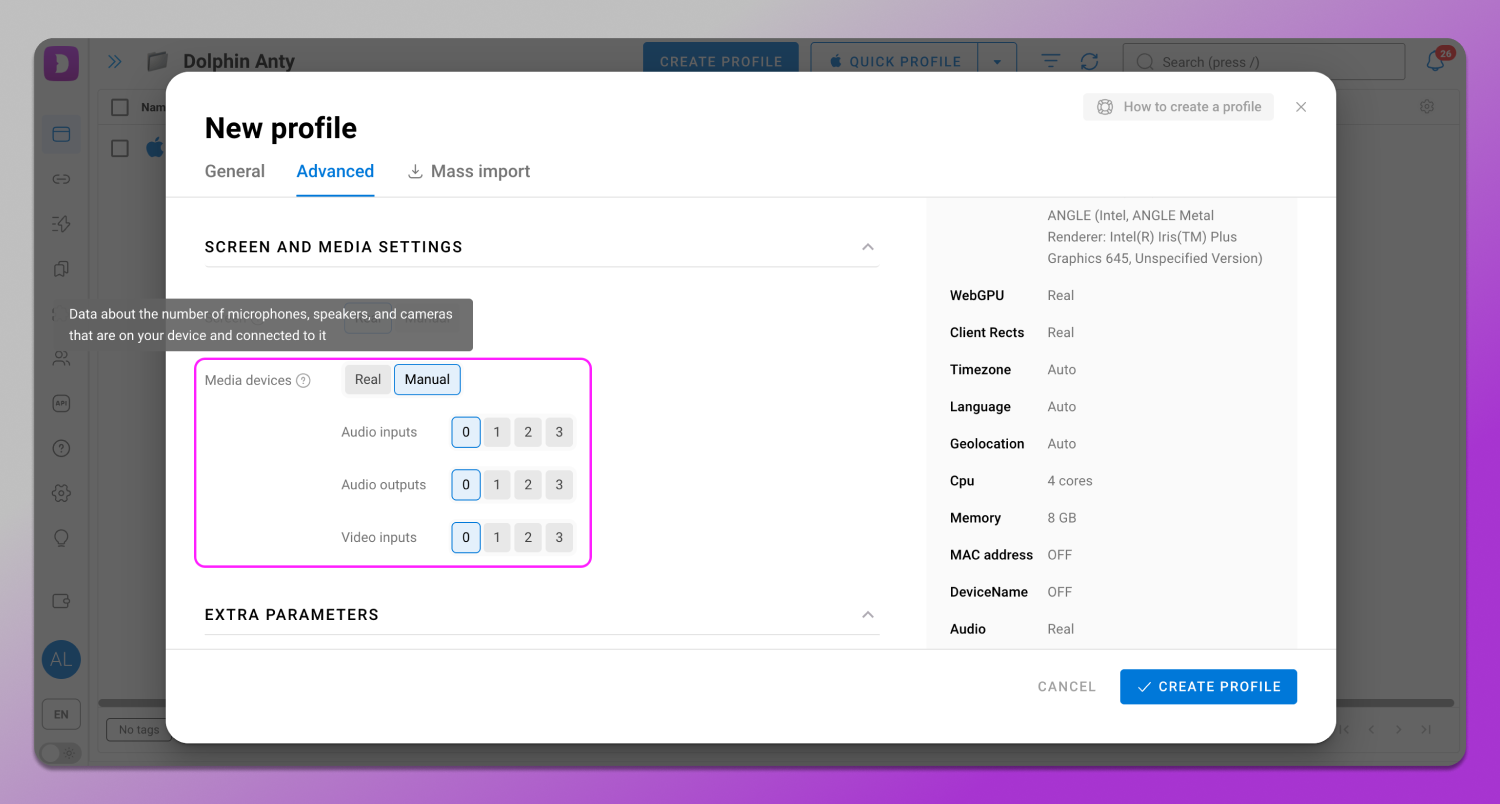
This means your 🥷 privacy is protected: real device data is never exposed while audio and video conferencing apps continue to function correctly. This approach allows you to use communication services safely without risking information leaks about your hardware.
Improved Geolocation Spoofing
We’ve completely redesigned the 🌏 geolocation spoofing system. The browser now uses a native method for location requests just like a real “location provider”, for example via Wi‑Fi.
This makes location spoofing more realistic and compatible with various IP-masking tools, including proxies, VPNs and others. The improvements are especially noticeable in areas where accurate geolocation is critical such as betting and working with sportsbook platforms.
Conclusion
The first quarter has shown that 🔥 Dolphin Anty continues to evolve on all fronts: the backend is improving, new automation capabilities are being added, security is being strengthened and the interface is becoming more user-friendly. These updates make your work faster and safer. And there’s even more to come — stay tuned for the next wave of innovations.