Dolphin Anty and Playwright Automation
Blog » Dolphin Anty and Playwright Automation
The Ultimate Guide 2026 with KindProxy
Quick Summary
Toolstack: Dolphin Anty + Playwright + Python
Core Benefit: Combine fingerprint isolation with KindProxy’s high-capacity residential backbone to scale beyond 50 concurrent profiles without latency spikes.
ROI Insight: Block non-essential resources (images, media, fonts) to reduce bandwidth usage by ~30% and increase parallel capacity.
Introduction: Modern Challenges in Automation
In 2026, scaling browser automation requires more than well-written scripts. Beyond 50–100 concurrent profiles, failures are rarely caused by fingerprints alone; network issues like stalled pages, latency spikes, broken WebSockets, and session timeouts are ☝️ the main culprits.
Reliable scaling depends on two layers:
- Fingerprint Consistency: Dolphin Anty’s isolated browser profiles maintain stable, realistic identities across sessions.
- Infrastructure Reliability: KindProxy’s auto-scaling residential network delivers high-trust IPs with high-capacity backbone bandwidth.
Without both, automation often collapses under load or triggers platform detection.
Why Residential IPs Matter: Trust is the New Currency
Fingerprint consistency ensures each browser profile looks legitimate, but network reliability is equally critical.
KindProxy’s residential and ISP network inherits 💻 the trust scores of real household connections, bridging 🚀 Dolphin Anty’s fingerprint isolation with the target platform’s security gate.
Strategic Use Cases
🔗 Residential IPs become essential where standard proxies fail, enabling reliable access and identity consistency across platforms.
Key applications:
- Multi-Account Marketing & Social Media: TikTok, Facebook, Instagram, YouTube profiles appear as unique home users, preventing linkage and bans.
- E-commerce & Retail Arbitrage: Monitor Amazon and eBay prices or track limited-release inventory with stable regional access.
- Ad Verification & Brand Protection: Access ads and SERPs like a local user to verify campaigns and detect counterfeiters.
- AI & ML Training Data: Safely collect authentic human interaction data for LLM/AI training while avoiding rate limits.
- Additional Capabilities: High-volume web scraping and real-time travel aggregation worldwide using KindProxy’s residential proxies.
Infrastructure: KindProxy’s Backbone Advantage
KindProxy’s network is designed for high-concurrency, anti-detect browsers and automated workflows, supporting Dolphin Anty profiles at scale.
Why KindProxy Stands Out in 2026
- Global Residential IPs: Access over 100 million high-trust IPs in 200+ countries.
- High-Concurrency Optimized: Handles dozens of parallel Dolphin Anty profiles without throttling.
- Static ISP Proxies: Ideal for long-term Amazon, TikTok, social media, and e-commerce management.
- Flexible Sessions: Rotating for scraping, Sticky for consistent identity.
- Reliable Performance: Real consumer IPs work with Akamai, Cloudflare, and other advanced security systems.
- Entry Plan: Start with 5GB at $0.85/GB — perfect for testing or small-scale projects.
Elastic Infrastructure: Solving Bandwidth Bottlenecks
High-capacity per-node backbone with auto-scaling ensures 🚀 smooth sessions and consistent throughput even at peak load.
Preparing Dolphin Anty Profiles with KindProxy
❗ For security and consistency, proxy configuration should always be handled at the Dolphin Anty profile level, not inside automation scripts.
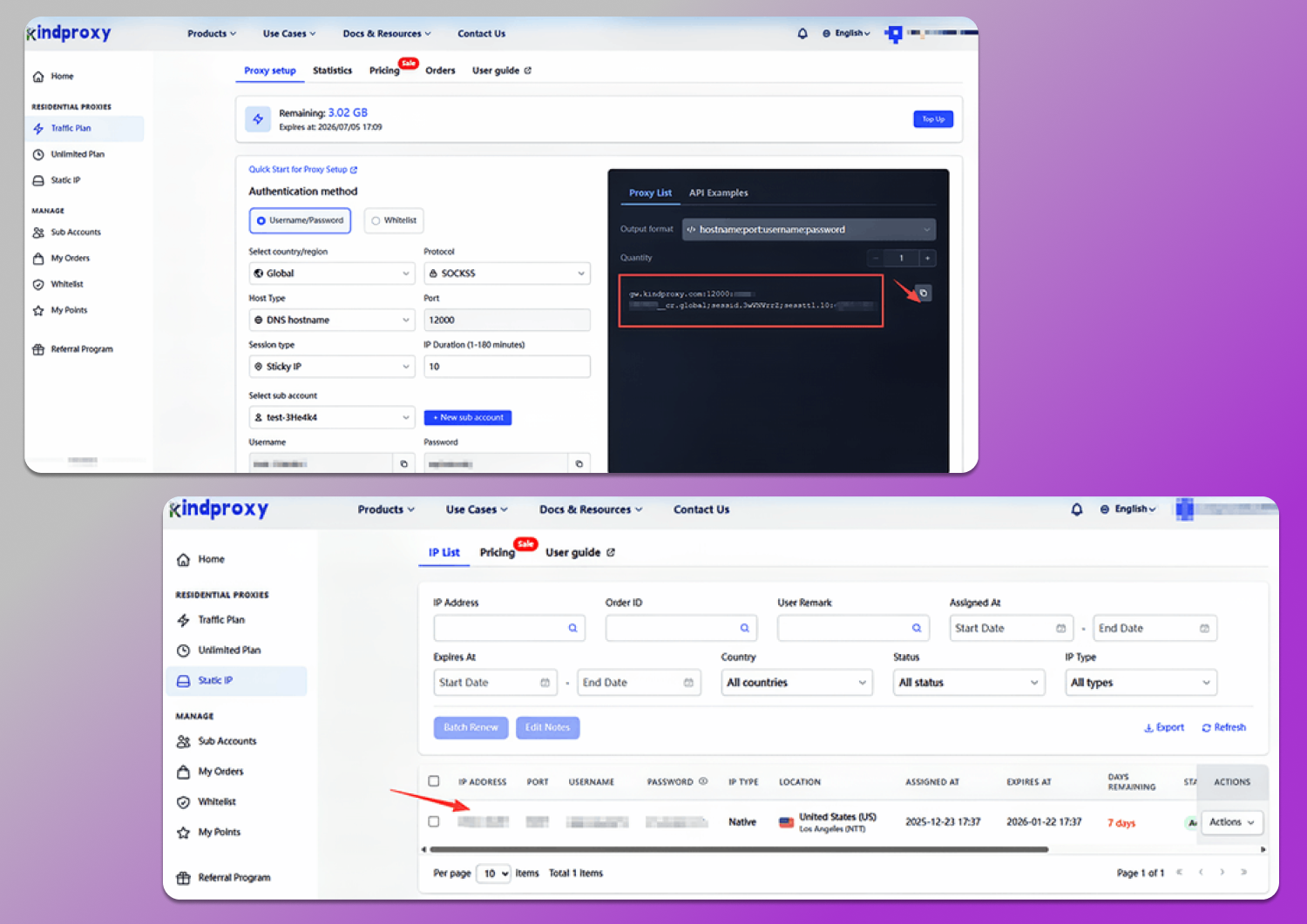
Step 1. Copy your proxy credentials
- Log in to your KindProxy dashboard
- Go to Dashboard → Residential Proxies → Plan Type
- Copy your Host, Port, Username, and Password
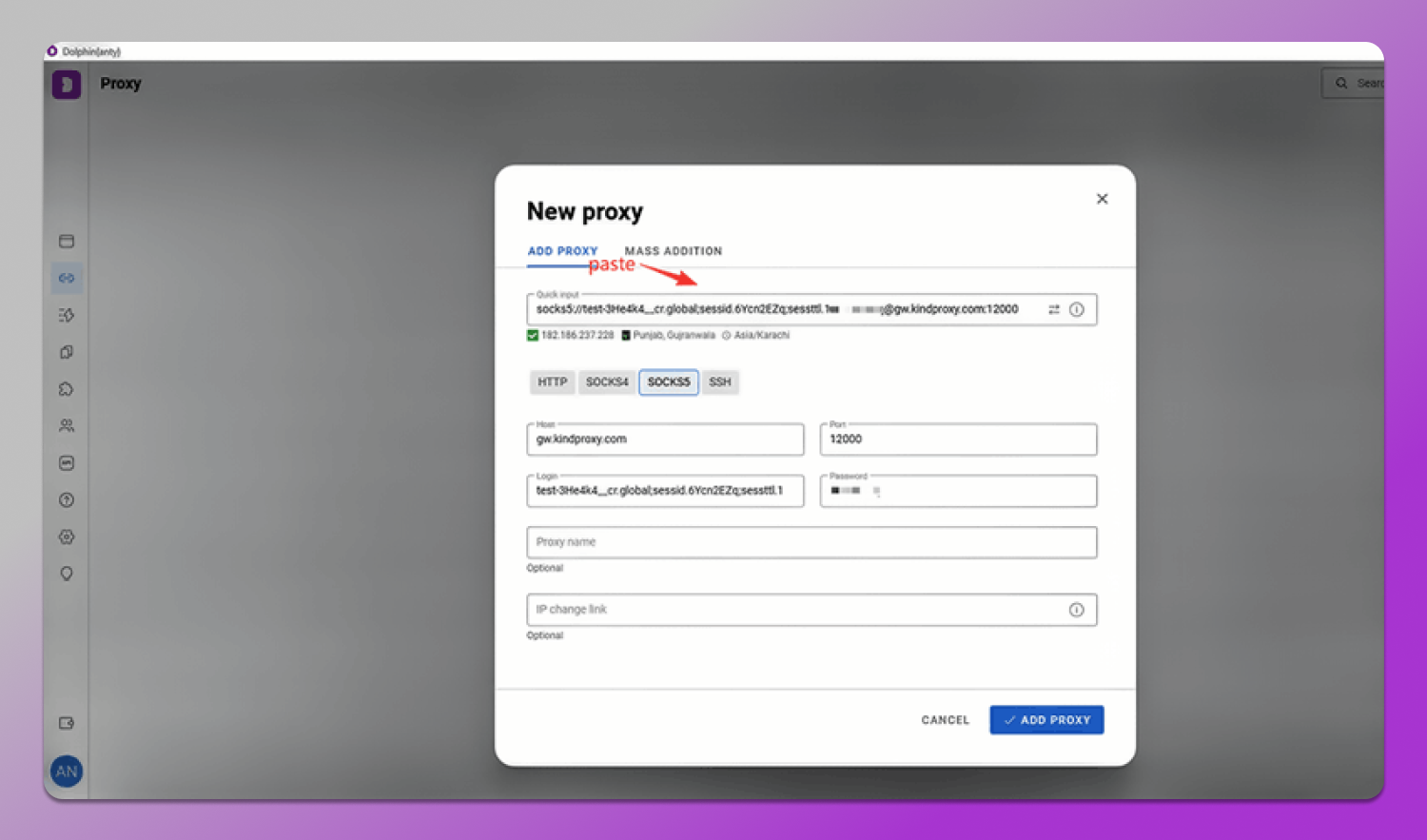
Step 2. Apply Proxy to Dolphin Anty
- Open Proxies → click ADD PROXY
-
Paste your KindProxy credentials
- Save and select this proxy for any Dolphin Anty profile
Integrating KindProxy with Dolphin Anty Automation
Dolphin Anty exposes a Local API that allows automation tools like Playwright to control browser profiles while inheriting both the browser fingerprint and the KindProxy configuration.
Technical Architecture
Understanding the connection flow is 🛠 key to debugging and scaling:
Your Script → Dolphin Anty Local API (Profile Identity) → Playwright(CDP Connection) → KindProxy Residential IP (High-Trust Network) → Target Site.
Step-by-Step Implementation
Part A: Launching a Profile via Local API (Python)
import requests
from playwright.sync_api import sync_playwright
PROFILE_ID = “12345678” # Replace with your Dolphin profile ID
DOLPHIN_API_URL = “http://127.0.0.1:3001”
def run_task():
# Launch Dolphin profile with automation enabled
start_url = f”{DOLPHIN_API_URL}/v1.0/browser_profiles/{PROFILE_ID}/start?automation=1″
resp = requests.get(start_url).json()
if not resp.get(“success”):
print(“Failed to start profile.”)
return
# Get the Remote Debug Port
debug_port = resp[“automation”][“port”]
print(f”Profile launched on port: {debug_port}“)
Part B: Connecting Playwright via CDP
Once the profile is running, Playwright connects using the Chrome DevTools Protocol (CDP).
# ROI OPTIMIZATION: Stop loading images/videos/fonts to save 30%+ bandwidth & boost profile capacity.
def block_resources(route):
request = route.request
if request.resource_type in [“image”, “media”, “font”]:
route.abort()
else:
route.continue_()
with sync_playwright() as p:
# Connect to the existing Dolphin profile
browser = p.chromium.connect_over_cdp(f”http://127.0.0.1:{debug_port}“)
# Use the page already opened by Dolphin
context = browser.contexts[0]
page = context.pages[0] if context.pages else context.new_page()
# Apply traffic blocking rules BEFORE navigation
page.route(“**/*”, block_resources)
# Execute task using KindProxy’s residential IP
page.goto(“https://ipinfo.io/json”, wait_until=“domcontentloaded”)
print(“Current IP Data:”, page.text_content(“body”))
browser.close()
if __name__ == “__main__”:
run_task()
Best Practices for Reliable Automation
Why This Matters
Good practices ensure stable sessions, lower detection risk, and efficient scaling.
- Automatic Proxy & Resource Optimization: Sessions inherit residential IPs; block images, media, and fonts to save bandwidth/CPU, enabling 30% more parallel threads.
- Full-Stack Consistency: Align Canvas, Timezone, WebGL, and environment settings. Simulate human behavior with mouse movements and random delays.
- Reliable Local API Connections: Connect via 127.0.0.1 with automation=1to avoid IPv6/automation detection issues.
- Profile Launch & Navigation: Stagger launches by 5–15s. Wrap API calls in try-except and use exponential backoff (2s, 4s, 8s) for high-concurrency stability.
Success Story: Scaling a Multi-Account Operation
“Limited to 50 profiles and facing Amazon activity warnings, switching to KindProxy with the resource-blocking script raised capacity to 210 sessions and cut data usage per profile by 28%.”
Conclusion
Who This Stack Is (and Isn’t) For
This setup is ✅ ideal if you:
- Manage multiple accounts or browser profiles simultaneously
- Run high-frequency scraping or monitoring tasks
- Require long-lived sessions (social media, e-commerce, ad accounts)
- Need predictable network behavior at scale (50+ concurrent profiles)
- Care about bandwidth efficiency and infrastructure cost control
This setup may be ❌ overkill if you:
- Operate a single account or a handful of low-activity profiles
- Run occasional scripts with minimal concurrency
- Don’t need persistent sessions or identity stability
- Are optimizing for the lowest possible cost, not long-term reliability
Final Thoughts
In 2026, fingerprint consistency alone isn’t enough for anti-detect browser automation.
🔥 Dolphin Anty provides realistic, consistent fingerprints, while KindProxy delivers high-trust residential and ISP IPs — together forming a scalable, reliable automation stack.
Reader’s Note: Use coupon code DOLPHINVIP for 15% OFF your KindProxy residential plan and get started with Playwright integration.